


 Video Converter Ultimate
 Gravador de ecrã
 Reparo de vídeo
Tutorial simplificado sobre como converter TRP para WMV usando conversores Pro
Have a hard time dealing with TRP files because they can't open on your media player or editor? A low of internet users also have difficulty handling their TRP files. If you are one of those people, we suggest you stay tuned and read this article as we talk more about TRP format. Also, to solve your problem with this format, we recommend converting it into a WMV, especially if you want to play it on Windows. So now, what are you waiting for? Let's get going to the details below to convert TRP to WMV.

Parte 1. Converta TRP para WMV com o Video Converter Ultimate
Want to know how to convert TRP to WMV with the ultimate professional tool? If so, use the FVC Video Converter Ultimate to achieve it. Before we go and learn how to convert your TRP, we must need to know about this converter tool. This converter provides an easy and swift converting process that millions of users already like. Moreover, it can convert your TRP file into WMV, AMV, MKV, AVI, or whatever format you want. Still, you can also do advanced editing here. Want to have a full scope features of this tool? Then continue reading below.

FVC Video Converter Ultimate
5.689.200++ downloads- Suporta a conversão de TRP para WMV, AVI, MP4, MOV, MKV e em mais de 200 formatos disponíveis.
- É fácil de usar e possui uma conversão ultrarrápida integrada para uma transcodificação mais rápida.
- Nenhuma limitação para converter e sua conversão em lote funciona bem.
- Recursos avançados de edição estão no Toolbox.
Free DownloadFor Windows 7 or laterSecure Download
Free DownloadFor MacOS 10.7 or laterSecure Download
Sem mais delongas, vamos começar a usar este conversor A1 seguindo os passos abaixo.
Step 1. Download the FVC Video Converter Ultimate on your drive by clicking the download button presented below. Follow the installation, then proceed on launching the tool.
Free DownloadFor Windows 7 or laterSecure Download
Free DownloadFor MacOS 10.7 or laterSecure Download
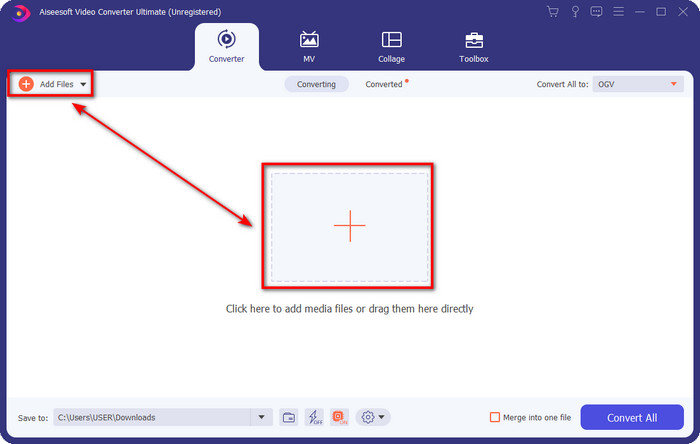
Step 2. On the homepage of the converter, click Add Files at the upper left part of the interface. Then browse the TRP file you want to convert on the folder that will show and press Open to proceed.
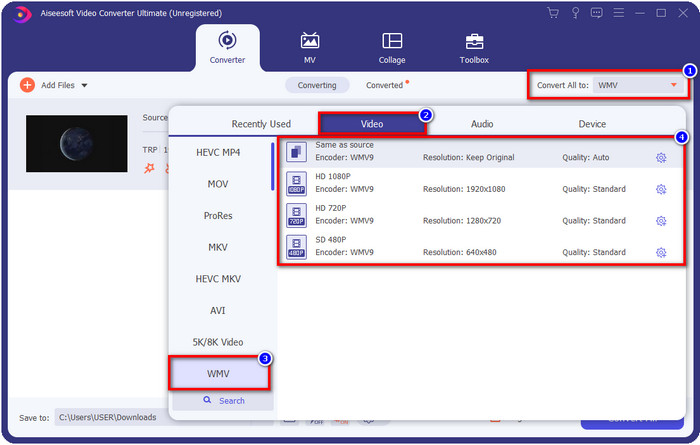
Step 3. Once you have uploaded the file, you must now change the format into WMV by clicking the Convert All to button. You will see that each available format has individual characteristics you can choose from on the list.
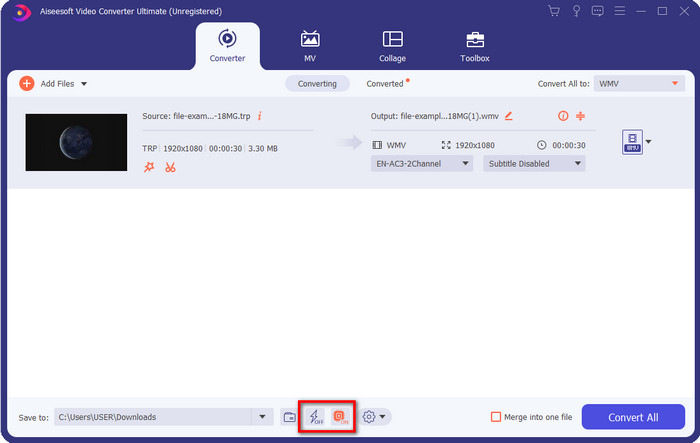
Optional. Want to enjoy the fast conversion we were bragging about? You can click Ultrafast Conversion and Hardware Acceleration below and activate them to enable it.
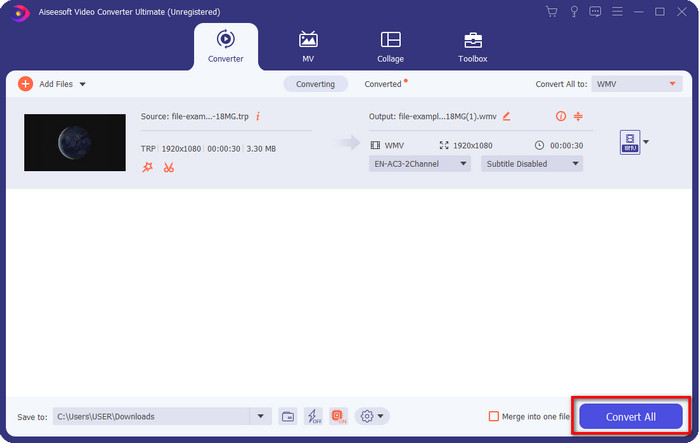
Step 4. Start the converting process by clicking the Convert All button at the bottom right part.
Parte 2. Converter TRP para WMV Online
Many converters are available to use on the internet to convert TRP to WMV. Still, the FVC Free Video Converter Online is the best and professional online converter. This converter is free of charge, and no download is needed to use it. It already helps many internet users resolve their problem about converting TRP into a WMV, AVI, MP4, and MOV. But this converter doesn't support many formats like the FVC Video Converter Ultimate; it also has no editing features. So now, if you want to know how to use this converter, you must follow the steps below.
Step 1. Tick this link to open the main FVC Free Video Converter Online.
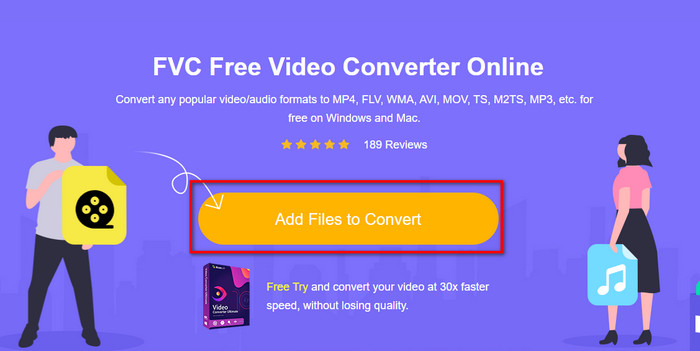
Step 2. Press the Add Files to Convert button, and the folder will open on your desktop. Locate the TRP file you want to convert and hit Open.
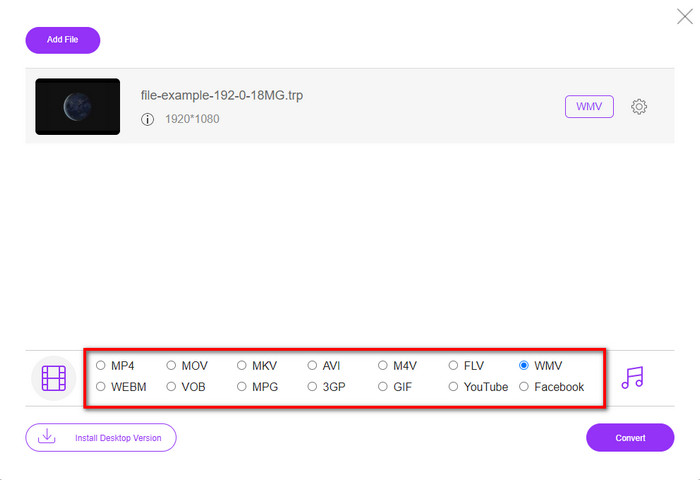
Step 3. After uploading the TRP file, click WMV format on the setlist below.
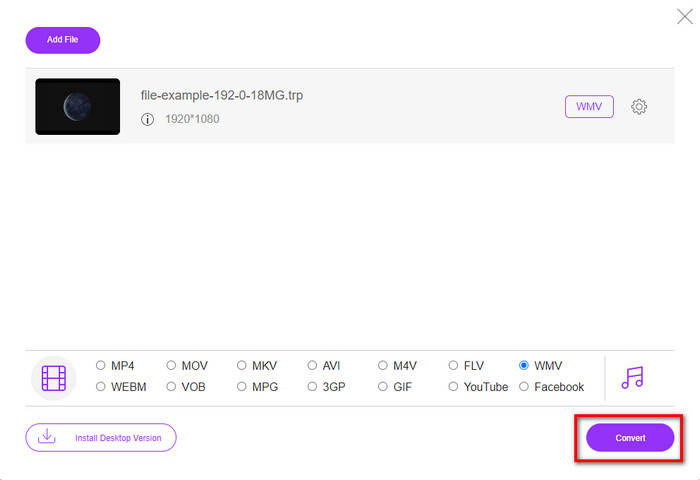
Step 4. Start the converting process by ticking the Convert; the file will automatically save into your drive after the operation.
Parte 3. Qual é a diferença entre TRP e WMV
Embora esses dois formatos sejam ótimos para streaming online, TRP e WMV ainda têm estruturas e usos diferentes. Além disso, seu codec é muito diferente um do outro. Então agora, se você quiser saber informações mais detalhadas e profundas sobre arquivos TRP e WMV, você deve manter a bola rolando e ler as informações abaixo.
O TRP contém o arquivo de mídia de alta definição codificado no formato de transporte MPEG-2 Parte 1. Esse formato é conhecido por fluxos de multiplexação que podem reproduzir conteúdo de mídia sincronizado. Além disso, esse formato geralmente está em DVB ou Digital Video Broadcasting para correção de erros que esse formato fornece. Além disso, os dados que o TRP usa são diferentes do H.264 no vídeo e do AC3 no áudio. Neste momento, o formato TRP não ganha muito suporte, especialmente na maioria dos players de mídia no Windows.
Por outro lado, o WMV possui uma série de codecs de vídeo com diferentes finalidades para codificar o arquivo. A Microsoft introduziu este formato para competir com o formato RM em conteúdo de streaming online. E agora, o formato foi atualizado para WMV9, que é ativado se a resolução de vídeo do conteúdo de mídia exceder 300.000 pixels. Este formato atualizado versão adaptada em discos HD DVD e Blu-ray.
Para simplificar, o TRP precisa se transformar em WMV devido ao problema de compatibilidade ao reproduzi-lo no Windows. Embora o TRP e o WMV sejam ótimas opções para streaming online, se você quiser assistir ao seu TRP no Windows, precisará torná-lo compatível. Por esse motivo, as ferramentas mencionadas acima estão prontas para ajudá-lo quando você precisar converter TRP para WMV.
Parte 4. Perguntas frequentes sobre conversão de TRP para WMV
Posso usar o TRP no Mac?
You are able to use this format if you download a third-party media player and editor that supports this type of format. However, there are limited Mac apps that support this type of format. But we have an idea of how you can use your TRP file without downloading a third-party app. Do you want to know more? If so, you can click this link and read how to convert TRP to MOV.
É seguro usar um conversor TRP online?
Yes, you can use an online converter to convert your TRP into a format your desire. But not all of the converters online are a must to use because most of the tools have malicious issues. So, to avoid this problem we suggest that you must pick a tool that is safe like the FVC Free Video Converter Online. Unlike any typical converter, this tool is far from all of the issues because it is guaranteed safe and malware-free.
O que devo fazer para tornar meu arquivo .trp reproduzível?
De acordo com algumas pesquisas, você pode alterar a extensão do arquivo para .ts ou .mpg para torná-lo compatível com os outros aplicativos de desktop. Mas a garantia de sucesso nisso não é 100%. No entanto, você pode converter o arquivo .trp no formato desejado para torná-lo compatível. Em vez de perder seu tempo alterando a extensão do arquivo e falhando muitas vezes, você deve convertê-lo para economizar tempo e desfrutar assistindo ou editando o vídeo.
Conclusão
In the end, we found out that the TRP needs to be converted into a WMV format if you want to make it accessible on Windows. Although you can download a third-party app to play or edit the TRP file. Still, there are a small group of applications that supported this format. Instead of doing a trial and error why don't you turn it into WMV? So now, it is in your hand to choose which converter you should depend on. But we greatly suggest to you that you must pick the FVC Video Converter Ultimate. Because of one simple reason, it provides simplicity and a perfect converting process you'll experience.
-
 Guia mais fácil sobre como converter TRP para AVI no Windows e Mac
 Talvez você não esteja familiarizado com o formato de vídeo TRP e se pergunte como converter TRP para AVI? Leia este artigo mais para conhecer os detalhes que dizem respeito ao problema.
-
 Converta TRP em FLV com os métodos offline e online mais fáceis
 Deseja converter seu arquivo de vídeo TRP para FLV rapidamente e sem problemas? Leia este artigo para fornecer o melhor software e serviço online que melhor se adapte à situação.
-
 3 maneiras principais de converter FLV em WMV no Windows e Mac
 Procurando a melhor maneira de converter FLV em WMV sem perder qualidade no PC ou Mac? Você tem sorte, pois aqui compartilhamos três métodos para fazer o trabalho facilmente.
