


 Video Converter Ultimate
 Gravador de ecrã
 Reparo de vídeo
 Secure Download
Guias excelentes para converter VOB para DIVX completamente
The files most frequently found on DVDs are called VOB files, and they can hold practically all of the data, including navigation, menus, subtitles, video, and audio. But it takes up too much space in a device. So, if you want your file size smaller, you must convert your VOB file to other file formats like DIVX format. Fortunately, this article has the best methods you can try to convert different files. To convert VOB to DIVX file format, you must read this article and learn the tools you can utilize online and offline.

Parte 1: Excelente conversor de VOB para DIVX sem perder a qualidade
Do you want to convert VOB to DIVX file without losing quality? Then this article is the best answer for you. The most excellent and helpful converter you can utilize is the Video Converter Ultimate. It can help you convert numerous files, like VOB, MT2S, DV, ASF, OGV, DIVX, MTV, MP4, M4V, AVI, AMV, GIF, and more. It also enables batch conversion to convert multiple files in a single click. In addition, this offline tool can convert files at a high speed of 30x faster than other converters. Moreover, you can download it on both Mac and Windows, wherein every user can utilize this tool.
Além disso, o Video Converter Ultimate possui muitos recursos, como criador de videoclipes, criador de colagens e muito mais. Com a ajuda desta ferramenta offline, você pode fazer o que quiser no seu vídeo. Leia mais detalhes sobre este conversor offline abaixo.
Features
◆ Converta vários formatos de vídeo, como VOB, DIVX, MP4, AVI, MTS e muito mais.
◆ Oferece processo de conversão em lote.
◆ Crie uma grande e bela colagem.
◆ Oferece várias ferramentas de edição, como compressor de vídeo, aprimorador, controlador de velocidade de vídeo, cortador, etc.
Prós
- Pode utilizar eficientemente Mac e Windows.
- Acessível para iniciantes e usuários avançados.
- Ele pode converter até 30x mais rápido.
Contras
- Recursos avançados podem ser usados usando a versão paga.
Oferece várias ferramentas de edição, como compressor de vídeo, aprimorador, controlador de velocidade de vídeo, cortador, etc.
Step 1: Download the Video Converter Ultimate on your Mac or Windows by clicking the Download button below. Install it and run the application.
Free DownloadFor Windows 7 or laterSecure Download
Free DownloadFor MacOS 10.7 or laterSecure Download
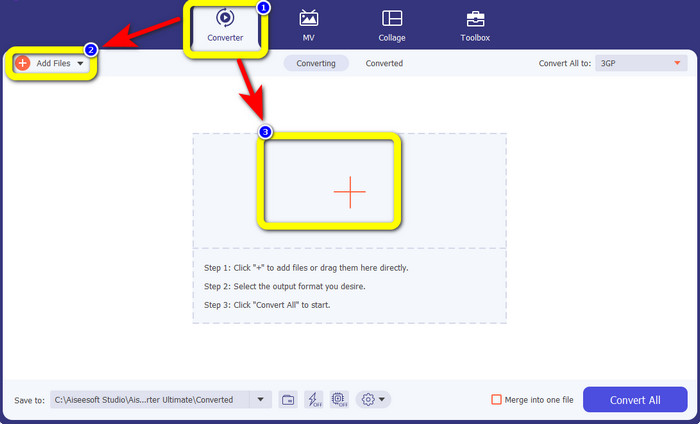
Step 2: Select the Converter panel. Then, click the Add Files button to upload your VOB file. You can also click the Plus sign button to upload the file.
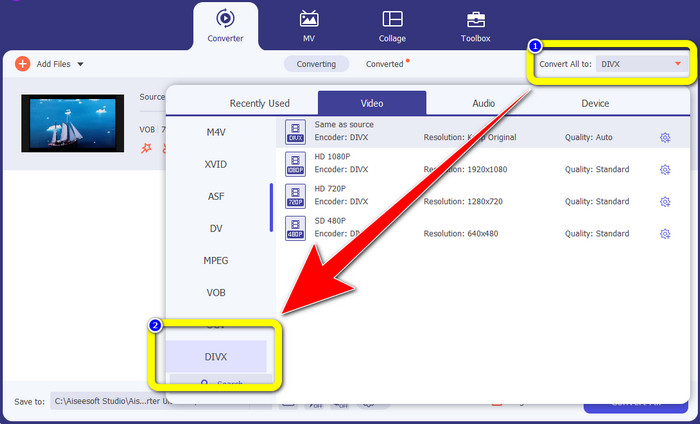
Step 3: After uploading the file, go to the Convert All to button. Format options will show up, then select the DIVX file format.
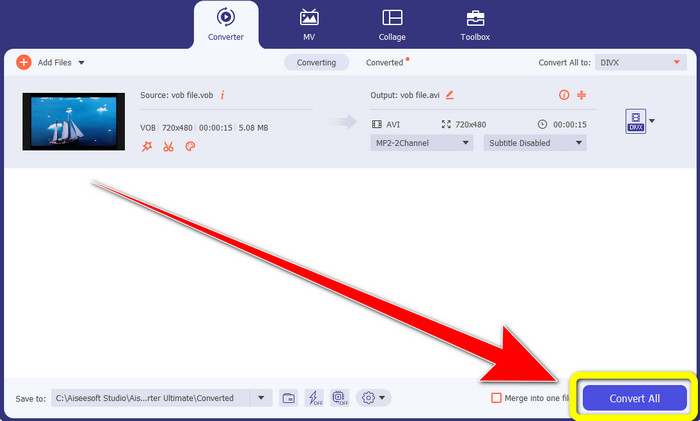
Step 4: Click Convert All to convert and save your final output.
Parte 2: Ferramentas online gratuitas para converter VOB em DIVX
Media.io
If you wonder what converter you can use without installing it on your Windows or Mac, you can use Media.io. This free online tool is capable of converting VOB to DIVX. This is very simple to utilize because it only takes three easy steps to convert various files. In addition, this online converter supports different video and audio formats, such as MOV, AVI, XVID, DIVX, FLV, MP4, M4V, MP3, WAV, WMA, and more. Moreover, this online tool is not just a converter. You can do many things with this tool, like editing your videos using several tools, such as video editor, merger, cropper, trimmer, etc. However, Media.io is a web-based application, so you always depend on internet access. Without an internet connection, you can’t utilize this converter. Also, it only has a normal conversion process, so converting more files takes a little time. To convert the VOB file to DIVX format, follow the simple steps below.
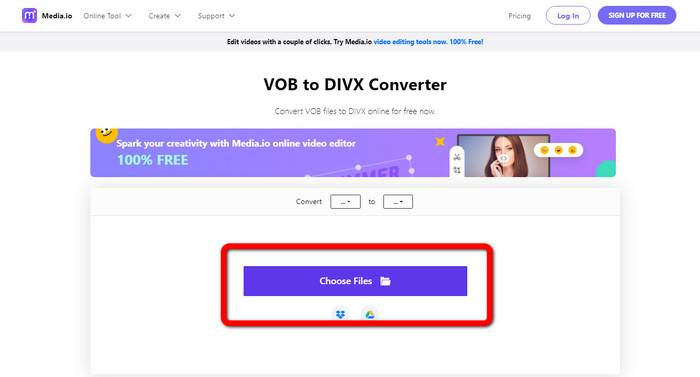
Step 1: Go to the Media.io website. Click the Choose Files button. Your files will show up on your screen. Select the VOB file format you want to convert.
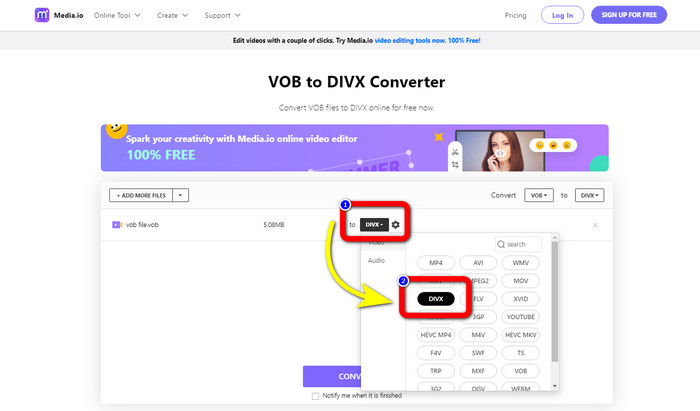
Step 2: When you are done uploading the VOB file. Select the DIVX file format from the format options.
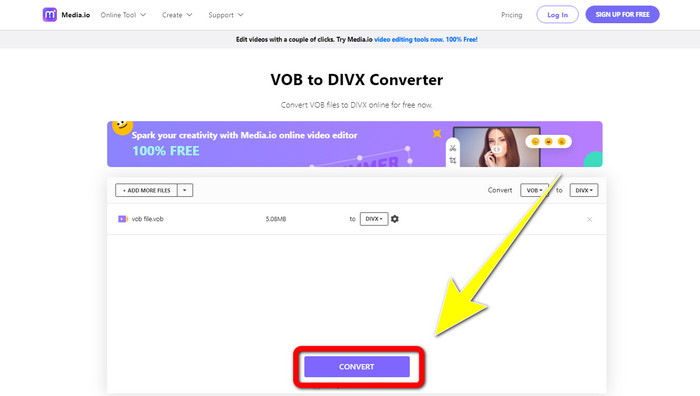
Step 3: For the last step, click the Convert button. Then save it to your desktop.
Convertio
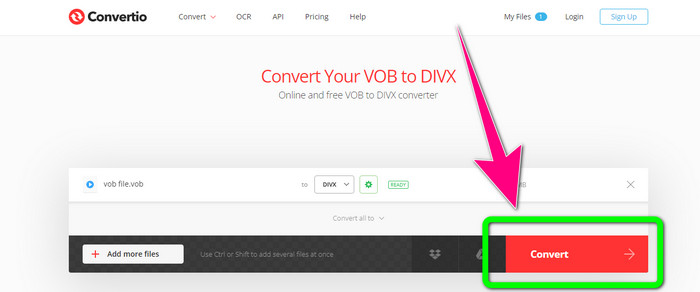
Outro software online que você pode usar para converter VOB para DIVX é o Convertio. Esta ferramenta online oferece suporte a diferentes formatos de arquivo, como FLV, MP4, DIVX, VOB, MOV, MTS, WMV e muito mais. Além disso, este software é fácil de utilizar e perfeito para todos os usuários. Além disso, você também pode converter vários formatos de áudio, imagens, apresentações, documentos, e-books, etc. Infelizmente, usar este conversor online tem uma desvantagem. Você só pode soltar arquivos com no máximo 100Mb usando a versão gratuita. A única maneira de aumentar o tamanho máximo do arquivo é adquirir uma assinatura. Dessa forma, você pode converter vários arquivos sem se preocupar com o limite de tamanho do arquivo. Siga as etapas abaixo para converter um arquivo VOB para DIVX usando o Convertio.
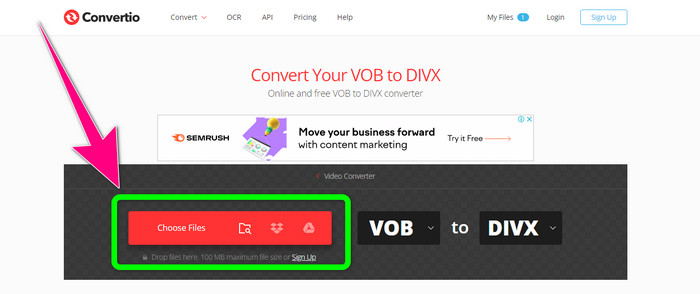
Step 1: Visit the Convertio website. Click the Choose Files button and drop the VOB file.
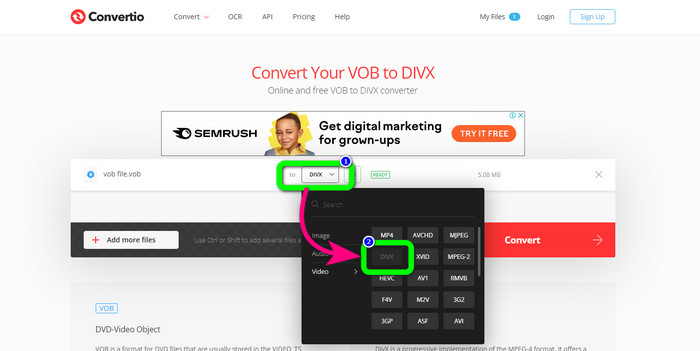
Step 2: For the second step, choose the DIVX format from the format options.
Step 3: In the last step, click the Convert button. Wait for the conversion process and save your DIVX file. If you need to convert VOB to 3GP, you also can use this tool.
Parte 3: VOB vs. DIVX
| VOB | DIVX | |
| Extensão de arquivo | O formato de contêiner de vídeo digital VOB (Video Object) é normalmente visto em material de vídeo em DVD. O VOB multiplexa juntos vídeo de DVD, áudio, menu e informações de texto como legendas. Os codecs de áudio AAC e MPEG-1 ou MPEG-2 Parte 2 são frequentemente usados. Apesar de serem gratuitas, versões específicas deste formato podem ser criptografadas. | O codec de vídeo DivX, criado pela DivX, LLC, é principalmente compatível com o software Windows, mas também pode ser integrado a consoles de jogos, despertadores, aparelhos de som automotivos e outros dispositivos. Atualmente, existem três codecs DivX principais: codec de vídeo H.264/MPEG-4 AVC DivX Plus de alta definição, HEVC Ultra HD e MPEG-4 Parte 2 (DivX Plus). |
| Programas Associados | KM Player VLC Media Player Media Player Clássico GOM Player | Reprodutores de DVD/Blu-ray estéreo para carro XBox 360 despertadores |
| Desenvolvido por | DVD Forum | DIVX Networks Inc. |
| Tipo MIME | Vídeo/MPEG, VÍDEO/DVD | DIVX/VÍDEO |
Parte 4: Perguntas frequentes sobre a conversão de VOB para DIVX
1. Para que serve o DIVX?
A empresa DivX produz produtos sob a marca DivX. A palavra às vezes é usada para se referir ao conhecido codec DivX, que compacta vídeos longos para reduzir o tamanho dos arquivos, mantendo um nível razoável de qualidade de vídeo.
2. Como faço para converter MP4 para o formato DIVX?
Você pode converter MP4 para o formato DIVX usando o Video Converter Ultimate. Dessa forma, você pode alterar facilmente o formato do seu vídeo.
3. DIVX é o mesmo que AVI?
Embora o formato de arquivo DivX também possa incluir recursos como legendas e capítulos XSUB, ele também é baseado no contêiner AVI. Todos os dispositivos certificados pela DivX, incluindo TVs e gadgets veiculares, suportam vídeos AVI e DIVX para reprodução.
Conclusão
These are the best methods to convert VOB to DIVX without losing quality using offline and online tools. But, as you can see, online tools have disadvantages. Then, the best solution is to download an excellent converter on your Windows or Mac, like the Video Converter Ultimate.
-
 Como converter VOB para arquivo WMV no Windows e Mac [rapidamente]
 Você é uma das pessoas que deseja converter seu arquivo VOB para o formato de arquivo WMV? Tentamos conversores offline e online e escolhemos os melhores conversores VOB para WMV.
-
 3 maneiras de converter VOB para MKV no Windows, Mac e Online
 Deseja converter DVD VOB para MKV? Este artigo oferece as três melhores maneiras de converter seu arquivo VOB para MKV sem ter dificuldade em converter arquivos.
-
 Como converter DIVX para 3GP no Windows, Mac e Online
 Como converter DIVX para 3GP? Se você está procurando uma resposta, leia este artigo. Mostraremos ótimos procedimentos com a ajuda de diferentes conversores.
