


 Video Converter Ultimate
 Gravador de ecrã
 Reparo de vídeo
Como converter VOB para MKV gratuitamente com estes 3 conversores [melhores ferramentas]
VOB or Video Object is a file format that DVDs usually use. This file is commonly kept in the VIDEO_TS folder, which is at the root of the DVD. However, a lot of media files are now available on the internet. And the use of DVDs is not common nowadays and is not supported by many devices. Therefore, you need a file format that is supported by a lot of devices. MKV is a file format that is widely supported by numerous devices. Below are the best ways to convert VOB to MKV for free.

Parte 1. Converta VOB para MKV sem perdas
To convert your VOB files to MKV, you need a converter that is well suited for that job. FVC Video Converter Ultimate is a converter that is popular in the market nowadays. This converter has many special features where you can edit, enhance, compress, and do batch conversion of your VOB file. Moreover, this tool also supports ultra-fast conversion so that you can convert your VOB file to MKV real quick, without losing its quality.

FVC Video Converter Ultimate
Mais de 5.689.200 downloads- Oferece conversão em lote para mesclar vários arquivos em um.
- Ele tem uma GUI fácil de usar, que é amigável para iniciantes.
- Tem um recurso para criar GIFs e fazer vídeos 3D.
- Permite converter rapidamente devido ao seu processo de conversão ultrarrápido integrado.
- Disponível em várias plataformas, incluindo Windows e Mac.
Free DownloadFor Windows 7 or laterSecure Download
Free DownloadFor MacOS 10.7 or laterSecure Download
Aqui estão os passos sobre como converter VOB para MKV usando o FVC Video Converter Ultimate:
Step 1. Download this application by clicking the Download button below for Windows or Mac. Follow the installation process, then proceed to the next step.
Free DownloadFor Windows 7 or laterSecure Download
Free DownloadFor MacOS 10.7 or laterSecure Download
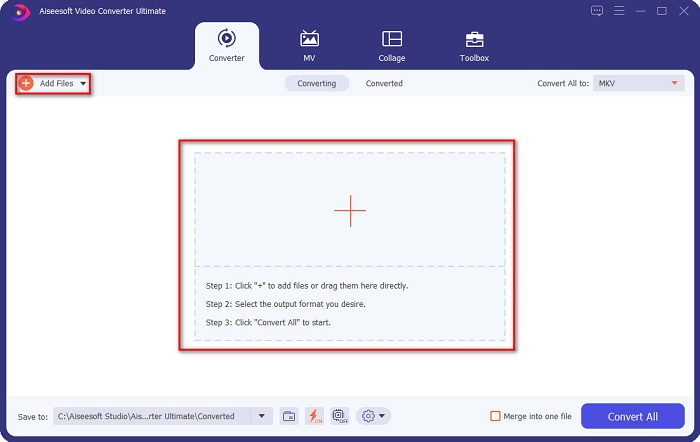
Step 2. After downloading the converter, click the Add Files button or the + button to upload your VOB file in the queue.
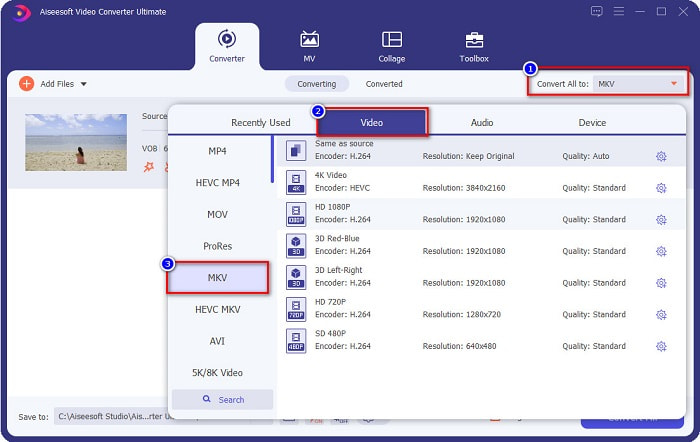
Step 3. And then click the Convert All to button located at the upper right corner of the software’s interface. A list of file formats will appear, then choose your desired file output.
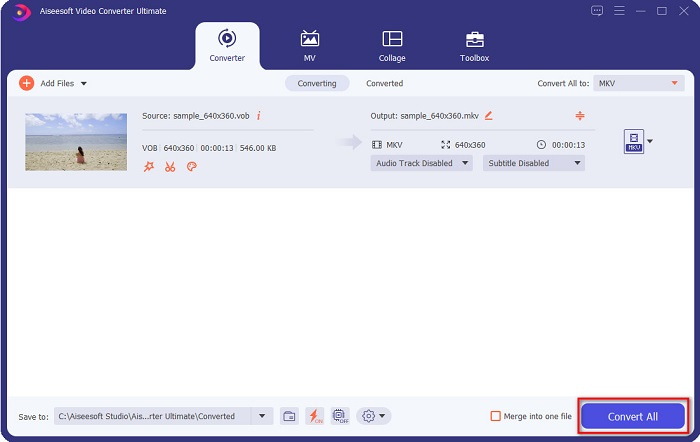
Step 4. After selecting MKV as your output file, click the Convert All button to convert your VOB to the MKV file. Then wait for a few seconds for your conversion to finish.
Seguindo estes passos simples, você pode converter VOB para MKV sem perdas.
Parte 2. Converter VOB para MKV usando conversores de freeware
Você também pode converter VOB para MKV usando freeware. Usar freeware como seu conversor pode economizar muito tempo porque você não precisará de uma conexão com a Internet para usá-lo. E quando se trata de baixar conversores de freeware, você não precisa comprar nada. Aqui estão os melhores conversores de freeware para você experimentar.
VLC Media Player
Ao escolher o melhor conversor de freeware, não há como negar que o VLC Media Player será. Muitas pessoas usam este conversor de freeware por causa de sua conveniência de uso. Este media player é muito famoso para usuários do Windows e provou ser uma ótima maneira de converter arquivos.
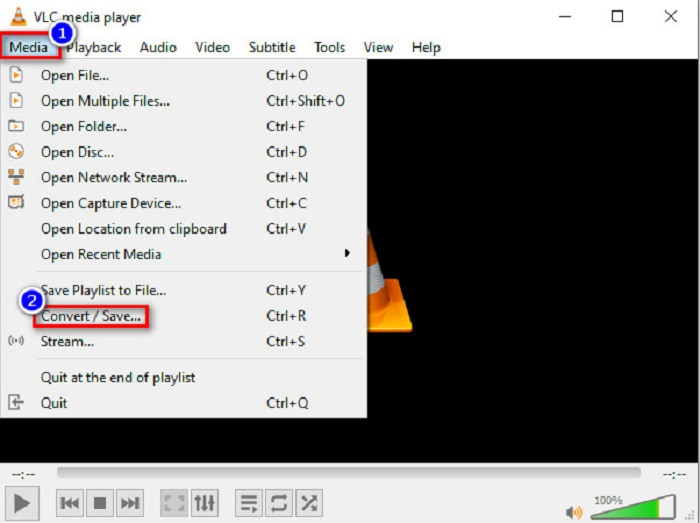
Step 1. First, if you do not have VLC Media Player on your device, download it by searching it in your browser. After downloading it, open the application. After opening the app, click the Media button, then select the Convert/Save button. Then you will be led to another interface.
Step 2. And then, click the + Add button to upload your VOB file. Then, click the Convert/Save button. Then proceed to the next step.
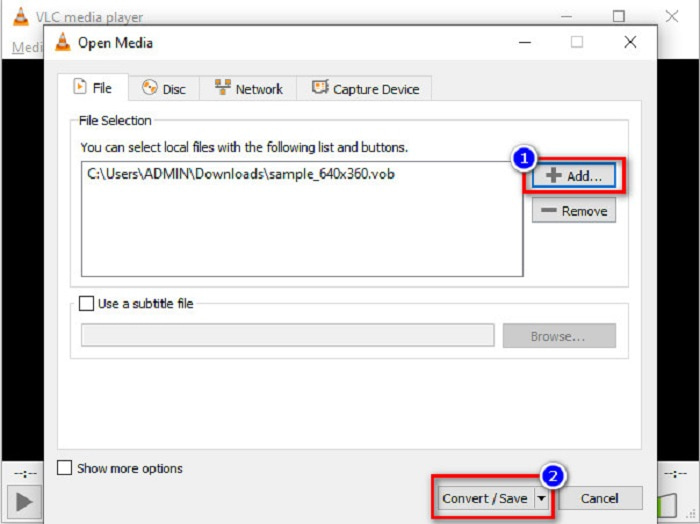
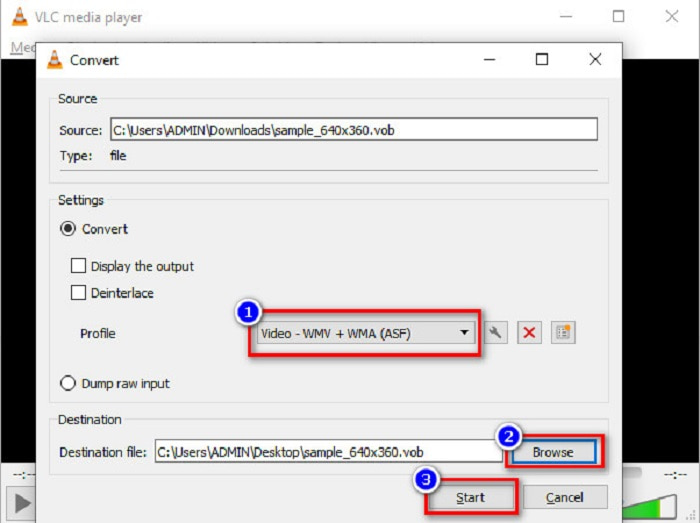
Step 3. Lastly, by clicking the drop-down button beside the Profile, select the MKV file as your output format. To choose your file destination, click the Browse button. And finally, tick the Start button to begin your conversion.
HandBrake
Another freeware converter that you can use to convert DVD VOB to MKV files is by using HandBrake. This converter is free when downloading. It also supports varieties of formats that are available on the web. However, its interface is complicated to understand for beginners. Still, this converter offers you distinct features that help convert your VOB file to MKV.
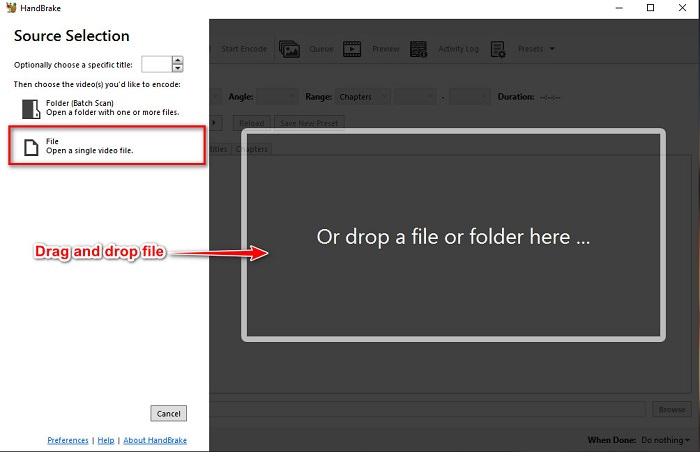
Step 1. Download the app by searching HandBrake in the browser that you use. After downloading, open the application. Then, click File, or drop your VOB file in the rectangular box in the middle of the software’s interface to upload it.
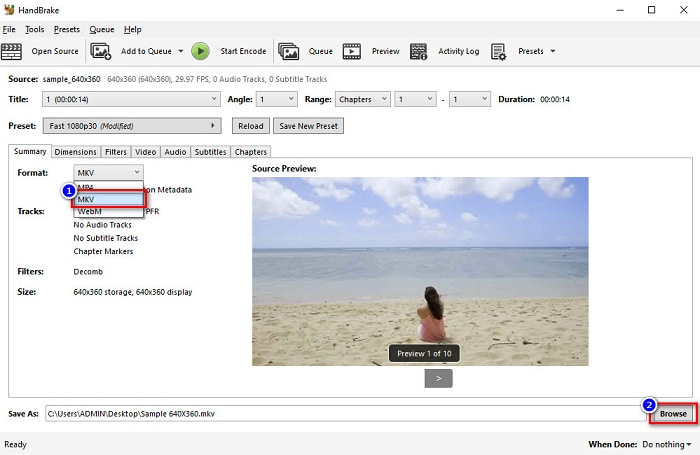
Step 2. After uploading your VOB file, choose MKV as your output file format by clicking the drop-down button beside Format. And for you to change the destination of your file on your computer files, click the Browse button.
Step 3. For the last step, click on the Start Encode button to convert your VOB to MKV using HandBrake.
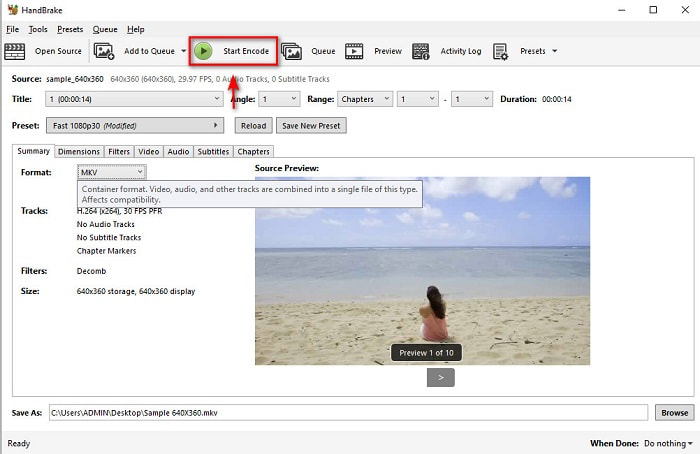
E é assim que você converte VOB para MKV usando freeware.
Parte 3. Converter arquivo VOB para arquivo MKV usando uma ferramenta online
Online converters are more convenient because you do not need to download anything. While there are many free online converters available on the web, Onlinefreeconvert.com is what we know as one of the best. This online converter is easy to use and free. Although you may experience slow conversion because it is web-based, many still use it for its convenience in using.
Passos sobre como converter seu arquivo VOB para arquivo MKV online:
Step 1. To convert a VOB file to MKV file format, search Onlinefreeconvert.com on your browser, then you will be directed to the converter’s website.
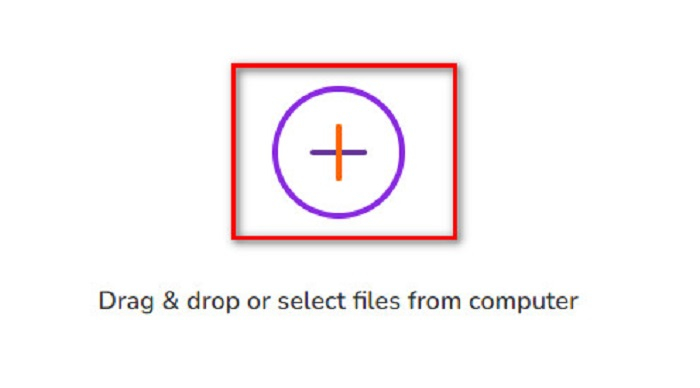
Step 2. Drag and drop your VOB file or select files from your computer by clicking the + button.
Step 3. Then beside the Output Format, click the drop-down button to select MKV as your output file format. Lastly, click the Start Now button to convert your VOB file to MKV.
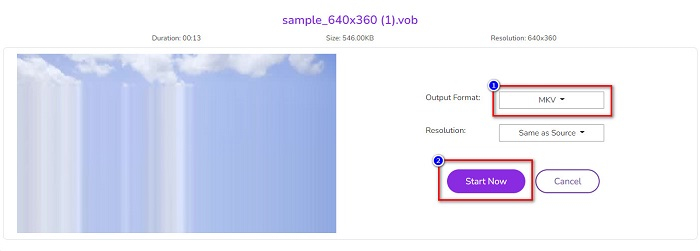
E é assim que você converte VOB para MKV online usando um conversor online.
Parte 4. Mais conhecimento sobre VOB e MKV
VOB ou Video Object é o formato de arquivo que os vídeos de DVD reproduzem. Ele contém dados que incluem áudio, vídeo e legendas. Este tipo de formato de arquivo tem proteção de direitos autorais para protegê-los de serem copiados diretamente. Em contraste, os arquivos MKV ou Matroska são um formato de arquivo comumente usado para armazenar videoclipes e filmes curtos. Também é suportado por vários codecs de vídeo e áudio. Além disso, é um arquivo à prova de futuro; portanto, é feito para não ficar desatualizado no futuro.
Parte 5. Perguntas frequentes sobre a conversão de VOB para MKV
Qual tem um tamanho de arquivo maior, VOB ou MKV?
Os arquivos MKV têm tamanhos de arquivo maiores em comparação com o VOB. Embora não haja muita diferença, o MKV é um pouco maior.
Você pode reproduzir arquivos de vídeo VOB no Mac?
macOS does not support VOB files; therefore, you cannot play it directly on Mac. However, you can use a converter to convert your VOB file to a file supported by macOS. MOV file is a file format that is widely supported by it. Moreover, read this article to know more about converting VOB to MOV.
O tamanho do arquivo será afetado ao converter VOB para MKV?
Not necessarily. When converting VOB to MKV, the file size will not be affected, especially if you use FVC Video Converter Ultimate as your tool to convert.
Conclusão
Todos os conversores online, freeware e offline apresentados acima apresentam um desempenho promissor. Embora tenham recursos distintos entre si, eles ainda são uma ferramenta eficaz e eficiente para converter VOB para MKV-free. Mas se você deseja um conversor ultrarrápido com muitos recursos excelentes para experimentar, o FVC Video Converter Ultimate é a ferramenta mais adequada para isso. Então, se você estiver interessado em experimentar este conversor, baixe-o agora!
-
 Melhores maneiras de converter VOB em FLV [gratuito e online incluído]
 Quer converter um arquivo VOB em um arquivo FLV? Você pode completar a tarefa facilmente com conversores de desktop ou online. Leia este guia e aprenda como transformar VOB em FLV com facilidade e rapidez.
-
 O que é o arquivo VOB e como transformar o arquivo VOB em GIF gratuitamente
 Quer saber mais sobre os arquivos VOB e como compartilhá-los depois de copiados? ou Por que você precisa converter VOB para GIF? Então leia este artigo com atenção.
-
 3 Conversores úteis disponíveis para alterar o arquivo VOB para o formato AVI [2021]
 Tem um problema porque os arquivos VOB não podem ser reproduzidos? Então, vamos tentar convertê-lo com as 3 formas apresentadas a seguir com etapas detalhadas em cada conversor.
