


 Video Converter Ultimate
 Gravador de ecrã
 Reparo de vídeo
 Secure Download
Excelentes truques para converter facilmente WMV em M4V que você pode experimentar
Are you one of the users looking for excellent and easy methods to convert your WMV to M4V? There are various converters you can find on the web. However, some of them don’t support WMV and M4V file formats. If that is your problem, this article can provide you with the easiest solution using worthy applications. You will also discover their features to get an idea of the other functions of these applications. Read the article from top to bottom to find out more essential details.

Parte 1: Introdução ao WMV e M4V
Formato de arquivo WMV
| Nome | WMV |
| Extensão de arquivo | .wmv |
| Descrição | A sigla WMV (Windows Media Video) significa um grupo de codecs de vídeo que a Microsoft lançou pela primeira vez em sua estrutura do Windows Media. Foi criado pela primeira vez para rivalizar com o formato RM em aplicativos de streaming na Internet. Ele contém arquivos de vídeo compactados e até ajuda os Blu-ray/DVDs a fornecer conteúdo. |
| Categoria de arquivo | Vídeo |
| Desenvolvido por | Microsoft |
| Programas Associados | VLC Media Player MPlayer Reprodutor de Mídia Clássico Windows Media Player |
| Tipo MIME | video/x-ms-asf vídeo/MPEG |
| Detalhes técnicos | O conteúdo multimídia foi codificado e está contido em um arquivo WMV usando o formato de contêiner Advanced Systems Format (ASF). Os arquivos ASF devem utilizar a extensão de arquivo.ASF em vez da extensão de arquivo.WMV, mesmo que o ASF possa conter multimídia em codificações diferentes das permitidas pelo padrão de arquivo WMV. |
Formato de arquivo M4V
| Nome | M4V |
| Extensão de arquivo | .m4v |
| Descrição | A Apple criou o formato de arquivo M4V, um formato de contêiner de vídeo semelhante ao padrão MP4. A principal diferença é que os formatos de arquivo M4V podem ter proteção contra cópia DRM. Em sua iTunes Store, a Apple codifica arquivos de vídeo usando o formato M4V. |
| Categoria de arquivo | Vídeo |
| Desenvolvido por | Apple Inc. |
| Programas Associados | VLC Media Player KMPlayer Reprodutor de Mídia Clássico Reprodutor de zoom |
| Detalhes técnicos | Os arquivos M4V podem ser protegidos usando a proteção contra cópia FairPlay da Apple para impedir a replicação não autorizada. Somente computadores aprovados (através do iTunes) com a conta usada para comprar o vídeo podem reproduzir um arquivo M4V protegido por FairPlay. |
Parte 2: Melhor maneira de converter WMV para M4V para Mac e Windows
The best way to convert WMV to M4V is the FVC Video Converter Ultimate. This converter is downloadable on both Windows and Mac. It can convert 100+ video file formats, such as WMV, M4V, MP4, AVI, FLV, MKV, MOV, and more. When converting, you can convert multiple files simultaneously because this application can handle the batch conversion. Also, you will never be disappointed when it discusses the conversion process. This converter offers a high-speed conversion process, wherein you can convert files 30x faster than the average speed.
Além disso, Video Converter Ultimate tem outra função principal. Se você estiver interessado em converter seus arquivos de imagem, poderá fazê-lo.
Features
◆ Converta diferentes formatos de arquivo de vídeo, como M4V, WMV, FLV, AVI, MP4, MOV, VOB, etc.
◆ Oferece ferramentas de edição de vídeo, como aprimorador de vídeo, compressor, cortador, aparador, reversor, etc.
◆ Capaz de criar uma colagem.
◆ Fazer um videoclipe está disponível.
◆ Permite a conversão em lote.
◆ Altere a velocidade do vídeo.
◆ Converta formatos de arquivo de imagem como PNG, JPG, BMP, WEBP e muito mais.
Vamos converter WMV para M4V no Mac usando o FVC Video Converter Ultimate. Use os guias simples abaixo.
Step 1: Download and install the FVC Video Converter Ultimate on your Mac by clicking the download button below with the Mac version.
Free DownloadFor Windows 7 or laterSecure Download
Free DownloadFor MacOS 10.7 or laterSecure Download
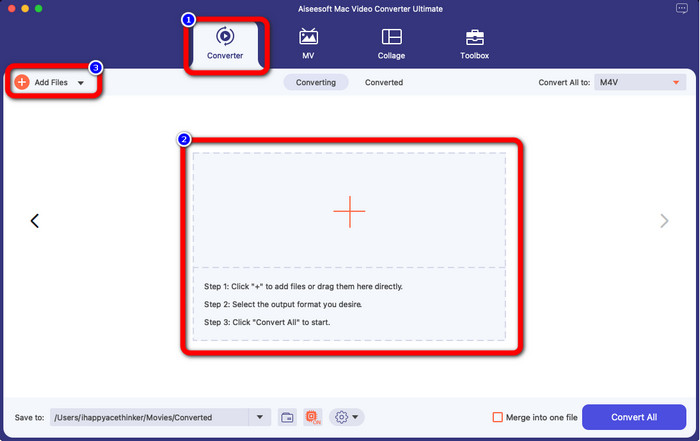
Step 2: Launch the application and select the Converter panel. Then, click the + icon or Add Files button to insert your WMV video file.
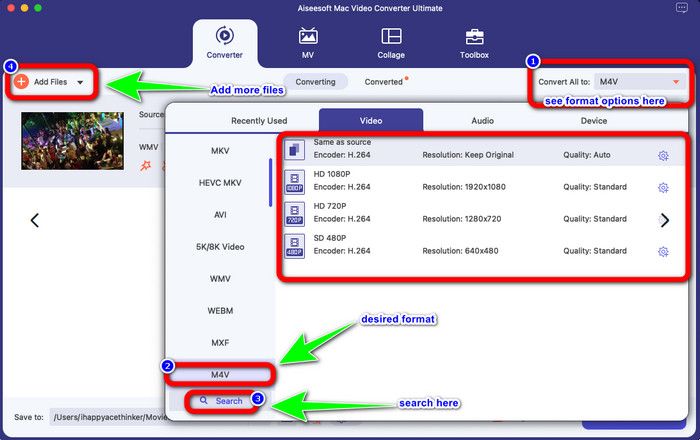
Step 3: After adding your video, click the Convert All to button to view the format options, and select the M4V file format. You can also search your desired format on the search box on the lower part of the interface. You can still click the Add Files button to add more videos to do batch conversion.
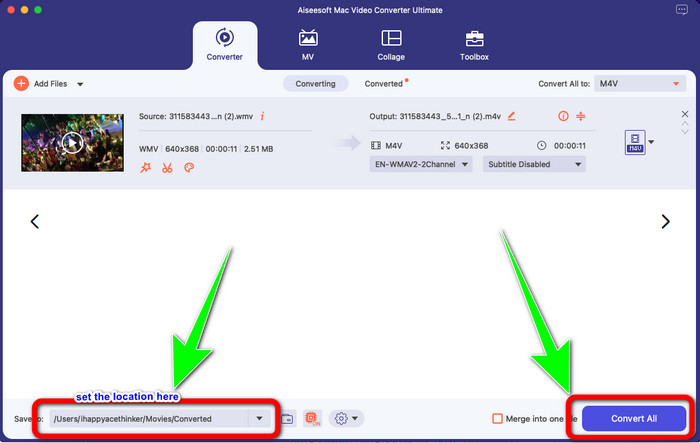
Step 4: When you select your desired file format, the M4V, you can already choose the location where you want to save your video. Then click the Convert button.
Parte 3: Maneira Gratuita de Converter WMV para M4V
To convert WMV to M4V for free, you can use Convertfiles.This online software is also capable of converting multiple files. It has easy instructions with a simple interface, which is suitable for all users. Aside from converting videos, you can also convert images, audio, presentation, and more. However, there are times when this converter doesn't perform well. It has a slow conversion process, and the ads are annoying.
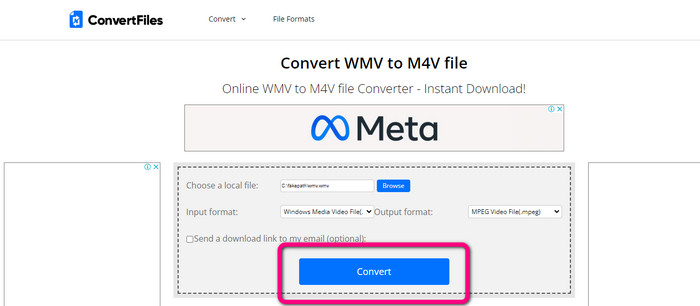
Step 1: Go to the Convertfiles website.
Step 2: Upload the WMV file format you want to convert.
Step 3: On the Output format, select the M4V file. Then click the Convert button.
Parte 4: Método excelente para converter WMV para M4V online
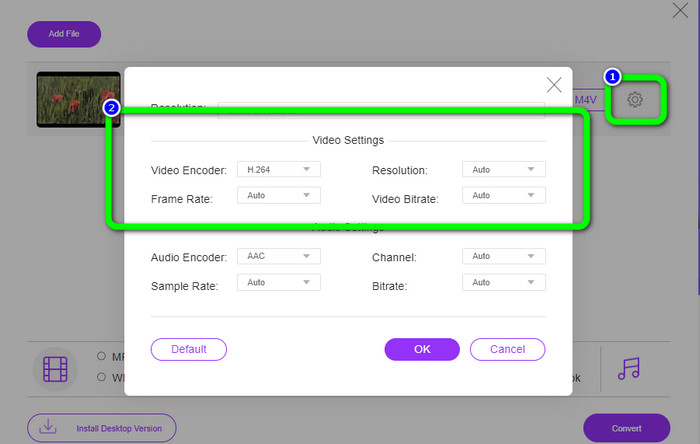
Another method to convert WMV to M4V online is to use the FVC Free Video Converter Online. With the help of this online tool, converting WMV is easy. It also converts more files like AVI, MP4, FLV, MKV, VOB, etc. Moreover, even though it is a free online converter, you don’t need to worry about the quality of your video. You can save your converted video with the original quality. Furthermore, you can also change your video's bit rate, frame rate, and resolution.
Features
◆ Capaz de alterar a taxa de bits, taxa de quadros e resolução do vídeo.
◆ Oferece conversão em lote.
Siga as etapas detalhadas abaixo para converter WMV para M4V usando o FVC Free Video Converter Online.
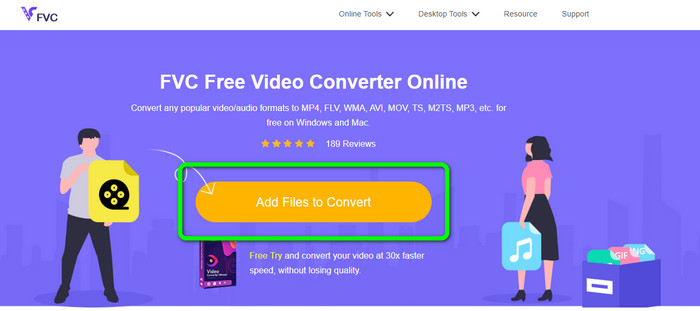
Step 1: Visit the FVC Free Video Converter Online website. Then, click the Add Files to Convert button.
Step 2: If you want to change your video’s bit rate, frame rate, and resolution, click the Settings icon. Then, press OK when you are done.
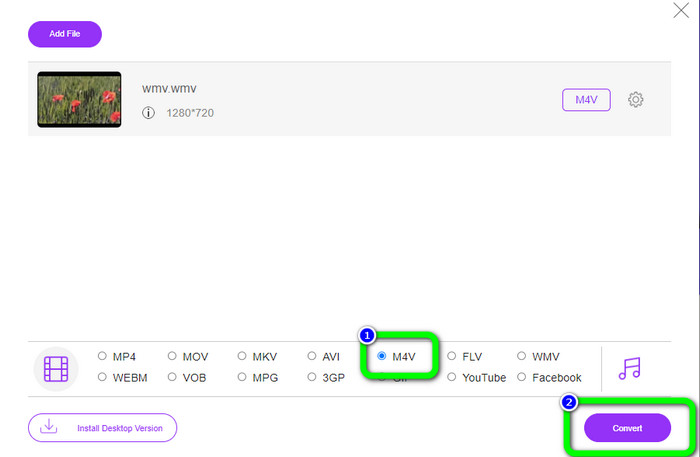
Step 3: Then, on the lower part of the interface, you will see the format options. Select the M4V file as your desired output file format, and click the Convert button to download your video.
Parte 5: Perguntas frequentes sobre a conversão de WMV para M4V
1. Todos os dispositivos podem reproduzir M4V?
Unfortunately, no. Built-in player of Android devices doesn’t support M4V files. You can download a third-party M4V player that supports the M4V format or convert it to a compatible format.
2. Existe o melhor conversor para converter WMV para M4V?
If you want the best WMV to M4V converter, you can use the FVC Free Video Converter Online. It can convert your files efficiently and effortlessly.
3. Qual é melhor, M4V ou MOV?
M4V is better. If you want to play your files on a portable device, such as iPhone, iPod, or iPad, M4V is highly recommended. But in some devices, MOV is supported only. In that case, you can convert M4V to MOV.
Conclusão
With all the essential information above, you can already convert WMV to M4V easily and instantly. If you prefer a fast conversion speed converter, you can use the FVC Video Converter Ultimate. Also, you can use the FVC Free Video Converter Online if you want a free online converter.
-
 Como compactar arquivos M4V para um tamanho menor (gratuito e online)
 Se você está procurando uma maneira simples de reduzir o tamanho do seu arquivo M4V, você deve ler este artigo. Aqui vamos compartilhar a maneira mais fácil de compactar arquivos M4V com você
-
 Guia concreto para juntar arquivos M4V no Windows e Mac gratuitamente
 Se você está procurando uma solução para combinar arquivos de vídeo M4V em um, nunca perca esta passagem. Aqui falaremos sobre os dois melhores métodos para combinar arquivos de vídeo M4V
-
 Dicas rápidas e fáceis para converter WMV para MOV [Comprovado]
 Quer saber quais são os melhores e mais fáceis de usar conversores que convertem WMV para MOV? Continue lendo este artigo, pois ele discute todas as opções possíveis que você precisa considerar usando
