


 Video Converter Ultimate
 Gravador de ecrã
 Reparo de vídeo
 Secure Download
Transformando o YouTube em toque: conversão facilitada
Are you tired of getting notified by bland and repetitive ringtones on your mobile device? How about starting to use that trendy, catchy, and upbeat tone on YouTube? You don’t know how? Well, we've got your back, as converting them is the answer to your concern and your luck hasn’t started yet as we listed software and online tools designed for converting YouTube to ringtones. Start converting YouTube videos today and turn your daily ringtone from boring to pleasing.

Parte 1. Converter link do YouTube em toque MP3
Você está se perguntando como fazer de um vídeo do YouTube seu toque? Bem, para esta parte, mostraremos como converter um vídeo do YouTube em um toque de MP3 copiando e colando o link e utilizando uma ferramenta de conversão baseada na web como o Y2Mate. O processo leva cerca de três etapas, garantindo uma conversão direta para economizar seu tempo e definir seu toque recém-convertido.
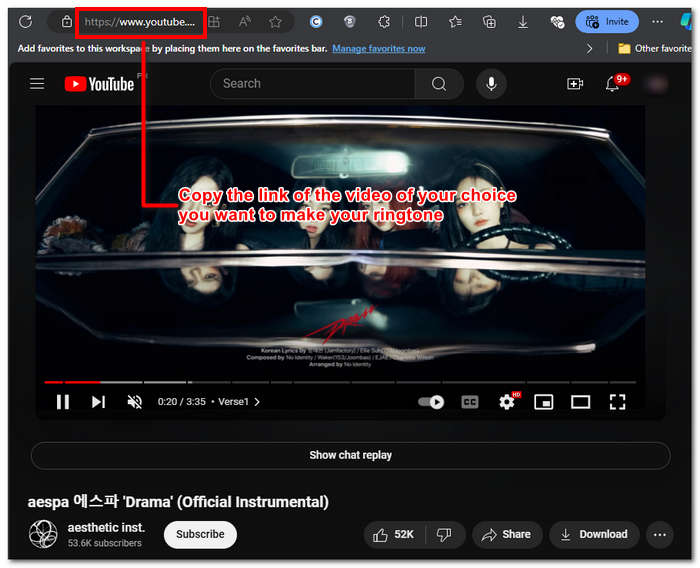
Step 1. Copy the link of your chosen YoTube video you want to convert into a ringtone. It can done through a browser on your desktop or a YouTube app on mobile.
Step 2. Go to Y2Mate.com and casually paste the link of your YouTube video in its designated field.
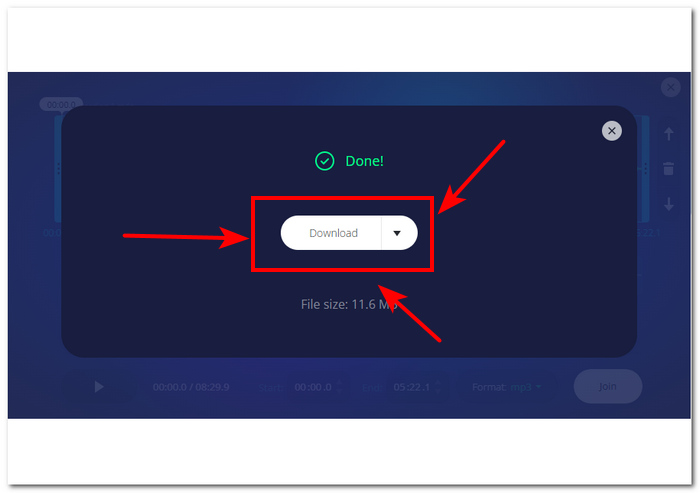
Step 3. Next, click on the Audio button and then click the Download button to convert the file and save it to your device.
Esta etapa também funciona em celulares, pois você pode usar o navegador do seu celular.
Parte 2. Personalize o vídeo do YouTube para toque MP3 para Android/iPhone
If you want to download a YouTube video, turn it into your ringtone, and customize it for a more personal touch, then a software-based tool is your go-to solution. FVC-picked Video Converter Ultimate is an all-in-one tool that can convert, enhance, compress, and even edit videos and audio with up to 1000 supported file formats. In contrast, integrated with high-speed processing technology to ensure fast conversion speed without losing quality.
Supostamente, a tarefa é personalizar um arquivo de vídeo do YouTube antes de convertê-lo em um toque M4R ou MP3. Assim, o software pode ajudar você a encurtar o tempo de duração, adicionar efeitos de fade e remover partes que você acha desnecessárias, fazendo uma personalização completa que atende perfeitamente à sua preferência em um toque.
Antes de personalizar seu toque, você deve ter baixado seu vídeo do YouTube. Se você não tiver baixado o vídeo para seu dispositivo, você pode usar o Y2Mate para fazer isso.
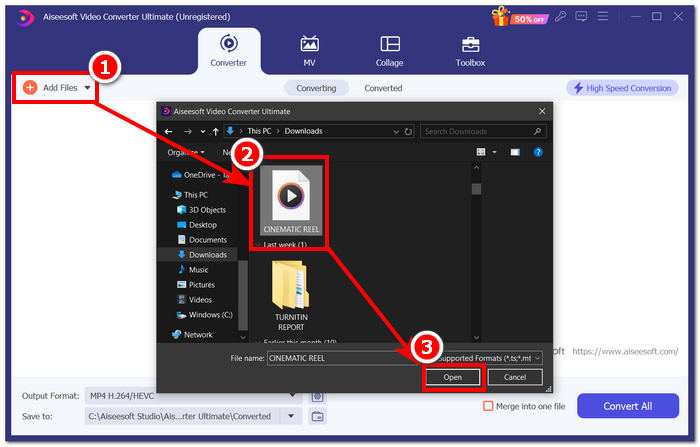
Step 1. Using your desktop, download and install the FVC-picked Video Converter Ultimate on your device. Open the program on your device and load the downloaded YouTube video by clicking on the Add Files link in the upper-left part of the interface.
Free DownloadFor Windows 7 or laterSecure Download
Free DownloadFor MacOS 10.7 or laterSecure Download
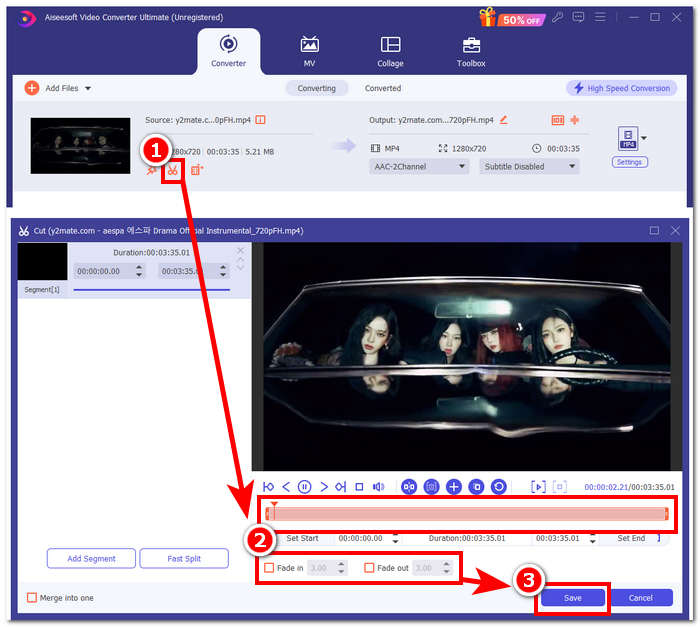
Step 2. Once the video is in the program, click on the scissor icon near the video to begin customizing your ringtone. When a new window appears on your screen, you can add fade effects to your ringtone and shorten it by dragging the cursor bar from left to right. When you are done customizing it, just click the Save button.
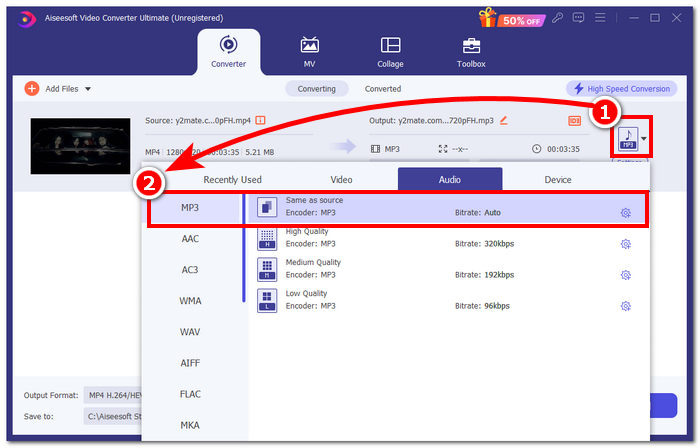
Step 3. Once you've customized your ringtone, change its file format from MP4, a video file format, to an actual MP3 format to make it appear as an audio file on your device.
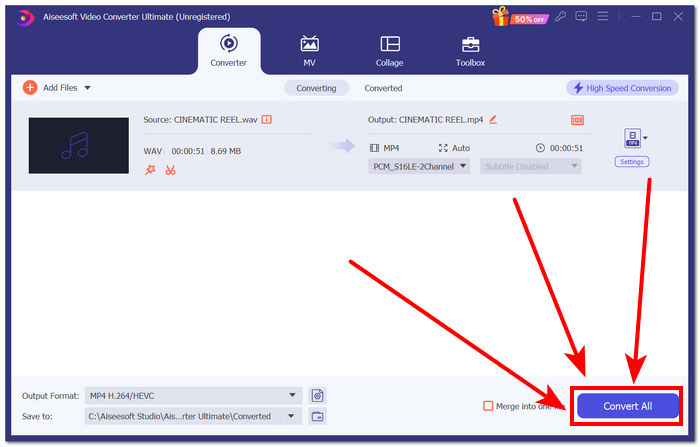
Step 4. Click the Convert All button to begin the conversion process and automatically save the ringtone to your device. Once you're done converting, your ringtone will be in your download folder.
Parte 3. Defina o vídeo do YouTube como toque MP3
Iphone
After making ringtones for iPhone, setting a ringtone on an iPhone is quite a weighty process compared to Android. iPhones don’t have built-in support to simplify the process of setting up a new ringtone that came from another source. Thus, it doesn’t stop us from finding ways to make a converted YouTube to MP3 ringtone on the iPhone guide.
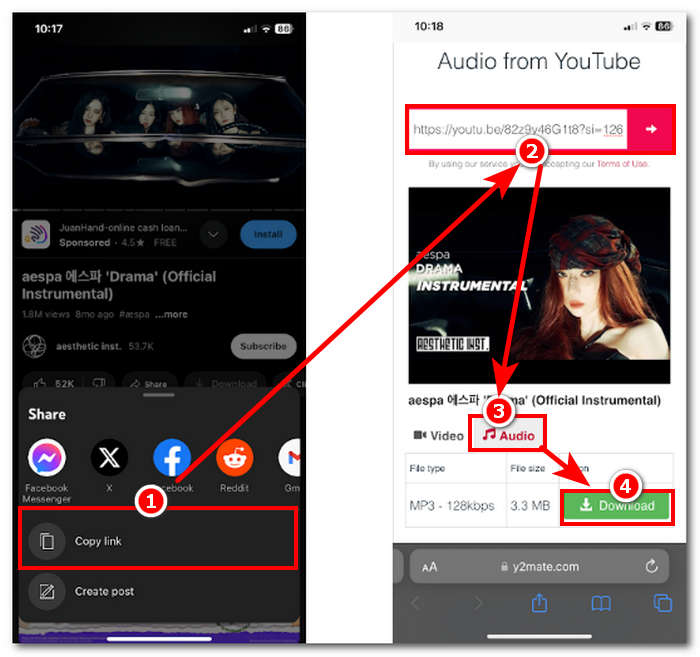
Step 1. Copy the link to the video in your iPhone's YouTube app.
Step 2. Paste the URL to your preferred converting tool into Safari. Remember to choose the Audio option first so that your movie will be converted to MP3 before tapping the Download button.
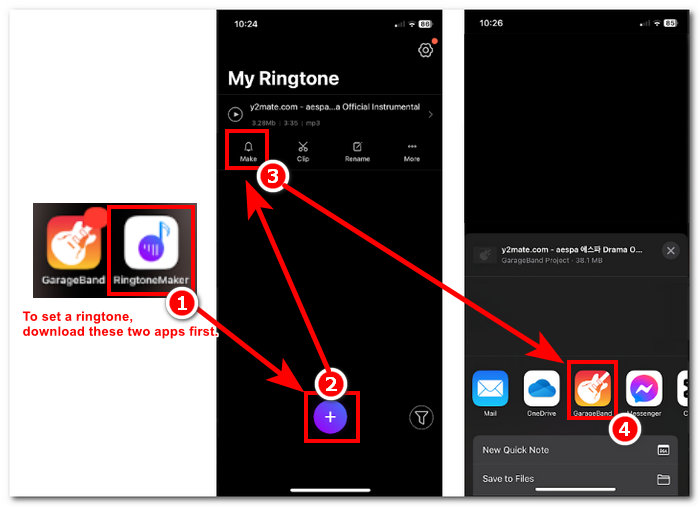
Note: Make sure you install GarageBand and RingtoneMaker apps before proceeding to the next step.
Step 3. Open the RingtoneMaker app and load the downloaded YouTube ringtone on the app. Once loaded, tap the Make Ringtone button and select the GarageBand app to proceed.
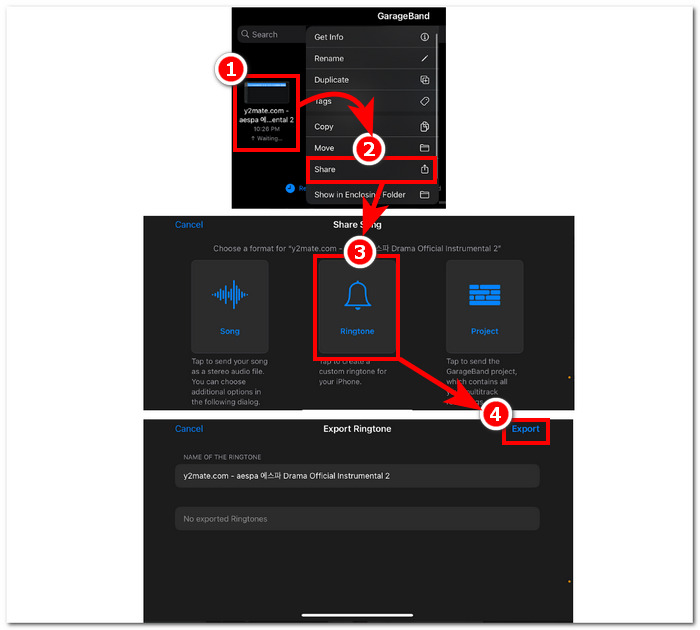
Step 4. Once you are redirected to the GarageBand app, tap the ringtone you imported on the app, then proceed to follow these navigation Share > Ringtone > Export.
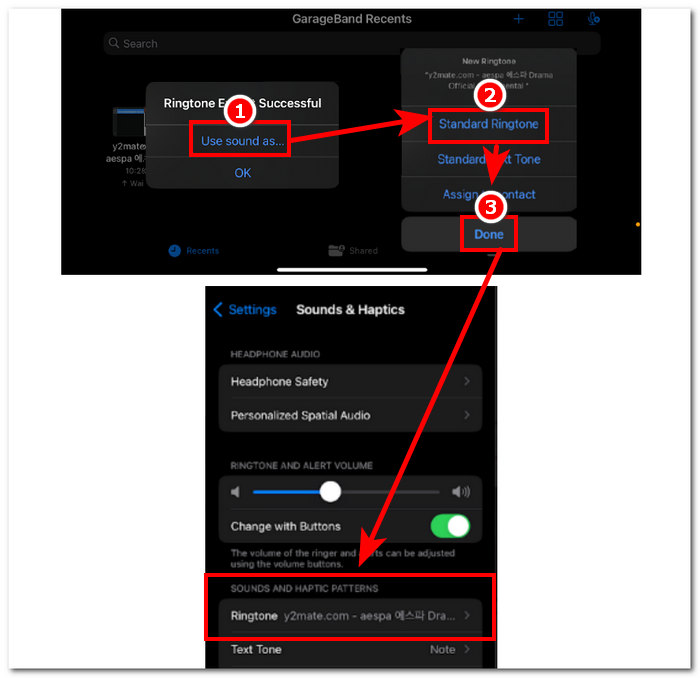
Step 5. Once you've finished exporting, use sound as a standard ringtone and hit the Done button. To check if you successfully set your new ringtone, go to Settings > Sound & Haptics. The name of your file should be under the Ringtone section.
Android
Converter o YouTube para MP3 Ringtone no Android é tão fácil quanto configurá-lo. Graças aos seus recursos integrados, o Android permite que seus usuários definam um ringtone, tornando o processo muito mais fácil e conveniente. Assim, os usuários ainda precisam baixar e converter o vídeo do YouTube usando a ferramenta online Y2mate.
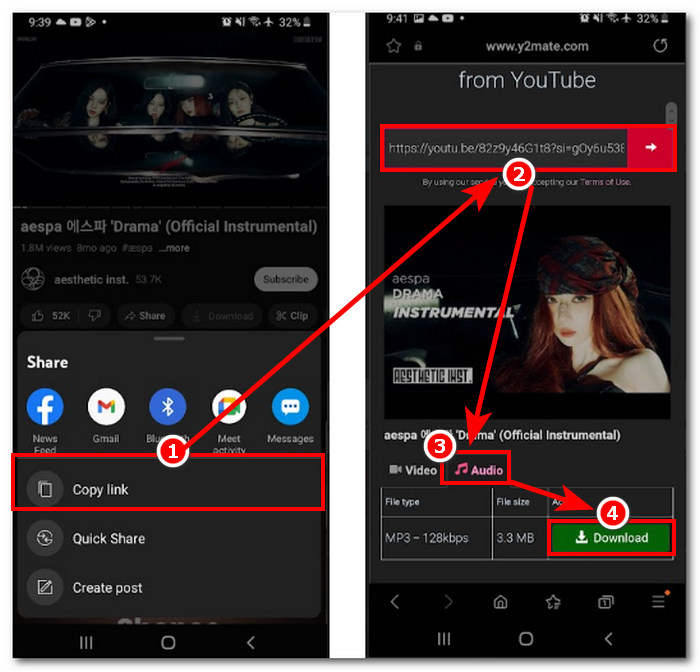
Step 1. Using the YouTube app, copy the link of the video you want to make a ringtone.
Step 2. Using your browser, paste the link to the converter tool of your choice. Before clicking on the Download button, remember to select the Audio section first so that it will convert your video into MP3.
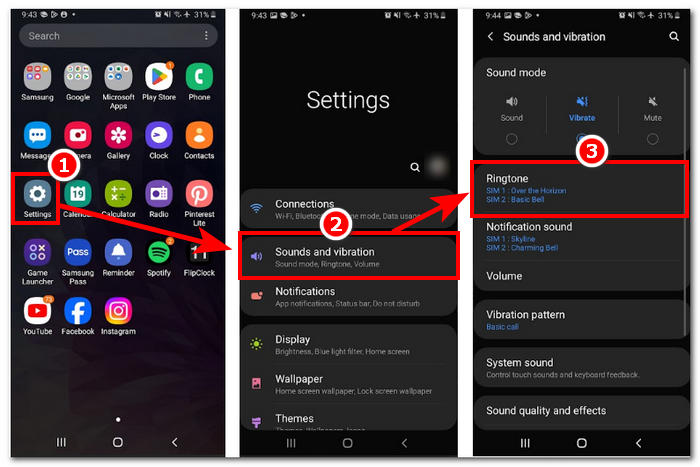
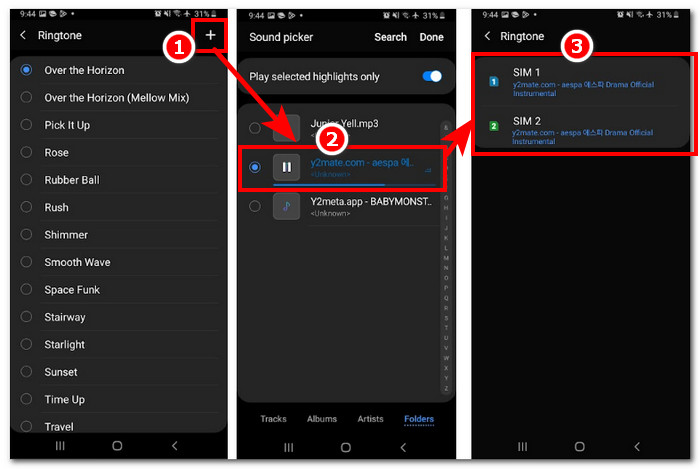
Step 3. Access your phone’s Ringtone setting to set your newly converted audio as a ringtone. Just follow these navigation steps: Settings > Sound and Vibration > Ringtone.
Step 4. Once you are in the Ringtone setting, proceed to add your new ringtone by clicking on the + button located at the top-most right part of your screen. And just like that, you have successfully set your new ringtone that came from a YouTube video.
Parte 4. Perguntas frequentes sobre o toque do YouTube para MP3
Qual ferramenta de IA converte YouTube para MP3?
Muitas ferramentas de IA de primeira linha podem converter vídeos do YouTube para MP3 de forma eficaz. Algumas escolhas populares são YTMP3.cc e ClipGrab.
O que é o aplicativo conversor do YouTube para MP3?
Um aplicativo YouTube para MP3 é uma ferramenta que pode ser baixada para o dispositivo móvel de um usuário. Esses aplicativos conversores são TubeMAte, VideMate e Snaptube.
Como você salva o áudio dos shorts do YouTube?
O YouTube proíbe o download ilegal de áudio, daí o conteúdo na plataforma. Para salvar ilegalmente o áudio de shorts do YouTube, os usuários contam com ferramentas de conversão online e gravação de tela do telefone.
Conclusão
Converting YouTube to an MP3 file for ringtone use can be quite a process, especially for a novice or non-tech-savvy person. Thus, thoroughly following the steps above can help users create their ringtone with ease. Giving options on how to convert a YouTube video and make a ringtone using the online software Y2Mate for Android and iPhone devices and a software-based tool, FVC-picked Video Converter Ultimate, for customization features.
-
 MOV VS MP4 - Qual você escolhe?
 MOV VS MP4, qual é o melhor? Este post mostra a diferença entre MP4 e MOV, para que você tenha a melhor escolha para usar em seus arquivos de vídeo.
-
 FLAC vs. MP3: qual formato de arquivo de áudio reina supremo
 Esta postagem irá comparar as principais diferenças entre FLAC e MP3. Isso inclui a qualidade do som, tamanho do arquivo, compatibilidade e muito mais.
-
 Como converter MP3 para M4A para qualidade de som aprimorada
 Melhore a qualidade de seus arquivos de música convertendo MP3 em M4A com nossas dicas e truques de especialistas. Nosso guia oferece instruções passo a passo e software recomendado.
