


 Video Converter Ultimate
 Gravador de ecrã
 Reparo de vídeo
 Secure Download
Zamzar Converter Review: Features, Safety, & Alternatives
If you're looking for a file converter that's easy to use and requires no downloads or installation, Zamzar is likely to be one of the first names you'll come across. But a brief introduction alone isn't enough to tell you whether it's the right choice.
How well does it support different file formats? Is its conversion speed fast enough? Can it do more than just convert files? Most importantly, is it safe to use, and is its pricing reasonable for everyday users?
If these questions are holding you back, this Zamzar Converter review has you covered. We'll walk you through Zamzar's key features, conversion performance, security, pricing, and overall value to help you decide whether it's worth your time. Plus, if you're looking for a more powerful alternative with similar functionality, we've also included our top recommendation for the best Zamzar alternative.

Part 1. Zamzar Converter - Key Features Overview
Now it's time to get to the core of this Zamzar online converter review: what Zamzar is and what it can do for you.
First, what is Zamzar Video Converter? It is an online file converter that runs directly in your browser, making it accessible from virtually any device. Whether you're using Windows, Mac, or Linux, you can use Zamzar without downloading or installing any software.
Here are its key features:
• Convert between 1,200+ file formats
This is Zamzar's core feature. It supports more than 1,200 file formats, including popular ones such as MP4, M4A, MP3, JPG, PNG, and PDF. You can convert your files to almost any format you need.
• Built-in file compressors
If your original or converted file is too large, there's no need to visit a third-party compression website. Zamzar also offers file, image, video, and audio compressors on its official website.
• Flexible file upload options
Zamzar can convert files stored not only on your local device but also from a file URL, Box, Dropbox, Google Drive, and OneDrive.
Zamzar also supports batch conversion.
• Email notification system
You don't have to wait in front of your computer while a conversion is in progress. Once the conversion is complete, Zamzar will send you an email notification.
• Speed Analysis
Conversion speed is another important factor to consider, so let's take a closer look at Zamzar's performance.
We tested Zamzar by converting two MP4 videos of different lengths into MOV format. For short videos lasting only a few seconds, the conversion was impressively fast and completed almost instantly.
However, longer videos took noticeably more time, requiring us to wait for the progress bar to finish. This is where Zamzar is slightly less impressive. Even so, its overall conversion performance is solid, with no major shortcomings.
Part 2. Is Zamzar Converter Safe to Use?
Some users who are familiar with multimedia tools may be aware that online tools like Zamzar typically process the entire workflow on online servers rather than on the user's local computer. As a result, users may worry whether the files they upload could be leaked during this process and whether the platform has sufficient security measures in place to protect their privacy.
The Zamzar MP4 to MP3 converter has implemented comprehensive security measures to address these concerns:
• File Encryption
Zamzar operates over the HTTPS protocol and uses 256-bit SSL certificates for encryption. As a result, all user-uploaded files are encrypted and stored only temporarily. Once the conversion is complete, the platform automatically deletes the files within 24 hours.
• Hardware Security
Zamzar's hardware infrastructure is hosted in highly secure data centers equipped with a combination of surveillance, access control, security personnel, and intrusion detection systems to prevent unauthorized access to the hardware.
• Secure Payments
Zamzar uses PayPal and Stripe as payment platforms for its paid services. Both meet the highest security standards to protect your payment data from theft and are equipped with anti-fraud tools.
To summarize the points above, all activities on the Zamzar platform - including uploading and downloading files, converting file formats, and purchasing paid subscriptions - are 100% secure.
Part 3. Zamzar Converter Pricing: Free VS. Paid Tiers.
When it comes to some excellent software, everyone knows it's trustworthy, but the high subscription fees can be a deterrent. Does the MP3 converter Zamzar give you this same headache? We'll have to take a look at the official subscription plans to find out.
Does Zamzar offer a free service? Yes, every non-paying user can convert files, but they're subject to a 50MB file size limit. Certain features are also unavailable to free users.
If you want to bypass these limitations, you might consider subscribing to one of Zamzar's paid plans.
There are three options in total:
• Basic: $12/Month
With this plan, you can convert files up to 200MB in size, with unlimited daily conversions and faster conversion speeds.
• Pro: $19/Month
With this plan, you can convert files up to 400MB in size, and conversion speeds are even faster than with the Basic plan.
• Business: $39/Month
The ultimate plan! You can convert files up to 2GB in size, and conversion speeds reach their maximum level.
Part 4. Best Alternatives to Zamzar Converter
Looking for a better converter of the same type than Zamzar? If you find some of Zamzar's current shortcomings - such as occasionally slow conversion speeds and the fact that conversions take place in the cloud - unacceptable, then you might want to consider choosing a new alternative from among similar products.
This guide will recommend one online converter and one desktop converter.
Online: Aiseesoft Free Video Converter Online
Similar to Zamzar, Aiseesoft Free Video Converter also handles the entire conversion process online, and its usage is just as simple. This tool also offers various customizable output settings, allowing you to adjust the resolution, aspect ratio, bitrate, and more.
It also functions as a enhancer, enabling you to change video resolution.
Here's how to convert a video using Aiseesoft Free Video Converter.
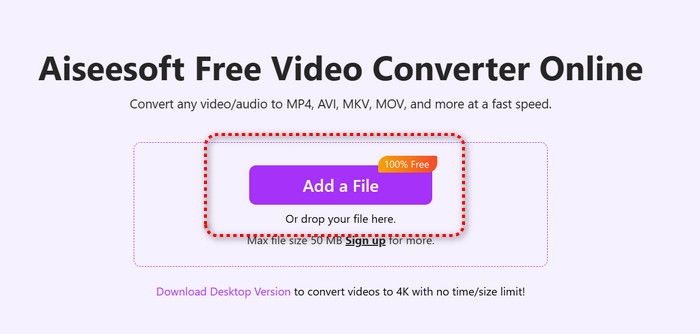
Step 1. Open the official Aiseesoft Free Video Converter website and click the Add a File button to upload the video you want to convert.
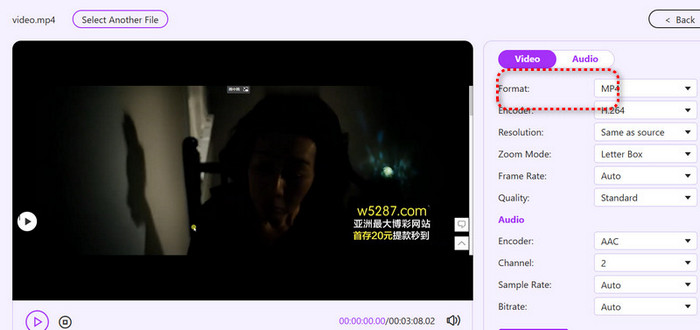
Step 2. Once the video has finished uploading, select the output format under the Format option on the right side of the new page. You can also use the options below to adjust the video resolution and other settings.
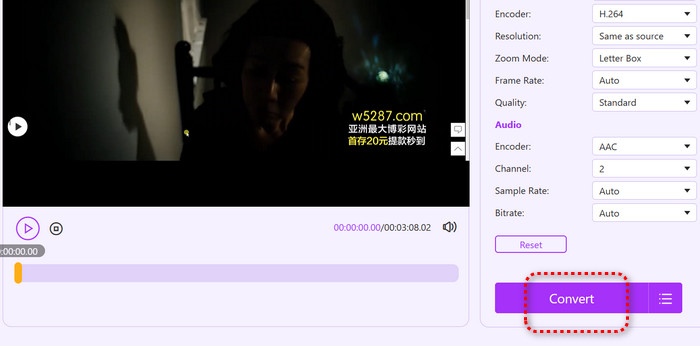
Step 3. Click Convert to start the conversion.
Desktop: FVC Video Converter Ultimate
Need a more stable and secure format conversion service? Why not try desktop software like FVC Video Converter Ultimate? Its performance is much more reliable - with conversion speeds 120X faster, batch conversion capabilities, compatibility with nearly all common video formats, and globally recognized ease of use - all reasons you can trust it.
We'd also like to remind you that FVC Video Converter Ultimate comes with a professional-grade Toolbox, where you'll find even more advanced audio, video, and image processing features - such as compression, enhancement, trimming, a 3D creator, and more.
Free DownloadFor Windows 7 or laterSecure Download
Free DownloadFor MacOS 10.7 or laterSecure Download
Here's how to convert videos using FVC Video Converter Ultimate.
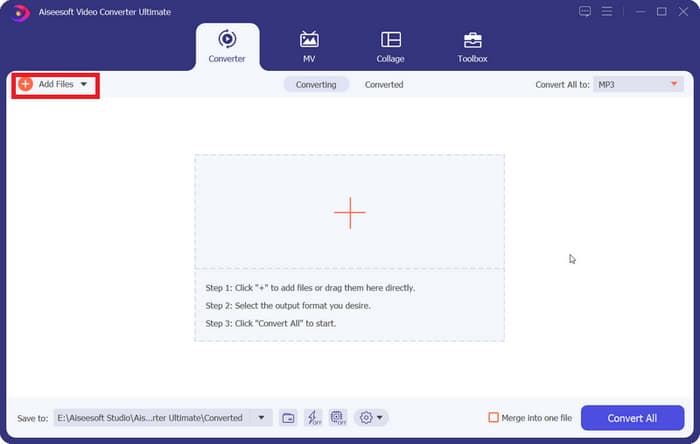
Step 1. Download and install FVC Video Converter Ultimate on your computer. Once you're in the interface, click Add Files to upload the videos you want to convert.
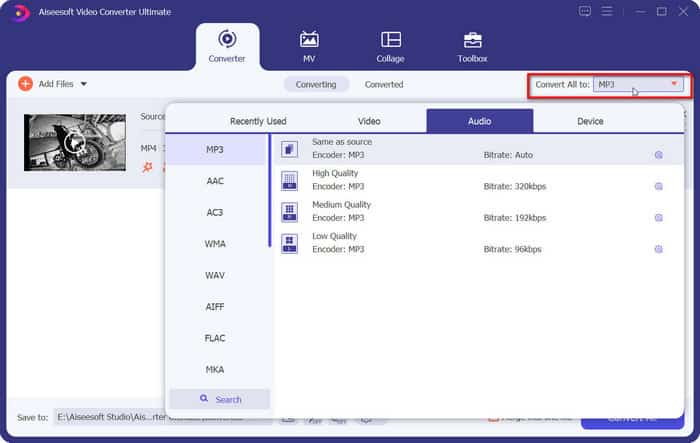
Step 2. Expand the menu next to Output Format, select Video, and then choose your desired output format from the available options.
Step 3. Finally, click Convert All.
Part 5. FAQs of Zamzar Converter Review
Is Zamzar free?
You can indeed use Zamzar for free, but the files you convert cannot exceed 50 MB. If you want to exceed this limit, you'll need to pay.
Does Zamzar store my files?
It does save your files while converting them. However, once the conversion is complete, Zamzar deletes them within 24 hours.
What is the alternative to Zamzar?
For online options, Aiseesoft Free Video Converter is undoubtedly the best alternative. For desktop software, FVC Video Converter Ultimate is the way to go - it won't let you down, as it's a comprehensive all-in-one tool that combines a video compressor, converter, and enhancer.
Conclusão
This guide provides a comprehensive Zamzar Converter review. We first explored what Zamzar has to offer, including its ability to batch convert video files, and then evaluated its safety from both physical and data security perspectives. Finally, we broke down Zamzar's three subscription plans to help you understand what each one offers.
If you're still deciding whether Zamzar is the right choice, this guide should answer all your questions. And if you're looking for a more powerful alternative, we also highly recommend Aiseesoft Free Video Converter and FVC Video Converter Ultimate.
-
 Melhores conversores de vídeo gratuitos para Windows 2025 Review
 Procurando um conversor de vídeo? Não procure mais! Listamos as 10 melhores ferramentas para converter vídeos gratuitamente em qualquer formato para a saída desejada.
-
 Análise dos 10 melhores softwares de conversão de vídeo HD (grátis e comercial)
 Leia e compare para obter o melhor software conversor de vídeo HD a partir de 10 recomendações. Aqui estão as análises detalhadas de cada conversor de vídeo HD para multiplataforma.
-
 Os 8 principais conversores de vídeo 4K para Windows/Mac/Online
 Procurando os melhores conversores de vídeo 4K para seus vídeos? Encontre aqui a ferramenta perfeita para converter e aprimorar seus vídeos com nossa lista completa.
