


 Video Converter Ultimate
 Gravador de ecrã
 Reparo de vídeo
Baixe as 5 melhores ferramentas disponíveis para tornar o vídeo 2x mais rápido em poucos cliques
There are times that you will need to speed up a video like increasing it to 2x video speed. Because there are some parts you want to skip or maybe you want the video to play faster to lessen the duration of it. So, if you want to learn how to make your video speed up then continue reading this article. To have a sufficient idea and knowledge about how to do it and why 2x should be used.

Parte 1. O que é um vídeo 2x?
Speed watch é o ato de assistir a um vídeo acelerado em sua velocidade natural de reprodução. Apenas ajustando a velocidade do vídeo que estamos assistindo; pode nos ajudar de diferentes maneiras. Então, se você quiser saber quais são os benefícios de trazer seu vídeo de velocidade natural para velocidade de vídeo 2x. Então leia os detalhes abaixo para saber mais.
Benefits of watching speed up videos.
◆Se você reproduzir um vídeo em velocidade 2x, poderá determinar facilmente se vale a pena assistir ao vídeo ou não. Isso pode se aplicar aos vídeos de longa duração e na maioria das vezes cansa assistir a todos na velocidade normal.
◆ Permite-nos poupar muito tempo do que a velocidade normal de reprodução. Nesse caso, se você tiver que assistir a 2 ou mais vídeos com duração de 15 minutos, é melhor assisti-los 2x mais rápido. Para absorver os detalhes mais rápido do que assistir na velocidade normal. Então, em vez de assistir 1 vídeo em 15 minutos, você pode assistir 2 nesse intervalo de tempo.
◆A maioria das pessoas que adoram assistir a vídeos reproduzidos em reprodução rápida são aquelas que adoram memorizar tudo em um minuto. Isso funciona melhor para pessoas ocupadas ou com pressa.
◆ Vai melhorar e treinar seu foco e habilidade de escuta melhor se você reproduzir o vídeo em velocidade 2x ao invés da velocidade normal. Agora é a hora certa de prosseguir para as ferramentas que ajudarão você a acelerar seu vídeo. A próxima parte falará sobre as diferentes ferramentas que você precisará usar.
Parte 2. Como fazer vídeos 2x
If you want to make video 2x faster then try to use the phenomenal video editor, the Video Converter Ultimate. This tool already helped a lot of its customers with their different problems, especially converting, making GIFs, enhancing and more. So, making your video playback faster can be easily done with the help of this tool. Also, while you enhance the speed of the video you can also have a preview of the 2x speed below. To determine if that video speed is right for you. So now, let's proceed on how to change the playback speed of your video by following the steps below.
Passos sobre como acelerar o vídeo até 2X a velocidade
Step 1. Download the tool to your desktop then install it after it finishes the downloading process.
Free DownloadFor Windows 7 or laterSecure Download
Free DownloadFor MacOS 10.7 or laterSecure Download
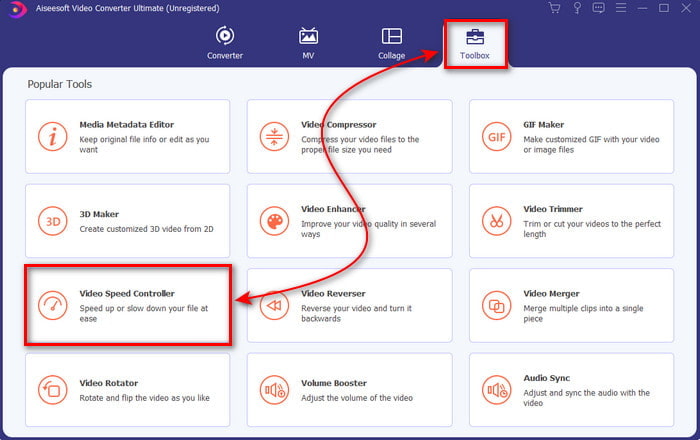
Step 2. Then go to the Toolbox and go find the Video Speed Controller.
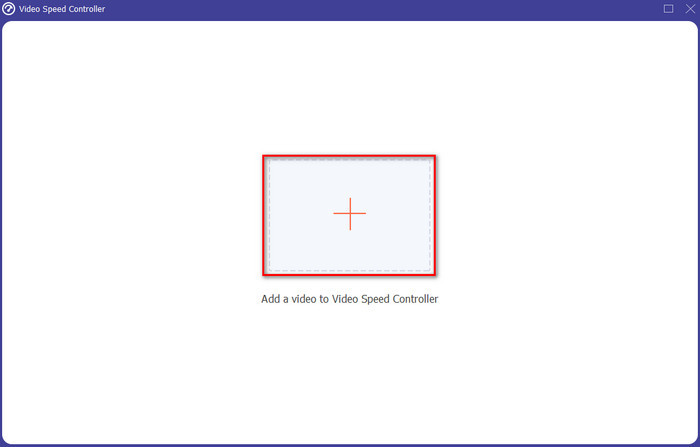
Step 3. Click the + button to insert the file you want to watch at 2x video speed and click Open to proceed.
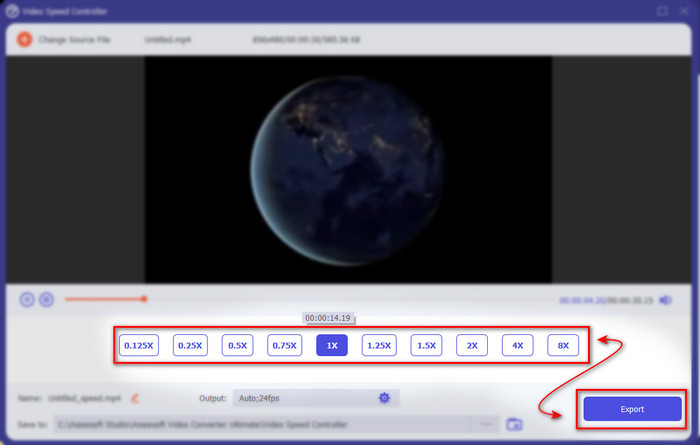
Step 4. After inserting the file, choose the 2x on the video speed list available. Then to save the video speed, click the Export button.
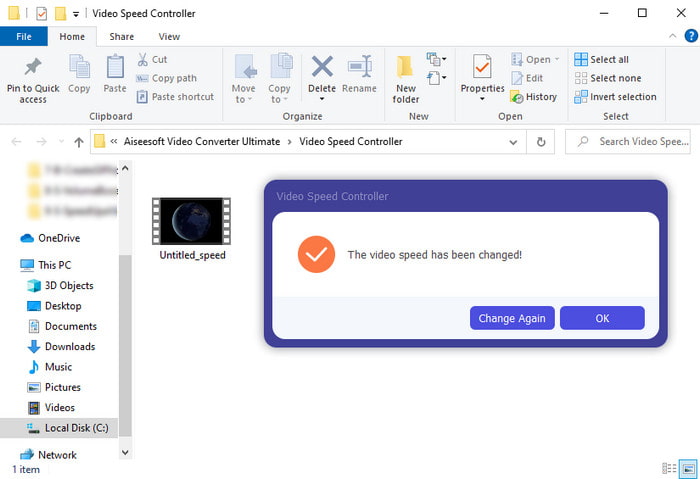
Step 5. After the file is exported, a folder will show to your screen; click the file to watch the speed up version of the video.
Parte 3. Como reproduzir vídeo em velocidade 2x
1. VLC Media Player
The most renowned media player you can download on PC or Mac, is the VLC Media Player. This desktop tool has been used by the users who love watching movie clips. Also, this tool has access in almost all of the formats we know on the web. However, some videos with complicated codecs can't be played here like the AVI or MKV. So, if you want to know how to make a video 2x speed with VLC Media Player then follow the steps provided below.
Step 1. Download the VLC to your desktop then open it.
Step 2. Drag and drop the file to the interface then click the video file you posted in here.
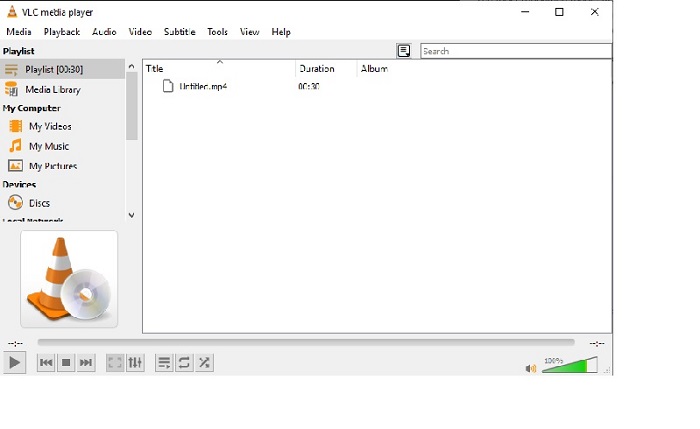
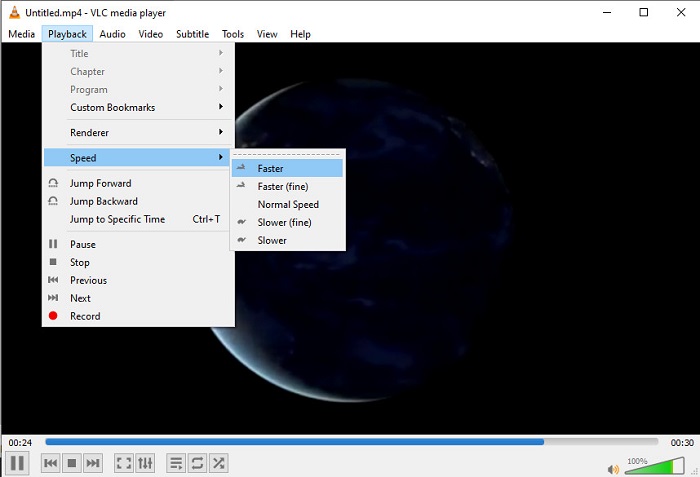
Then go to the Playback and click the Speed to change the natural speed of the video.
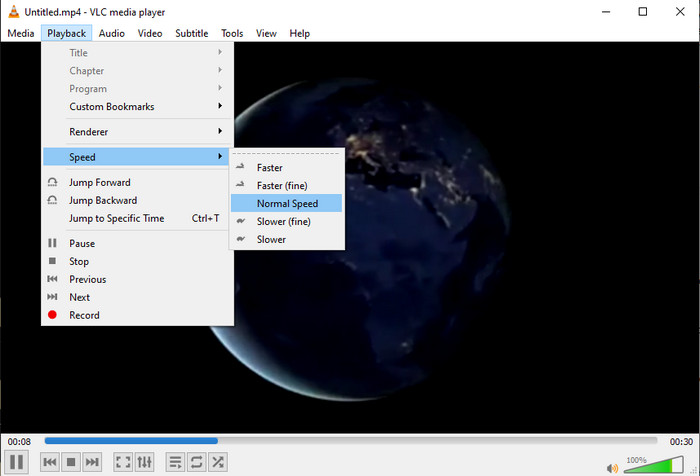
Step 3. And if you want to return the speed to normal go to the Playback and click Speed then locate the normal speed.
2. Jogador QuickTime
The native media player of Mac is here to help to play at 2x video playback speed. The QuickTime Player is the pre-installed media player you will see on Mac. Unlike VLC, this tool does not need to be downloaded onto your desktop. Unfortunately, if you are a Windows user you can't use this tool because it doesn't support Windows PC. Although the tool can be accessed on Mac, there are still a lot of features that it doesn't support like the formats. Because most of the formats Windows developed can't be played here. So now, if you have a Mac then try to follow the steps below.
Step 1. Look for the Quicktime on Finder then launch the tool. Click the File and Open File to locate the video and open it.
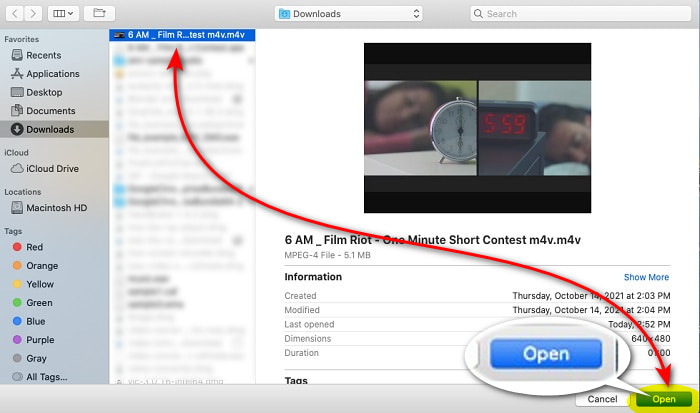
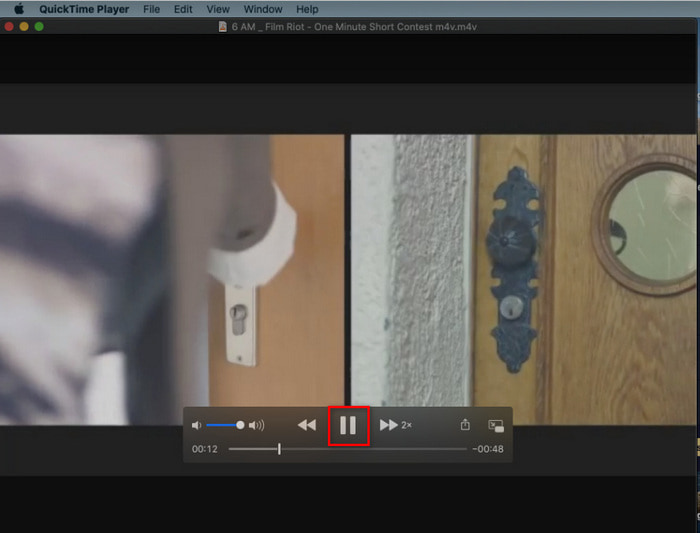
Step 2. While the video is playing, click the fast-forward button to speed it up.
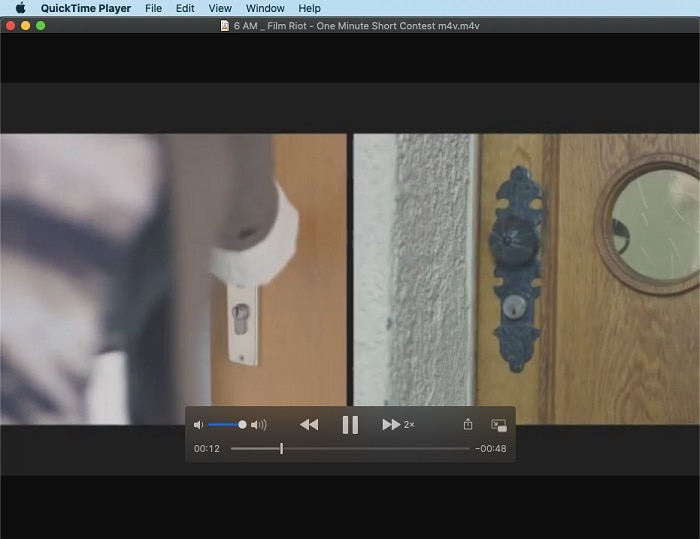
Step 3. And if you want to stop the speed up, click the pause/play button.
3. Windows Media Player
If Mac has its own pre-installed media player, then Windows has its own unique media player, the Windows Media Player. Just like QuickTime, this tool is already pre-installed on Windows and ready to be used to watch and make video 2x faster than its usual speed. However, we consider the speed up of this tool to be the worst because it removes the visual and jumps from seconds to second instead of playing fast. But if that is okay with you then follow the steps below on how to speed it up.
Step 1. Launch the tool to your Windows desktop
Step 2. Click the Playlist then drag and drop the video file to the small box on the right side.
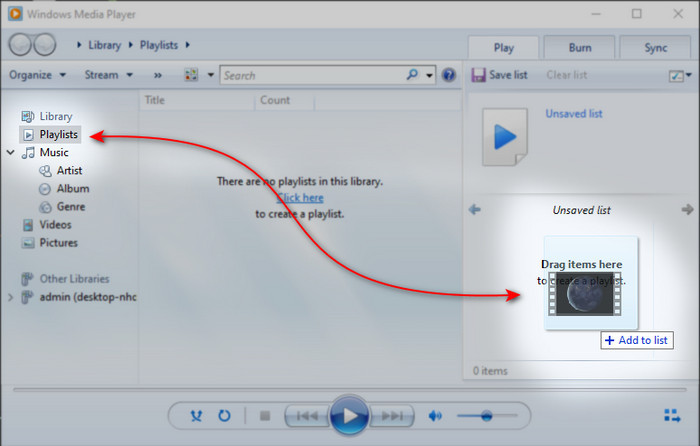
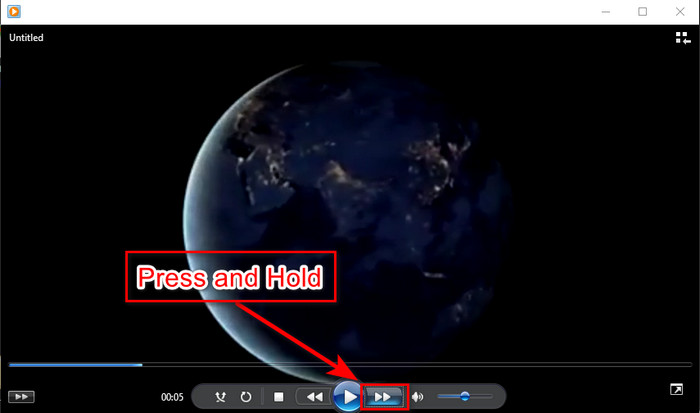
Step 3. The video will automatically be played, to speed up click and hold the fast-forward button and release it to stop.
Parte 4. Perguntas frequentes sobre o vídeo 2x
O que é melhor: câmera lenta ou acelerar?
Na verdade, depende da situação em que você supostamente vai usá-lo. Embora ambos os ajustes que você fará irão ajudá-lo. Então, se você estiver assistindo a um tutorial ou quiser revelar o truque do mágico, use câmera lenta. No entanto, se você estiver com pressa e precisar assistir a muitos videoclipes, é obrigatório assisti-lo para acelerar a reprodução.
Posso gravar em uma reprodução de movimento super-rápida?
Sim, você pode usar um lapso de tempo para transformar um vídeo de uma hora em um minuto ou segundo. Mas, ao contrário da aceleração, o lapso de tempo é muito mais rápido do que a aceleração normal de 2x, 4x, 8x.
Qual é a desvantagem de assistir vídeo na velocidade 2x?
Embora assistir a vídeos nesse tipo de velocidade possa ajudá-lo muito, há muitas desvantagens ao jogar que a velocidade pode acontecer com você. Por exemplo, se a reprodução de vídeo se tornar seu hábito, a velocidade normal do vídeo ficará mais lenta.
Conclusão
So now that you know the different tools you can use to watch videos at 2x speed.It is now the right time to choose which you prefer. So, we hope that this article helps you to choose which is better. It is either you will use a media player to do the adjustment of speed or use the editor like the Video Converter Ultimate. Although whatever solution you choose is, they all work the best to be used by you as a user.
-
 Os 4 melhores jogadores VOB para celulares Android para diferentes usos
 Quando você baixa vídeos VOB e deseja assisti-los no Android, você pode escolher o mais adequado entre os 4 principais jogadores VOB a seguir neste artigo.
-
 As 5 melhores alternativas do Windows Media Player para celulares Android
 Como não é possível baixar o Windows Media Player para Android, você deve ler este artigo e aprender sobre as 5 melhores alternativas para o Windows Media Player.
-
 Os 5 melhores reprodutores de vídeo para iPhone que você não deve perder em 2025
 Para reproduzir vídeos em todos os formatos e ter uma melhor experiência de visualização em seu iPhone, você deve ler este artigo e aprender sobre os 5 melhores reprodutores de vídeo para iPhone 12/11 / X / 8/7/6.
