


 Video Converter Ultimate
 Gravador de ecrã
 Reparo de vídeo
Breve discussão sobre como adicionar uma foto a uma postagem de vídeo do Tiktok como um profissional
Tiktok has already received more than one billion downloads worldwide, and it is still growing up to date. Users became delighted to use this app because it allows us to film videos for 3 minutes or less and watch other people in the entire world. As it pursues to become better, there are many features you can use to make your Tiktok video unique; one of them is to add an image on a video. However, adding images while filming on Tiktok could be a little bit tricky for some users. Luckily, we found a way to teach you how to add a picture to a Tiktok video with the three methods and learn from it.

Parte 1. Como colocar foto no vídeo do TikTok usando os dois recursos integrados do Tiktok
Antes de começarmos, gostaríamos de informar que as duas formas que adicionamos neste artigo já estão no Tiktok. Então agora, por favor, escolha a maneira que você mais se encaixa e aproveite para filmar seu vídeo com sua imagem.
1ª Via. Como usar a foto como plano de fundo no vídeo Tiktok
Suponha que você queira usar a imagem que tem como plano de fundo; bem, nós temos você coberto. Leia as etapas detalhadas que fornecemos abaixo e saiba como juntar vídeos e fotos no Tiktok.
Step 1. Download the Tiktok app from the Play Store or App Store, then open it next.
Step 2. After that, click the + button, and go to the Effects.
Step 3. Slide the menu to see the options, look for the Green Screen and click it. Hit the choose one in the options, then choose the image you want to use as a background.
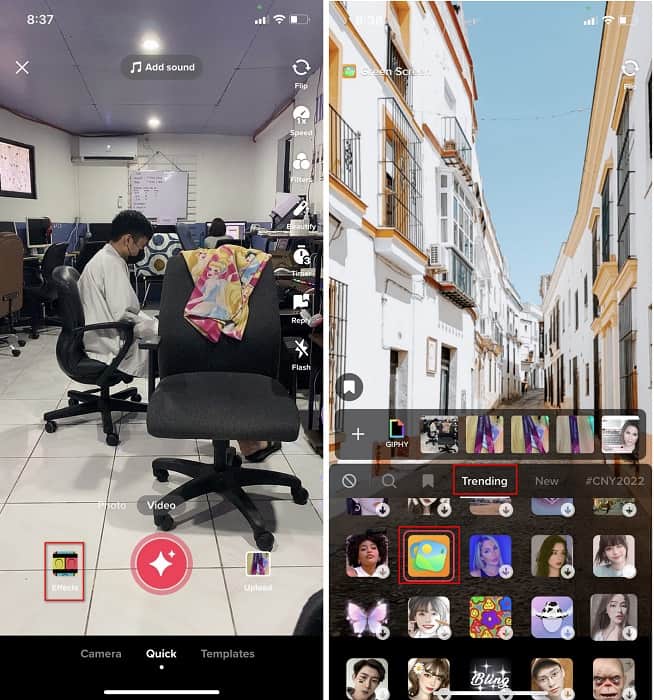
Step 4. Click the round REC button to record the video with the image background, re-click it to stop, click Next, then Drafts to save it on your accounts folder.
2ª Via. Como adicionar imagem no Tiktok durante a filmagem dos vídeos
Essa forma está na moda porque a maioria dos usuários usa essa imagem adicionada de seu artista favorito, amigos, família, gadgets, etc. Talvez você já tenha a ideia, e agora para ensiná-lo a adicionar fotos a um vídeo do TikTok, siga os passos abaixo.
Step 1. On your Play Store or App Store, download the Tiktok, and after that, open it to follow the following steps.
Step 2. Press the + button and click the Effects next.
Step 3. Click the Trending and look for this image icon and click it. Next, please select the image you want and place it where you desire on the screen.
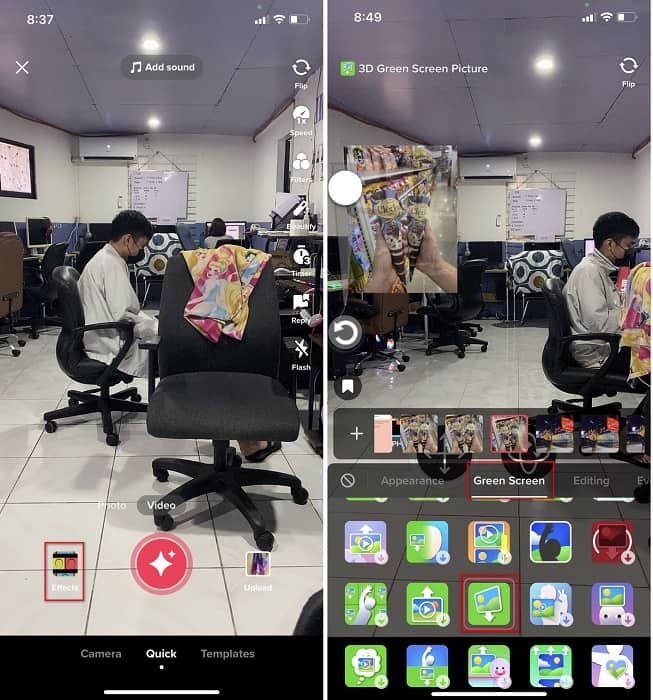
Step 4. Tap the red button to start the recording; if you've done recording, click the same button again to stop it. Press Next then Drafts to not post it yet on your TikTok account.
Parte 2. Como adicionar uma imagem a um vídeo do TikTok usando o Ultimate Way no Windows e Mac
Want to know the secret and learn how to put a picture in a TikTok video? Not satisfied with the built-in editor Tiktok provides? In that case, you must use the Video Converter Ultimate. If you enjoy doing editing, you can use this tool to add images, effects, filters, and more to your Tiktok videos before posting them on Tiktok.
Com esta ferramenta, você pode fazer um vídeo impressionante para impressionar os outros usuários com o resultado final. No entanto, você não pode baixar a ferramenta em seu telefone porque ela não é compatível. Mas você pode fazer mais se tiver um desktop e essa ferramenta. Deseja adicionar a imagem aos seus vídeos do Tiktok? Siga o tutorial abaixo para saber como adicionar uma imagem ao vídeo do Tiktok.
Step 1. You can now directly download the ultimate on your Windows and Mac by clicking the download button below. Next, install it promptly, then run the tool on your system by opening the tool. Before we proceed to the following steps, you'll need to get familiarized with the tool interface first. If you've already gotten familiarized, move to the next step.
Free DownloadFor Windows 7 or laterSecure Download
Free DownloadFor MacOS 10.7 or laterSecure Download
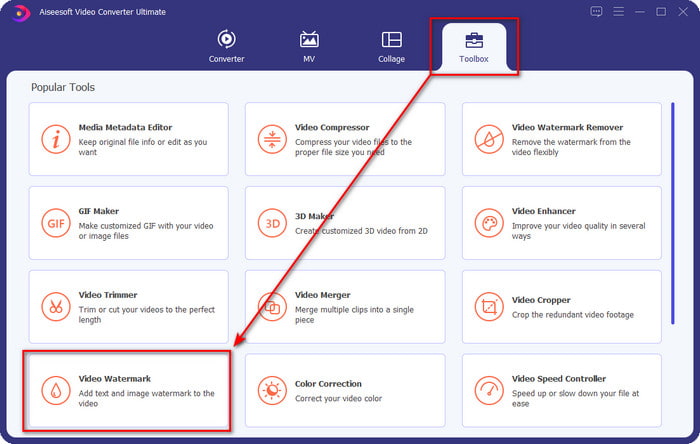
Step 2. Click the Toolbox part and find the Video Watermark.
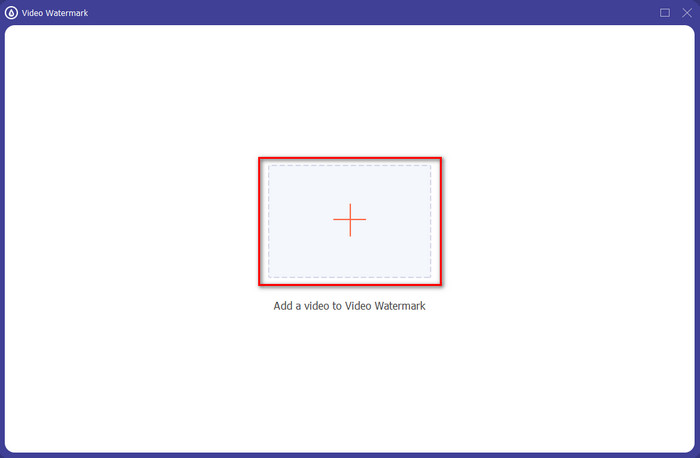
Step 3. Add the video file by clicking the + sign, locate the file on the folder that will show on your screen, click it, and press Open to upload the file.
Step 4. On the new window, click the Image Watermark. Another computer folder will show on your screen; find the image you've wanted to add and press Open.
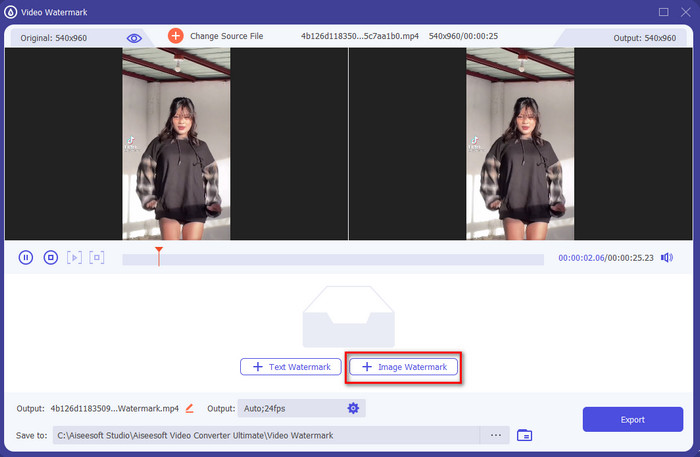
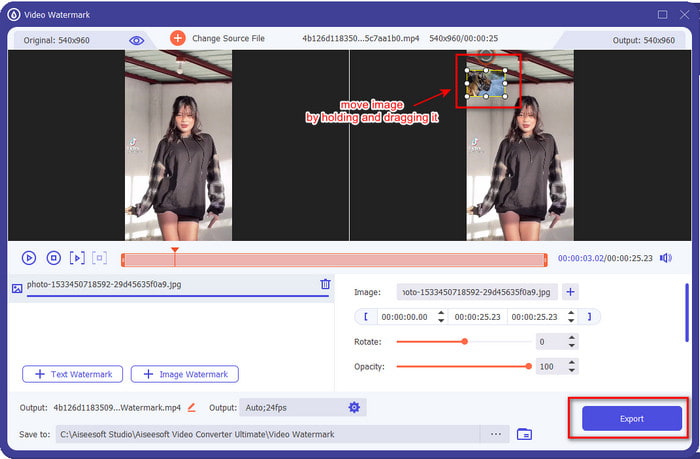
Step 5. Adjust the image size by dragging the frame ratio of the image. Hold and move the image and place it where you want it to be. After all, click the Export button to save the TikTok video with the picture included.
Parte 3. Perguntas frequentes sobre como adicionar fotos nos vídeos do TikTok
Como posso remover a marca d'água do Tiktok?
To learn how to remove the watermark of the Tiktok, you can click and read this article to know the method on how to do it. The details in this post will provide an effective way of removing the watermark of the TikTok on the exported video; no need to worry because it is easy to follow and understand.
É seguro usar o TikTok?
É seguro usar o TikTok. No entanto, alguns vídeos desafiam os outros usuários a fazer acrobacias que desafiam a morte que não são seguras para qualquer idade. Além disso, o aplicativo não possui criptografia de ponta a ponta, portanto, a comunicação entre o destinatário e o remetente não é criptografada ou, para dizer, simplesmente protegida. Além disso, alguns fragmentos de evidência dizem que o TikTok reuniu biometria dos usuários; para ser específico, ele rouba impressões de voz e rostos. Portanto, lembre-se de usar o aplicativo com sabedoria e nunca adicione muitas informações importantes sobre você.
Por que o Tiktok se tornou tóxico?
A cultura que os usuários do Tiktok criaram nesta geração tornou-se tóxica, e alguns usuários veem o aplicativo de compartilhamento de vídeo como prejudicial, especialmente para crianças pequenas. Tornou-se inevitável ver conteúdos impróprios como preconceito sobre a nacionalidade de uma pessoa, sexismo, padrão de beleza para todos e bullying. Embora isso seja inevitável, ainda há conteúdo que prova que nem todos os usuários do TikTok são tóxicos. E ainda acreditamos que há uma chance de mudar essa toxicidade e transformá-la em uma comunidade pacífica e amorosa.
Conclusão
Now that we know how to add a picture to a Tiktok video, it is time to share your Tiktok videos with images to bring good vibes or unique videos to everyone. However, filming with the picture will limit your movements because the image becomes a blockage on the screen. But wait, don't be sad, because you can film first, transfer it to your computer, and use the Video Converter Ultimate to add the image later. With it, you can do more on your Tiktok videos and make them look outstanding than the other videos. So, what are you waiting for? Download it now on your desktop to start making the ultimate and most impressive Tiktok video ever!
-
 Melhor maneira de adicionar marca d'água a um vídeo no Photoshop no Windows e Mac
 Quer saber como adicionar uma marca d'água a um vídeo no Photoshop? Nesse caso, este artigo fornecerá uma ou duas coisas que você precisa saber.
-
 3 melhores soluções sobre como remover marcas d'água de vídeos facilmente
 Quer remover a marca d'água irritante do vídeo? Com este blog, você pode aprender as diferentes ideias sobre como remover a marca d'água em um vídeo.
-
 4 melhores maneiras de como adicionar marca d'água em qualquer vídeo rapidamente
 Vamos aprender como adicionar marca d'água a qualquer vídeo no Windows, Mac, Online, iOS e Android com etapas detalhadas se você ler este artigo.
