


 Video Converter Ultimate
 Gravador de ecrã
 Reparo de vídeo
 Secure Download
Aprenda a adicionar tags a um arquivo usando as melhores maneiras em um minuto
If you post a media file online, it is ideal to use a tag to protect users who want to take ownership of your post. However, some users know how to remove metadata on the media file. Even though it is removable, adding tags to the file is still good for safety precautions. So, before you post anything on the web, you are lucky because you are in this article. But before we move, we must learn the basics of how to add tags to a file in less than a minute.

Parte 1. Editor de tags fenomenal para adicionar tags a um arquivo sem esforço [Software Ultimate]
Gostaríamos que você conhecesse o FVC Video Converter Ultimate; porque? A primeira razão é que é uma ferramenta capaz de adicionar tags a qualquer arquivo de mídia, seja uma imagem ou um vídeo. Em segundo lugar, em vez de aprender a usar outras ferramentas, essa curva de aprendizado da ferramenta é muito mais suave do que você pensa enquanto tem um toque de especialista. Terceiro, o software está disponível em todas as plataformas, como Windows e Mac, para que ambos os usuários do referido sistema possam experimentar o melhor desempenho de um editor de metadados.
Você quer mais? Milhões de usuários já aprovam que esta é sua primeira escolha para editar as tags ao fazer outras tarefas relacionadas a áudio e vídeo, e estão satisfeitos com os resultados. De fato, o software é perfeito como é, desde a GUI até seus recursos e funções.
Features of FVC Video Converter Ultimate:
Ele suporta um formato de amplo alcance no qual você pode fazer upload e alterar os metadados, como MP4, AVI, WMV, TS, RMVB e mais de 1000.
Possui um processo ultrarrápido e aceleração de hardware para ajudá-lo a concluir uma tarefa rapidamente.
Uma das GUI mais bonitas que um editor de metadados e um editor confiável em um desktop.
Ele possui uma caixa de ferramentas multiuso para fazer a edição mais avançada e básica que você precisará em seu vídeo e áudio.
Está disponível em Windows e Mac; eles têm as mesmas características e funções.
Amazingly, we add a tutorial you can learn how to add tags to a file within a blink of an eye.
Step 1. You can instantly download the software on your Windows and Mac by clicking the download button. Click the downloaded file, set it up according to your wants, and install it.
Free DownloadFor Windows 7 or laterSecure Download
Free DownloadFor MacOS 10.7 or laterSecure Download
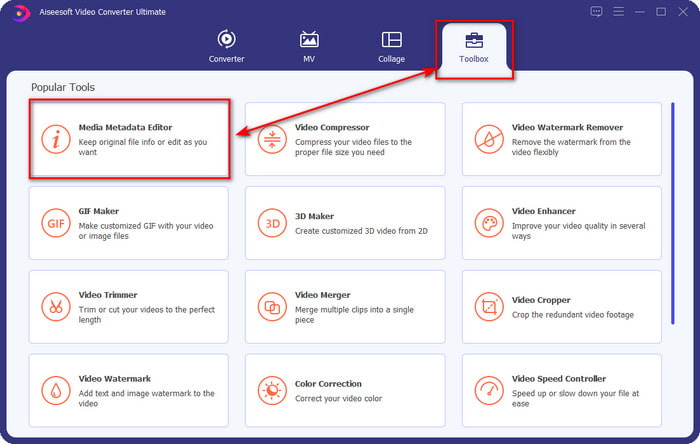
Step 2. Launch the software by clicking the Start Now. Once you've opened the ultimate software, you must open the Toolbox by clicking it and finding it under the Media Metadata Editor.
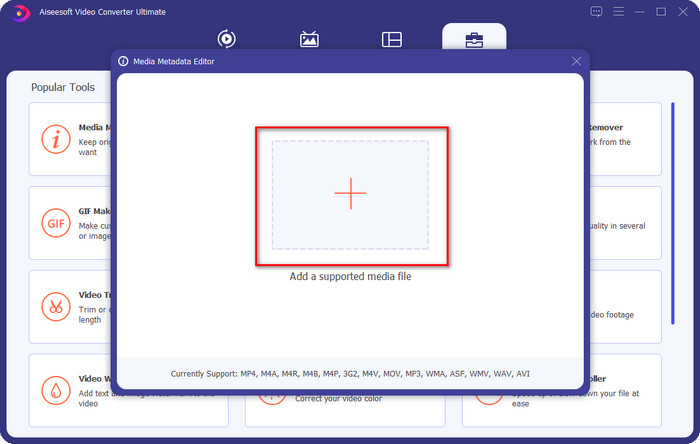
Step 3. Hit the + icon, find the media file on the file manager, and click Open next.
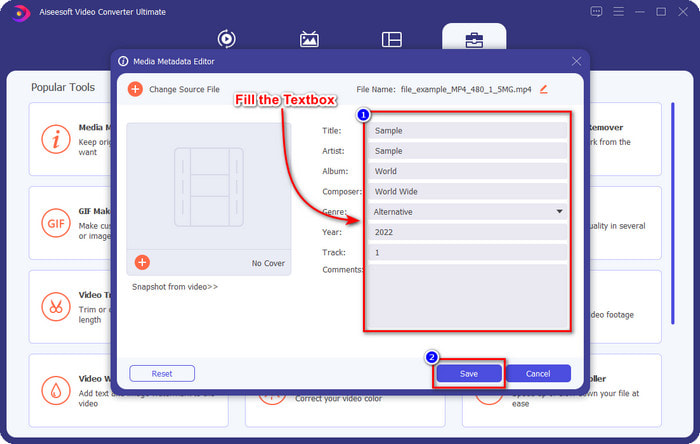
Step 4. Input all of the information you will need as your metadata on the text box. If filling it all up is done, you can now click the Save button.
Related:
How to Edit Properties of WAV Files
How to Change File Details in Windows
Parte 2. Como adicionar tags a um arquivo sem software de terceiros [Editor de tags integrado no Windows]
Esses métodos sucessivos para adicionar uma marca a arquivos estão disponíveis apenas no Windows. A etapa pode variar na versão atualizada do Windows em breve; se você é um Windows 10 ou 11, deve conhecer esse método. Sem mais delongas, vamos nos aprofundar nos recursos internos que você pode usar para alterar ou editar as tags no PC com Windows.
Propriedades no Windows
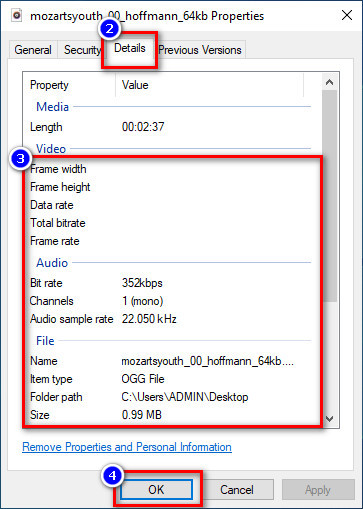
This method is not new to us because this is more known to handle changing the tags of the media files on every Windows. Properties on Windows is a simple tool that does a simple job easily. Moreover, learning how to add tags to a file is simpler with the help of this tool. To know more, keep on reading the details below.
Step 1. Find the media file on your Windows drive.
Step 2. Press the right-click and go to the Properties.
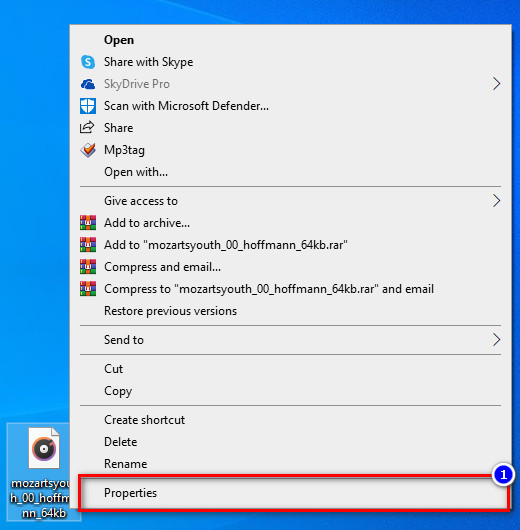
Step 3. Under Properties, you will see the Details, add the information or tags you need, and press OK.
Painel de detalhes
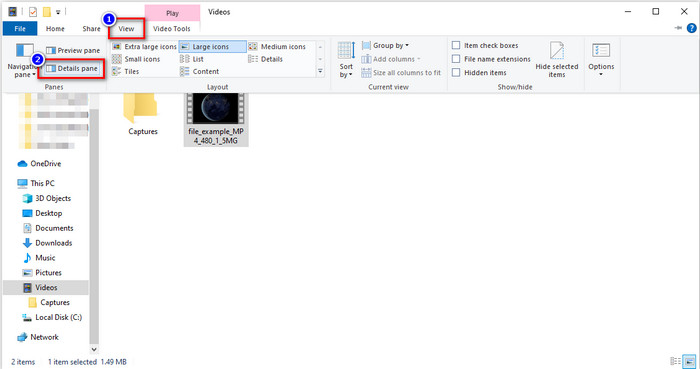
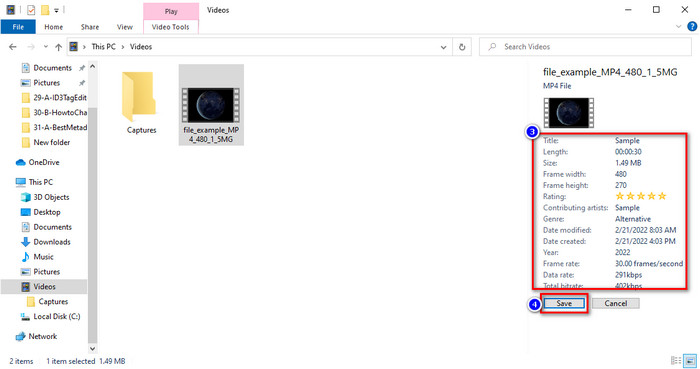
Not all Windows users know that we can use the Details Pane to adjust the media file's metadata. However, you can't add more information than the first method. But if you want to try using this method, you must now follow how to add tags to a file without opening it with detailed steps.
Step 1. Open the File Explorer and locate the file.
Step 2. Click the file, and go to the View. If you've to click the view on its panel, click the Details Pane.
Step 3. You can now adjust the tags and click Save if you've finished it.
Parte 3. Perguntas frequentes sobre como adicionar tags a um arquivo
O que é melhor: editor de tags integrado ou de terceiros?
Ambas as técnicas para adicionar ou remover metadados funcionam bem. No entanto, se precisarmos de software profissional, sugerimos a instalação de uma ferramenta que ofereça mais opções do que o integrado não pode fornecer. Como o FVC Video Converter Ultimate, é a ferramenta de terceiros perfeita para editar a tag de um arquivo de mídia diferente. Leia as informações acima para saber mais.
Qual é a vantagem de usar um editor de metadados integrado?
Em vez de baixar, instalar e configurar tudo, você pode ir imediatamente para as etapas de alteração dos metadados, ao contrário das ferramentas de terceiros. Além disso, uma das melhores vantagens de usar um built-in é que ele é, sem dúvida, seguro de usar porque já está em sua unidade. Mas lembre-se, o editor de tags integrado não oferece uma ampla opção de marcar o arquivo de mídia; Portanto, baixar um terceiro apropriado é obrigatório, mas certifique-se de que o software que você baixará é seguro e tem mais opções em relação aos metadados. No entanto, o editor de metadados integrado é confiável e fácil de usar.
Posso editar metadados online?
Sim, você pode editar os metadados online. Editar metadados online é muito melhor do que usar aplicativos integrados, mas nem todas as ferramentas da Web são seguras de usar. Portanto, se você estiver usando uma ferramenta online, certifique-se de que a web esteja segura para evitar ser hackeado ou vírus. E se você não tem certeza sobre o site, você pode ler alguns artigos confiáveis sobre a revisão da ferramenta da web e saber se eles são seguros para acessar.
Conclusão
Whether you choose to add metadata by built-in or third-party, the success rate of making it is 100% sure. Although the tool we mentioned works best on its own, it is still better if you rely on the best software, such as the ultimate tool on the job. Why? Because it is more capable of doing more than the built-in tag editor on your Windows. If you didn't believe our review about the FVC Video Converter Ultimate, you would need to install it and try it out if it works the same as we say.
-
 Revisão completa dos metadados do FFmpeg sobre uso e funcionalidade
 Quer saber como usar o editor de metadados FFmpeg? Certamente, o software não é fácil de usar, mas com este artigo, você pode realizá-lo com facilidade.
-
 Como visualizar facilmente metadados de fotos e vídeos no iOS
 Quer saber como ver metadados no iPhone e iPad? Então, ler este artigo pode ajudá-lo a resolver esse problema sem esforço.
-
 Melhores técnicas sobre como editar tags iD3 no iTunes [Dicas eficazes]
 Precisa saber como editar tags no iTunes? Então você está no lugar certo. Conforme discutimos os métodos, você pode seguir para editar as tags usando o iTunes.
