


 Video Converter Ultimate
 Gravador de ecrã
 Reparo de vídeo
 Secure Download
CapCut Video Enhancer Review: Is It Your Reliable Partner?
We can only ensure steady hands, high clarity, and clean visuals the next time we shoot a video. But what about footage that has already been recorded - or old videos that turned out shaky and blurry? Is there still a way to fix them?
The answer is yes.
AI technology has now expanded into this field, leading to the development of many AI-powered video enhancers available on the market. As a developer at the forefront of the video editing industry, CapCut has launched its own solution, CapCut Video Enhancer, which appears capable of resolving many common video quality issues with ease.
But how effective is its enhancement performance? Is it easy to use? Is it beginner-friendly? Are there any usage limitations?
Based on hands-on testing and real-world evaluation, this guide provides all the answers. It also outlines the potential limitations currently associated with the tool.

Part 1. CapCut Video Enhancer - Overview
Let's get straight to the point: Everything you need to know about CapCut AI Video Enhancer is right here.
What Is CapCut Video Enhancer
CapCut Video Enhancer isn't a standalone platform or app, but rather a feature integrated within the CapCut system. Its primary function is to leverage AI technology to enhance video resolution, repair blurry footage, restore lost details, and boost color vibrancy - effectively elevating video quality tiers, such as from 1080p to 4K.
Key Features
- • One-click upgrade to 4K-level clarity.
- • Effectively removes blur and restores lost details through advanced algorithms.
- • Supports uploading raw videos from devices, cloud storage, Google Drive, and Dropbox.
- • Enhances video color vibrancy.
Plataforma Suportada
This is an important point to note when using the Video Quality Enhancer in CapCut. You have three ways to unlock this feature:
• Desktop: Windows & Mac
First, you can download the desktop version of CapCut to your computer and find it among the editing options provided on its homepage.
• Online
CapCut also offers a web-based video editing platform. If you prefer not to download software, try CapCut Video Enhancer Online. However, its performance may not be as stable as the desktop version.
• CapCut App: iOS & Android
This mobile app includes AI video enhancement features, fun AI effects, and other enhancement options. It's easy to use and offers more playability.
Prós
- Supports enhancing videos up to 4K, significantly improving your viewing experience.
- Highly compatible, supporting most video formats.
- Offers flexible methods for uploading original videos.
- Comes with numerous additional video editing functions.
- Supports one-click sharing of creations to other online platforms.
Contras
- Online version only supports upscaling videos to 2K resolution.
- Sometimes struggles to gauge intensity, resulting in output that appears overly smooth or plastic-like.
- May cause distortion or loss of detail in blurry areas.
- Occasional lag during the video upscaling process.
Plano de preços
It's worth noting that video quality enhancer CapCut is not a free tool. You'll need to pay a subscription fee to unlock its features.
According to official information, this video and image resolution enhancer offers two subscription plans:
• Monthly: $3.99/Month
• Yearly: $179.99/Year
However, there are some user-friendly highlights: First, regardless of which plan you subscribe to, you can enjoy a 7-day free trial. Second, your subscription account is universal across desktop, web, and mobile platforms.
Is Capcut Safe to Use
Based on our research, we can assure you that using CapCut is perfectly safe as long as you download it from the official website, App Store, or Google Play. The app itself contains no viruses or malware, and its consistently high download numbers reflect the trust it has earned from users worldwide.
If you're concerned about security vulnerabilities, we recommend keeping the app updated to ensure you have the latest security patches. For privacy concerns, you can adjust the permission settings for CapCut.
Overall, CapCut Video Enhancer launches and operates with remarkable ease, delivering visually noticeable improvements. However, it occasionally introduces excessive smoothing that can distort footage.
The app holds a 4.6 rating on the App Store and a 4.0 rating on Google Play. While most users commend its powerful features, some report occasional lag during final output processing.
Part 2. How to Use CapCut Video Enhancer
Next, let's dive into the step-by-step guide for using this video enhancer.
On Windows/Mac
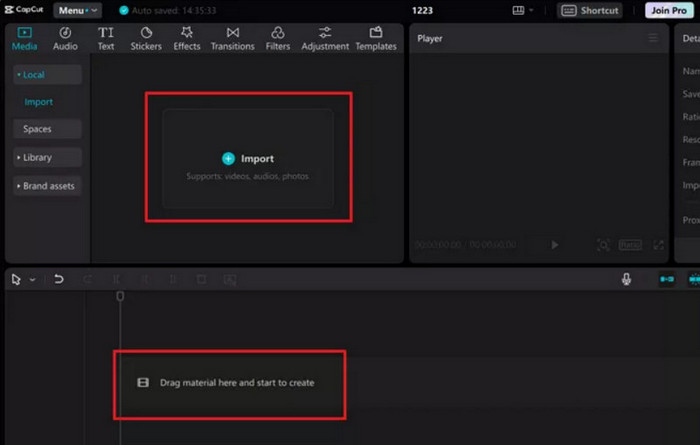
Step 1. Download CapCut to your computer. Click Media > Import to select your target video. Then drag and drop the video onto the timeline.
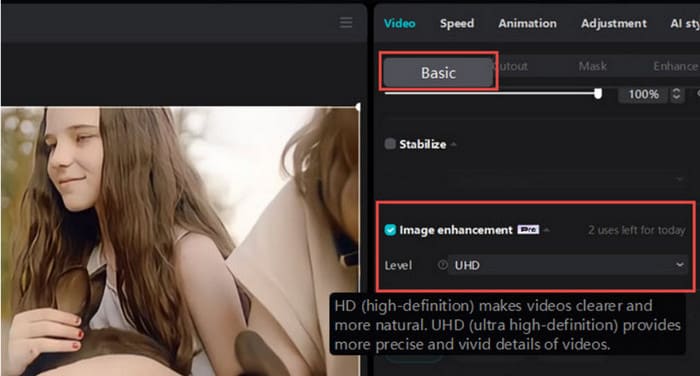
Step 2. Select the video on the timeline, then click Video > Basic > Image Enhancement in the top-right corner. Enable this option and choose your enhancement level.
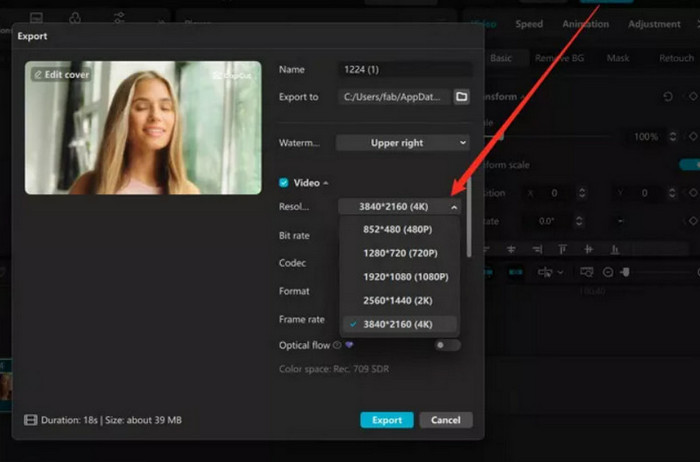
Step 3. Click the Export button in the top-right corner, select 4K as the output video resolution, then click Export again.
Conectados
Step 1. Access CapCut via your browser and click Create New to enter the workspace.
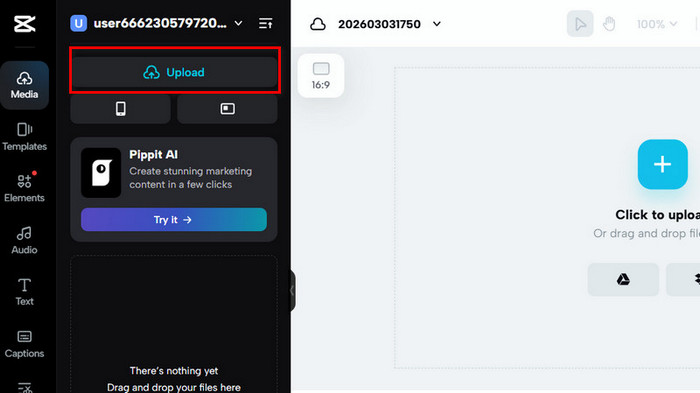
Step 2. Click the Upload button on the left side of the page to upload your video.
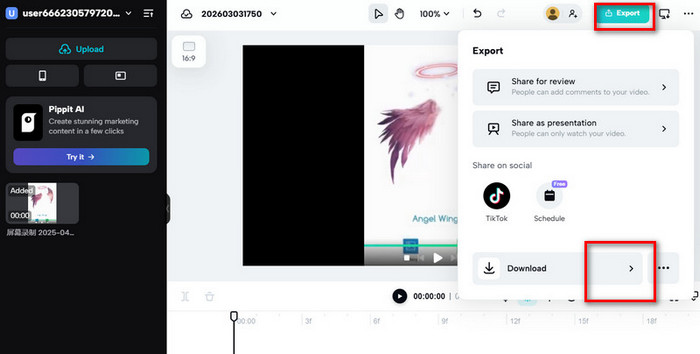
Step 3. After successful upload, select your video on the timeline. Click the Export button in the top-right corner, then expand the menu behind the Download botão.
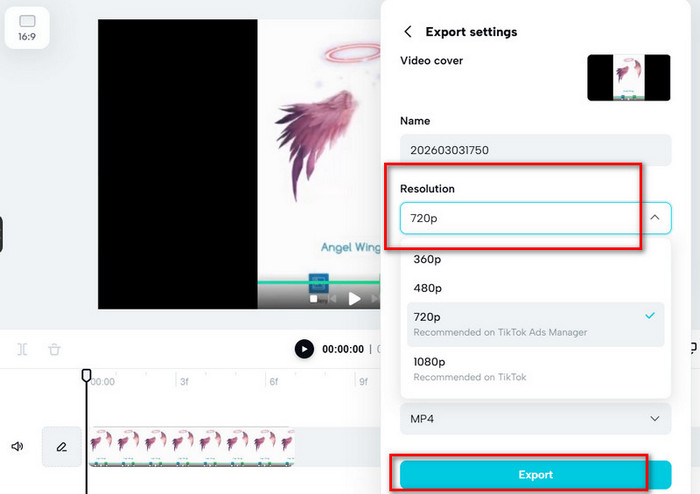
Step 4. Scroll down to find the Resolution option and select one that suits your needs. Click Export in the window to proceed.
Part 3. Best Alternative to CapCut Video Enhancer - FVC Video Converter Ultimate
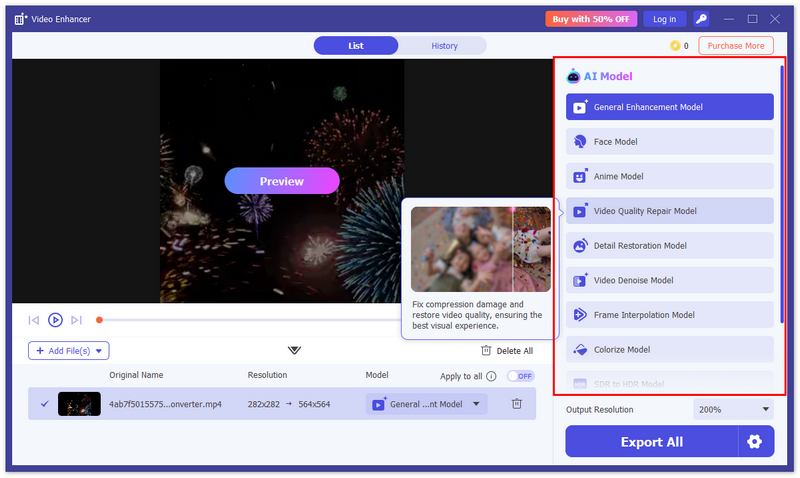
There are more products like CapCut Video Enhancer that intelligently enhance video quality in a more convenient and efficient way. FVC Video Converter Ultimate is an excellent choice.
It features over 10 AI enhancement models tailored for different visual styles, ensuring targeted optimization. Additionally, it offers comprehensive customizable video parameter settings. Whether you're working with anime, black-and-white footage, or facial features, there's always a model suited to your needs. After each enhancement, two preview models are provided for a more intuitive view of the results.
Free DownloadFor Windows 7 or laterSecure Download
Free DownloadFor MacOS 10.7 or laterSecure Download
Part 4. FAQs of CapCut Video Enhancer
Is CapCut's quality enhancer effective?
Yes. It significantly improves the clarity and color effects of blurry videos, using AI technology to restore lost details.
What's a better editor than CapCut?
You might consider trying FVC Video Converter Ultimate. This MP4 editor offers more specialized video enhancement options, providing over 10 AI models tailored for different visual styles.
What are the drawbacks of CapCut?
Some users report that CapCut's sharpening and smoothing effects can be overly aggressive during enhancement, resulting in a plastic-like appearance.
Conclusão
Based on our hands-on evaluation of CapCut Video Enhancer, you'll find that it achieves an excellent balance between usability and compatibility. It can be launched virtually anywhere - on desktop, via web browser, or on mobile devices - allowing you to transform blurry footage into sharp, detail-rich, and vibrant 4K videos with ease.
If you're looking for more customized video enhancement options, especially models tailored to different visual styles, we recommend FVC Video Converter Ultimate. It offers more than 10 specialized enhancement models while remaining equally user-friendly.
-
 Enhance Video with DaVinci Resolve: Turn Video Quality High
 Learn how to enhance video with DaVinci Resolve with an easy process. This article is here to guide. Check out all the details you need for the process.
-
 4 Methods to Make a Dark Video Brighter on iPhone [2026]
 Learn how to make a dark video brighter on your iPhone using its built-in tools. Moreover, don’t miss its best alternative to enhance dark iPhone videos further.
-
 How to Enhance Video Quality on Canva: Things You Must Know
 Wondering if Canva can enhance video quality? Read this article to learn more. Also be guided on how to enhance video as well as the best alternative for Canva.
