


 Video Converter Ultimate
 Gravador de ecrã
 Reparo de vídeo
As 2 melhores maneiras gratuitas de compactar arquivos MPV grandes no Windows e Mac
Como comprimir arquivos MPV? Você acabou de gravar um vídeo com seu gravador de tela no Windows 10. Como resultado, o gravador produziu um grande arquivo MPV que você não pode assistir ou editar. O que é pior? MPV não está na lista de formatos de vídeo populares. Veja como compactar grandes arquivos de vídeo MPV neste artigo.

Parte 1: Como compactar grandes vídeos MPV online
The quickest solution is to use FVC Free Video Compressor. With this best MPV compressor, you just need to follow 3 simple steps to accomplish the task of compressing large MPV videos online.
Key Features:
- 1. Reduza os arquivos de vídeo de qualquer tamanho, mantendo a alta qualidade.
- 2. Personalize as configurações para cada vez que compactar um arquivo
- 3. Interface fácil de usar para todos os níveis de usuários, incluindo iniciantes.
- 4. Suporte TS, MOV, 3GP, MP4, WMV, RMVB, AVI e mais formatos
Steps to Compress MPV Files Online
Step 1: Load the MPV compressor and enter the interface.
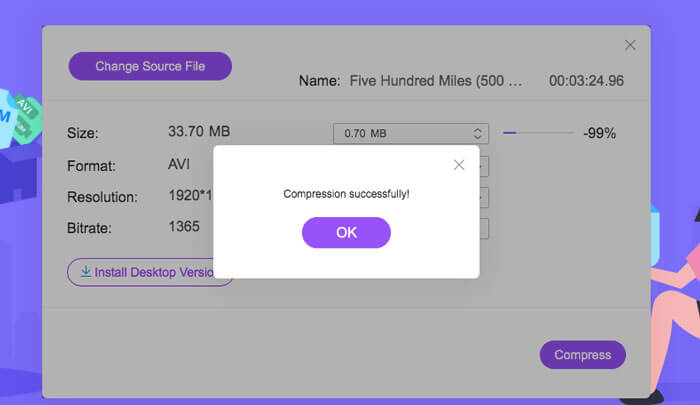
Load FVC Free Video Compressor and click the Add Files to Compress button. Select the MPV file to upload and compress.

Note: For the first time to use this MPV compressor, you need to download and launch a file named fvc-launcher.exe. After installing the launcher, just click the Add Files to Compress button again. The Open window will pop up.
Step 2: Customize the settings for the MPV compression.
Size: Drag to change the output size. The smaller the output video is, the more image quality will be lost.
Format: Choose your desired format.
Resolution: You can reduce the resolution or keep it as the original.
Bitrate: The final bitrate depends on the combination of the size and resolution.

Step 3: Start compressing the MPV file and wait for the output.
Click the Compress button and choose a path where you want to save the compressed MPV file. During the process of compressing the MPV file, avoid closing the browser or shutting down the computer.
Further Reading:
How to Compress WebM File Online with 2 Free Video Compressors
2 Easy Ways to Compress MXF with Smaller File Size
Parte 2: Como compactar grandes vídeos MPV nativamente no Windows e Mac
More than merely compress the MPV video to a smaller size, you may also want to edit the video. FVC Free Video Compressor does not support you to do it. So you need Aiseesoft Video Converter Ultimate. It is a comprehensive tool to convert, rip, edit and compress MPV Videos.
Key Features:
- 1. Compacte arquivos de vídeo MPV com o mínimo de perda de qualidade
- 2. Compatível com Windows 10/8/7 e Mac OS X 10.7 ou superior.
- 3. Inclua todos os formatos de codificação, como H.264, VP8, H.265 / HEVC, etc.
- 4. Suporta mais de 1000 formatos: AVI, WMV, MP3, MP4, FLAC, WMA e mais.
- 5. A aceleração de hardware e software fornece velocidade máxima.
- 6. Aplique efeitos poderosos e filtros impressionantes com apenas um clique.
Free DownloadFor Windows 7 or laterSecure Download
Free DownloadFor MacOS 10.7 or laterSecure Download
Step 1: Download, install and launch the ultimate MPV compressor on your Windows or Mac. Alter to the Toolbox tab.
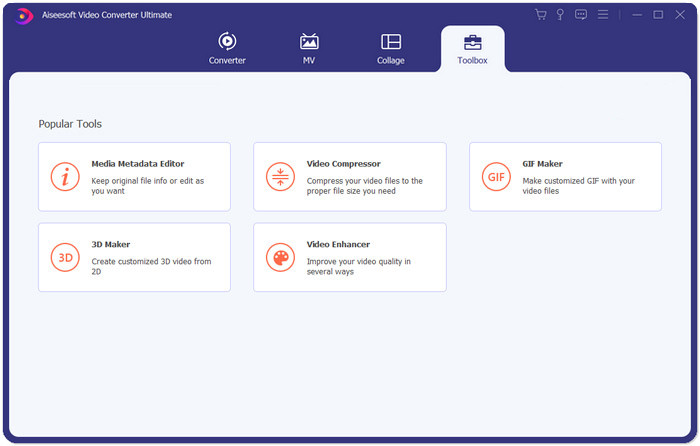
Step 2: To compress the MPV file, you need to use the Video Compressor.
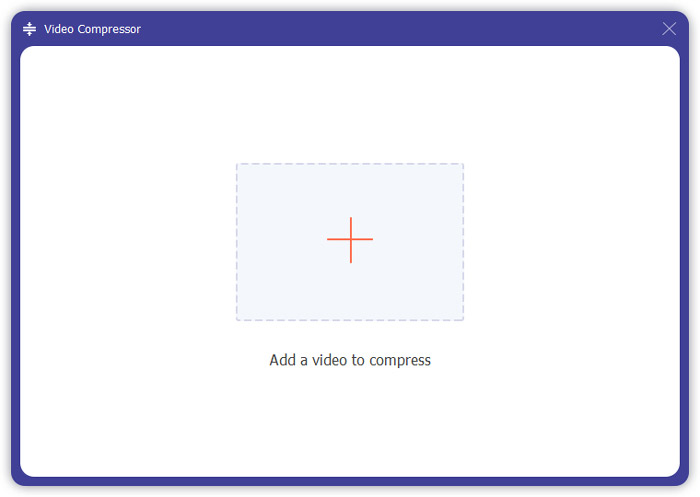
Step 3: Click the “+” button and select the MPV file you want to compress.
Step 4: Customize the settings before start compressing the MPV file. Size: You can drag the percentage bar to adjust the output size or directly type in a desired output size.
Format: MPV is not on the list. You can choose anyone from the 16 options.
Resolution: It is better to select the Auto. You can also reduce it to a lower resolution.
Bitrate: The bitrate will be calculated automatically according to the compressed size.
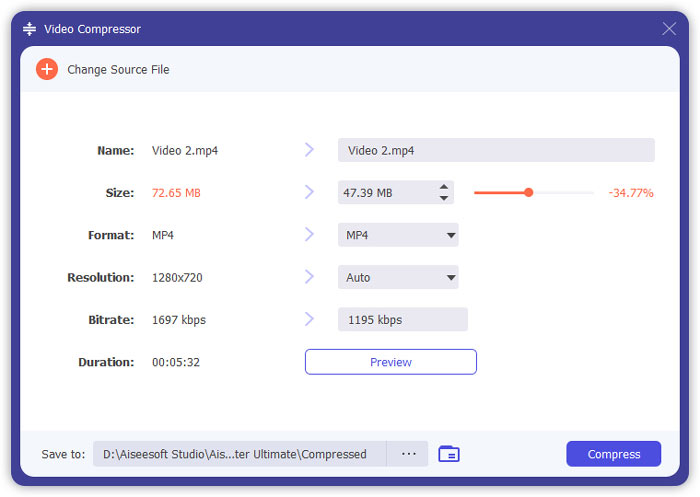
Step 5: Click the Compress button on the bottom right of the Video Compressor interface. Before it, you can change the name of the output file.
Parte 3: Perguntas frequentes sobre compactação de MPV
O que é um arquivo MPV?
MPV é um tipo de arquivo de vídeo de fluxo elementar MPEG. Ele contém dados de vídeo brutos e não compactados.
Preciso converter MPV para MP4?
Dependeria das circunstâncias. Por exemplo, se você vai levar o arquivo para um computador da sala de aula e reproduzi-lo em sala de aula, é melhor convertê-lo para MP4 com antecedência para melhor compatibilidade.
Posso abrir um arquivo MPV com o Windows Media Player?
sim. O Windows Media Player oferece suporte a arquivos MPV.
Posso abrir um arquivo MPV com QuickTime?
No. To open an MPV on your Mac, you can download and install the Blu-ray player.
Conclusão
Este artigo apresentou duas maneiras gratuitas de compactar arquivos MPV enormes no Windows e no Mac. A maneira mais simples é usar o FVC Free Video Compressor. Para uma experiência mais completa, você pode baixar Video Converter Ultimate. É uma ferramenta multifuncional para converter, cortar e compactar arquivos MPV.
-
 Como compactar vídeo para Facebook grátis e online
 Se você foi proibido de fazer upload de um grande vídeo no Facebook, não se preocupe. Basta comprimir o grande tamanho do vídeo de GBs para MBs com o compressor de vídeo gratuito.
-
 Comprimir MPEG-4 | Como fazer arquivos MPEG-4 menores sem perder qualidade
 Não tem armazenamento de arquivo suficiente para manter todos os seus arquivos MPEG-4? Aqui estão algumas soluções que podem ajudá-lo a diminuir o tamanho dos seus arquivos de vídeo.
-
 Compressão VOB: Como reduzir facilmente o tamanho dos arquivos VOB online gratuitamente
 Você está procurando métodos para compactar arquivos VOB? Aprenda a melhor maneira de diminuir o tamanho dos arquivos VOB neste artigo.
