


 Video Converter Ultimate
 Gravador de ecrã
 Reparo de vídeo
 Secure Download
2 maneiras fáceis de compactar MXF com tamanho de arquivo menor
MXF is an industry standard file format which supports full timecode and metadata. It is mainly designed for professional use of the video contents, especially in TV broadcasting. MXF is a video container format for SMPTE standard professional video and audio content. You may easily get a high quality MXF video from your digital camera. Meanwhile, MXF file usually takes a large file size.
When you want to share a big MXF video, it’s quite necessary to compress MXF with smaller file size. The question is, do you know how to compress MXF files?

In fact, there are many video compressing and editing tools offered on the market that can help you compress MXF and reduce the file size. This post will show you how to compress MXF with Adobe Premiere Pro and free online video compressor.
Parte 1. Como compactar arquivos MXF gratuitamente online
To compress MXF with smaller file size, you can choose the popular MXF video compressing software, Free Video Compressor. It has the capability to reduce the file size of MXF video while keeping the original image and sound quality. This video compressor highly supports any frequently-used video formats including MXF, MP4, MOV, AVI, MKV, FLV and more. It enables you to compress MXF on both Windows PC and Mac.
Step 1. When you want to compress a MXF file, you can go to the official site of this MXF file compressor. Click the Add Files to Compress button to install a small file size launcher for the MXF files compressing.

Step 2. Select and add the MXF file you want to compress to this free online video compressor. Here you can freely adjust the video compression based on your need. In addition, you are allowed to custom the video resolution, frame rate and bitrate and video name. You can also select another output format like MP4 for your compressed video.

Step 3. After that, you can simply click the Compress button to start compressing MXF file free online.

Diferente de muitos outros compressores de vídeo online, este Free Video Compressor não adicionará nenhuma marca d'água ao seu arquivo MXF compactado.
Parte 2. Como compactar MXF no Adobe Premiere Pro
Adobe Premiere Pro is a common professional video production suite for Mac and Windows users. If you have Premiere Pro installed on your computer, you can use it to compress MXF files.
Step 1. Launch Premiere Pro on your computer. When you enter the main interface, click New Project to create a new project. You can custom various settings in the window.
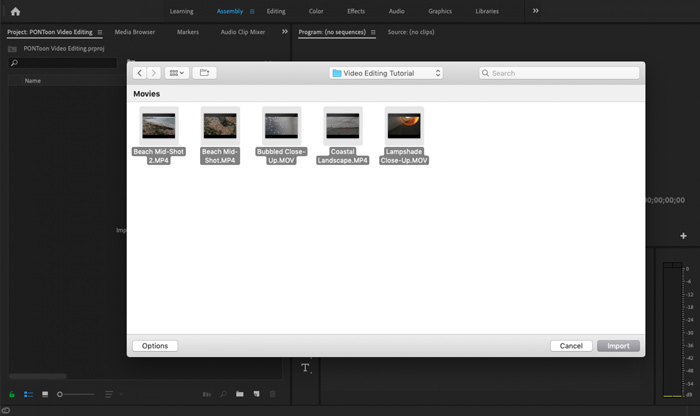
Step 2. Click File, Import and then Media to select and import your MXF file to it. If you want to compress a MXF file in your digital camera, here you can connect your camera to computer. Also, you are allowed to drag and drop MXF video directly from a folder.
Step 3. Switch over to the Editing workspace for better compressing your MXF file.
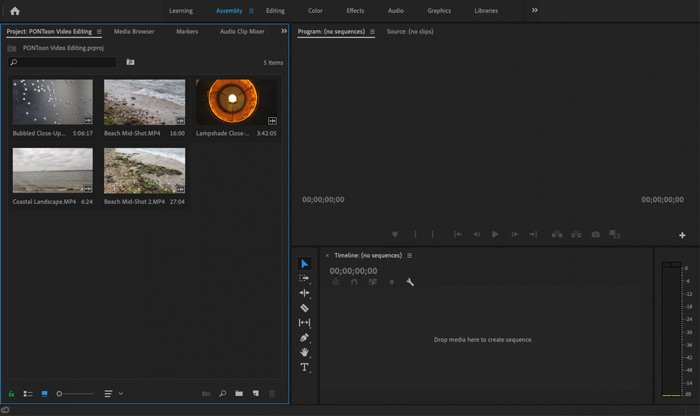
Step 4. Now you can edit your MXF file on the timeline. Just drag and drop a MXF clip from your imported media into the timeline to create a new sequence. Then you are able to trim MXF file to reduce the file size.

Você também pode escolher a resolução de vídeo personalizada e outros para compactar o arquivo MXF. Além disso, você pode enviar MXF para um formato de vídeo que carrega um tamanho de arquivo menor.
Parte 3. Perguntas frequentes sobre compactação de arquivos MXF
Pergunta 1. Qual é o formato de vídeo MXF?
MXF, sigla para Material eXchange Format, é um formato de contêiner que armazena vídeo, áudio e metadados. É um formato de container de vídeo para conteúdo de áudio e vídeo profissional padrão SMPTE. Muitas camcorders digitais profissionais como Sony, Panasonic, Canon e outras armazenam vídeos no formato MXF.
Pergunta 2. Como converter MXF para MP4 gratuitamente online?
MP4 is no doubt the most popular format which can be supported by almost all players, editors and devices. So in many cases, you need to convert MXF to MP4 for better playback or editing. You can choose the Free Online Video Converter to make the MXF to MP4 converting with ease.
Pergunta 3. O MXF é um formato de vídeo sem perdas?
O MXF pode armazenar filmagem RAW sem perdas, que oferece aos estúdios de pós-produção profissionais recursos avançados nos fluxos de trabalho para gradação de cor e edição de vídeo. O formato MXF pode suportar totalmente o código de tempo SMPTE.
Conclusão
We have mainly talked about how to compress MXF files in this post. You have to admit that, compressing MXF files with Adobe Premiere Pro is too complex. So you are suggested using the recommended Free Video Compressor to reduce your MXF file size.
-
 Como compactar um vídeo MP4 para um tamanho menor
 O vídeo MP4 é muito grande para ser enviado? Quer reduzir o tamanho do vídeo? Aqui estão 3 maneiras eficientes de compactar um arquivo MP4 em um tamanho menor sem limite.
-
 Tutorial para compactar GIF e reduzir o tamanho do arquivo com alta qualidade
 Aqui estão duas maneiras fáceis de compactar GIF em seu computador ou telefone celular. Você pode usar o FVC Free Online Video Compressor e o Photoshop para reduzir o tamanho do arquivo GIF em diferentes aspectos.
-
 4 maneiras de compactar arquivos MOV grandes QuickTime sem perder qualidade
 Este artigo mostra como compactar vídeos QuickTime MOV em seu telefone ou computador em detalhes. Se o seu vídeo MOV for muito grande para enviar, compartilhar ou salvar, você pode obter 4 soluções viáveis aqui.
