


 Video Converter Ultimate
 Gravador de ecrã
 Reparo de vídeo
 Secure Download
Aprenda a cortar vídeos no Snapchat para uma aparência mais polida
Want to make your content stand out from the crowd and impress your followers? Look no further than video cropping on Snapchat. By mastering this simple but powerful technique, you can create polished, professional-looking snaps that capture your audience's attention. Read on as we show you how to crop videos on Snapchat like a pro. The methods we will introduce will take your storytelling game to the next level. Take advantage of the chance to transform your Snapchat stories or videos to make your mark on this dynamic social media platform.

Parte 1. Como cortar um vídeo no Snapchat
O Snapchat é uma plataforma de mídia social que conquistou o mundo com seus recursos exclusivos e interface amigável. Um dos recursos mais importantes das ferramentas de edição de vídeo do Snapchat é a capacidade de cortar vídeos. Ao recortar seus vídeos, você pode se concentrar em um assunto específico, criar uma composição mais envolvente e fazer uma transição perfeita entre vários clipes. Por outro lado, aqui está um guia de instruções simplificado sobre como cortar um vídeo no Snapchat.
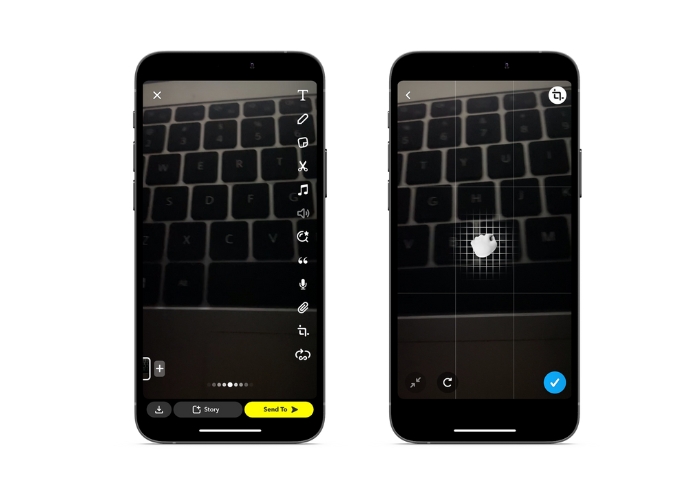
Step 1. Open Snapchat. Record a video by pressing and holding down the circular capture button.
Step 2. Once you've recorded your video, tap on the crop icon to access the cropping tool from the right menu.
Step 3. Pinch and drag the video using your fingers to crop it to your desired size and shape. When you're happy with your crop, tap the checkmark icon to save your changes.
Step 4. Add any additional filters, text overlays, or effects to your video, and then send it to your followers or add it to your story.
Parte 2. Como cortar um vídeo para o Snapchat
1. FVC Video Converter Ultimate
FVC Video Converter Ultimate makes it easy to convert and optimize your videos with just a few clicks. One of the intriguing features of FVC Video Converter Ultimate is its powerful toolbox, which includes a range of tools for editing and enhancing your videos. From adding subtitles and watermarks to adjusting brightness, contrast, and saturation, the toolbox has everything you need to create professional-looking videos that stand out from the crowd. But perhaps one of the most useful tools in the toolbox is the ability to crop videos. You can crop your videos to remove unwanted sections, adjust the aspect ratio, or create a more engaging composition. Follow the walkthrough below to learn how to crop Snapchat videos for posting.
Step 1. Acquire the program
To get started with cropping your videos using FVC Video Converter Ultimate, you'll need to download and install the program on your computer. Simply click the Free Download button that corresponds to your operating system and follow the installation instructions.
Free DownloadFor Windows 7 or laterSecure Download
Free DownloadFor MacOS 10.7 or laterSecure Download
Step 2. Import a video to crop
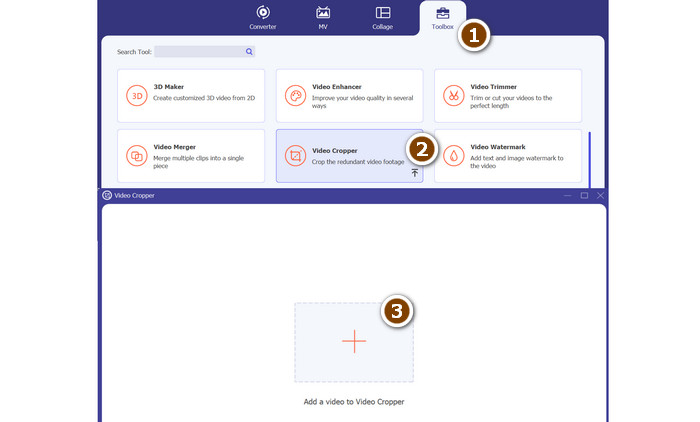
Once the program is installed, open it up and access the toolbox by clicking on the Toolbox tab. From there, select the Video Cropper option to open the cropping tool. To import a video to crop, click on the plus sign button in the upload area of the Video Cropper option.
Step 3. Crop the video
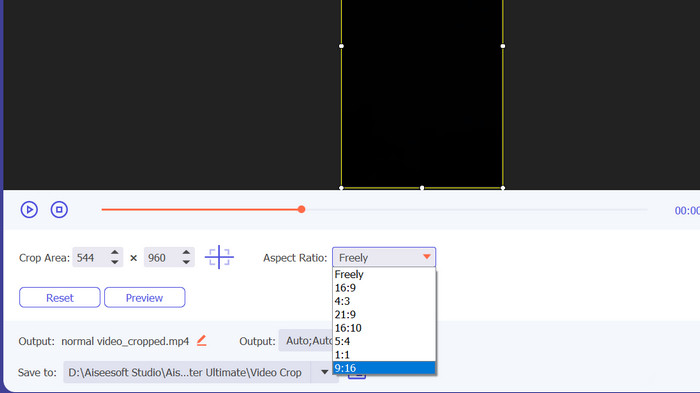
Em seguida, selecione a proporção que deseja usar para o seu vídeo. Para o Snapchat, a proporção ideal é 9:16 (vertical). Você pode selecionar a proporção desejada no menu suspenso localizado abaixo da visualização do vídeo. Para recortar seu vídeo, basta arrastar os cantos da caixa de recorte para ajustar o tamanho e a forma do seu vídeo.
Step 4. Export the cropped video
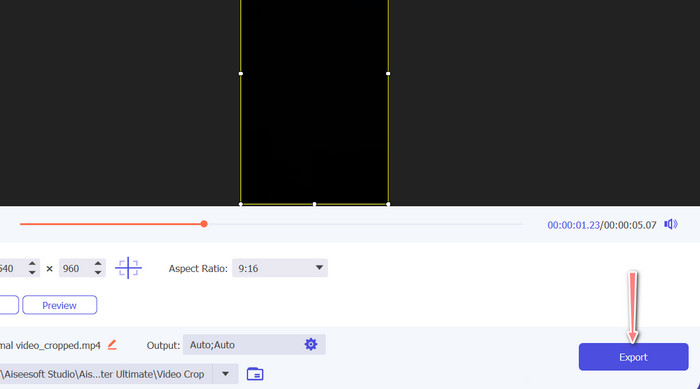
Once you're happy with your crop, click on the Export button at the bottom right corner of the interface to save your cropped video file. You can then share it with your followers or post it to your Snapchat account to impress your friends with your awesome video editing skills!
2. Vid.Fun
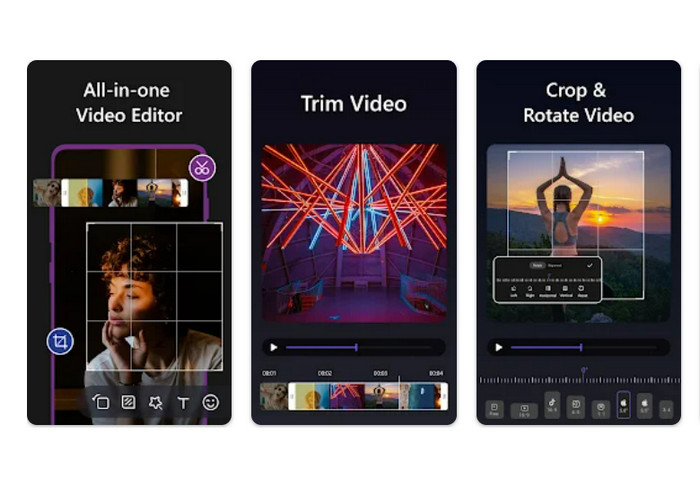
If you're using a smartphone or tablet, Vid.fun can help you crop your movies to the ideal dimensions for Snapchat. Among the app's many helpful tools is a robust video cropper that makes it simple to adjust the aspect ratio of your films with a few simple taps. Also, it provides multiple aspect ratio options, ensuring that your Snapchat videos will always look their best. The following is a tutorial on how to crop Snapchat videos.
Step 1. Start by getting Vid.fun from the Google Play Store. Then, immediately put it into motion. The Crop button can be accessed from the main menu.
Step 2. Secondly, you must add a media file by picking one from your device's gallery. Choose the desired aspect ratio from the corresponding drop-down menu. You can also utilize the crop and position handles on the video preview to get the results you want.
Step 3. Check the results of your cropped video to make sure it's how you envisioned it. At the upper right, you'll find an Export button; press this when you're through cropping.
Further Reading
How to Slow Down a Video on Snapchat Easily on Any Devices
Easiest Ways on How to Remove Snapchat Text from Screenshot
Parte 3. Perguntas frequentes sobre como cortar vídeos no Snapchat
Como alterar a proporção no Snapchat?
O Snapchat suporta várias proporções para vídeos, incluindo 9:16 (vertical), 16:9 (paisagem), 16:9 (paisagem) e 4:5 (vertical).
Qual proporção devo usar para vídeos do Snapchat?
A proporção ideal para vídeos do Snapchat é 9:16 (vertical). Isso garante que seus vídeos ocupem a tela inteira em dispositivos móveis e sejam otimizados para visualização na plataforma.
Quais são algumas dicas para cortar vídeos para o Snapchat?
Ao recortar vídeos para o Snapchat, é importante escolher uma proporção adequada às diretrizes da plataforma e que tenha boa aparência em dispositivos móveis.
Conclusão
Cropping videos for Snapchat is a simple but important process to ensure that your content looks its best on the platform. By following the steps outlined above on how to crop a video on Snapchat or for Snapchat, you can easily crop your videos to the appropriate aspect ratio and share them with your followers.
-
 Como cortar arquivo MP4 sem perder a qualidade do vídeo [2023]
 Aprenda como cortar MP4 com etapas fáceis fornecidas apenas para você. Portanto, mantenha o ritmo porque apresentamos a você o melhor das melhores ferramentas de corte que você pode usar.
-
 [Grátis] 4 maneiras fáceis de cortar GIFs animados online e offline
 Quer cortar GIFs facilmente? Bem, você pode fazer isso com a ajuda desses cortadores de GIF disponíveis neste artigo, leia-o bem e aprenda como fazê-lo.
-
 6 Filtros de Snapchat Animados do Snapchat de Escolha Favorita no Snapchat
 Quer saber as melhores maneiras de adicionar filtros nos vídeos do Snapchat? Bem, você pode clicar aqui e aprender os diferentes filtros que você pode usar para aplicar nos vídeos do Snapchat.
