


 Video Converter Ultimate
 Gravador de ecrã
 Reparo de vídeo
 Secure Download
Dicas e truques sobre como fazer uma câmera lenta no CapCut com etapas detalhadas
On emphasizing a specific detail in the video, adding a slow-mo effect can help you. Though changing the frame per second speed on the video is easy, choosing the right tool can be bothersome on most occasions. But with software like Cap Cut, you can quickly do the task effectively even though you don't have expertise. Instead of wasting time searching for a tutorial on how to do a slow-mo on CapCut, you can read this article as we provide an easy to follow steps. In the latter part, we will add the best alternative for you if you think that the software we will introduce doesn't fit your standards.

Parte 1. Como fazer câmera lenta no CapCut em dispositivos Android e iOS
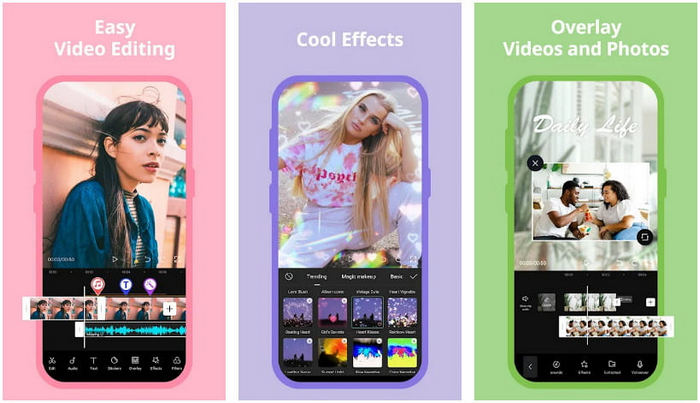
As informações abaixo se concentrarão no detalhamento de como desacelerar um vídeo no CapCut. Portanto, se você deseja usar o software em seu dispositivo para desacelerar um vídeo, essas etapas abaixo são absolutas e testadas antes de adicioná-lo aqui. Antes de mais nada, as etapas aqui são o controlador de velocidade mais básico que você pode obter no CapCut.
Step 1. Download the Capcut on your device and open it right after installing it.
Step 2. After you open the app, click New Project, then add the video you want to slow-mo.
Step 3. Tap the video you upload on the Timeline and click the Speed menu, then choose between the Normal and Curve speed controller methods you want. For an easier way of slowing down a video, you must click the Normal.
Step 4. Move the video speed point to the left to slow down the video, click check, then Export.
Prós
- É um dos melhores controladores de velocidade que você pode baixar no Android e iOS.
- Editor tudo-em-um que você pode ter gratuitamente.
- Interface intuitiva para ter uma experiência de usuário de fluxo fácil.
Contras
- Recursos de processamento limitados em seu dispositivo.
- Os principais recursos de edição ainda não estão disponíveis.
- Bugs e falhas às vezes estão acontecendo.
Parte 2. Alternativa definitiva para o CapCut diminuir a velocidade de um vídeo na área de trabalho
Although Capcut can do the slowdown, you will need on the video you have, and we still find that there are things that hold this tool to become an ultimate. Undoubtedly, FVC Video Converter Ultimate has the upper hand and has become the ultimate resolver of video speed controlling problems.
Devido às suas ofertas de recursos e funções, muitos usuários gostaram disso porque é impressionante em tudo o que oferece. Ele altera perfeitamente a velocidade do vídeo para criar uma bela saída de vídeo em menos de um minuto. Mesmo que você não seja um profissional em controle de velocidade de vídeo, ainda pode gerenciar facilmente o uso do software. Impressionante né? É mais do que isso; você pode seguir os detalhes abaixo enquanto ensinamos como fazer câmera lenta na alternativa definitiva do Capcut em menos de um minuto.

FVC Video Converter Ultimate
Mais de 5.689.200 downloads- Ele suporta uma velocidade final e retarda o efeito para aplicar.
- Importe seu vídeo aqui, pois ele suporta mais de 1000 formatos.
- Recursos e funções multifuncionais adicionais estão disponíveis.
- Possui uma interface intuitiva para uma melhor experiência do usuário.
- Você pode ter o software no Windows e no macOS.
Free DownloadFor Windows 7 or laterSecure Download
Free DownloadFor MacOS 10.7 or laterSecure Download
Step 1. Please click the download button below to have the ultimate software on your Windows and Mac. After that, click the file you've downloaded to install it promptly, and click Start Now to run the software on your system.
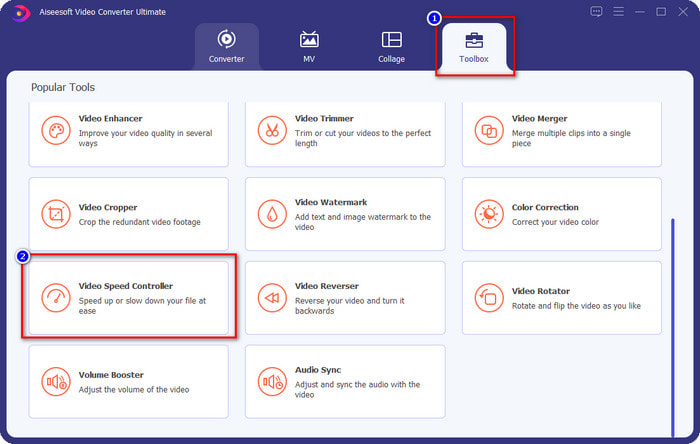
Step 2. When the tool runs into your system, click the Toolbox and locate the Video Speed Controller.
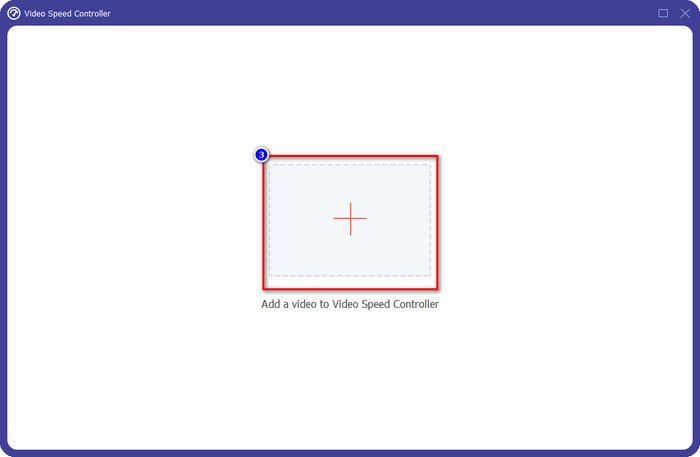
Step 3. Press the + button to open the folder on your desktop. Locate the video file you want to slow-mo and click Open to proceed.
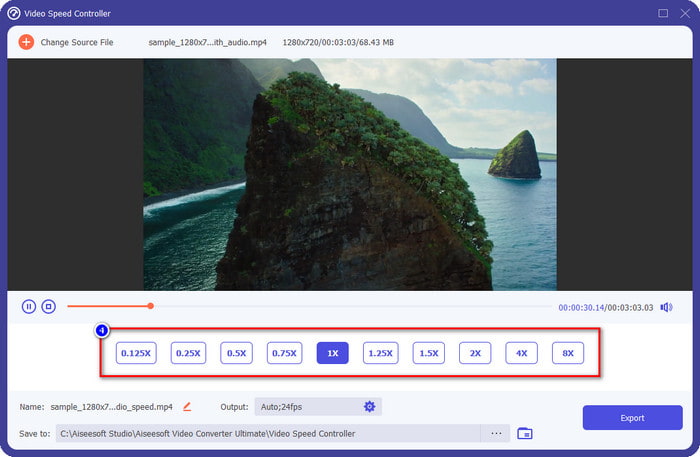
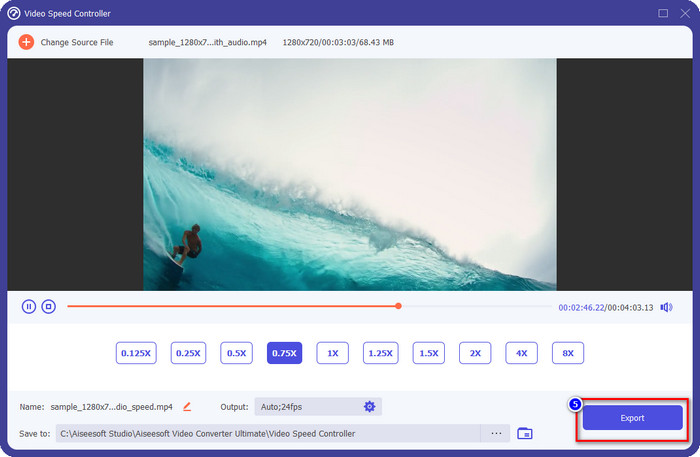
Step 4. After uploading the video file here, click the video speed you want on the options presented below. Every time you click one of them, a preview will happen on the preview pane. It will show you the video you upload but at your chosen speed.
Step 5. Everything is settled now; click Export to start the converting the regular speed video into a slow-mo. Easy right? Yes, it is; even though you aren't an editing expert, there is no need to worry if you choose to use this software.
Prós
- É a solução definitiva para resolver o problema de velocidade de vídeo e outros problemas de vídeo e áudio.
- Mesmo que você seja um iniciante na edição da velocidade, você pode dominar rapidamente o uso em menos de um minuto.
- Ele pode importar e exportar o vídeo sem diminuir a qualidade bruta.
- Disponível em todos os sistemas operacionais Mac e Windows.
Contras
- Não está disponível para iOS e Android.
Parte 3. Perguntas frequentes sobre como fazer uma câmera lenta no CapCut
Existe alguma versão desktop do CapCut?
Infelizmente, o CupCat não está disponível para Windows e Mac, então você não pode baixá-lo em sua área de trabalho, mesmo que queira. Nesse caso, você não deve baixar o aplicativo em outros sites de terceiros ou pirataria porque isso é ilegal, e sempre haverá consequências depois disso.
Posso comprar CapCut?
Se você estiver com um orçamento apertado, não é necessário comprar ou assinar o CapCut porque é gratuito. Sem cobranças ocultas depois de baixar o aplicativo no seu Android e iOS. Você pode aproveitar todo o potencial deste editor de vídeo gratuitamente.
Como acelerar o vídeo no Tiktok usando o CapCut?
You can follow the steps we added above and download the Tiktok video you want to speed up. But if you want a comprehensive, detailed step on how to speed up video on Tiktok, you can read this article instead and rely on it.
Depois de exportar o vídeo no Capcut, ele aplicará uma marca d'água?
A marca d'água não é aplicada diretamente ao vídeo que você edita aqui, mas é adicionada à última parte do vídeo. Mas você pode cortar o videoclipe com uma marca d'água usando o editor de vídeo designado ou o FVC Video Converter Ultimate para removê-lo permanentemente. Você pode exportar um vídeo sem marca d'água tocando em exportar sem marca d'água em vez de editar.
Conclusão
Now that we know how to slow down a video on CapCut, we have now the chance to change the speed of the video we want. Despite being a free app on Android and iOS, there are still limitations that could hold you back while using this app. So, if you want to fill the gap that this app can't provide, it is a must to download the best alternative on the desktop, for it is the ultimate software to slow down the video. To download the ultimate tool, you must click the download button above to have it within your reach.
-
 5 criadores de vídeo em câmera lenta profissionais para Windows/Mac/online
 Quer saber como fazer seu vídeo rodar em câmera lenta? Então leia este artigo para descobrir quais são os 5 criadores profissionais de vídeo em câmera lenta.
-
 Melhores maneiras de usar o iMovie para fazer vídeos em câmera lenta [Resolvido]
 Você já usou o aplicativo iMovie para converter seu vídeo de velocidade normal em câmera lenta? Esta é a oportunidade de saber mais sobre este aplicativo, então continue lendo.
-
 3 melhores câmeras em câmera lenta que você deve considerar comprar
 Você está tendo dificuldade em escolher a melhor câmera para fazer vídeos em câmera lenta? Continue lendo e considere estas melhores opções de câmera lenta listadas para você.
