


 Video Converter Ultimate
 Gravador de ecrã
 Reparo de vídeo
4 métodos para editar ou corrigir metadados MP3 no Windows e Mac
Todo mundo é Musicphile, o que significa que amamos música porque nos ajuda a sentir as emoções dos cantores e escritores, mesmo que não os vejamos visualmente. Por meio da música, todos podem ficar conectados e isso pode nos ajudar a aliviar o estresse, melhorar nosso QI e ser produtivos todos os dias. A maior parte da música está no formato MP3 porque é o contêiner de áudio padrão para isso. Embora você possa reproduzir o MP3 em seu dispositivo, você não reproduzirá o arranjo correto corretamente se os metadados estiverem errados. Você não pode definir o clima certo se sua biblioteca de música estiver uma bagunça, então o que você deve fazer? Por que você não tenta consertar as tags para organizá-las corretamente? Se você quer saber como editar metadados MP3 no Windows e Mac, este é o artigo certo para você, pois mostramos quatro métodos diferentes que você pode usar.

Parte 1. Melhor método para corrigir ou editar metadados MP3 no Windows e macOS [recomendado]
FVC Video Converter Ultimate has already taken a step toward being one of the best programs to fix MP3 tags on your Windows and Mac. This tool supports uploading MP3, WAV, WMA, AAC, and many more audio formats to fix the same problem about the metadata. It is also possible to remove the hidden metadata you cannot access with the other tag editors.
Além disso, ele pode converter o MP3 para outro formato de áudio, se você quiser, e também oferece muitas funções e recursos que estão dentro do Toolbox; você pode verificá-los se você baixá-lo. Em questão de minutos, você pode fazer com que este programa corrija o problema o mais rápido possível. Não tem tanta certeza se é verdade? Felizmente, o tutorial escrito abaixo ensinará como editar metadados MP3 para provar que você pode fazer isso rapidamente, como dizemos.
Step 1. Click the download button below, choose which of the two operating systems you are currently using below. Install it quickly after downloading, open the tool and proceed to the next step.
Free DownloadFor Windows 7 or laterSecure Download
Free DownloadFor MacOS 10.7 or laterSecure Download
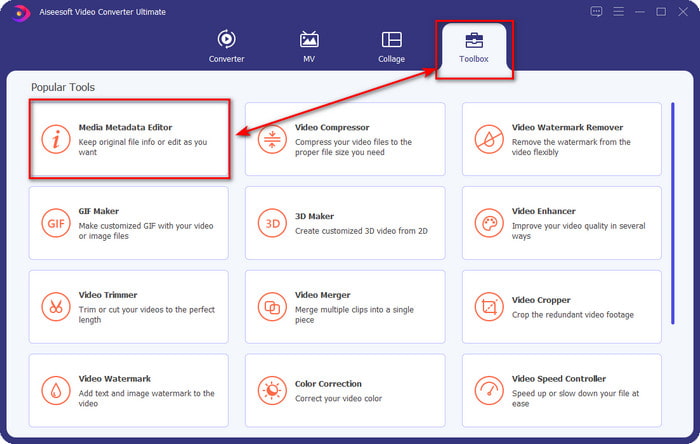
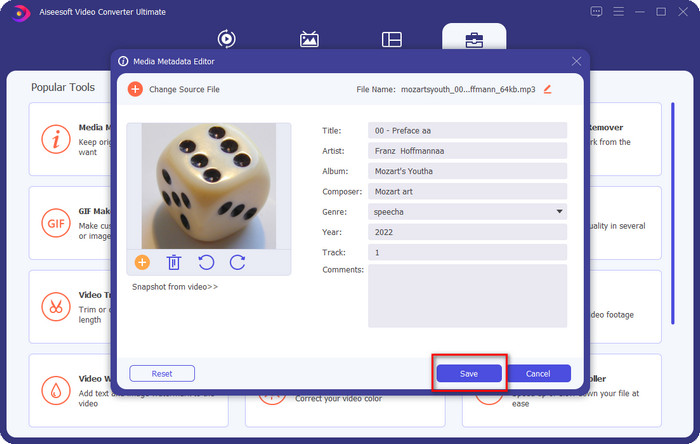
Step 2. Select Toolbox and under it click the Media Metadata Editor. As we said in the introduction, there are multiple functions you can use that are in the Toolbox that the other editor doesn't offer.
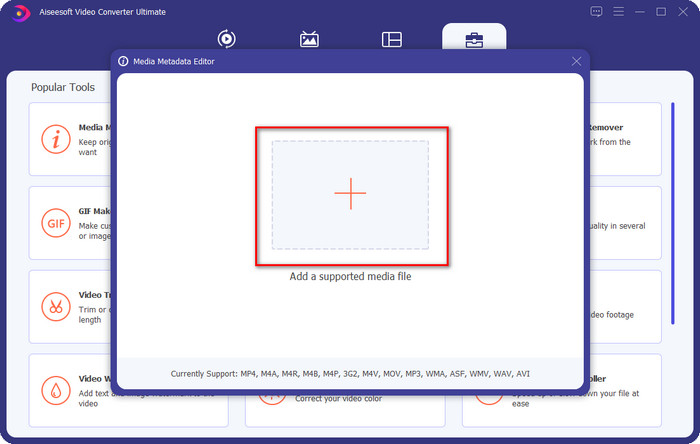
Step 3. Mini windows will show on your screen; click + icon. Locate the audio or MP3 file on the folder that will show on your display, click the file, and press Open to upload it.
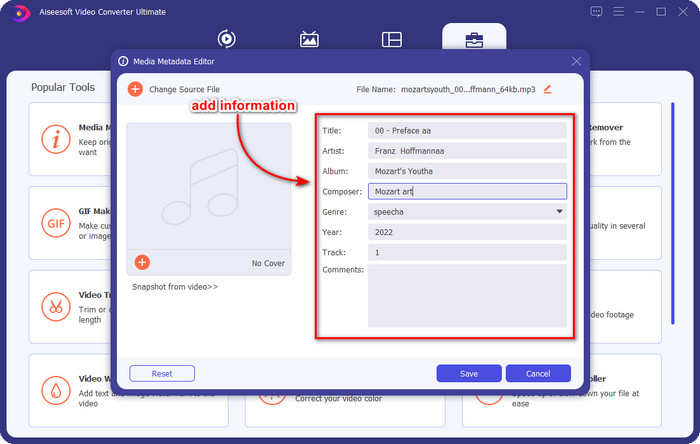
Step 4. Edit and fix the metadata according to your needs; click each text box to add information.
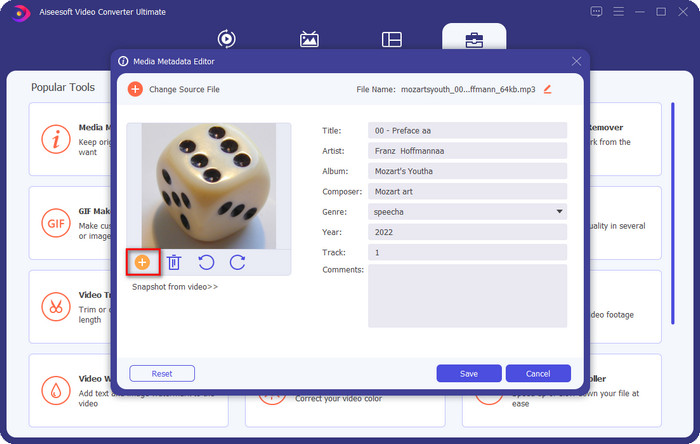
Optional. With this tool, you can also add or fix MP3 album art metadata on your MP3 file by clicking the + icon; select the image you want to use as a cover on the folder, and click Open to proceed.
Step 5. If you've done adding and fixing the metadata of your MP3 file, hit the Save button to save the changes you've made on your audio file. Voila, with that, you have now fixed the audio tags effortlessly with the help of the ultimate tool.
Parte 2. 3 Métodos Gratuitos para Alterar Tags MP3 no Desktop
iTunes
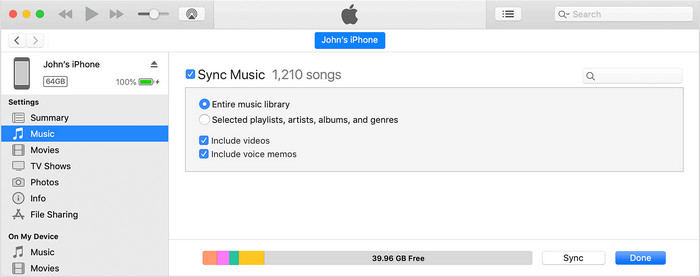
iTunes is a built-in that can help you edit mp3 tags on macOS X. It does the same thing with Groove Music regarding editing your audio file's metadata. But with this tool, you can buy music and play it here as quickly as possible. In addition, the music that came from this app already has tags on them, and if the music you've downloaded doesn't have, you can use this to add tags. Follow the steps below to know how to do it.
Step 1. Open iTunes on your Mac.
Step 2. Click the audio file and select Get Info.
Step 3. Fix the tags and click OK to save the changes.
MP3 Tag
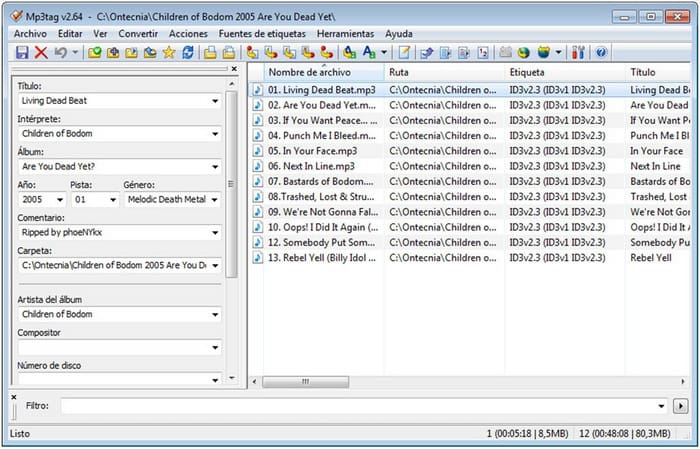
MP3 Tag is a dedicated and best MP3 tag fixer you can download on your Windows. With this tool, you can automatically access the music database to have the correct metadata. Although the tool isn't similar to the other built-in software, we can still see that it is still possible to adjust the metadata with the help of this tool with an average supported format. If you want to download and use this tool, follow the steps below.
Step 1. Download the software on your computer and open it.
Step 2. Drag and drop the MP3 file at the center, click the audio file, and on the left side, you can edit the tags.
Step 3. To save the editing you've made, click the save-icon.
Música Groove
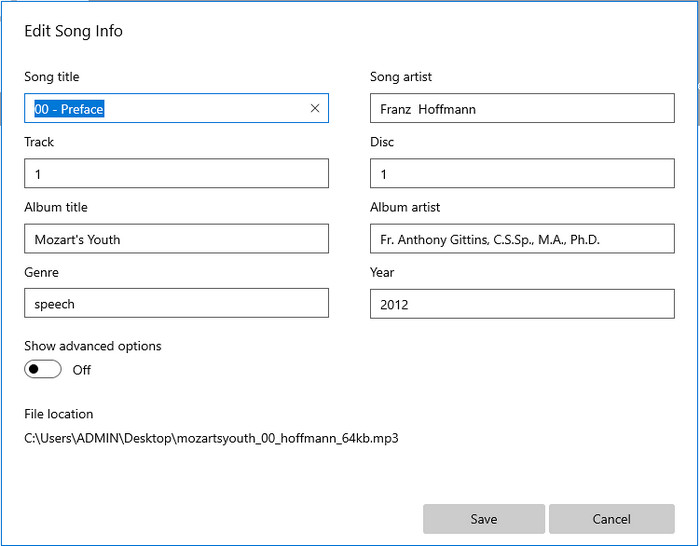
Suppose you don't have enough space on your drive. Is it possible to learn how to edit MP3 tags on Windows 10? Then Groove Music is here to help Windows users change the tags on their audio files. With this tool, you can play almost any audio file saved on your drive at ease. If you want to know how to use this built-in app, follow the steps below.
Step 1. Click the windows-icon on the screen and type Groove Music to open it. After clicking it, the tool will automatically be setting it up.
Step 2. Press the right click of the audio file and go to Edit Info.
Step 3. Change the Edit Song Info metadata and click Save when you've finished it all.
Parte 3. Perguntas frequentes sobre como editar metadados em MP3
É seguro editar metadados MP3 online?
Bem, sim, você pode editar os metadados do seu MP3 online se quiser. Mas lembre-se de que existem sites com uma rede não segura, portanto, fazer login é uma má decisão que você tomará. Portanto, para evitar isso, você deve usar as ferramentas que apresentamos acima para corrigir seus metadados de mp3 com segurança.
Os metadados são importantes?
Indeed it is. Metadata plays a significant role in every media file we have. With this, you can easily determine what is inside of a file, such as location, time, date, information, and more. Moreover, the information we add here is just simple ideas about metadata, and if you want to know more about the metadata, you must click this link and read what metadata is.
Posso visualizar metadados no meu MP3?
Absolutely, yes, you can, and if you don't know how to view metadata, you can read this article and follow the indicated steps on how to view them correctly.
Conclusão
Indeed, all of the four best .mp3 tag fixers are now at your reach, which means you can now choose the tool by your means. With the factual information we provide in this article, we could easily edit or fix the tags on our MP3 files. Although the methods we provide are best, we still choose the FVC Video Converter Ultimate over the other built-ins or the third-party app. Because this tool presents the most advanced and powerful tag editing that you will need without exerting too much effort. So, if you want to have the tool, you can click the download button and follow the steps we have written above.
-
 5 principais editores de metadados MP4 [atualizado em 2022]
 Como posso alterar meus metadados MP4? A melhor maneira de alterar os metadados do seu MP4 é usar um editor de tags que suporte o formato MP4, como o exemplo que listamos abaixo.
-
 Os 5 principais editores de tags de vídeo AVI escolhidos pelos usuários para 2022
 Qual é o melhor editor de tags AVI que posso usar? O mercado de editores de tags para arquivos AVI é muito amplo. Por isso, hoje apresentaremos os cinco editores mais escolhidos no ano de 2022.
-
 4 editores de metadados MKV eficazes para Windows e macOS
 Não consigo encontrar um editor de metadados MKV no mercado. O que devo usar? Tendo o mesmo problema? Se sim, continue lendo este blog para conhecer as ferramentas a serem usadas.
