


 Video Converter Ultimate
 Gravador de ecrã
 Reparo de vídeo
Aprenda a editar metadados OGG facilmente com etapas detalhadas
Com tags em seus arquivos OGG, o dispositivo que você está usando no momento pode entender o que está no arquivo. Depois que os metadados são anexados, eles podem ajudá-lo a organizá-los adequadamente, determinando as tags para encontrá-los rapidamente. Portanto, se seus arquivos OGG não tiverem metadados, é obrigatório adicionar um. Embora a busca por um editor de tags para OGG seja fácil, não temos certeza se eles são perfeitamente seguros de usar. Em vez de experimentá-los e falhar, faremos a solução de problemas por ferramenta para você. Portanto, continue lendo este post para saber como editar metadados OGG manualmente com uma garantia de sucesso 100%.

Parte 1. Editar metadados OGG sem baixar um programa externo no Windows
On Windows, you can easily edit OGG metadata without downloading a tool using Properties. However, it is not as effective as the ultimate devoted tool below, but the task can be done with its help. So, if you want to know how to use this metadata editor, you can follow the steps below.
Vantagens de usar propriedades no Windows:
◆ O download não é essencial para usá-lo a qualquer momento, e mesmo que você não tenha acesso à internet.
◆ Fácil de usar e pode ser usado por qualquer usuário que queira editar metadados.
◆ Suporta uma ampla variedade de formatos OGG, MP3, WAV, WMA e muitos outros formatos.
Como editar tags OGG facilmente com propriedades no Windows:
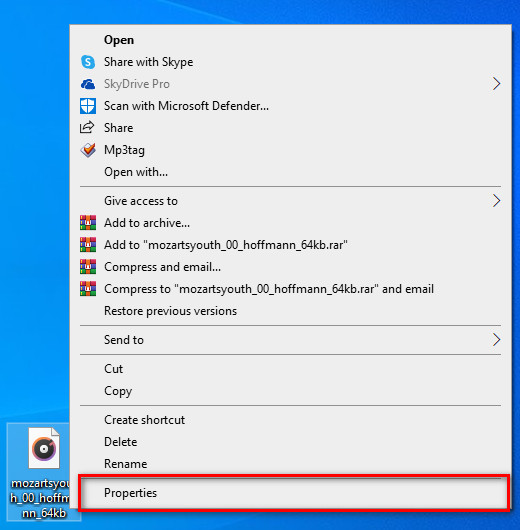
Step 1. Find the OGG file on your desktop, and right-click the file; under it, hit Properties.
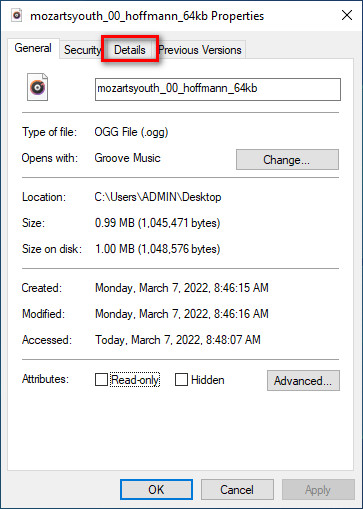
Step 2. After you've clicked the Properties, a panel will show on your screen. Go to the Details, tap every tag and fill it.
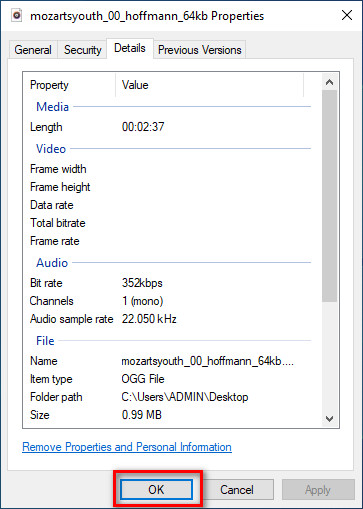
Step 3. Press OK to save the changes you've made with Properties.
Dica: Esta função às vezes não salva os metadados que você adicionou no arquivo OGG. Então, se isso acontecer, você precisará refazê-lo novamente e começar do início.
Parte 2. Editor de tags OGG mais recomendado para editar metadados OGG no Windows e Mac [Profissionalmente]
The best way to edit OGG is to use a powerful yet simplistic tag editor on Windows and Mac, the FVC Video Converter Ultimate. With this tool, you can manually override the metadata of OGG within a few clicks away. Unlike Properties, you won't encounter any problem regarding editing or fixing the tags of your media file. However, you will need to download and purchase the tool to fully access its great features that no other tool can give you.
Além de sua capacidade de edição de metadados, esta ferramenta permite converter seu arquivo OGG em um novo formato de áudio, mantendo o áudio de alta qualidade armazenado em seu arquivo OGG. Você também pode realizar edição básica em seu vídeo e áudio, se desejar, como cortar, aparar, mesclar, cortar e muito mais, mas também pode executar edição avançada; você pode verificar a edição avançada na caixa de ferramentas. Talvez você pense qual é a melhor coisa sobre essa ferramenta; Bem, atende às expectativas de todos, e o nome ultimate não é apenas um nome, mas também as habilidades da ferramenta. Portanto, se você deseja usar a ferramenta para editar metadados OGG, pode copiar as etapas abaixo para ter sucesso na ponta do dedo.
Vantagem de usar o FVC Video Converter Ultimate [recomendado]:
◆ É um editor de tags profissional que pode manipular facilmente os metadados do seu arquivo de áudio, mesmo que você não seja um profissional.
◆ Ele suporta uma ampla variedade de formatos para upload como OGG, MP3, WAV, WMA, AIFF e mais de 1000, incluindo formatos de vídeo.
◆ É a melhor escolha para iniciantes na edição de metadados, resolução, qualidade, corte, etc.
◆ Capaz de baixar o software nos sistemas Windows e Mac, se possível.
◆ Funções e recursos adicionais estão disponíveis no Toolbox para ajudá-lo em diferentes tarefas relacionadas a vídeo e áudio.
Como editar tags OGG como um profissional com o FVC Video Converter Ultimate:
Step 1. Press the download button below, choose the correct operating system you're using. If downloading is finished, click the software file you've downloaded to install it next to your drive. Set it up according to your preferences; lastly, click Start Now to launch the tool.
Free DownloadFor Windows 7 or laterSecure Download
Free DownloadFor MacOS 10.7 or laterSecure Download
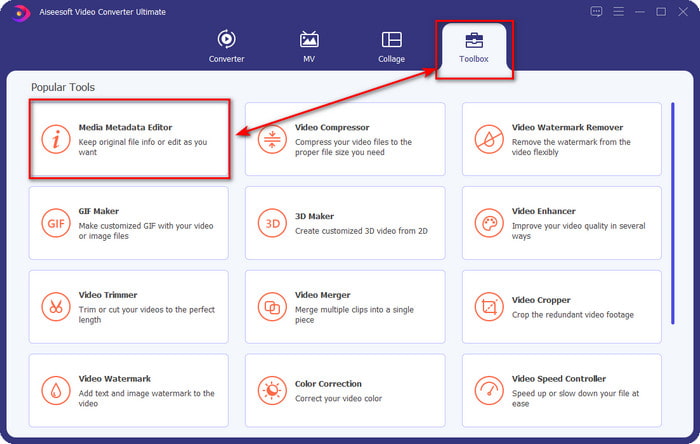
Step 2. After you've opened the software on your desktop, go to the Toolbox section and find the Media Metadata Editor; hit the feature to proceed.
Step 3. Click the + icon to locate the OGG file saved on your desktop drive. Select the .ogg filename and click Open to upload the file to the tool.
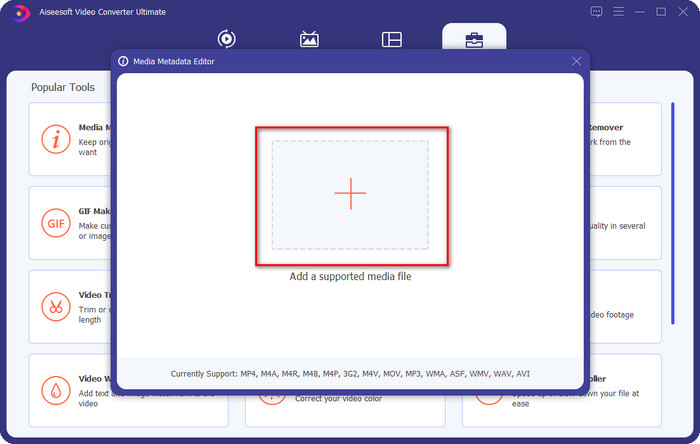
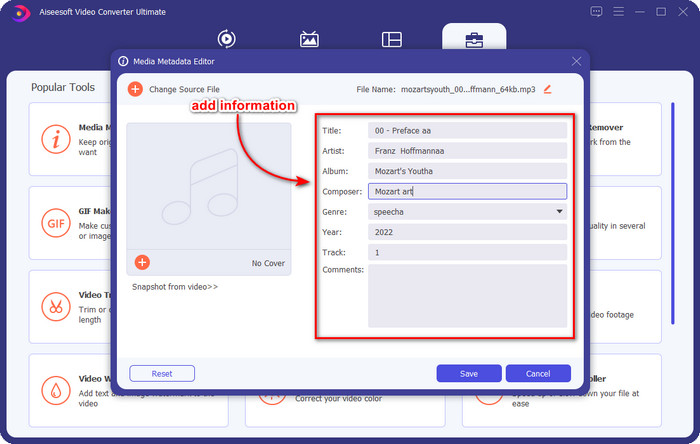
Step 4. Edit or remove the metadata on the mini window that will show on your screen, click every textbox and add the information you want to apply on the OGG. You can also add an image on the OGG audio file if you've desired, but make sure that the image is saved on your desktop.
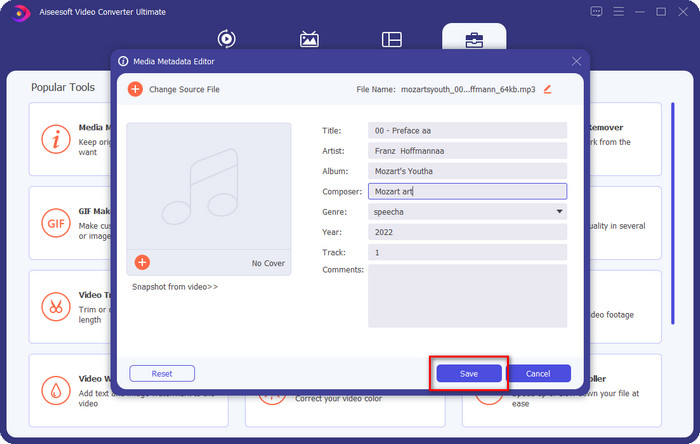
Step 5. If you've done adding the needed information on your OGG file, you can click Save to proceed to save the file with metadata on it. With that, you have now added the edited OGG metadata on your desktop with the assistance of the best OGG metadata editor you can use on both operating systems safely and quickly.
Parte 3. Perguntas frequentes sobre como editar metadados OGG
Posso usar o arquivo OGG no Mac?
OGG files aren't supported on any Apple devices, but you can use a third-party app to play the unplayable OGG file on Mac. Want to know how? If so, click this link as we gathered the facts about OGG and how to play the OGG files on Mac easily.
O OGG é mais popular que o MP3?
Em termos de popularidade, o MP3 é muito mais suportado que o OGG porque é muito mais flexível se os compararmos. Ambos são bons contêineres de áudio e possuem diferentes intensidades de áudio. Mas em termos de qualidade, o OGG é muito melhor que o MP3, mas é menos suportado.
Posso gravar OGG de alta qualidade?
Absolutely, yes, you can record OGG. But which tool supports the OGG format? If there is any, is it the best OGG recorder I can use? Well, all of these questions do have an answer if you've clicked this link and proceeded on reading it.
Conclusão
Amazing right? It is, with what can you do to edit OGG metadata with the solutions listed above. If you need one, these are the known solutions to solve your OGG file tags. If you don't believe in the information we have written here, you must try them both, and we can assure you success in editing the tags on your OGG. But if you want a pro tool to edit tags on your OGG, you must use the ultimate tool to finish the task. FVC Video Converter Ultimate is undoubtedly the best choice for editing any tags on any media type that you have. If you think that this is the right tool for you, we suggest that you read the steps we provided above to edit the tags easily.
-
 7 editores de tags de música populares no Windows, Mac e dispositivos móveis
 As tags de música são populares para o arranjo da música em sua biblioteca de acordo com os dados contidos. E se você quiser mudá-lo? Leia os detalhes abaixo para saber mais.
-
 4 Editores de metadados de audiolivros sugeridos em 2022
 Se você não tem nenhuma ideia sobre o editor de tags de Audiobook, este artigo o ajudará. Conheça melhor lendo cada detalhe abaixo e as ferramentas a serem usadas.
-
 Os 5 principais editores de tags MP3 gratuitos disponíveis on-line e off-line
 Você quer saber como editar tags MP3? Nesse caso, continue lendo. Para hoje, damos a você 5 dos melhores editores de tags MP3 que você pode usar.
