


 Video Converter Ultimate
 Gravador de ecrã
 Reparo de vídeo
 Secure Download
3 dos melhores editores de metadados FLAC que você deve conhecer em 2025
It is known to us that FLAC is the best lossless musical file format, and it is an ideal format for ripping the audio on CDs because it doesn't lose the raw audio if this is the format you choose. Amongst the lossless audio file, this is the best choice for it is compatible with any device. It produces a compression ratio of 30 to 50 percent without losing the original quality. With this audio format, you can have the metadata, album cover, and fast seeking all at once. Instances may occur, such as wrong tags on the FLAC file, because the format is not perfect like the other format. In less than five minutes, you will know the different FLAC metadata editors on Mac and Windows that you can use to fix the problem.

Parte 1. Melhor Editor de Metadados FLAC para Mac e Windows – FVC Video Converter Ultimate
FVC Video Converter Ultimate is the most effective software you must have regarding this metadata editing problem. This tool provides a professional and easy-to-understand GUI to help any users have a smooth sailing process of changing or fixing metadata at ease. Also, you can add multiple information or tags to your FLAC, such as title, author's name, date, album cover, and many more. Its competitor on metadata editing focuses on changing the metadata of a few audio and video formats. But with this software, you can easily upload any FLAC, MP3, WMA, WMV, and other 1000+ formats and edit their metadata as quickly as 1-2-3.
Além disso, esta ferramenta não é apenas capaz de alterar, corrigir ou excluir os metadados; ele também pode ser usado como solução para qualquer problema relacionado a áudio de vídeo. E com isso, podemos garantir que, uma vez que você use a ferramenta, não há necessidade de se preocupar em reencontrar o mesmo problema, pois você obteve a melhor solução. Deseja usar o editor de metadados FLAC de alto nível no Mac e no Windows? Em caso afirmativo, continue lendo as etapas abaixo, pois fornecemos o tutorial fácil de seguir e conclua a tarefa com eficiência.
Step 1. You can have the ultimate software on your desktop; click the appropriate OS to download the correct tool. Continue the installation process by opening the file you've downloaded, and press Start Now to continue.
Free DownloadFor Windows 7 or laterSecure Download
Free DownloadFor MacOS 10.7 or laterSecure Download
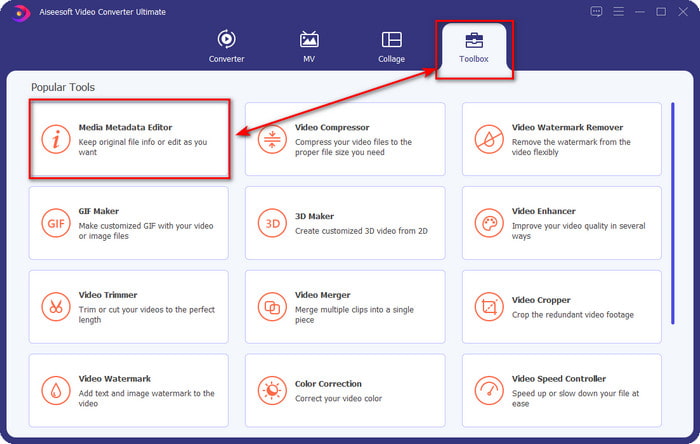
Step 2. Click Media Metadata Editor to open the tag editor feature on the Toolbox section.
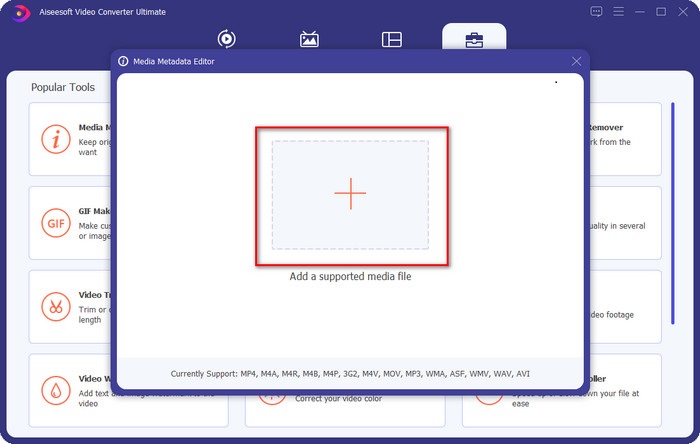
Step 3. You must click the + button to add the file, look it on the folder that will show, and click Open to add the FLAC file successfully.
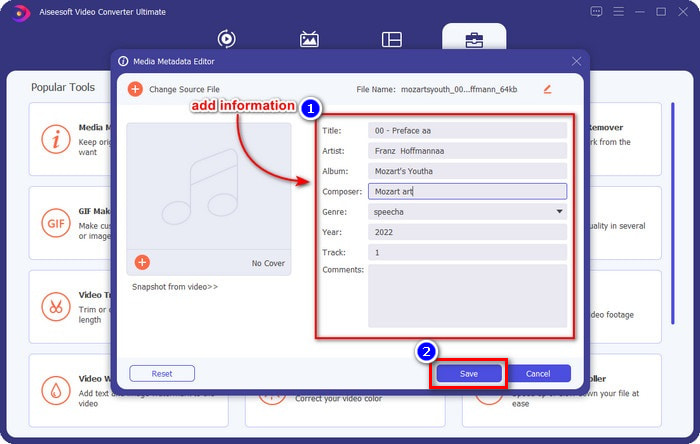
Step 4. In this panel, you can now change the metadata of your FLAC on each textbox. Then click Save to save the update you've made with the software. As easy as that, you've added tags on your FLAC and corrected them efficiently with the help of an ultimate tool.
Prós
- É a melhor escolha para editar metadados em FLAC, MP4, WMA, WAV, TTA, OGG e mais de 1000 formatos.
- Ele suporta vários recursos de edição que você pode usar na seção Caixa de ferramentas.
- Interface gráfica intuitiva e fácil de usar.
- Disponível para download nos sistemas operacionais Windows e Mac.
Contras
- Adquirir a ferramenta é uma obrigação para aproveitar os recursos incríveis a um baixo custo.
Parte 2. Outros 2 melhores editores de metadados FLAC gratuitos para Windows
Fragata3
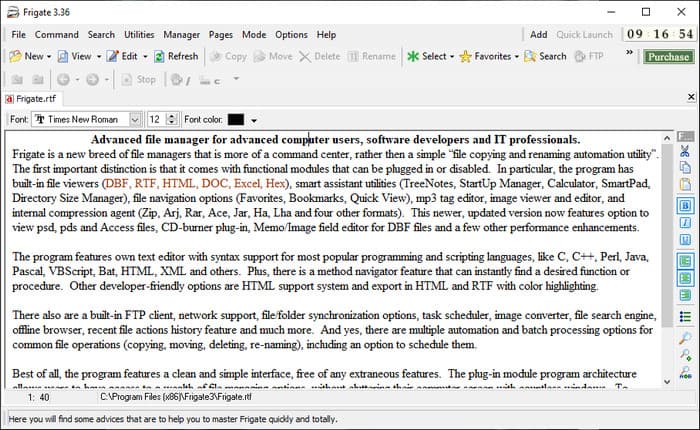
Frigate3 is a FLAC metadata editor that you would love to use on your Windows. With this tool, you can easily adjust the tags you have on your desktop. But before you download the tool, you must check out the two options it provides, the standard and pro versions. The standard version of this tool only includes the basic features you will have while using it. If you've downloaded the standard version, the file size is smaller than the pro one.
Enquanto isso, se você baixou a versão pro, terá todos os recursos que este software oferece que não estão no padrão, mas o tamanho do arquivo é muito maior que o padrão. Apesar de ser um software Windows gratuito, ainda podemos ver que a ferramenta é um pouco difícil de entender, e sua GUI não é tão bonita quanto os outros softwares do mercado. Mesmo que isso seja um problema, ainda é considerado uma ferramenta eficaz para lidar com essa tarefa.
Prós
- Gratuito para download no Windows.
- Ele suporta as versões padrão e pro da ferramenta.
- Capaz de adicionar plug-ins.
Contras
- A GUI não é tão boa quanto o outro editor de metadados.
- Às vezes, a ferramenta é difícil de iniciar.
- A rede fica insegura quando você acessa o site oficial da ferramenta.
MusicBrainz PiCard
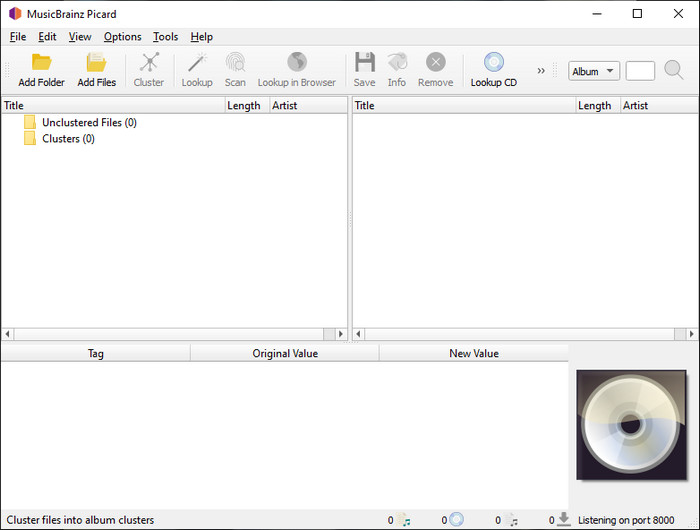
MusicBrainz PiCard is a Windows-based FLAC metadata editor you can freely download on your desktop to finish adding the metadata. If the audio file has a record on the database, you can retrieve the tags or update them with the help of this tool. Unlike other tools, this software can add multiple in-depth information such as the performers and instruments used on the music. But remember that the volunteers accumulate the tags on the MusicBrainz.
Além disso, este software é um editor de tags de áudio dedicado, o que significa que ele apenas suporta a maioria dos formatos de áudio, sejam eles com perdas, sem perdas ou ambos. Embora seja uma enciclopédia abrangente de tags de música e a torne utilizável para o público, algumas tags fornecidas não são confiáveis, portanto, você precisará adicioná-las manualmente. No entanto, a ferramenta é fácil de usar e melhor que a Fragate3, mas não é tão boa quanto a ferramenta final.
Prós
- Possui um banco de dados embutido para tags de áudio.
- Interface de usuário simples.
- Aprender a usá-lo é fácil.
Contras
- Às vezes, os metadados coletados no banco de dados não são confiáveis.
- É limitado apenas a arquivos de áudio.
Parte 3. Perguntas frequentes sobre o FLAC Metadata Editor
Posso gravar FLAC de alta qualidade?
Absolutely, yes, you can record audio in this format, but remember now all of the audio recorders support this format, and not all can record high-quality audio output. So, if you don't know how to record a high-quality FLAC lossless recorder, you must click this link to learn more about this topic.
Qual é o melhor software para converter FLAC?
Sem dúvida, o FVC Video Converter é o melhor conversor FLAC que você pode usar para tornar o FLAC compatível com os outros dispositivos sem perder a qualidade original. Com esta ferramenta, você pode converter vários FLAC simultaneamente, mas lembre-se, se você quiser mais do que um download de conversor, a ferramenta final é obrigatória.
O memorando de voz é compatível com FLAC como saída de áudio?
Voice Memo uses M4A instead of FLAC for storing audio recorded format. If you want to know more about voice memos, you can read the full-detailed scope we did on the built-in app; read it carefully to know if it is the best audio recorder on iOS devices by clicking this link.
Conclusão
FLAC is not just an audio format, but it is one of the best audio formats you must use to store high-quality audio on your devices. So, if you want to arrange the .flac on your library, then the help of the tool we review can help you handle the task efficiently. If you are a Windows user, we suggest reading the software we found to add metadata on Windows in part 2. But if you want a more reliable and pro tool to add metadata on FLAC, we suggest you use the FVC Video Converter Ultimate instead. With a tool like this, you can do pro editing on tags that the other Windows tool we present can’t provide. So, if you want to know more about the best FLAC metadata editor on Mac and Windows, you must download it to discover the other functions.
-
 Os 5 melhores editores de metadados de vídeo para 2025 [análise imparcial]
 Deseja visualizar os metadados do seu vídeo? Em caso afirmativo, leia os detalhes abaixo para entender completamente o tópico e saber qual ferramenta se adapta melhor a você.
-
 7 editores de tags de música populares no Windows, Mac e dispositivos móveis
 As tags de música são populares para o arranjo da música em sua biblioteca de acordo com os dados contidos. E se você quiser mudá-lo? Leia os detalhes abaixo para saber mais.
-
 5 principais editores de metadados MP4 [atualizado em 2025]
 Como posso alterar meus metadados MP4? A melhor maneira de alterar os metadados do seu MP4 é usar um editor de tags que suporte o formato MP4, como o exemplo que listamos abaixo.
