


 Video Converter Ultimate
 Gravador de ecrã
 Reparo de vídeo
Revisão sobre editores de metadados FLV para editar metadados FLV [sem esforço]
FLV is a popular format used to deliver digital content using Adobe Flash Player embedded with SWF. Although it is best to transfer files in the extension of .flv, some contents are lost, especially if interrupted. Then if this happens, what should you do? Fortunately, we have metadata available on the market. Want to know what Windows, Mac, and Online tools you can use? Keep on reading to learn the best ways to change the FLV metadata format easily.

Parte 1. 3 do Melhor Editor de Metadados de Vídeo Disponível no Windows/Mac/Online
Video Converter Ultimate
Video Converter Ultimate is one of the powerful FLV metadata editors to easily update and change the FLV tags. This tool is available on any Windows or Mac OS to use. While using the ultimate tool, you can quickly add, remove, or update the metadata on 1000+ formats with the help of this tool, not only on FLV. Unlike another metadata editor, this tool offer s variety of options that are perfect for any video type problem. Such as converting, speeding it up or down, reversing, and other sets of amazing filters to make your video very unique that the other tag editor doesn't offer it to you.
Além disso, planeje fazer alguma edição em seu vídeo FLV, como adicionar efeitos, filtros, cortar, mesclar, adicionar texto ou marca d'água. Esta ferramenta pode ajudar a cumprir a tarefa facilmente em qualquer usuário. Todas essas coisas são possíveis com a ajuda da ferramenta final. Você não precisará procurar nada com a melhor GUI e recursos. Se você está se perguntando e quer tentar usar esta ferramenta, você pode seguir os passos abaixo para saber como usar a ferramenta.
Step 1. Press the download button to have the FLV metadata injector on your desktop; choose Windows or Mac. Install the tool by clicking the file, following it accordingly, and running it.
Free DownloadFor Windows 7 or laterSecure Download
Free DownloadFor MacOS 10.7 or laterSecure Download
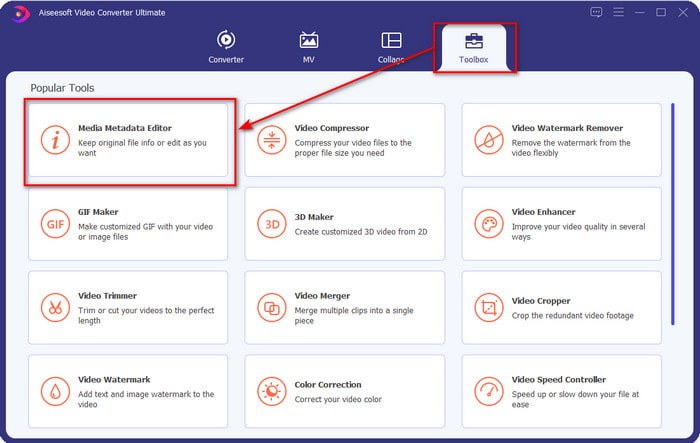
Step 2. After you've opened the software, go to the Toolbox and select Media Metadata Editor to edit the tags on your FLV.
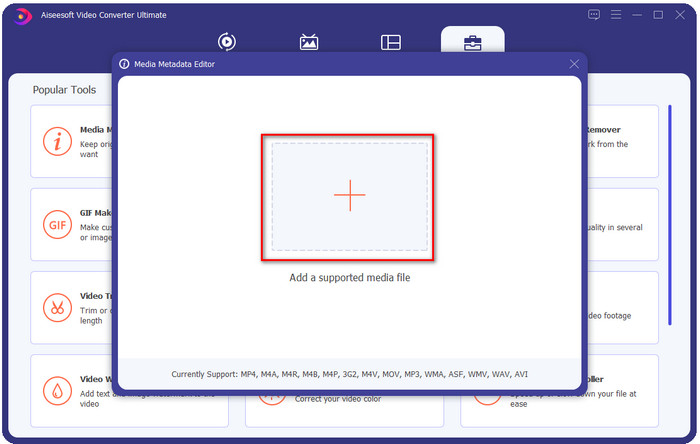
Step 3. Add the FLV files by hitting the + icon, locate the file on the file folder that will show on your screen, and click Open.
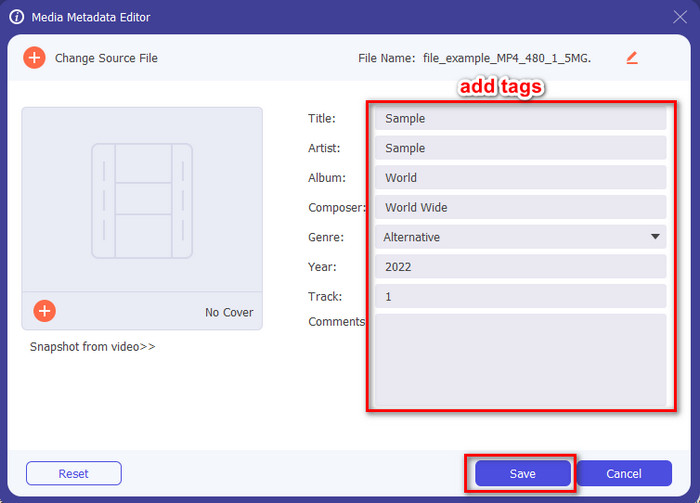
Step 4. Add, change, or remove the information on the textbox and press Save. With that, you've now added tags to your FLV file as simple as it is.
FLVMeta - Editor de Metadados FLV
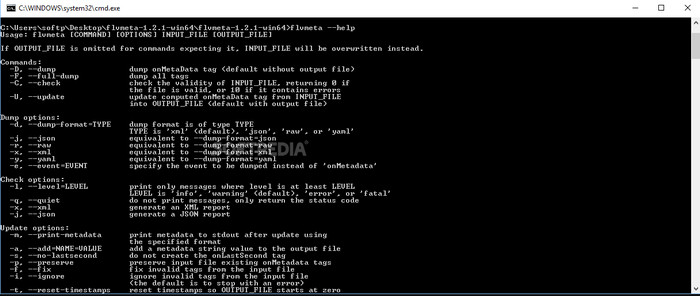
If you are a pro and want to try a dedicated FLV metadata editor you can download, we would like to introduce the FLVMeta – FLV Metadata Editor. This tool isn't the typical editor you've already encountered because it is a command-line tool. It means to command the tool; you will need to insert a specific code. Similarly to FFmpeg, you will need to input the location, file name, data, and many complicated things. Although this isn't the best choice for beginners who need to edit their FLV metadata, it is worth mentioning because it does the job perfectly.
Além disso, o software não funciona com os outros formatos; você só pode usá-lo em FLV se quiser usar a ferramenta. Se você tiver muitos arquivos FLV e quiser alterar suas tags e tiver um conhecimento básico sobre como manipular uma ferramenta de linha de comando, sugerimos que você use isso. Caso contrário, você precisará de tempo para estudar a ferramenta para realizar uma tarefa simples, como adicionar metadados.
Editor de Metadados FLV Online
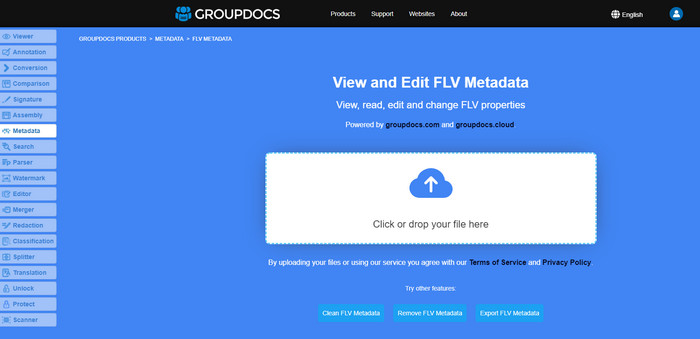
Don't want to download a tool to edit the FLV metadata format? In that case, you can use the Online FLV Metadata Editor. With this tool, you can edit the metadata on your FLV without installing the software for free, for it is a web-based tool. Even though the tool is free on the web, this tool won't function if you don't have internet, and the process might be interrupted if you have slow internet.
Ao contrário do FLVMeta, esta ferramenta suporta mais formatos e não apenas FLV; ele não suporta tão amplamente quanto a ferramenta final. Portanto, se você quiser terminar de editar a tarefa sem baixar o software, sugerimos que use isso, pois também é seguro acessar. Mas lembre-se de evitar problemas inesperados, certifique-se de ter uma conexão de internet estável.
Parte 2. Gráfico de comparação sobre os 3 principais editores de metadados FLV
| Recursos | Video Converter Ultimate | FLVMeta – Editor de Metadados FLV | Editor de Metadados FLV Online |
| Seguro de usar |  | | |
| Amigo do usuário | |  | |
| Dependente da Internet | | | |
| Recursos de edição, como cortar, aparar, cortar, mesclar, etc. | | | |
| Melhor interface gráfica de usuário | | | |
Parte 3. Perguntas frequentes sobre o Editor de metadados FLV
FLV e F4V são iguais?
Although they are both Adobe Flash-related, their purpose is different. For example, FLV has the same encoder used on SWF files, ideally used to transfer data over the internet. In contrast, F4V is an ISO-based format that resembles the MP4. Although they are both good at transferring files over the internet, their aspect and structures are different. If you want to convert your F4V to FLV, click this, and learn to convert the format into an FLV.
Onde posso jogar FLV?
Not all media players can play FLV format because of its limited support. Yet you are in luck, as we gathered the finest FLV player you can use on your device to play your FLV files without worrying if it is supported. These tools are tested to ensure that they can play FLV files on Windows, Mac, Android, and iPhone; to know more, click this link.
O FLV é o formato padrão de compartilhamento de vídeo?
Antes, considerávamos o melhor formato de compartilhamento de vídeo que você pode usar na web para reproduzir vídeos de alta qualidade; no entanto, existem formatos ainda melhores nesta nova era, como o MP4. Por ser mais compatível com diferentes dispositivos que os usuários possuem, isso é conhecido como formato de vídeo padrão. Embora você ainda possa compartilhar os arquivos FLV na web, ainda precisará reconsiderar o dispositivo do receptor desse arquivo. E se você for o receptor, precisará baixar uma ferramenta de terceiros para reproduzi-lo ou convertê-lo em um formato reproduzível.
Conclusão
Embora existam ferramentas limitadas que suportam FLV, ainda estamos com sorte; porque ainda podemos editar os metadados FLV por causa das ferramentas acima. Mas entristece nosso coração que precisamos escolher um para usar, mesmo que eles possam nos ajudar. Se você ainda não decidiu o que usar, deve optar pela ferramenta definitiva. É a escolha mais segura porque é simples, mas pode facilmente ajudá-lo a lidar com a tarefa. Ainda não acreditando quais são as habilidades desta ferramenta? Nesse caso, você deve baixá-lo em sua área de trabalho para usá-lo e testá-lo para ver se ele executa a tarefa. Agradeceríamos se você pudesse nos enviar uma mensagem sobre sua sugestão, recomendação e muito mais no aplicativo.
-
 O que são metadados: aprenda as informações básicas sobre metadados
 O que são Metadados? Isso é importante? Quais são as partes dos metadados? Você tem a mesma dúvida? Neste artigo, você aprenderá as informações básicas sobre metadados.
-
 4 dos melhores visualizadores de metadados online e offline [atualizado em 2025]
 Posso verificar os metadados do meu arquivo? Sim, você pode, com a ajuda deste post, apresentaremos os diferentes visualizadores de metadados que você pode usar.
-
 6 Filtros de Snapchat Animados do Snapchat de Escolha Favorita no Snapchat
 Quer saber as melhores maneiras de adicionar filtros nos vídeos do Snapchat? Bem, você pode clicar aqui e aprender os diferentes filtros que você pode usar para aplicar nos vídeos do Snapchat.
