


 Video Converter Ultimate
 Gravador de ecrã
 Reparo de vídeo
 Secure Download
Como funciona o Video Colorizer: as três principais ferramentas para usar em 2023
Do you have those old videos captured in black and white tones? While reminiscing the days could be done with a single play, you can now make your videos into a timeless piece by colorizing them. Thankfully, the digital age has innovated many technological discoveries, including a tool that can colorize black and white video. In this guidepost, we will introduce you to the top well-performing programs that can use color and intelligent algorithms - seamlessly adjusting the color of your footage.

Parte 1. Colorir Vídeo Offline
Transforming old films into colorized ones should not be a hassle anymore by using powerful software like the Video Converter Ultimate. While this tool is mainly used for converting videos and audio, it also comes with a video editor tool that allows you to bring back black and white videos to life. On top of that, Video Converter Ultimate offers a real-time preview panel where you can see the changes you have made during the editing process. Moreover, you can crop, rotate, and add countless choices of filters to your footage for an extra touch of creativity. Follow the simple guide beneath to colorize black and white video with this excellent tool.
Step 1. Launch the Best Video Colorizer
Primeiro, baixe o instalador do Video Converter Ultimate clicando no melhor sistema operacional para o seu dispositivo. Depois, execute o assistente de instalação para iniciar o programa no seu computador.
Free DownloadFor Windows 7 or laterSecure Download
Free DownloadFor MacOS 10.7 or laterSecure Download
Step 2. Import the File on the Program
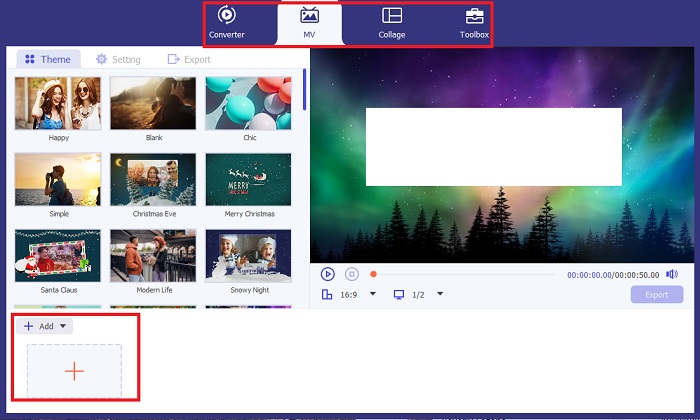
Next, go to the MV section of Video Converter Ultimate to access the video editor. From there, click the Plus button to import your raw footage and wait for it to load on the screen.
Step 3. Colorize Footage
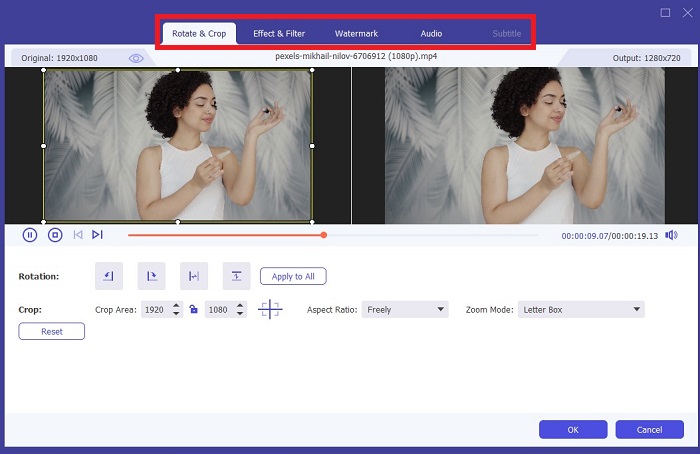
Após enviar seu arquivo, adicione os ajustes de cores arrastando a seta. Existem também filtros pré-determinados para adicionar um efeito instantâneo ao seu vídeo.
Step 4. Save the Output
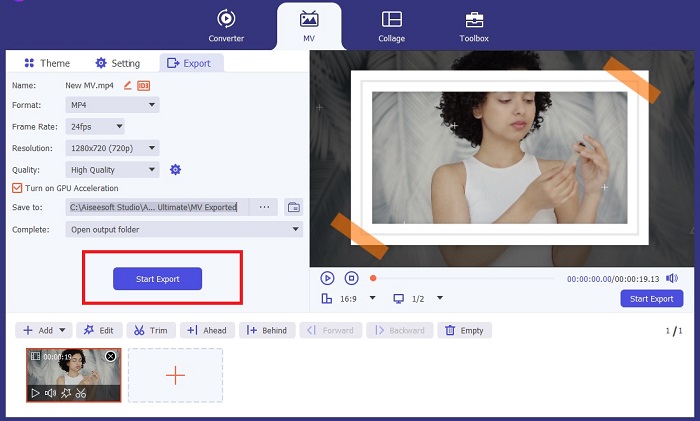
Once satisfied with your colorized video, hit the Export button to proceed with the final process. Next, change your file's fps, name, resolution, and format, and hit Start Export to save your output on your local file.
Parte 2. Colorir Vídeo Online Grátis
As ferramentas online são ótimas maneiras se você não tiver armazenamento para instalar programas offline. Usando a tecnologia de IA, seus vídeos ou fotos enfadonhos voltarão à vida instantaneamente. PickFrom é um vídeo colorido online gratuito que ajuda os usuários a adicionar matiz às suas filmagens usando um algoritmo de calibração de cores. Funciona na maioria dos navegadores da web, incluindo Opera, Chrome, Safari e Internet Explorer. Além disso, este programa é 100% por cento seguro e protegido, graças aos canais de criptografia de dados, para evitar invasão de dados.
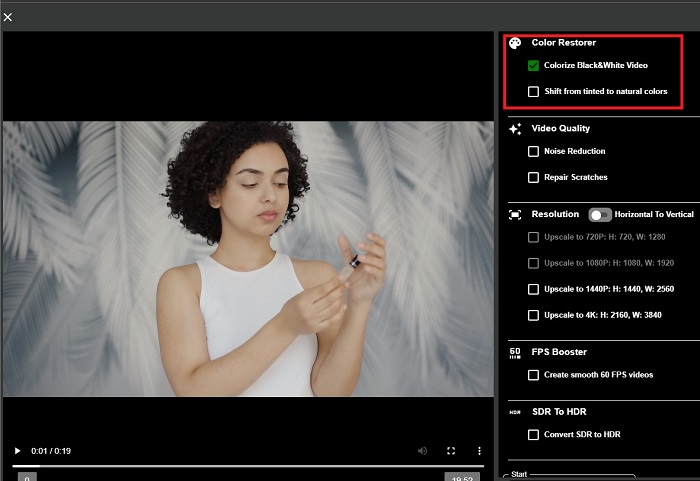
Step 1. First, grab your web browser and land on the site of PickFrom. Afterward, go to the Video Colorizer section and click Add Files to Upload your raw video.
Step 2. After uploading the video, the tool automatically presents the AI colorized video output. You can also drop down the Settings of Colorize Video tool and choose the resolution of your file between 780p and 1080p.
Step 3. Finally, choose the Output format of your file by expanding the Format tab. You may choose between MP4, AVI, and MKV. Once satisfied with your output, click the Start button to download your colorized black-and-white video.
Parte 3. Colorir Vídeo no Celular
Transforme suas imagens de maneira inteligente usando uma ferramenta de aplicativo desenvolvida pelo Google chamada Colorize! Como o nome sugere, este programa é uma excelente escolha para usuários de iOS e Android em termos de aplicação de cores em suas imagens obsoletas. Além disso, você pode maximizar o aplicativo de vídeo colorido em preto e branco adicionando filtros e efeitos especiais à sua saída e personalizando a taxa de seleção da sua saída. Aqui está um guia rápido para adicionar cor a vídeos em preto e branco com este aplicativo móvel.
Step 1. Click the Upload button on the program and choose the black and white file you need to fix.
Step 2. While uploading, the tool automatically applies color to your project, and the time will only depend on the length or size of it.
Step 3. Once the colorized photo appears, you can adjust the details on your photo by going to the Enhance section. You can adjust the hue, saturation, and vibrance of your photo. Afterward, tap the Download button to save the file on your device.
Further Reading:
Efficient Solutions to Brighten Video in Less than a Minute
5 Best Windows Video Editor with Professionals & Beginners Tips [2023]
Parte 4. Perguntas frequentes sobre o software AI Colorize Video
Como as pessoas colorem vídeos antigos?
Colorir vídeos e fotos em preto e branco agora é possível por meio de ferramentas de manipulação digital, como colorizador de vídeo ou editores de vídeo. Às vezes, você deve ajustar manualmente as configurações para atingir sua preferência ou usar um software de vídeo AI colorize.
É possível colorir vídeo em preto e branco?
Definitivamente sim! Corrigir o tom visual de sua filmagem é 100% possível hoje. A título de conselho, é melhor normalizar a cor dos seus vídeos antes de editá-los.
Por que preciso fazer a gradação de cores do vídeo?
A gradação de cores é um processo essencial que os cineastas devem executar ao finalizar sua produção. Com este processo, eles podem obter um tom de cor consistente para adicionar um efeito visual excepcional ao seu público.
Quanto tempo leva para colorir fotos e vídeos?
Contanto que você tenha as ferramentas certas em seu dispositivo, colorir fotos e vídeos antigos pode ser feito instantaneamente. Por outro lado, considere o tamanho e a duração do seu vídeo.
Meus vídeos coloridos são precisos?
O colorizador de vídeo oferece uma cor quase precisa do vídeo. Você também pode pedir orientação de especialistas para ajudá-lo a determinar qual é a cor original mapeando o vídeo.
Conclusão
And that's it! Now that you have learned the top 3 ways to colorize black and white video with offline, online, and mobile tools, the decision-making is not tough anymore. With an AI video colorizer, the tool will automatically add color to your videos. Still, it will not let you adjust the prominent color settings in offline solutions, like Video Converter Ultimate.
-
 Métodos sem problemas para converter imagens em preto e branco
 Você quer fazer suas fotos parecerem nostálgicas? Temos uma resposta para você. Esta postagem oferecerá maneiras notáveis de converter uma imagem colorida em preto e branco.
-
 Um guia passo a passo: o melhor impulsionador de 7 volumes disponível em todas as plataformas
 Quer conhecer os amplificadores de volume disponíveis no PC, Mac, Online, Android e iOS? Então leia este artigo com diferentes ferramentas que você pode escolher.
-
 Principais redimensionadores de vídeo do Instagram para otimizar seu conteúdo do Instagram
 Confira nosso guia para redimensionar vídeos para o Instagram. Aprenda como aprimorar seu conteúdo e aumentar o engajamento na plataforma de mídia social mais popular do mundo.
