


 Video Converter Ultimate
 Gravador de ecrã
 Reparo de vídeo
 Secure Download
Fácil e eficiente: corte vídeos online com os melhores editores de vídeo
Cropping a video involves removing unwanted parts of the footage to focus on a specific area or subject, adjust the aspect ratio, or remove any distractions. Traditionally, video cropping required specialized software and a steep learning curve, but with the rise of online video editing tools, anyone can now crop videos online with ease. In this article, we'll explore the best web app tools to crop videos online for free, and provide a step-by-step guide on how to crop videos online.

Parte 1. Tutorial online de corte de vídeo EZGIF
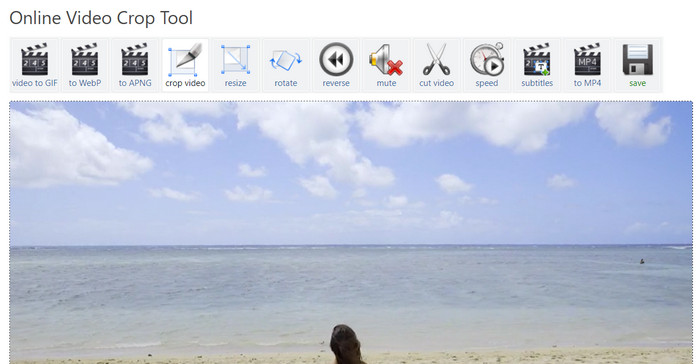
Step 1. Go to the Ezgif website (ezgif.com) and select the Video to GIF option from the main menu.
Step 2. Upload your video to the website by clicking on the Choose File button and selecting the video from your computer.
Step 3. Once the video is uploaded, select the Crop video option from the list of editing tools on the right-hand side of the screen.
Step 4. Adjust the crop box by dragging the edges to the desired size and position. Alternatively, EZGIF crop video online works with the help of the pre-designed aspect ratio. Click the Crop video! button to crop your video.
Step 5. Finally, click the Save button to download your cropped video.
Prós
- Várias opções de edição.
- Nenhum download de software é necessário.
- Amigo do usuário.
Contras
- A saída pode resultar em perda de qualidade.
- Limitações no tamanho do upload do vídeo.
- Conectividade com a Internet é necessária.
Parte 2. Passo a passo do Kapwing Video Resizer
Step 1. Go to the Kapwing website (kapwing.com) and select Get Started from the main page.
Select Crop Video from the list of editing tools on the left-hand side of the screen.
Step 2. Upload your video to the website by clicking on the Click to upload button and selecting the video from your computer.
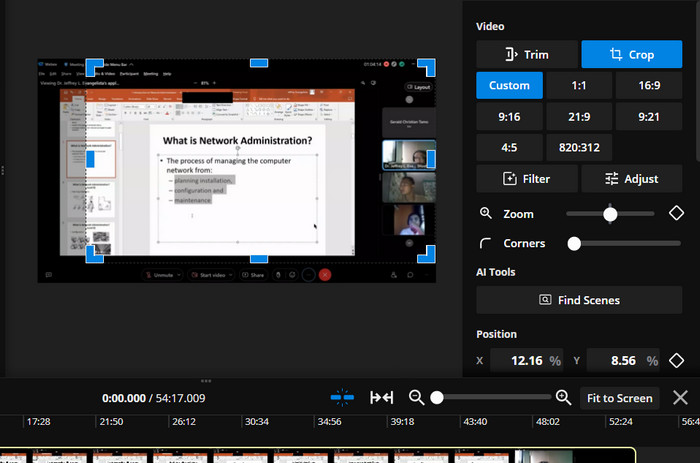
Step 3. Next, add the video to the timeline and select Crop on the right menu. Adjust the crop box by dragging the edges to the desired size and position. Use the Preview or Play button to see how your cropped video will look.
Step 4. Click the Export Project button to crop your video. Finally, click the Download button to save your cropped video to your computer. That is how to use this video resizer online.
Prós
- Tecnologia de alta compressão para saída de qualidade.
- Integração com plataformas de mídia social.
- Corte, redimensione e cortar vídeos on-line.
Contras
- Marca d'água no plano gratuito.
- Limitações no tamanho do arquivo de vídeo.
- Requer uma conexão com a internet.
Bônus: a melhor maneira off-line de recortar vídeos
FVC Video Converter Ultimate is an all-in-one software for editing videos that gives you full control over your videos. FVC Video Converter Ultimate is a must-have tool for anyone who wants to make professional-quality videos from their home or office. It can convert, edit, and burn videos very well. FVC Video Converter Ultimate can help you convert video files to different formats, crop, trim, or merge videos, or add subtitles or watermarks.
Além disso, esta alternativa de redimensionamento de vídeo EZGIF ou Kapwing suporta uma ampla variedade de formatos de vídeo e áudio, incluindo vídeos HD e 4K. Isso o torna a ferramenta perfeita para converter e editar todos os seus vídeos.
Step 1. Obtain the Software
The program can be obtained by clicking the Free Download icon below. Install and run it on your computer next.
Free DownloadFor Windows 7 or laterSecure Download
Free DownloadFor MacOS 10.7 or laterSecure Download
Step 2. Upload a video
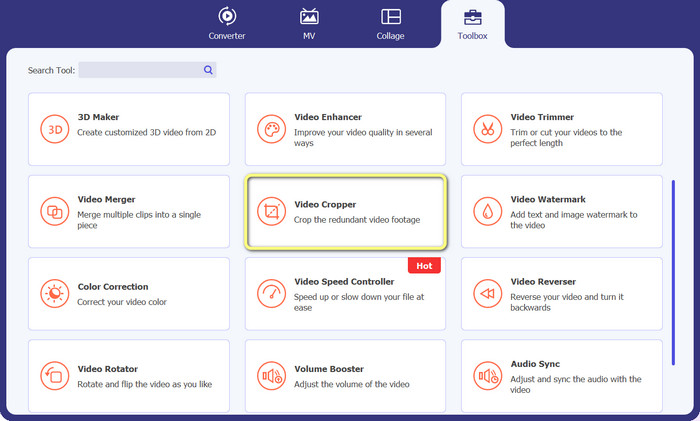
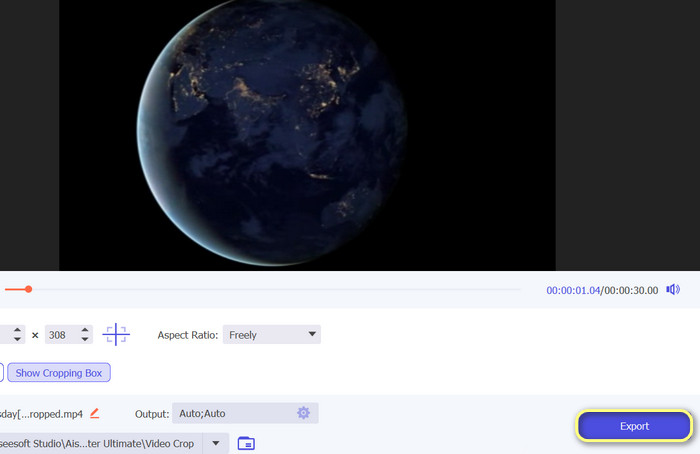
Under the Toolbox menu, locate the Video Cropper option. Then, click the plus sign and select the video from your PC's local storage.
Step 3. Crop the footage
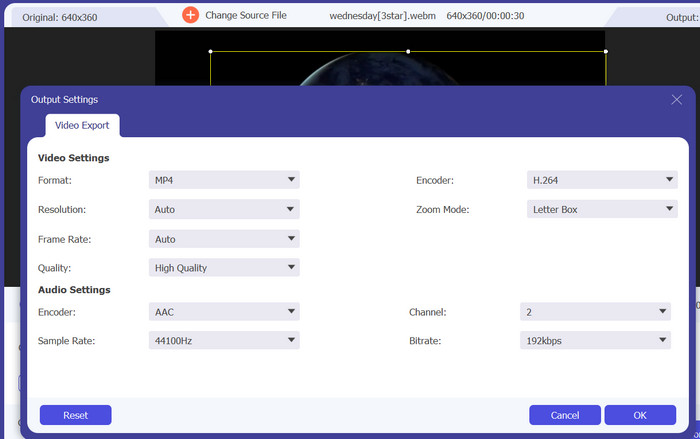
Crop the video by modifying the aspect ratio this time. Alternatively, you can adjust the aspect ratio by dragging the boundaries of the sliders. Then, the video and audio parameters are modified by selecting the Output menu.
Step 4. Export the video
To save the cropped video, press the Export button after reviewing the modifications in real time.
Parte 3. Perguntas frequentes sobre como recortar vídeos online
Posso recortar vídeos no meu dispositivo móvel?
Yes, many video editing apps for mobile devices allow you to crop videos. Some popular options include InShot, Adobe Premiere Rush, and VideoShow, which are great choices when you want to crop videos on Android.
Posso alterar a proporção dos vídeos online?
Para alterar a proporção de um vídeo on-line, geralmente você precisará enviar o vídeo para o editor de vídeo on-line, selecionar a proporção que deseja alterar e salvar o vídeo editado. Alguns editores de vídeo online também podem oferecer opções adicionais para ajustar a resolução do vídeo e cortar o vídeo para ajustá-lo à nova proporção.
Posso recortar um quadro de um vídeo online?
Sim, você pode cortar o quadro de um vídeo online usando várias ferramentas de edição de vídeo. Ao recortar o quadro de um vídeo, é importante ter em mente o tamanho final e a resolução do vídeo que você deseja obter. Cortar muito do quadro pode resultar em uma resolução mais baixa e um tamanho de vídeo final menor, enquanto cortar muito pouco pode resultar em barras pretas ou elementos indesejados no vídeo.
Conclusão
Cropping videos online has never been more accessible and easier, with the availability of various video editing tools that offer this feature. Now, you can effectively and efficiently resize videos online. Whether you want to remove unwanted parts of the video's frame, adjust the aspect ratio, or create a new video with a smaller frame size, many online video editors can help you achieve your goals.
-
 Edite como um profissional: como cortar seus vídeos do iPhone sem esforço
 Se você'está procurando levar suas habilidades de edição de vídeo do iPhone para o próximo nível, os aplicativos de corte de vídeo são uma virada de jogo. Abordaremos alguns dos melhores aplicativos de corte de vídeo para iPhone.
-
 Como cortar um vídeo no Snapchat para criar um snap perfeito
 Transforme suas histórias ou vídeos do Snapchat com técnicas especializadas de corte de vídeo. Este guia ensinará como cortar vídeos no Snapchat para obter o máximo impacto.
-
 [4 maneiras] Como acelerar facilmente seus vídeos online
 Quer acelerar um vídeo online? Leia este artigo para saber mais sobre como acelerar um vídeo das diferentes maneiras possíveis.
