


 Video Converter Ultimate
 Gravador de ecrã
 Reparo de vídeo
Como diminuir a resolução de um vídeo no Windows, Mac e telefones celulares
Videos on 1080 and 720 HD have the best resolution you would love to use, especially watching. Although these resolutions are best, sooner or later, you will need to convert the video resolution into less to save some space on your drive. But the question is how to convert the video resolution to lower it? This article will identify the leading video resolution converter to lower the video resolution on Windows, Mac, Online, Android, & iPhone.

Parte 1. Por que você precisa diminuir a resolução de vídeo
Como preparação antes de diminuirmos a resolução de vídeo, primeiro vamos determinar a causa pela qual precisamos alterar para diminuir a resolução de um vídeo. As informações que fornecemos abaixo são a instância mais comum que você precisará para reduzir a resolução.
Motivo 1. Não suportado em dispositivos móveis
Alguns dispositivos móveis não suportam uma resolução de vídeo mais alta porque seu celular não a reconhece. Às vezes, achávamos que o vídeo não abria por causa da compatibilidade de formato, mas esse é outro motivo. Se você deseja reproduzir o vídeo, deve ter em mente a resolução do vídeo que salvou em seu telefone.
Razão 2. Reserve um tempo para carregar o arquivo em um media player
Todo reprodutor de mídia pode reproduzir seu vídeo na resolução mais alta possível, mas nem todos podem carregar o vídeo com alta qualidade imediatamente. Embora assistir a um vídeo com alta resolução seja mais agradável do que assistir a um menor. Aprender a diminuir a resolução de um vídeo é essencial se você quiser assistir ao vídeo instantaneamente com pouca ou menos carga no media player.
Razão 3. Vídeo com alta qualidade ocupa muito espaço
Esta razão não é nova para nós; é mais provável que um vídeo com alta qualidade tenha um tamanho de arquivo enorme. Devido à saída de alta qualidade, você deve esperar que o tamanho do arquivo seja grande. Por exemplo, 720 e 1080 são algumas das melhores qualidades, mas o tamanho do arquivo de 720 vídeos é muito menor do que 1080 vídeos. Por outro lado, a resolução de 1080 é muito superior a 720.
Agora que temos a ideia de por que precisamos reduzir a resolução do vídeo, as informações a seguir ensinarão a você os diferentes conjuntos de ferramentas que você pode usar para reduzir a resolução do seu vídeo. Mantenha a bola rolando para ter uma ideia abrangente sobre isso.
Parte 2. Maneira mais fácil de reduzir a resolução de vídeo no desktop
If you need a user-friendly video converter that can help you quickly change the video resolution, then Video Converter Ultimate will offer this to you. This tool supports 200+ formats with different presets you can choose from. Want to know what impressed us about this converter? With this tool, you can create presets that can go up to 4k or as low as 360 resolution. Moreover, you don't need to be a professional video editor to learn how to convert video to a lower resolution; by following the steps below, you can convert resolution successfully.
Step 1. Kindly click the appropriate button to get the version you are currently using, whether Windows or Mac. Open the download file to install the software follow the installation process to install it properly. After installation, open the Video Converter Ultimate and proceed to the next step.
Free DownloadFor Windows 7 or laterSecure Download
Free DownloadFor MacOS 10.7 or laterSecure Download
Step 2. Upload the video with the highest resolution by dragging and dropping it on the tool's interface. But you can click the + button to open the folder, locate the file and click Open to upload the video.
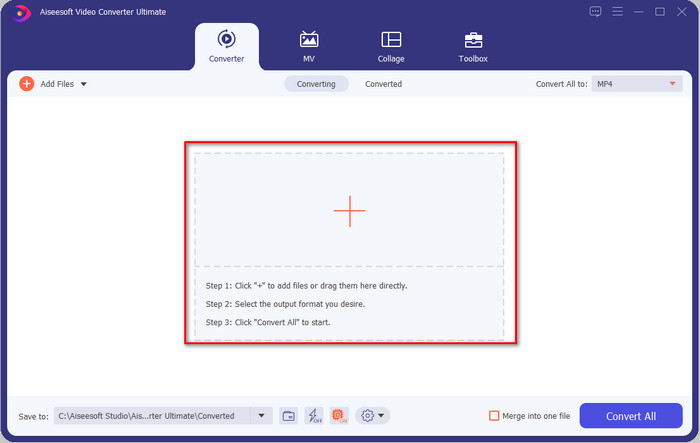
Step 3. Click Convert All to, and a setlist of the premade format will show. You can select different formats such as MP4, MOV, AVI, MKV, and 200+ more with different resolutions, click the format you want, and proceed.
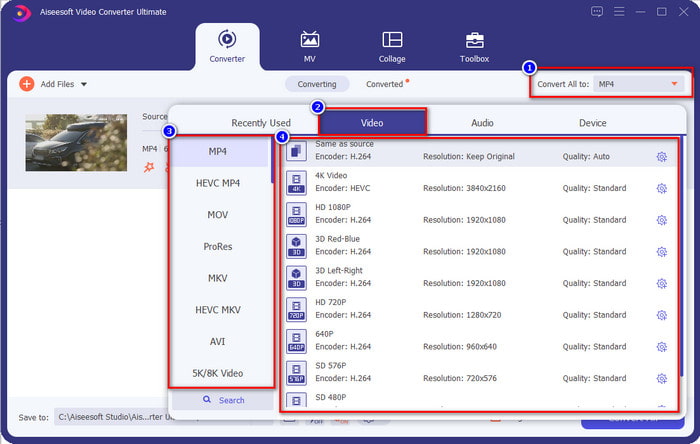
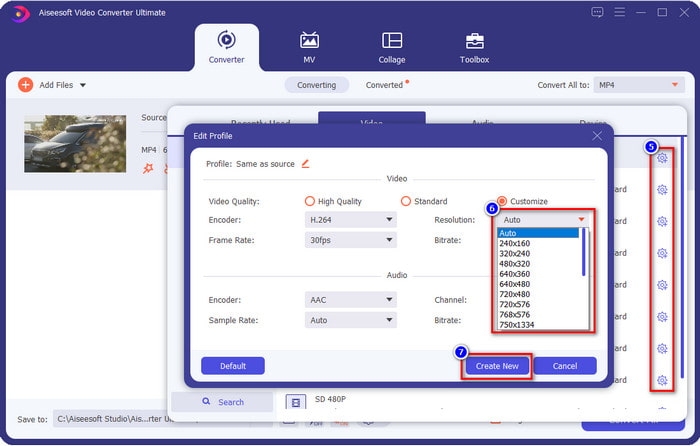
What if the resolution you want to achieve is not on the pre-made list? No need to worry; you can create your resolution. After clicking the Convert All to, choose the format you want and click the gear with a plus icon. Click the drop-down button, select the resolution you want, click Create New, and click the preset you've made.
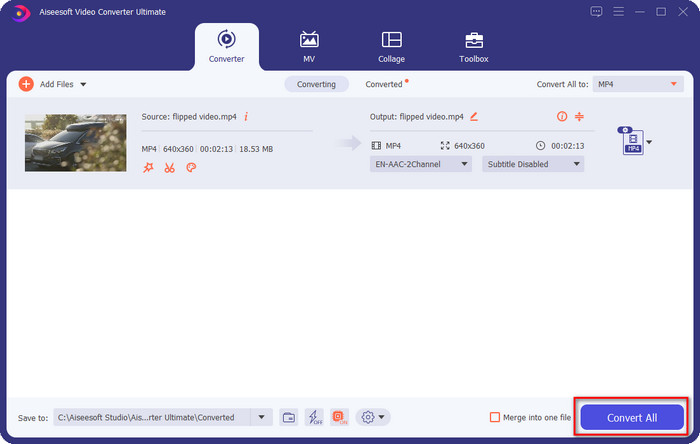
Step 4. To start lowering your video resolution, hit the Convert All button. With the ultra-fast conversion, the download will take less than a minute. And voila, the resolution of your video is now lowered, all thanks to the ultimate tool.
Parte 3. Maneira Gratuita de Converter Resolução de Vídeo para Resolução Mais Baixa na Web
If you are looking for a way to convert HD video to lower resolution online, then you can use the FVC Free Video Converter Online as a solution. This web tool supports numerous formats you can upload and export into. Unlike the ultimate tool, you won't need to download this tool to convert the high-resolution video into a lower one. However, the tool doesn't have an ultra-fast converting process, and the supported format is not as many as the ultimate tool. So, if you want to try and use this web tool, you can follow the steps below.
Step 1. To go to the main webpage of FVC Free Video Converter Online, click this link.
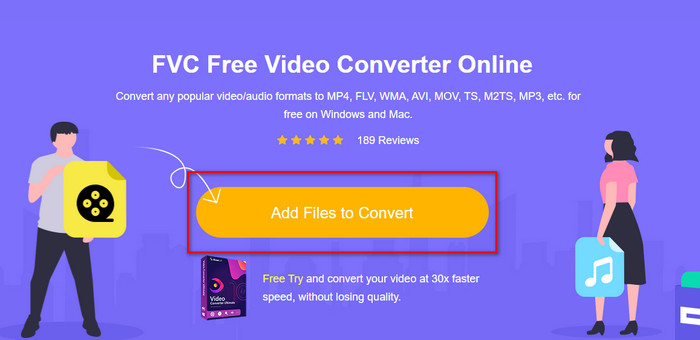
Step 2. Press Add Files to Convert to upload the video you want to lower the resolution. Additionally, if this is your first time using the tool, you must download the launcher. After that, click the Add Files to Convert again to upload the file.
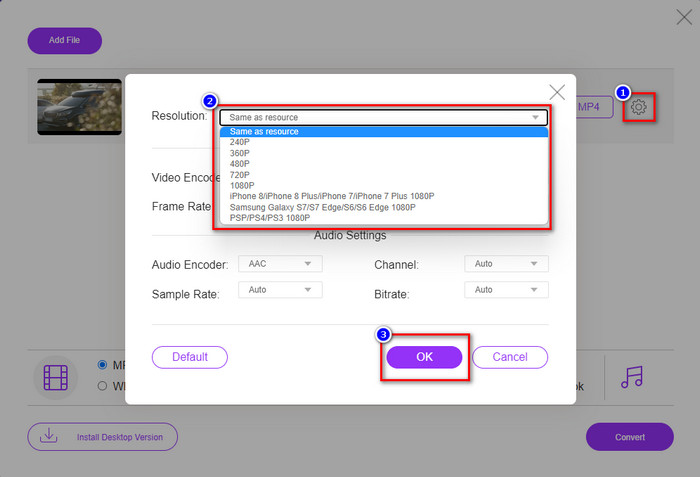
Step 3. Click the gear icon on the right side of the window that will show. Choose the resolution you want by clicking the drop-down button and pressing OK to save.
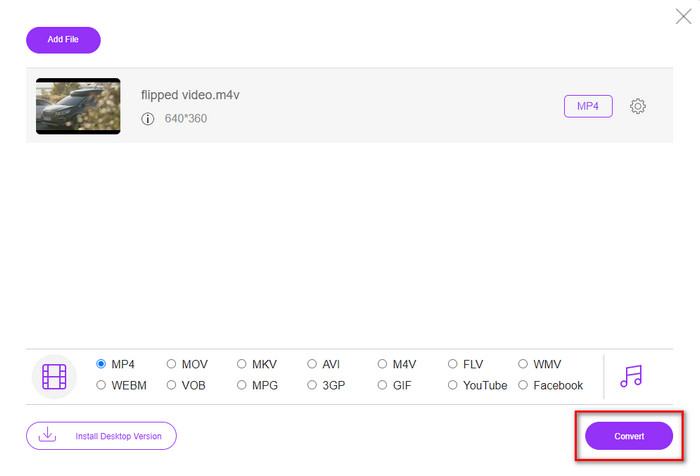
Step 4. To export the lower-quality video, click Convert and wait to download it on your drive.
Parte 4. 2 melhores aplicativos para reduzir a resolução de vídeo no iPhone e Android
Fábrica de formatos de vídeo (somente para usuários do Android)
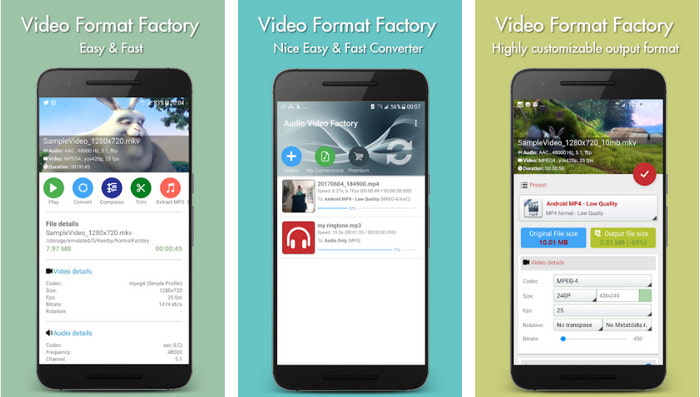
Se você precisa aprender a reduzir a resolução de vídeo no Android, o Audio Video Factory pode ajudá-lo. Com este aplicativo, você pode converter facilmente a resolução de vídeo do seu vídeo gratuitamente. No entanto, alguns anúncios serão exibidos durante a conversão e você não poderá usar todo o potencial da ferramenta se não comprá-la. Então, para ensiná-lo a usá-lo, siga os passos.
Step 1. Download the app on Playstore, then open it.
Step 2. Click Add to upload the video, choose where your video is, and click the video. After that, click Convert; click the Size and choose the resolution you want.
Step 3. Scroll up and click Convert Now to begin the process.
Câmera de baixa resolução muito baixa (somente para usuários de iOS)
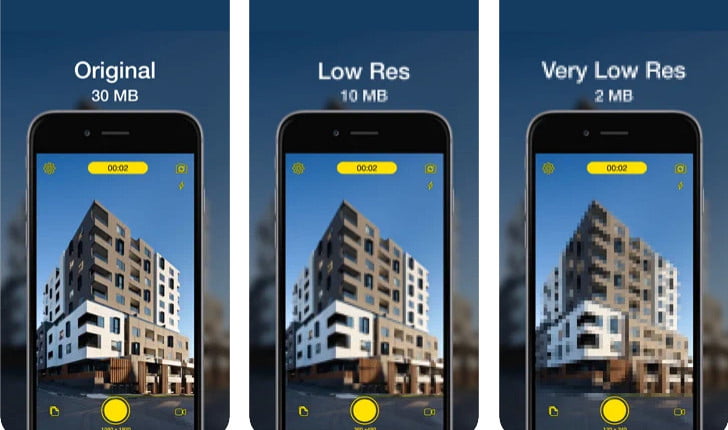
If you are an iOS user, you can still learn how to reduce the resolution of the video on the iPhone by using the Lower- Very Low Res Camera. Unlike the tools in this list, you can shoot a video with a lower resolution if you download this app on the App Store. However, the tools have some limitations, and it has pop-up ads while using the app.
Step 1. Download the app on the App Store, then click it to open.
Step 2. Click the file's icon and select the video you want to convert; after clicking the video, press Resize.
Step 3. Select the Recording Quality, and the process of converting it will begin.
Parte 5. Perguntas frequentes sobre como diminuir a resolução de vídeo
O VLC suporta resolução 4k?
Yes, VLC 3.0 supports playing videos that are on 4k resolution. But did you know there are many things VLC can do? If you want to explore VLC more, click this link and learn about VLC and its other perfect alternatives to use.
Quais são as outras ferramentas que posso usar para converter a resolução de vídeo?
This review will learn the 8 of the best video resolution converters you can use on different platforms. By clicking this link, you will have more detailed information and different varieties of converter choices.
Qual é a resolução de vídeo mais alta que posso ter?
A resolução de vídeo de 8k é a resolução de vídeo mais alta que você pode usar na TV. Esta resolução é 4x mais nítida que a 4k e 16 vezes melhor que a 1080.
Conclusão
Finally, we now have a clearer idea on how to lower the video resolution in your platform; whether you are using a Windows, Mac, Online, Android, or iPhone, you can use the converters in this list. But if you want a tool that can change your resolution without reducing the quality, we recommend using the FVC Video Converter Ultimate. As we present above, there are many reasons you should use this tool, and if you still do not believe us, you can download the tool and try if it works, as we explain in this post.
-
 Ultimate Guide Como alterar a resolução de vídeo disponível em plataformas cruzadas
 Precisa alterar a resolução de vídeo do vídeo? Em caso afirmativo, aprenda as diferentes maneiras de alterar facilmente a resolução do vídeo que você está assistindo.
-
 Os 8 principais conversores de resolução de vídeo para uso em multiplataformas [atualizado em 2022]
 Você não tem idéia do melhor conversor de resolução de vídeo no seu dispositivo? Em caso afirmativo, você pode ler este artigo na íntegra para saber mais sobre os conversores de vídeo disponíveis.
-
 Melhor player de vídeo HD 1080p para Windows / Mac / iOS / Android em 2021
 Se você está procurando um player de vídeo para assistir a vídeos de alta definição 1080p em seu computador, verifique nossas opções dos melhores players de vídeo HD 1080p para Mac, Windows PC, iOS e Android.
