


 Video Converter Ultimate
 Gravador de ecrã
 Reparo de vídeo
Revisão sobre a importância do ID3 Tag Editor em 2022
Songs that you've downloaded on music websites do have metadata or known as ID3 tags. Usually, all the information you need about that song is in the tag information. On some occasions, the music doesn't come with tags or has wrong information. In this type of situation, you will need to use software that can help you easily handle the task. In this situation, we are gladly present to you the best ID3 tag editor you can download on your Windows, Mac, iOS, and Android to edit the tags on your songs.

Parte 1. O que é a etiqueta ID3
ID3 tags are essential for every user who want to know more about the song in-detailed information. A great example of tags that you can see without viewing the exact tags is the name of the artist and the title of the song. Although we didn't add it to the audio file, it is still embedded to help us know if we play the correct music accordingly.
No entanto, se você não tiver uma tag em suas músicas ou podcast, há uma chance de que os arquivos sejam codificados por toda a biblioteca ou pasta em que estão armazenados. Adicionar as tags em seu arquivo pode ajudá-lo a determinar o arquivo e organizá-lo para parecer organizado. Se o seu arquivo não tiver um, você deverá adicionar dados. Mantenha a bola rolando para ajudá-lo a procurar o editor de tags ID3 que você deve usar e que atenda às suas necessidades.
Mas antes de começar, prepare os metadados que deseja adicionar ao seu arquivo de áudio; estes incluem título, autor, capítulo, páginas, comentários, letras e tal. Depois de ler isso, você ficará surpreso com nossa análise sobre os principais editores de tags que você pode usar em todos os dispositivos.
Parte 2. Melhor editor de tags ID3 no Windows/Mac para alterar metadados facilmente
FVC Video Converter Ultimate – Melhor editor de tags ID3
One of the common knowledge you should know on selecting an ID3 tag editor on Mac or Windows is that it should be on-point, user-friendly, and accessible; all of these can be found on FVC Video Converter Ultimate. It is known as the first-class metadata editor that is easy to handle even the users don't know how to adjust them correctly. Unlike any other tag editor, you wouldn't need to do many complicated things to add or fix your audio or video tags. So, if you are new in this area of editing or fixing the ID3 tags, then without a doubt that this is your one-stop software.
Além disso, não o chamamos de editor único sem motivo; talvez você pense por quê. Se explorarmos mais a ferramenta, você verá que pode fazer edição de vídeo avançada e básica aqui para tornar seu vídeo excelente adicionando efeitos e filtros. Ainda existem muitos recursos não mencionados que você pode revelar se baixar a ferramenta. Mas hoje, vamos nos concentrar em usar este software de edição de tags ID3 para ajudá-lo a editar e corrigir rapidamente as tags de suas músicas.
Step 1. First, download the software on your selected operating system; there are two options available Windows and Mac. Next is to install it correctly, follow the set-up process, then open the tool once you've done all of this.
Free DownloadFor Windows 7 or laterSecure Download
Free DownloadFor MacOS 10.7 or laterSecure Download
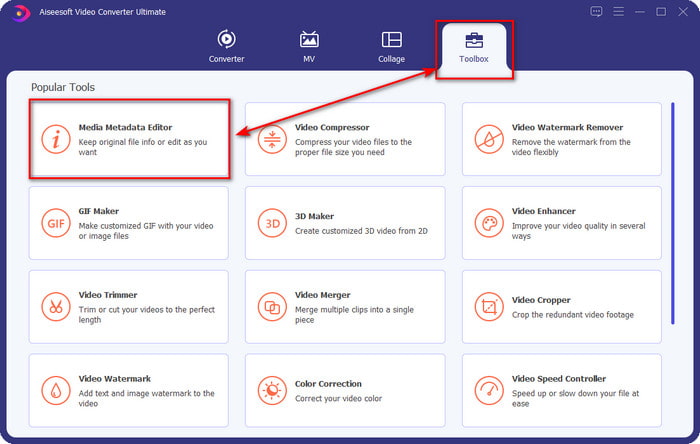
Step 2. Once you've opened the tool, you must proceed to the Toolbox section and open the Media Metadata Editor by clicking it.
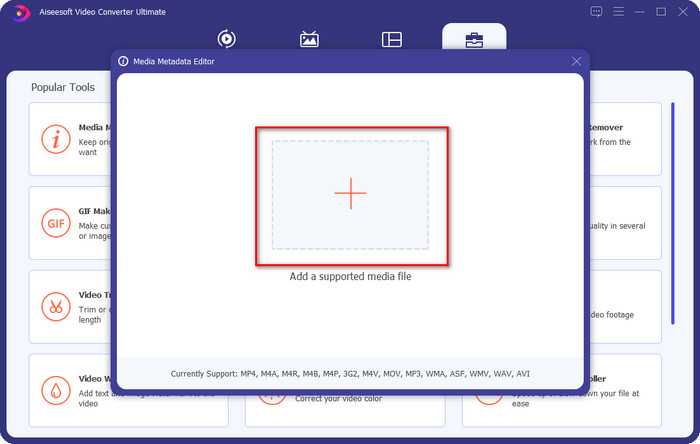
Step 3. Press the + icon on the new window that will show on your screen, select the audio file you want to change the ID3 tags, press Open to upload it.
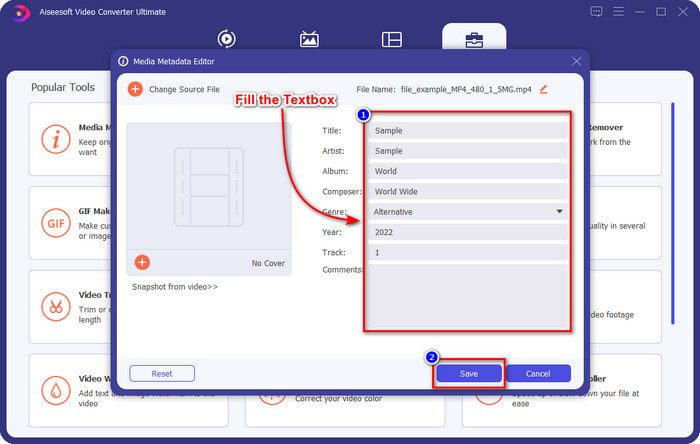
Step 4. You can now type the information you want to add to your audio file and click Save if you are done on each textbox. As easy as that, you have now added tags on the audio file with the assistance of this software.
Prós
- Ele suporta a alteração de MP3, WMA, WAV e mais de 1000 metadados sem esforço.
- A conversão ultrarrápida e a aceleração de hardware são suportadas para um processo de velocidade relâmpago.
- Os recursos de edição de vídeo primários e avançados estão disponíveis no Toolbox.
- É a primeira escolha de milhões de usuários em todo o mundo para assumir essa tarefa.
Contras
- A compra da ferramenta é necessária para ter todos os recursos de edição sofisticados.
- Não disponível para Android e iOS.
VLC Media Player
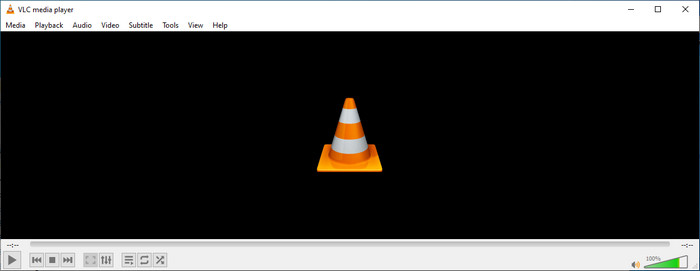
VLC Media Player is a top-notch media player you can download on Windows and Mac. This tool can help you play the video without downloading any codecs on your system, but you can use this as well to edit the ID3 tags of your audio file. Although the tool isn't a dedicated metadata editor, it can still fix the incorrect tags. So, if you have this tool, you can easily adjust the metadata of your song, but don't expect too much on the tool because it is not as good as the first-class iD3 tag editor on a desktop.
Prós
- Um media player e editor de metadados que você pode usar em qualquer dispositivo.
- Ele suporta um formato de mídia médio para alterar as tags.
- GUI é pura e simples.
Contras
- Não é um editor de metadados profissional.
- Suporta funções limitadas relacionadas à edição de tags.
Parte 3. Os 3 principais editores de tags ID3 em dispositivos móveis iOS/Android
Editor de tags de música estrela
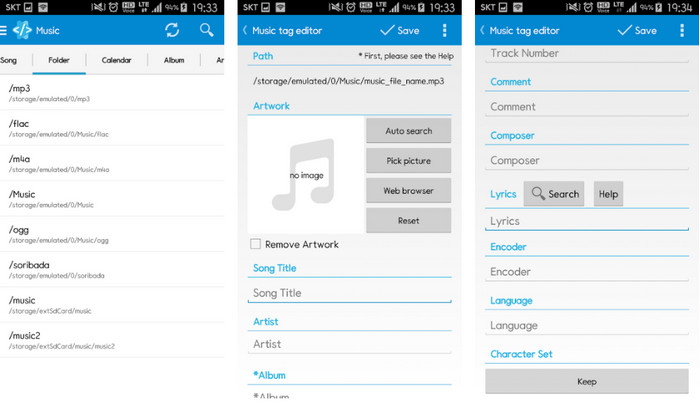
Star Music Tag Editor is one of the most used iD3 tag editors on Android. This app can show you different information on your music, and you can change them if you need to. Its GUI is straightforward, so you can easily learn how to use it even if you aren't familiar with using a tool for editing tags. Even though the app is excellent, it still has some flaws in adding metadata, especially on the album cover. Although problems may occur, it is still a dependable tag editor you can download on your Android phone.
Prós
- Gratuito para baixar o editor de metadados no Android.
- GUI é simples e fácil de entender.
- Adicione as tags no arquivo de áudio facilmente.
Contras
- Ele tem um problema ao adicionar uma capa de imagem no arquivo de áudio.
- Às vezes, os bugs ainda estão acontecendo.
Leitor de música de nuvens para nuvens
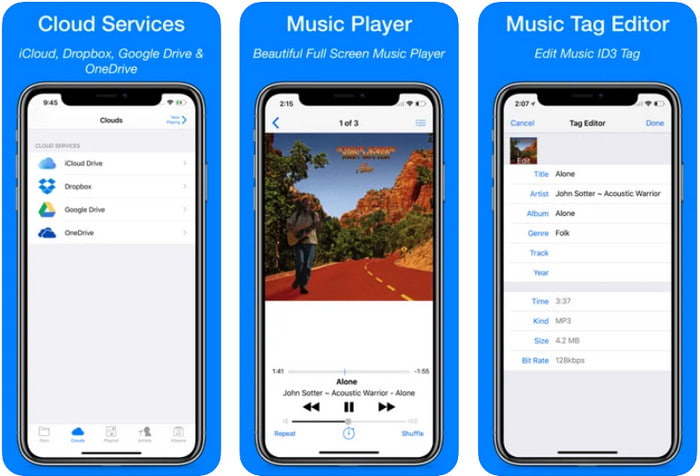
Clouds Music Player for Clouds is a multipurpose app you can download on your iOS devices. It can edit id3 tags on iPhone, play music, and create a ringtone out of the music. With its features, its GUI is plain and simple, and you can access your cloud service through the app. Even with its user-friendly interface, some information you can add as metadata on your audio file is insufficient, which means only the basic tags are available to edit. Nevertheless, it is excellent to download if you are an iOS user.
Prós
- Disponível em qualquer dispositivo iOS para download.
- Editor de música multifuncional e editor de tags.
- Editor de metadados intuitivo no iOS.
Contras
- Ele não suporta a adição de mais metadados.
- Erros e problemas de alteração de metadados estão acontecendo, mas não com frequência.
Dash- Aplicativo de entretenimento
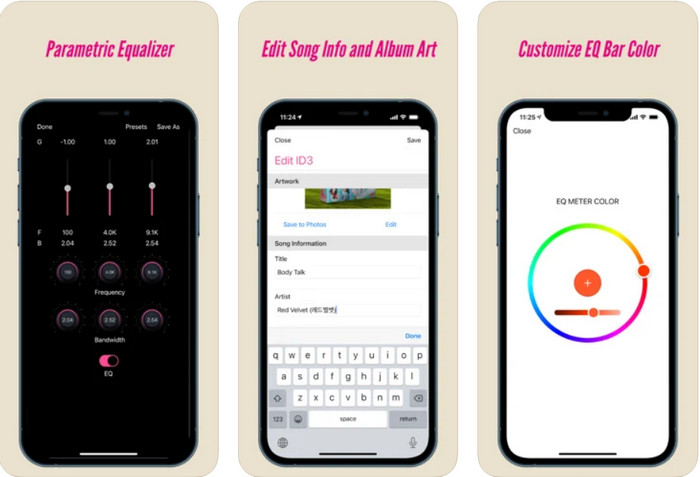
Dash- Infotainment App is another tool you can download and edit ID3 tags on iPhone whether you need one. There isn't much learning you'll need before using the app with its simple and streamlined user interface. You can use this tool to change the parameters of your FLAC and ALAC easily with its easy-to-use equalizer. Also, you can see the speed and compass of the song you upload here. Same as the first iPhone tag editor, you can only add title, artist, and album art here, but remember that your format must be FLAC or ALAC only; if it isn't in this format, then you can't upload it.
Prós
- A curva de aprendizado não é tão rígida.
- Um equalizador de áudio multitudinário está disponível.
- GUI não é muito, e não é menos.
Contras
- Ele suporta apenas o formato FLAC e ALAC.
- Não há muito a oferecer em relação à edição de metadados.
Parte 4. Perguntas frequentes sobre o ID3 Tag Editor
Qual é o melhor editor de tags ID3 de linha de comando que posso usar?
If you are looking for a command-line ID3 tag editor, you must know that FFmpeg is a command-line editor. With this tool, you can convert, rotate, cut, trim, and edit your metadata tags. If you want to know more about FFmpeg, you might want to read how to use it by clicking the link to edit FFmpeg metadata easily.
Quais são os outros tipos de metadados?
There are six metadata types: descriptive, administrative, reference or explanatory, statistical, legal, and structural metadata. If you want to know more about these types and their information, you can click this link and read more about them.
É possível visualizar tags sem um aplicativo?
Yes, instead of downloading software, you can use an online tool to view your file's tags. Click on this link to view metadata on your desktop online, but we will also introduce some tools that you would love to download.
Conclusão
Com as informações que listamos acima, tornou-se possível editar as tags ID3 usando os editores que apresentamos acima, independentemente do dispositivo que você está usando no momento. Além disso, o aplicativo e o software são perfeitos para usuários que precisam editar seus metadados. Mesmo que as ferramentas abram uma excelente oportunidade para os usuários editarem os metadados, ainda não há dúvida de que a ferramenta final apresenta uma maneira eficaz de editar tags ID3 em qualquer arquivo de música. Se você deseja ter o melhor editor de tags ID3 no Windows e Mac, pode baixá-lo diretamente clicando no botão de download apresentado acima e aproveitar sua grandeza.
-
 2 melhores maneiras de editar metadados OGG que você deve experimentar gratuitamente
 Precisa editar metadados OGG? Bem, você pode facilmente editar as tags usando o software correto. Se você não tiver um, a leitura deste artigo é obrigatória.
-
 Uma visão geral absoluta sobre o Pentaho Metadata Editor [Atualizado em 2022]
 Não encontra um artigo confiável sobre o Pentaho Metadata Editor? Felizmente, nós mesmos revisamos a ferramenta para fornecer os fatos que você saberá sobre a ferramenta.
-
 Dicas e truques sobre o editor de metadados VLC que você deve conhecer em 2022
 Deseja usar o VLC como editor de metadados? Nesse caso, você pode ler este artigo, pois fornecemos uma revisão imparcial do editor de metadados do VLC.
