


 Video Converter Ultimate
 Gravador de ecrã
 Reparo de vídeo
 Secure Download
2 métodos eficientes para mesclar arquivos WebM sem perder qualidade
Como mesclar arquivos WebM? Quando você baixa uma série de vídeos enviados de outras pessoas online e deseja reproduzi-los continuamente para ter uma melhor experiência de visualização, você pode considerar a possibilidade de mesclar esses vídeos WebM em um. No entanto, por causa de sua alta qualidade e tamanho pequeno, é melhor juntar os arquivos WebM ao MKV para manter a alta qualidade em um tamanho relativamente pequeno. Portanto, existem duas maneiras eficientes de ajudá-lo a mesclar o WebM como arquivos MKV.

Parte 1: Como mesclar arquivos WebM gratuitamente online sem perdas
FVC Free Online Video Merger is a versatile joiner to combine any format file including merging WebM files free online. You don’t need to download the software, so you can just upload your WebM files on the browser and merge them in several clicks.
- 1. Cliques simples para mesclar qualquer quantidade de arquivos de vídeo WebM em um online totalmente gratuito.
- 2. Suporte para exportar formatos de vídeo mais populares, incluindo o formato MKV com alta qualidade.
- 3. Sem marca d'água para carregar diretamente os vídeos no YouTube, Facebook ou outras plataformas.
- 4. Exclua permanentemente os arquivos carregados em 24 horas para proteger sua privacidade.
Step 1: Navigate to FVC Free Online Joiner and follow the guide to install the plugin in a few seconds. Then click the Upload the Videos to Merge button to choose one of the desired WebM video files.

Step 2: Click the plus icon to add other WebM video files you want to merge. And you should add these videos in the order you want. Then choose the MKV format and the 1920*1080 Resolution to keep the high quality of videos.

Step 3: Click the Merge Now button and after choosing the local folder, it will start merging WebM video files automatically.
Parte 2: A maneira mais profissional de juntar arquivos WebM para criar um novo
The free online joiner can help you to combine WebM videos easily. But if you want to merge some parts of the WebM files together to create a new one, you should use the professional tool – Video Converter Ultimate that can not only join WebM files but also edit the videos before merging.
- 1. Junte os arquivos de vídeo WebM em um com vários formatos, incluindo MKV.
- 2. Capaz de preservar a qualidade original dos vídeos WebM, incluindo 1080p HD e 4K.
- 3. Ferramentas de edição fáceis de usar para recortar os vídeos, adicionar filtros, ajustar efeitos de vídeo e dividir vídeos.
- 4. Velocidade de fusão rápida para combinar vários arquivos de vídeo WebM em poucos minutos.
Free DownloadFor Windows 7 or laterSecure Download
Free DownloadFor MacOS 10.7 or laterSecure Download
Step 1: Download Video Converter Ultimate and launch it. Click the Add Files button at the top left corner to choose all the WebM files you want to merge.

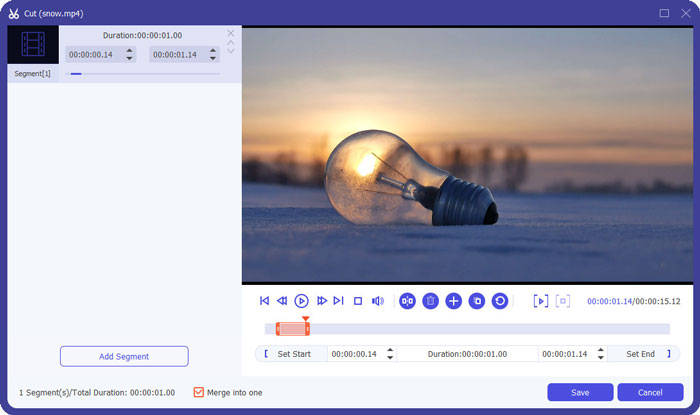
Step 2: Click the Cut button to clip every video one by one. Pull the timeline or input the exact time point to select the needed parts. Then click the Save button to remain the settings.
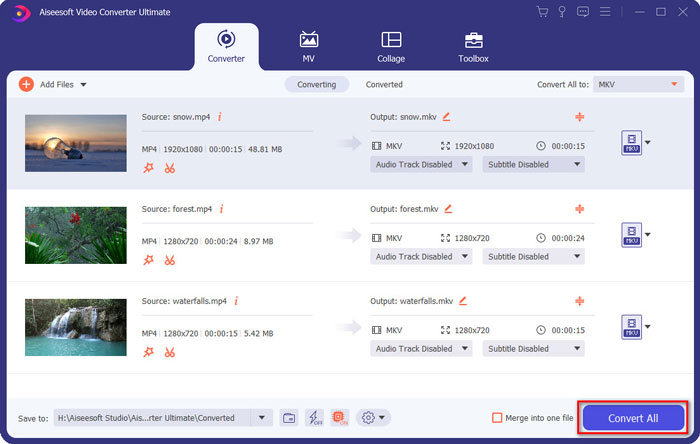
Step 3: Click the Convert All to > Video > MKV button and choose the Same as Source button. Although it will enlarge a little size of the WebM files, the quality is as same as the original videos.

Step 4: After choosing the storage path, tick the Merge into one file and click the Convert All button to save.
You May Also Want to Know: How to Merge Videos on iPhone.
Parte 3: Perguntas frequentes sobre como ingressar em arquivos WebM
1. O que é WebM?
WebM é um tipo de formato de vídeo proposto pelo Google. E os vídeos WebM são sempre usados no site porque podem ser reproduzidos fluentemente em quase todos os navegadores, incluindo Google Chrome, Firefox e assim por diante, com alta qualidade e tamanho pequeno.
2.A fusão de arquivos WebM reduzirá a qualidade do vídeo?
Sim, será, especialmente quando você mesclar vários arquivos WebM em um arquivo WebM. A melhor maneira de manter a qualidade original é juntar os arquivos de vídeo WebM como arquivos MKV.
3. Posso manter o formato WebM depois de combinar os arquivos de vídeo WebM?
Yes, you can. But it’s better to convert the format to MKV, which is the prototype of WebM. That because although WebM can keep high quality with small size, MKV format is used more frequently than WebM. But if you want, you can also convert WebM to MP4.
Conclusão
Quando você deseja mesclar arquivos de vídeo WebM baixados no site para ter uma experiência de visualização mais fluente, a maneira mais fácil é usar um joiner de vídeo online gratuito para ajudá-lo. No entanto, se você deseja criar um novo vídeo mesclando arquivos de vídeo WebM, você precisa cortar as partes necessárias antes de ingressar. Neste caso, baixe o conversor de vídeo profissional - Video Converter Ultimate para recortar e mesclar arquivos WebM ao mesmo tempo.
-
 Os 5 melhores jogadores WebM para Android / iPhone / Windows / Mac
 Se quiser reproduzir um WebM com sucesso em seu dispositivo, você deve aprender mais sobre os 5 melhores reprodutores WebM para Android, iPhone, Windows, Mac neste artigo.
-
 Compactar WebM - Como compactar arquivo WebM online
 Como comprimir arquivo WebM online? Qual é a maneira mais rápida de compactar arquivos grandes? Esta postagem mostra 2 maneiras gratuitas de compactar o WebM.
-
 MP4 to WebM Converter - 4 melhores métodos para converter MP4 para WebM
 Quando você deseja converter MP4 em WebM gratuitamente, você pode aprender mais sobre os 4 métodos usados com mais frequência para obter os vídeos desejados gratuitamente a partir do artigo.
