


 Video Converter Ultimate
 Gravador de ecrã
 Reparo de vídeo
 Secure Download
Como tornar o vídeo em preto e branco: crie efeitos de filtros
Cinematographers can modify the way a film will look by using filters. There are a lot of filters in many kinds of applications, but the black-and-white filter is always present. Making your video black and white sets a mood, for it can show a scene of the past, sadness, nostalgia, and many emotions that colored images or videos cannot bring. But how can you make a video black and white? With the right tools in your hand, it will be a possible thing to do. Stay on this post and we will teach you how.

Parte 1. Como adiciono filtro preto e branco
A web-based multimedia converter tool called. Video Converter Ultimate converts practically all popular video and audio files to the output format of your choice. This online tool is more capable than it initially appears because it allows users to edit videos with valuable tools, including filters, and perform other converting tasks. However, this program is unavailable on the Play Store or App Store. Below is an efficient way on how to add black and white filters to video with Video Converter Ultimate.
Step 1. Install the Video Converter Ultimate
Clique no ícone abaixo para baixar a ferramenta para o seu computador Windows ou Mac. Siga as etapas fáceis de seguir para concluir a instalação da ferramenta e inicie-a.
Free DownloadFor Windows 7 or laterSecure Download
Free DownloadFor MacOS 10.7 or laterSecure Download
Step 2. Attach the Video Files
By selecting the Plus button or Add Files, you can import the video file you want to apply a filter on. Click Open after selecting the video file you wish to upload. Additionally, if you want to, you can insert numerous video files; in other words, there is no restriction on the number of videos it can filter.
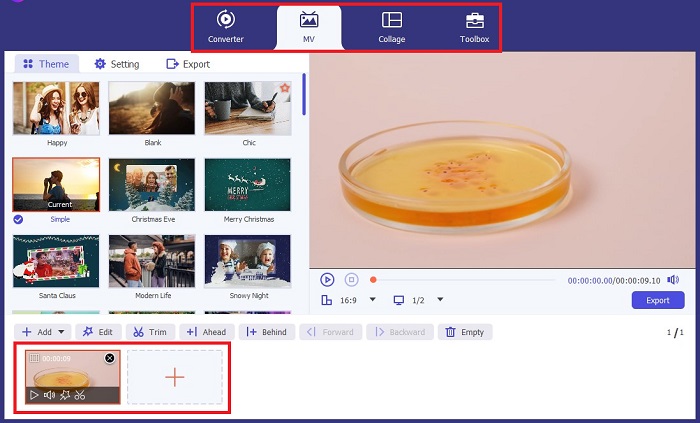
Step 3. Access Filters & Effects
By selecting the Wand button, you can launch a new window to customize the video. To apply a black and white filter, click Filters & Effects, then select black and white. Also, the FVC Video Converter Ultimate allows you to control your project's hue, saturation, brightness, and contrast.
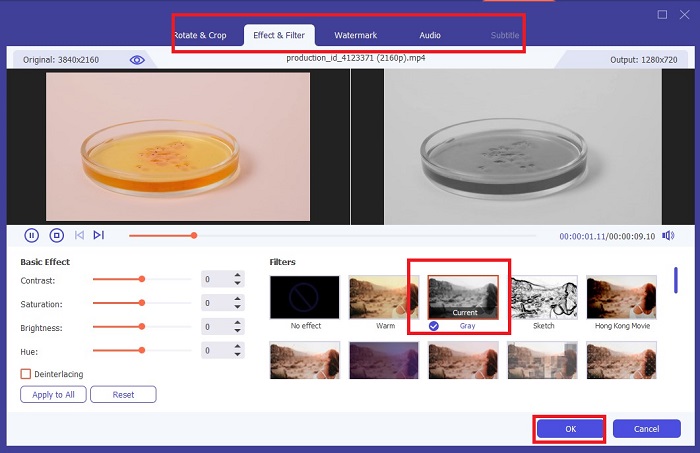
Step 4. Save your Black-and-White Video.
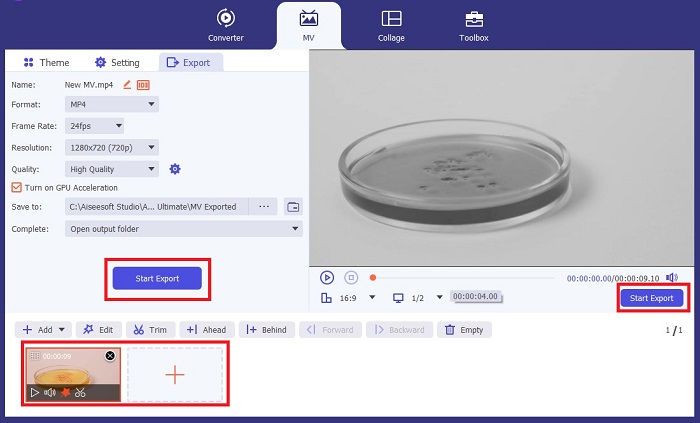
If you are satisfied with your video, click OK and convert it to your desired file format. Once you are set with your requirements, click the Convert button to save the output on your device.
Parte 2: Como tornar o vídeo em preto e branco com o Premiere Pro
Premiere Pro da Adobe é o software de edição de vídeo líder do setor para filmes, séries de TV, conteúdo de vídeo e comerciais. Tornou-se o software preferido para cineastas de todo o mundo porque, em comparação com outros softwares de edição, esta ferramenta oferece muitas ferramentas criativas para fazer com que seu vídeo pareça polido, excelente e profissional.
Se você deseja definir um clima em seu vídeo, colocar filtros é a primeira coisa que você pode fazer para conseguir isso. Colocar filtros em vídeos usando o Premiere Pro é relativamente fácil de fazer. Estas são quatro etapas simples para sobrepor filtros preto e branco com o Premiere Pro.
Step 1. Attach the video you want to make black and white. To do this, go to the project panel or Timeline Panel, an area in Premiere Pro considered your workspace where you trim, add sounds, arrange videos, add effects, and many more. Drag the videos you desire to make blank and white, and then you are ready for the next step.
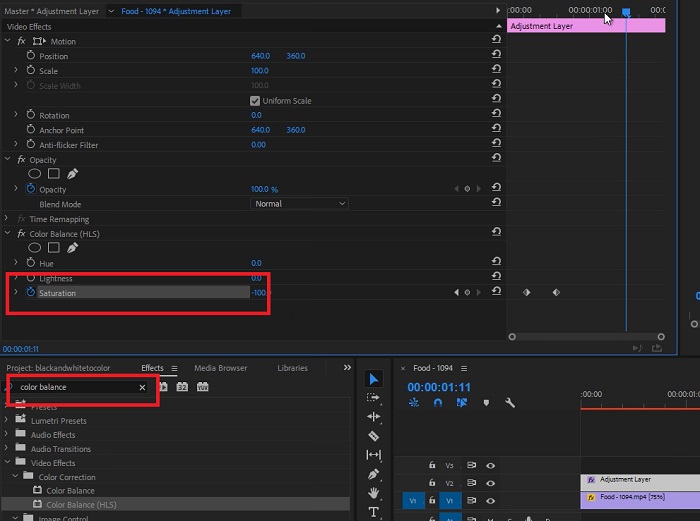
Step 2. To access the effects panel, select Window > Effects. You are now near to having the black-and-white filter.
Step 3. After going to the Effects panel, you can see the Video Effects, select this and click Image Control. Under the Image control, pick the Black and White button and then drag and drop it on your project.
Further Reading:
4 Amazing Ways to Add a Filter to a Video on Windows & macOS
Trouble-Free Methods to Convert Images to Black and White
Parte 3: Comparação de Tabelas de Software
Agora você terminou de tornar seu vídeo em preto e branco. Para entender melhor qual é o software de edição adequado para você, comparamos o Video Converter Ultimate e o Premiere Pro abaixo.
| Programas | Preço | Sistema operacional | Recursos |
| Video Converter Ultimate | A licença de 1 mês custa $23,20 | Windows 10, Windows 8, Windows 7, Windows Vista, Windows XP (SP2 ou posterior) macOS 10.7 ou superior. | Não deixa marca d'água de marca zero. A ferramenta oferece uma caixa de ferramentas para suas atividades de edição de áudio e vídeo. |
| Premiere Pro | Os programas Adobe Cloud oferecem uma assinatura de 1 mês por $52,99 | macOS Monterey v12.0 ou posterior. | Ferramentas de edição avançadas Edição de vídeo 3D Editor de áudio Gerenciamento de conteúdo |
Parte 4: Perguntas frequentes sobre como adicionar filtro preto e branco
O Video Converter Ultimate é uma plataforma confiável e segura?
Sim! Video Converter Ultimate garante que a plataforma é segura e 100% segura. Além disso, você pode pular o login em sua conta para acessar os recursos do FVC Video Converter Ultimate.
Posso usar o Premiere Pro no meu telefone?
Infelizmente não. Video Converter Ultimate e Premiere Pro são compatíveis apenas com dispositivos de PC porque exigem uma unidade alta para funcionar e usar sem problemas.
Posso editar imagens no Video Converter Ultimate e Premiere Pro?
Claro! Porém, já que o Premiere Pro está mais focado na edição de vídeo. Você pode estar limitado nas ferramentas criativas necessárias para editar suas fotos.
O Premiere Pro tem marca d’água?
O Premiere Pro não deixa marcas d’água. Mesmo se você estiver fazendo um teste com o Premiere Pro, ele não deixa marca d'água, mas pode exigir que você compre uma conta licenciada após alguns dias.
O Canva pode editar o vídeo em preto e branco?
Absolutamente sim! O Canva, como outras plataformas, pode editar vídeos e oferece vários filtros para aplicar aos seus vídeos brutos.
Conclusão
This article shows the steps and procedure for how to make video black and white with Video Converter Ultimate and Premiere Pro by Adobe. If you are a beginner and do not need complex editing, Video Converter Ultimate is perfect. However, suppose you are somebody who wants to have software that focuses on editing and has a lot of creative tools to make your creativity come to life. In that case, Premier Pro is the one for you.
-
 3 métodos sobre como tornar um vídeo mais longo no iPhone e outros dispositivos
 Fazer um vídeo mais longo é bastante desafiador. Felizmente, encontramos três métodos sobre como tornar um vídeo mais longo no iPhone e em outros dispositivos.
-
 Métodos excelentes sobre como dividir vídeos com eficácia
 Este artigo explica como dividir um vídeo em partes. Portanto, se você estiver interessado, clique neste post, pois oferecemos as maneiras mais diretas de experimentar.
-
 5 principais reproduções de gerador retroativo em PC e Mac
 Você está procurando o melhor gerador de retrocesso de vídeo na web? E se sim, tente ler este artigo, pois reunimos diferentes softwares para você escolher.
