


 Video Converter Ultimate
 Gravador de ecrã
 Reparo de vídeo
 Secure Download
Como mesclar vídeos 3GP de um telefone celular em um arquivo
Ao gravar vários vídeos durante a viagem com o smartphone, você pode querer mesclar os arquivos 3GP em um único vídeo. Quais são os melhores métodos para combinar os videoclipes? Quer você simplesmente junte os vídeos 3GP ou faça filmes com os arquivos do smartphone, você pode aprender mais sobre os 2 métodos usados com mais frequência neste artigo.

Parte 1: Como mesclar 3GP online gratuitamente
To merge your 3GP files without editing, you only need a convenient tool that can merge 3GP videos free online. FVC Free Online Video Merger is one of the best 3GP video mergers with a simple interface. It enables you to combine 3GP files without a number or size limit. Moreover, you can adjust the resolution and video format.
Step 1: Go to the Free Online Video Merger with any web browser. You can click the Upload Videos to Merge button to load one 3GP file into the online video merger. It will direct you to an online video joiner interface.
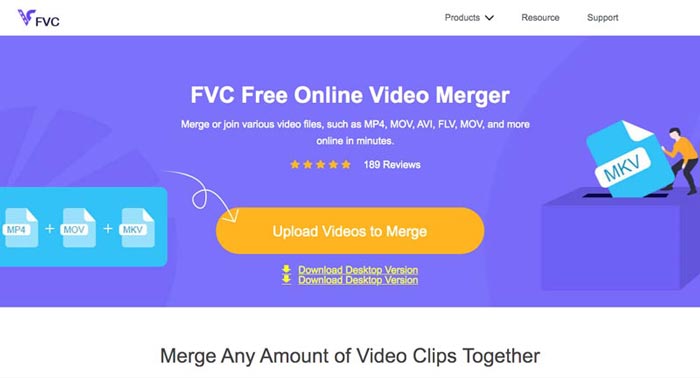
Step 2. Just upload more 3GP files that you need to combine. Then you can change the resolution and the format of your video by clicking the Resolution and Format fields. You can merge your 3GP files into popular video files like MP4 or MKV.
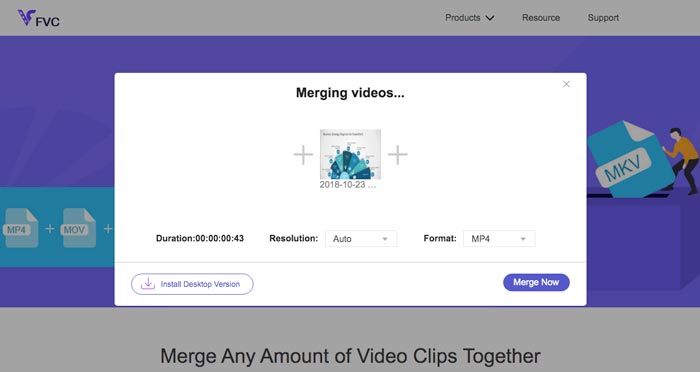
Step 3. Once you are satisfied with the output video, you can click the Merge Now button to start the combination process. When the merging is finished, the joined video will be saved on your hard drive.
É uma maneira fácil de juntar arquivos 3GP online gratuitamente. Mas se quiser fazer mais edições em seus arquivos de vídeo, você precisa de uma ferramenta mais profissional.
Parte 2. Como combinar vídeos 3GP em um filme
Whether you need to combine 3GP videos into a movie with some stunning filters, or simply join 3GP files into one, Video Converter Ultimate is a versatile video converter you should take into consideration. It enables you to split and merge video clips, select the video themes, add watermarks to videos, and even convert 3GP videos to other video formats for social media websites directly.
- 1. Permite cortar as partes desejadas ou combinar vários 3GP em um.
- 2. Fornece recursos básicos de edição de vídeo, como cortar, dividir, cortar e girar.
- 3. Junte-se a videoclipes 3GP em um filme com diferentes filtros, temas, arquivos de música, etc.
- 4. Adicione legenda, faixas de áudio, efeitos 3D, marca d'água, comprimir vídeo, e mais.
Free DownloadFor Windows 7 or laterSecure Download
Free DownloadFor MacOS 10.7 or laterSecure Download
Método 1: como combinar vários vídeos 3GP diretamente
Step 1: Download and launch Video Converter Ultimate from the official website. Choose the Converter interface and click the Add Files button to add the 3GP files you want to merge. Moreover, you can also drag the 3GP videos into the program.

Step 2: Once you have imported the 3GP files, you should choose the format of the output file. Click the scissors icon to cut out the desired part. Moreover, you can rotate/crop the videos, apply filters, add a watermark, or adjust audio tracks for the output video.

Step 3: Go to the bottom of the user interface to choose the destination folder for the merged 3GP files. After that, you can click the Merge into One File box and click the Convert All to start to merge 3GP files.

Método 2: como juntar arquivos 3GP em um filme
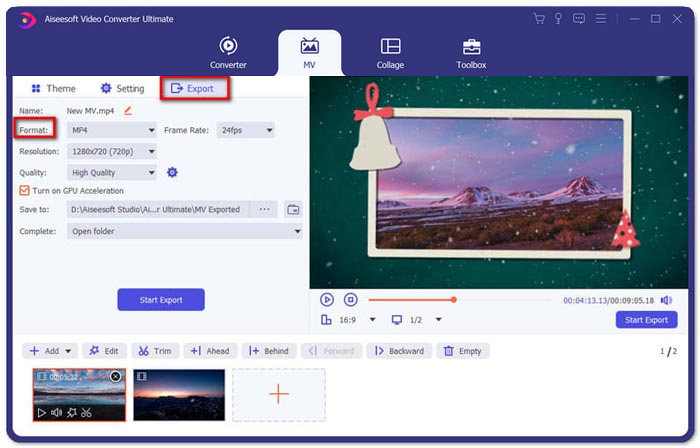
Step 1: When you need to join 3GP files into a movie, you can choose the MV menu, and then you will enter into the MV creating interface. Click the Add button from the lower left of the window to import your 3GP videos and pictures.
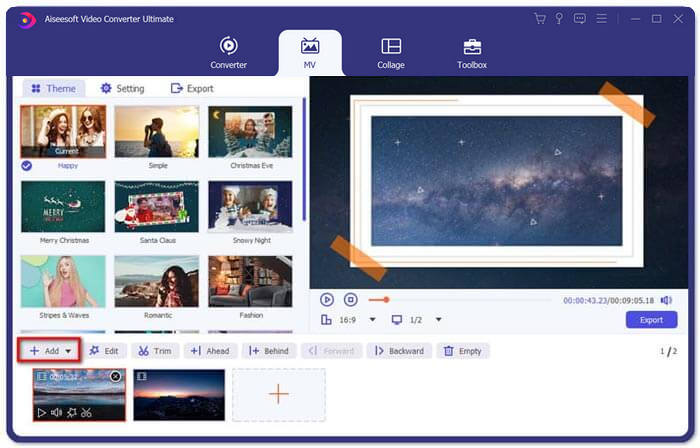
Step 2: After that, you can click the Edit button to apply the video effects. Moreover, you can also select a theme for your MV movie. On the left section, click the Theme tab and then choose your desired theme for your MV.
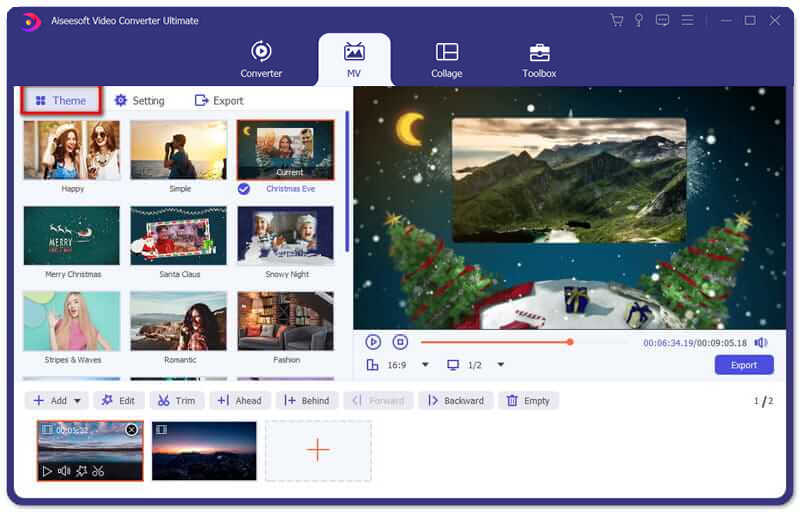
Step 3: If you are satisfied with the combined 3GP file, you can click the Export button to save the video file. By default, the output format is MP4. Of course, you can also choose the preferred video format according to your requirement.
Parte 3. Perguntas frequentes sobre como mesclar 3GP
1. O que é um formato 3GP?
3GP é um formato de arquivo multimídia projetado para economizar armazenamento de dados. Ele está sendo amplamente utilizado em dispositivos móveis. Quando você tira fotos ou grava vídeos com seu telefone celular, geralmente o arquivo é salvo no formato 3GP. Normalmente 3GP é usado em telefones celulares 3G e também pode ser reproduzido em alguns telefones 2G e 4G.
2. Como mesclar arquivos 3GP em um smartphone?
Quando você deseja mesclar arquivos 3GP em um telefone iPhone ou Android, você pode usar Video Merger para um telefone Android, VivaVideo para um iPhone ou baixar outros aplicativos para combinar os vídeos. Mas quando você precisa juntar os arquivos 3GP como um filme, você ainda precisa usar uma fusão de vídeo profissional.
3. Posso combinar vídeos 3GP com arquivos de áudio?
sim. Mas você não pode usar os arquivos de áudio como fundo para o vídeo 3GP. Quer você precise combinar dois arquivos ou usar o áudio como fundo de um vídeo 3GP, o combinador profissional 3GP deve ser sua escolha.
Conclusão
When you need to merge 3GP video files on your mobile devices into one video file, you can learn 2 efficient methods from this article. You can merge 3GP free online by using Free Online Video Joiner. If you need to edit and put some special effects in your video, Video Converter Ultimate should be an ideal tool for you. If you have any questions about merge 3GP files, you can feel free to contact us.
-
 As 3 principais maneiras gratuitas de converter FLV em 3GP no Windows / Mac
 Não é possível abrir arquivos FLV no smartphone ou tablet? Não se preocupe! Aqui, compartilhamos três métodos para converter FLV para 3GP sem perder qualidade para jogar no celular.
-
 3 métodos para converter MP4 em 3GP sem complicações
 Quer converter MP4 para 3GP de forma rápida e fácil? Aqui, vamos compartilhar 3 conversores MP4 para 3GP para alterar MP4 para 3GP para jogar em vários telefones celulares.
-
 Os 3 melhores players 3GP gratuitos para computadores e celulares que você deve conhecer
 Quando quiser reproduzir seu filme 3GP facilmente sem a instalação ou conversão do codec de vídeo, você pode aprender mais sobre os três melhores players 3GP no Windows, Mac, Android e iPhone neste artigo.
