


 Video Converter Ultimate
 Gravador de ecrã
 Reparo de vídeo
 Secure Download
Como combinar arquivos de vídeo MPEG em um - 2 métodos fundamentais que você deve conhecer
How to join MPEG files? You just downloaded an old TV series in the MPEG format, such as 8 short episodes and each of them has a redundant opening and ending. How to merge these MPEG files into one like a movie? Whether you simply need to combine the videos into one, or merge the MPEG files with advanced features, here are 2 efficient methods you should never miss.

Parte 1: Como combinar arquivos MPEG online gratuitamente
FVC Free Online Video Merger is a free online MPEG combiner that enables you to merge MPEG, MP4, AVI, and more video files without size limitations. It allows you to combine multiple MPEG files to impressive videos with no watermark added. Moreover, the uploaded files will be deleted within 24 hours to protect your privacy.
Step 1: Go to the FVC Free Online Video Merger with any web browser. Click the Upload Videos to Merge button in the middle webpage to get the installer. After that, you can click the button again to upload the MPEG files you want to combine into the online program.

Step 2: When you get into the Merging videos interface, you can arrange the sequence of the MPEG videos you want to merge. It enables you to manage the position of the video, delete the file, or add more MPEG files by clicking the insert new button in the proper place.
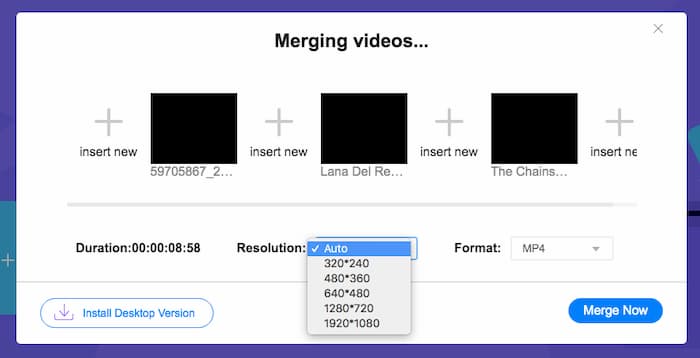
Step 3: After that, you can decide the resolution and format of the output video. You can combine the MPEG files into an MP4 file before clicking the Merge now button to start the process. It enables you to get the desired video within a short period.

O combinador de vídeo online é fácil de usar. No entanto, se você deseja cortar as aberturas e finais redundantes dos episódios, isso não pode ajudá-lo mais. Você precisa usar uma fusão MPEG mais poderosa.
Further Reading:
Parte 2: O método versátil para mesclar vídeos MPEG
Aiseesoft Video Converter Ultimate is a professional MPEG joiner that enables you to combine the desired parts of MPEG files into one movie. It enables you to trim the desired part of the MPEG files, adjust the video quality, customize the watermark, or even make a movie with different themes.
- 1. Combine arquivos MPEG em MPEG, MP4 e mais de 300 formatos de vídeo.
- 2. Ajuste a resolução do vídeo ou até mesmo melhore a qualidade do vídeo para mesclar arquivos.
- 3. Corte as partes desejadas dos arquivos MPEG e combine-os em um vídeo.
- 4. Adicione efeitos e filtros e personalize marcas d'água nos vídeos MPEG.
Free DownloadFor Windows 7 or laterSecure Download
Free DownloadFor MacOS 10.7 or laterSecure Download
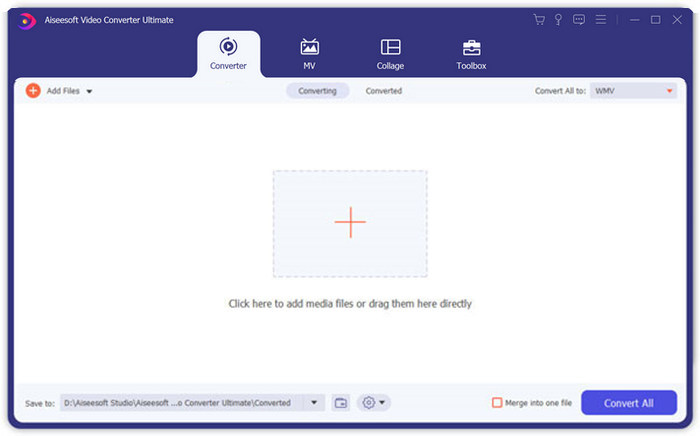
Step 1: Launch the Aiseesoft Video Converter Ultimate on your computer. Go to the Converter menu and click the big “+” button in the middle of the main interface to add the MPEG files you want to merge. Click the Add Files button to import all the files you want to combine.
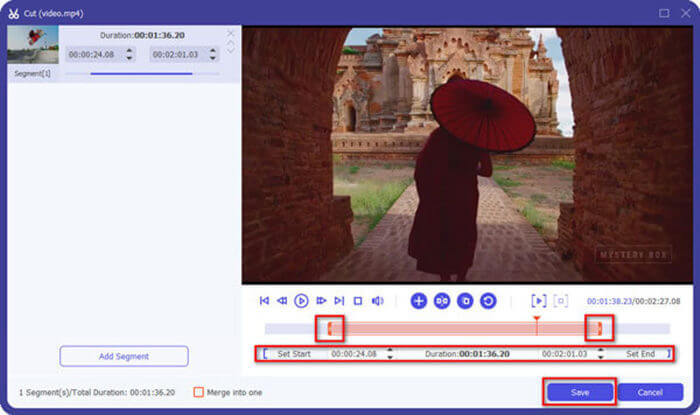
Step 2: For the MPEG clips that need to be trimmed, click the Cut button next to the video. You can set up the start and end points to delete the openings and endings of your MPEG videos. After that, you can click the Save button at the bottom to save the file.
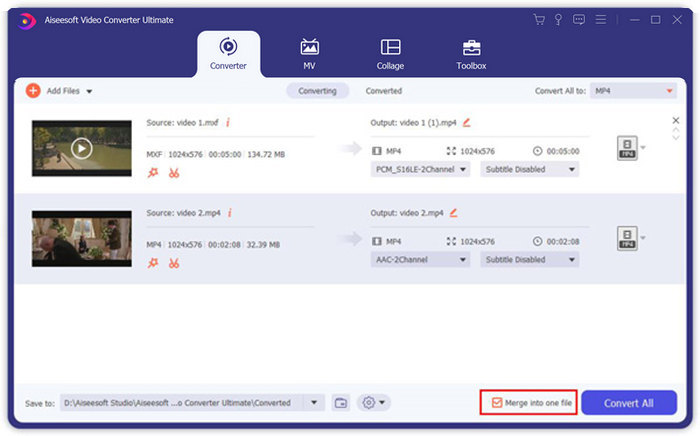
Step 3: After that, you can drag the trimmed video into the program. Adjust the sequence of the MPEG videos. When everything is ready, you need to check the Merge into one file box beside the Convert All. Click the Convert All button to start merging the MPEG files.
Parte 3: Perguntas frequentes sobre como ingressar em arquivos MPEG
Como mesclar arquivos MPEG com a melhor qualidade?
Quando você deseja mesclar arquivos MPEG com uma qualidade semelhante, você pode escolher os parâmetros como os vídeos originais. Mas se os arquivos MPEG forem diferentes em qualidade de vídeo, você terá que fazer upgrade de alguns arquivos MPEG com baixa qualidade antecipadamente com o combinador de vídeo profissional.
Posso combinar arquivos MPEG com um iPhone ou telefone Android?
sim. Antes de baixar aplicativos de combinação de vídeo para juntar arquivos MPEG, você deve se certificar de que o aplicativo é compatível com MPEG ou outros vídeos que você deseja combinar. Adobe Premiere Clip, Viva Video e Splice Video são os recomendados que você pode levar em consideração.
Qual é o formato de arquivo MPEG?
MPEG é um formato de arquivo de vídeo que usa compactação de arquivo MPEG-1 ou MPEG-2. É um formato popular para filmes distribuídos na Internet que torna o streaming e o download muito mais rápidos do que outros formatos de vídeo populares.
Conclusão
Este artigo apresenta 2 maneiras eficientes de mesclar arquivos de vídeo MPEG, especialmente quando você precisa cortar partes extras. O FVC Free Online Video Merger é um método fácil de mesclar os arquivos MPEG online, mas você não pode editar os videoclipes. Assim, se você deseja cortar e editar os vídeos MPEG, Aiseesoft Video Converter Ultimate deve ser a solução definitiva.
-
 Os 6 melhores marcadores de vídeo MP4 para combinar vídeos MP4 gratuitamente
 Existem muitos associadores MP4 disponíveis para conectar diferentes clipes MP4. Neste artigo, escolhemos alguns marcadores MP4 gratuitos para Windows 10/8/7 e Mac.
-
 Como mesclar arquivos M4V? Aqui estão as 2 soluções mais rápidas
 Se você está procurando uma solução para combinar arquivos de vídeo M4V em um, nunca perca esta passagem. Aqui, falaremos sobre os dois melhores métodos para combinar arquivos de vídeo M4V.
-
 Como mesclar vídeos 3GP de um telefone celular em um arquivo
 Quando quiser combinar alguns vídeos 3GP de seu BlackBerry em um vídeo, você pode aprender mais sobre 2 métodos eficientes para mesclar arquivos 3GP do artigo.
