


 Video Converter Ultimate
 Gravador de ecrã
 Reparo de vídeo
4 Ferramentas de Visualização de Metadados Eficazes para Visualizar Metadados de Arquivos
As part of a video element, the metadata contains the data you'll need to know about the file. But the question is, how can you view the file's metadata? So, if you want to see the meta information inside your video, this is the perfect post for you. Keep on reading this article because we will review for you the best metadata viewer you can use to see the metadata, and if possible, you can edit it as well.

Parte 1. 2 dos melhores visualizadores de metadados para Windows e Mac de 2022
Video Converter Ultimate [Melhor Visualizador e Editor de Metadados de Vídeo e Áudio]
Video Converter Ultimate offers you the best video metadata viewer on Mac and Windows. With this tool, you can easily add and view the metadata in all video and audio formats with just a few clicks. Even though you didn't have experience dealing with this particular task, you can depend on the best viewer to help you. Unlike the other tools that offer to view metadata, this software provides a great function to help you do more in different tasks, such as editing the metadata. Want to know what these are? If so, read the key features you can have once you attain this software.

FVC Video Converter Ultimate
Mais de 5.689.200 downloads- É a melhor ferramenta para visualizar e editar os metadados em cada vídeo ou vídeo.
- Suporta diferentes formatos de mídia, incluindo MP4, AVI, MOV, MKV, FLV e muito mais.
- Você pode inserir grandes arquivos de vídeo e áudio aqui para verificar seus metadados.
- Para começar, este é o melhor visualizador de metadados com interface amigável.
- Disponível em todos os diferentes tipos de plataformas de desktop, como Windows e Mac.
Free DownloadFor Windows 7 or laterSecure Download
Free DownloadFor MacOS 10.7 or laterSecure Download
Portanto, agora, se você deseja aprender a visualizar metadados, deve primeiro baixar a ferramenta clicando no botão de download apropriado apresentado abaixo, instalá-lo em seguida e abri-lo.
Free DownloadFor Windows 7 or laterSecure Download
Free DownloadFor MacOS 10.7 or laterSecure Download
Como visualizar metadados no Video Converter Ultimate
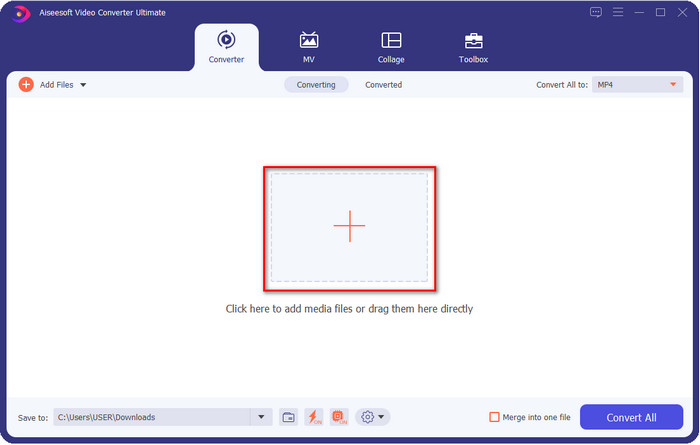
Step 1. By clicking the + button, a file folder will show on your screen where you can locate the video or audio file you want to check the metadata. Once you've chosen the file, click Open and proceed to the next step.
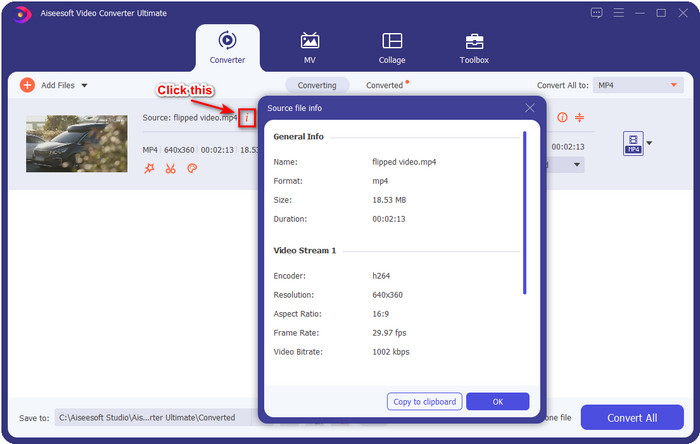
Step 2. While the file is on queue, click the i icon; voila, you have now viewed the metadata of your video file saved on your computer.
Como adicionar ou editar metadados do arquivo de vídeo ou áudio com o melhor editor de metadados
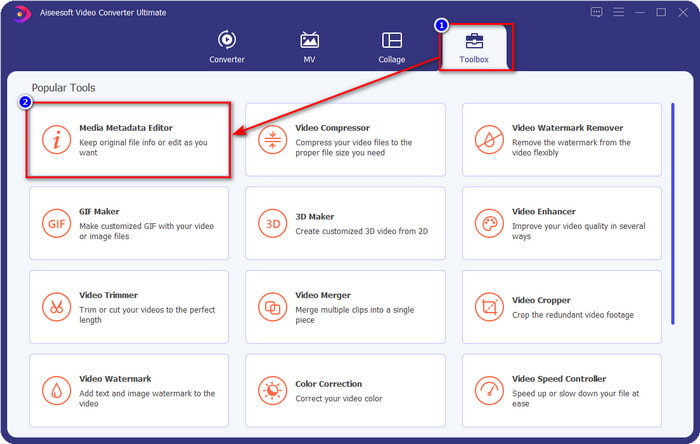
Step 1. After you've opened the software, you must go to the Toolbox section, and in that section, you will see a feature Media Metadata Editor, then click it.
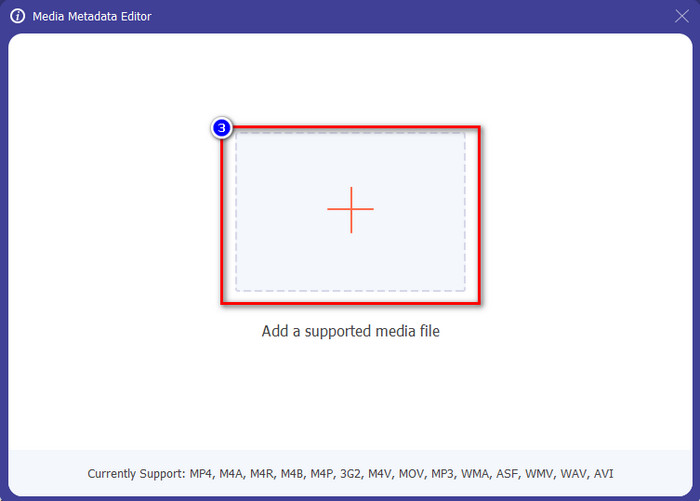
Step 2. New windows will show, click the + button, find the video or audio file on the computers folder, and click Open.
Step 3. Add or edit the data about the file according to your needs; after that, click Save to apply the changes you add.

Photoshop [Melhor visualizador de metadados para profissionais]
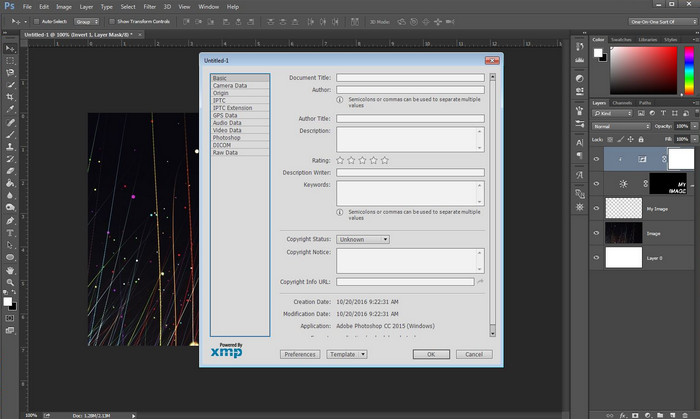
Photoshop became known as the top photo editor you can use as a professional. This tool offers users the high-end editing you will need to make your photo look better than before. Although the tool offers advanced editing, viewing the file's metadata, this tool is too expensive for some users. Maybe you are asking why we add this editor to the list, well it is popular, and many users already use this, so why not? Although it can add metadata on every PSD file, the metadata it supports is minimal, which means it is mostly about basics. So, if you want to view metadata in Photoshop, you must purchase the tool.
Prós
- É o melhor editor que você pode encontrar na web.
- Ele suporta uma ampla variedade de formatos de arquivo de imagem que você pode inserir e verificar posteriormente seus metadados.
- A escolha do editor por ser um software de edição de primeira linha na área de trabalho.
Contras
- Se você comprar a ferramenta, espere que ela seja cara.
- Ele precisa de um desktop de última geração para ter uma melhor experiência de uso.
- Não é a melhor escolha para iniciantes para começar.
Related:
How to Add Watermark in Photoshop
Parte 2. 2 Visualizadores de Metadados Gratuitos Disponíveis na Web
Editor de metadados de imagem de Jeffrey
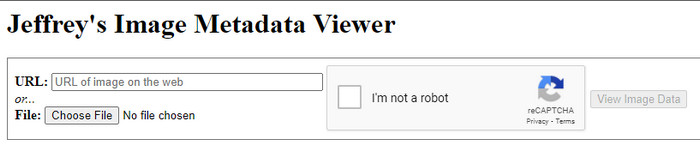
If you want a simple free metadata viewer on the web, try to use Jeffrey's Image Metadata Editor. This web tool is an effective tool to view the metadata of every media file you have for free. However, the users' interface of the web tool isn't as impressive as the others; it still serves its purpose as a metadata editor and viewer. Moreover, if you want to try and access this tool, you must beware because the website isn't protected on different web browsers, which means signing in to the website can lead to hacking or losing some files. Remember that you'll need to beware if you try to access the tool to view your metadata or edit it. So far, there aren't any reports of some who have been hacked while using the website.
Prós
- Livre para acessar em todos os navegadores da web.
- Suporta diferentes formatos; você pode fazer upload e visualizar os metadados.
- Você pode inserir a URL em vez do arquivo para economizar espaço.
Contras
- O captcha é um pouco chato se você quiser visualizar os metadados.
- O site não é seguro.
Metadata2go
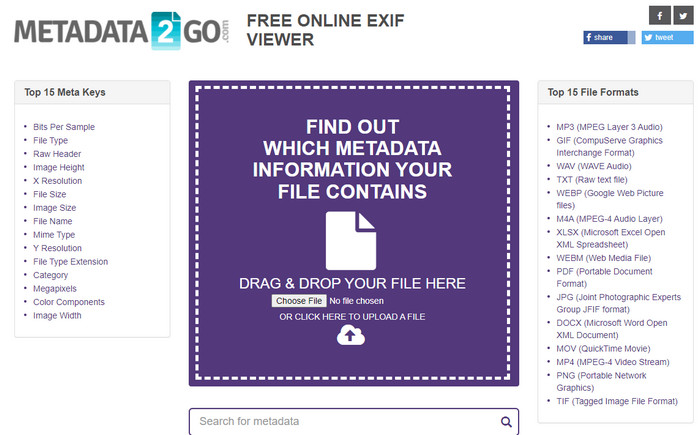
Metadat2go offers a wide range of image formats to insert and later view the metadata. Even though the GUI is much heavier than the first web tool we introduced, it is still easy to use for anyone who would like to access the tool. Although the tool is safer to use than the first one, there are some limitations on the functions, and most of the time the drag and drop function of it doesn't do well. But if you want to learn how to open and read metadata from video, this tool will suffice your needs.
Prós
- É gratuito e seguro para acessar em diferentes motores de busca.
- Ele faz a tarefa sem problemas.
- Ele suporta vários formatos de imagem.
Contras
- Em alguns casos, as opções não funcionam bem, como arrastar e soltar.
- Suporta outros formatos, mas são poucos os selecionados.
Parte 3. Gráfico Comparativo sobre o Visualizador de 4 Metadados [Online e Offline]
| Recursos | FVC Video Converter Ultimate | Photoshop | Editor de metadados de imagem de Jeffrey | Metadata2go |
| Visualize e edite metadados facilmente |  | | | |
| Seguro de usar | | |  | |
| Econômico | | | | |
| Amigo do usuário | | | | |
| Recursos avançados disponíveis | | | | |
| Baseado em Programa | Programa baseado em desktop | Programa baseado em desktop | Programa baseado na Web | Programa baseado na Web |
Parte 4. Perguntas frequentes sobre o Visualizador de metadados
O que há dentro dos metadados?
Dentro dos metadados, você verá um conjunto diferente de informações sobre o arquivo, por exemplo, nome do autor, gênero (se for música), título do arquivo, tamanho do arquivo e muito mais.
Por que preciso ver os metadados?
Bem, os metadados ajudarão você a saber informações curtas sobre o arquivo que você não pode ver no arquivo. Ao visualizar os metadados, você terá uma ideia sobre os dados de um determinado arquivo, seja uma imagem, vídeo, áudio, PDF ou mais.
Posso usar metadados para proteger o arquivo?
Sim, você pode adicionar metadados para proteger seu arquivo das pessoas que querem tentar roubá-lo de você. Dessa forma, você pode ter as credenciais que fez funcionar se alguém tentar roubar isso de você. No entanto, existem algumas técnicas para remover os metadados do arquivo; embora alguém possa remover os dados, é melhor adicionar metadados ao arquivo para proteção extra e direta.
Conclusão
Now that we have the metadata viewer presented, it is time to choose one and use it to see your file's inside. Moreover, the first two tools we presented are undoubtedly the best on viewing metadata; but we can see that Photoshop is too expensive to use compared to the ultimate tool. So, therefore, if you want a cheap and safe way to view your metadata or edit it, you must use the FVC Video Converter Ultimate because it is the perfect tool for this task. Still, are you not convinced with the review we did on the tool? Well, you can download the tool on your software and try it for yourself!
-
 3 melhores soluções sobre como remover marcas d'água de vídeos facilmente
 Quer remover a marca d'água irritante do vídeo? Com este blog, você pode aprender as diferentes ideias sobre como remover a marca d'água em um vídeo.
-
 4 melhores maneiras de como adicionar marca d'água em qualquer vídeo rapidamente
 Vamos aprender como adicionar marca d'água a qualquer vídeo no Windows, Mac, Online, iOS e Android com etapas detalhadas se você ler este artigo.
-
 4 maneiras eficazes de remover marcas d'água do Tiktok dos vídeos do Tiktok
 Você precisa remover a marca d'água Tiktok dos seus vídeos exportados do Tiktok? Você pode fazê-lo aqui com a ajuda das ferramentas que apresentamos; você pode facilmente fazê-lo.
