


 Video Converter Ultimate
 Gravador de ecrã
 Reparo de vídeo
 Secure Download
Espelhe vídeos online para transformar sua experiência de visualização de vídeo
Assistir a vídeos virados ou de cabeça para baixo pode ser frustrante. Sim, pode ser frustrante capturar um momento perfeito apenas para descobrir que o vídeo precisa ser invertido ou girado. Mas não tema. Inverter vídeos online é uma solução fácil e conveniente!
Meanwhile, video content on social media or video-sharing sites is quickly becoming a staple of the internet. And with good reason: videos are incredibly easy to share and get feedback from your audience—and they can be used to build brand awareness and increase engagement with your audience. In this blog post, we'll be going over the different ways you can flip videos free online.

Parte 1. Diferentes maneiras de inverter vídeos on-line
Aqui, falaremos sobre os melhores flippers de vídeo e extensões de espelho de vídeo que você pode usar para alterar a orientação de um vídeo. Não importa se o vídeo foi carregado de sua unidade local ou o vídeo foi diretamente de um site de compartilhamento de vídeo, essas ferramentas podem lidar com isso.
1. Espelho de vídeo
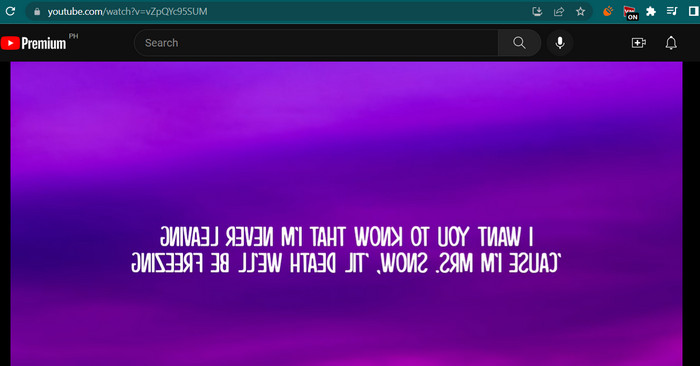
A extensão Video Mirror Chrome é uma ferramenta poderosa e fácil de usar que facilita o espelhamento de seus vídeos para uma experiência de visualização aprimorada. Com apenas um clique, você pode virar e espelhar seus vídeos para corrigir quaisquer distorções e apreciá-los na orientação adequada. A extensão é compatível com uma ampla variedade de formatos de vídeo e funciona perfeitamente com os players de vídeo mais populares. Além disso, a extensão é fácil de instalar e usar, com controles intuitivos e uma interface simples. Se você deseja inverter o vídeo horizontal online usando esta ferramenta, siga as etapas abaixo:
Step 1. Pop open your favorite browser and Install the Video Mirror Chrome Extension from the Chrome Web Store.
Step 2. Once installed, navigate to the video you want to flip in your web browser. You can go to video-sharing sites like YouTube, Netflix, etc.
Step 3. Now, click on the Video Mirror icon located in the toolbar. The video will be flipped and mirrored horizontally. Unfortunately, you cannot mirror videos vertically using this tool.
2. Kapwing
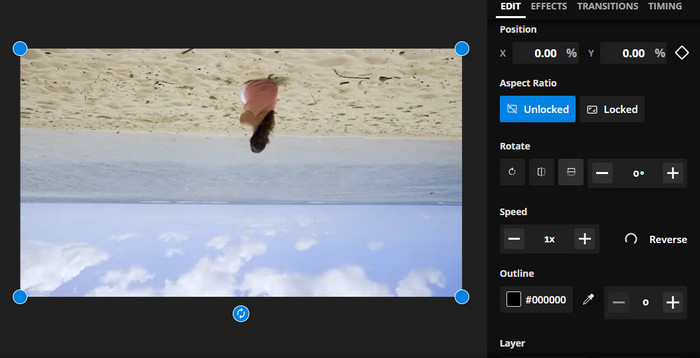
Kapwing é uma poderosa plataforma de edição de vídeo online que oferece suporte a uma ampla variedade de ferramentas e recursos para ajudá-lo a criar e editar vídeos de maneira rápida e fácil. Com o Kapwing, você pode cortar, redimensionar, adicionar texto e imagens e até adicionar efeitos e transições aos seus vídeos. Um dos recursos cativantes do Kapwing é a capacidade de inverter vídeos online. Os vídeos podem ser invertidos horizontal ou verticalmente, as distorções podem ser corrigidas e você pode assisti-los na orientação ideal.
Step 1. To get started with the tool, launch your preferred web browser and go to Kapwing's official webpage.
Step 2. When you have an account, tick the Create New Project button and hit the Upload button to embed the video you wish to flip online.
Step 3. Once the media is added to the online tool, the editing tools on the right side will appear automatically. This time, go to the EDIT tab and look for the Rotate section. After that, tick on the Flip Horizontally or Flip Vertically icon.
Step 4. When you are satisfied, tick the Export Project button in the upper right corner of the interface. By then, you should be able to flip videos horizontally online and vertically.
3. Clídeo
Clideo é uma excelente ferramenta de edição de vídeo online que simplifica o processo de edição de vídeo para todos. O que é ótimo neste programa é que ele vem com ferramentas dedicadas para cada finalidade. Uma ferramenta útil é o flip video. Você pode virar vídeos horizontalmente ou verticalmente sem configurações complicadas. Além disso, a ferramenta permite que os usuários escolham seu formato preferido após inverter o vídeo. Portanto, inverta o vídeo em 90 graus online através das seguintes etapas:
Step 1. Navigate to the webpage of Clideo using a web browser available on your computer. Then, look for the Flip Video option from the selection of tools on the main page.
Step 2. Now, tick the Choose file button to upload a video from your local computer drive. If you wish to embed from cloud storage, you can do so by ticking the dropdown button and selecting your target storage.
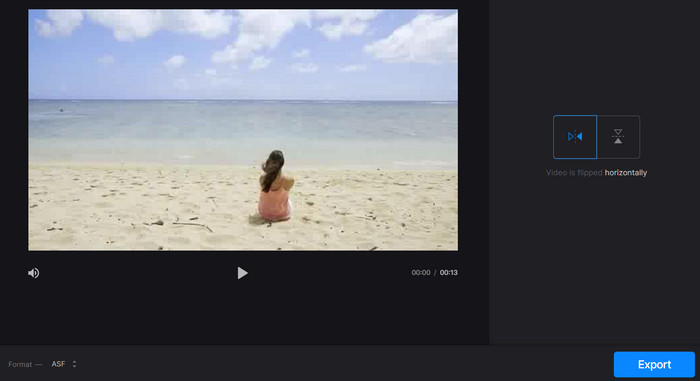
Step 3. Next, you can change the video's orientation after adding it to the program. Tick on the appropriate buttons to fit your orientation needs.
Step 4. If you wish to alter the video format, tick the Format and hit the Export button to save the video to your computer. After following the instruction, you should be able to flip videos online for free with no watermark.
Parte 2. Ótima abordagem para inverter vídeos offline
In many cases, the internet is not available, especially if you are always on the go. Therefore, an offline program like FVC Video Converter Ultimate can greatly help you. The desktop editing tool offers a greater variety of editing options than those offered by online video flip apps. For both PC and Mac, FVC Video Editor is the most professional-grade video editing program available. It is the best video editor available since it allows you to freely convert, rotate, flip, clip, trim, and watermark videos.
Step 1. Obtain and install the software
Click the Free Download button below to obtain a copy of the program's installer. Then set it up with the aid of an installation wizard. Immediately after, launch it on your computer and navigate around it.
Free DownloadFor Windows 7 or laterSecure Download
Free DownloadFor MacOS 10.7 or laterSecure Download
Step 2. Launch the video flipper
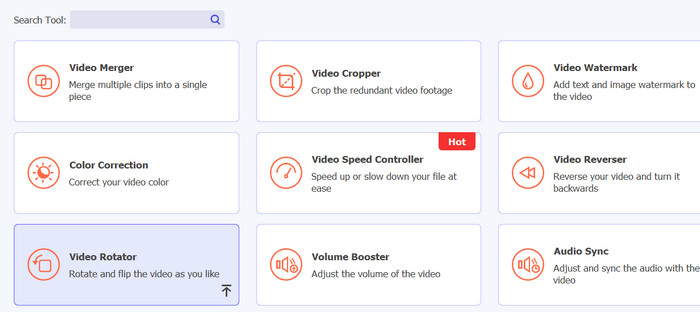
After launching the application, you should see four tabs on the main interface. Choose Toolbox > Video Rotator from the dropdown menu. You may also search for the tool using the search box to find it quickly.
Step 3. Upload a video file
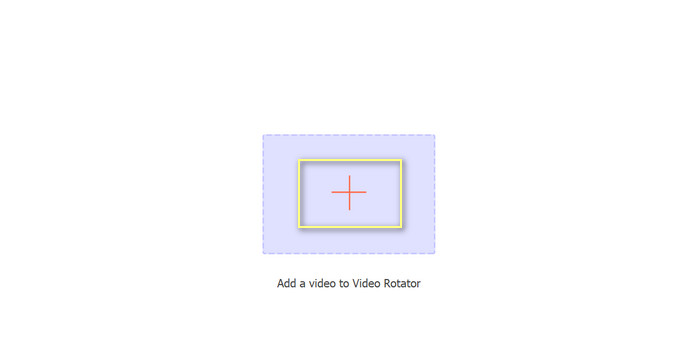
O sinal de mais pode ser selecionado para fazer upload do vídeo desejado no painel de upload do Video Rotator. A interface para inversão será então apresentada.
Step 4. Flip the video
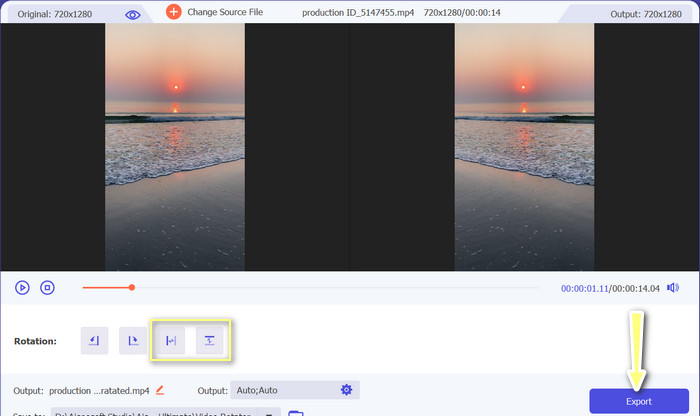
After the flipping interface has been displayed, access to its flipping buttons is granted. You can choose to rotate the video horizontally or vertically. Choose the appropriate button and then click the Export button to complete the process.
Further Reading:
Excellent Ways about How to Cut Video Online Conveniently
How to Reverse a Video Like a Pro to Make a Great Cinematic Video
Parte 3. Perguntas frequentes sobre a inversão de vídeos on-line
O que significa espelhar um vídeo online?
Espelhar um vídeo significa girá-lo horizontal ou verticalmente para que o lado esquerdo se torne o lado direito e vice-versa. Isso é útil para corrigir filmagens que foram gravadas em um ângulo estranho ou ao criar certos tipos de conteúdo.
É legal espelhar o vídeo de outra pessoa?
Geralmente, não é legal espelhar o vídeo de outra pessoa sem permissão ou atribuição adequada. Antes de espelhar qualquer vídeo, verifique se você tem o direito de usá-lo e se não está infringindo nenhuma lei de direitos autorais.
Posso espelhar um vídeo no meu telefone?
Sim, você pode espelhar um vídeo em seu telefone usando um aplicativo de edição de vídeo. Muitos aplicativos populares de edição de vídeo, como InShot, VideoShow e KineMaster, oferecem opções de espelhamento. Basta enviar seu vídeo para o aplicativo, selecionar a opção de espelhamento e salvar a nova versão espelhada.
Conclusão
Mirroring videos online has never been easier, thanks to the wide variety of online video editing tools available. With the many mirror video online app options, it's important to choose a reliable and high-quality online video editing tool that meets your specific needs.
-
 [4 maneiras] Como acelerar facilmente seus vídeos online
 Quer acelerar um vídeo online? Leia este artigo para saber mais sobre como acelerar um vídeo das diferentes maneiras possíveis.
-
 Como fazer um vídeo com lapso de tempo no iPhone perfeitamente
 Você quer saber como fazer um vídeo de lapso de tempo no seu iPhone? Você pode fazer um lapso de tempo de vídeo perfeito no seu iPhone seguindo estes passos simples abaixo.
-
 5 melhores conversores online de GIF para qualquer formato de vídeo de graça e premium
 Se GIFs não forem suportados na plataforma, é melhor converter seu GIF para qualquer formato de vídeo online. E preserve o conteúdo dos GIFs também.
