


 Video Converter Ultimate
 Gravador de ecrã
 Reparo de vídeo
Melhor editor de metadados MKV para adicionar/alterar/remover metadados em MKV
There isn't a wide variety of MKV metadata editors on the market because the MKV isn't much supported. But it doesn't mean that we can't edit the tags on our MKV files, so don't look gloomy. So for you to find out what is the best metadata editor that supports MKV, you can read the full scope of this article as we review different tools. What are you waiting for? Keep the ball on a roll because this won't last more than 7 minutes to have a tag editor.

Parte 1. Melhor editor de tags MKV recomendado para Windows e Mac: FVC Video Converter Ultimate
FVC Video Converter Ultimate is the most popular MKV metadata editor on Windows and Mac. This tool lives up to its name and expectation, so downloading the software to edit the metadata is the best choice you will make. Its powerful features and functions will easily handle the job as if it is a piece of cake. Furthermore, this tool supports other formats to upload, such as MP4, AVI, MOV, FLV, WMV, and the 1000+ media formats without re-encoding the file for a less hassle experience.
O que mais? Suponha que você baixe a ferramenta. Você terá a ferramenta mais rápida para adicionar os metadados em MKV e a GUI mais bonita do editor de metadados que a outra ferramenta não pode oferecer. Se você estiver interessado em usar o editor, continue lendo a parte 2, pois explicamos como editar os dados dos arquivos MKV.
Parte 2. Como editar metadados MKV com o editor de metadados MKV recomendado
Siga as etapas de acordo, começando pelo download da ferramenta e assim por diante. Então, vamos começar a usar o melhor editor de metadados MKV que você pode baixar no seu Windows ou macOS.
Step 1. Tick the download button we present below; select which operating systems you are currently using. Install it immediately after you've downloaded the file, follow the installation process, and we promise that you wouldn't get wrong, then open it to proceed. Before we start, you'll need to get familiarized with the tool to have a smooth sailing process using the MKV tag editor.
Free DownloadFor Windows 7 or laterSecure Download
Free DownloadFor MacOS 10.7 or laterSecure Download
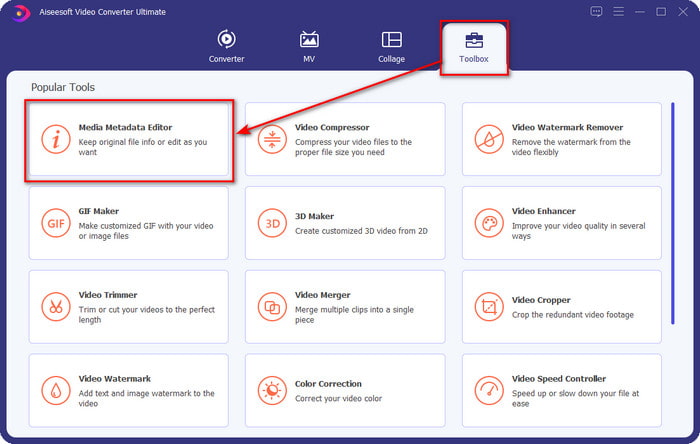
Step 2. Open the Toolbox, look for the Media Metadata Editor, and tap it to open.
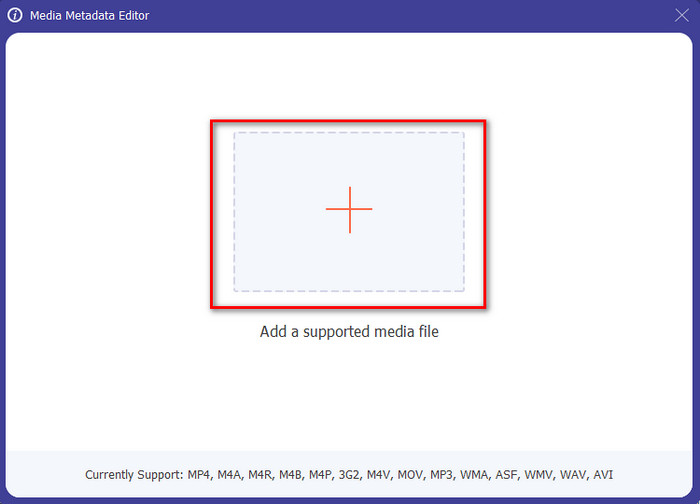
Step 3. Upload your MKV file by clicking the + icon, and a file folder will show, select the MKV file and press Open.
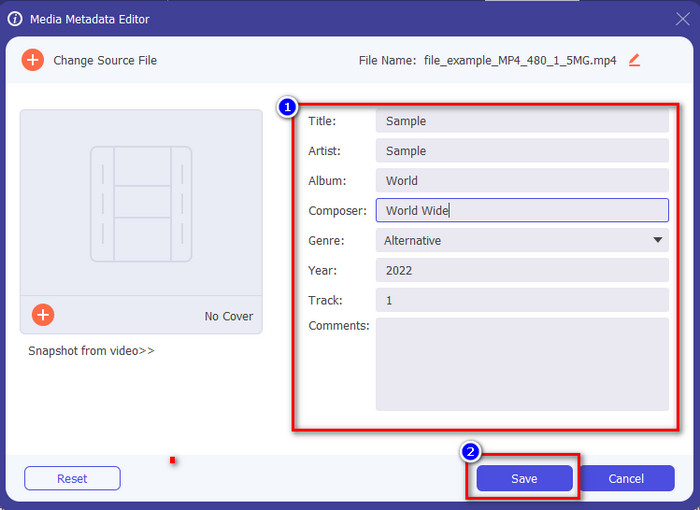
Step 4. Edit the metadata textbox; you can either fill them or remove them, do what you want to do with the metadata. After all of that, click Save to apply the change you've made earlier. With that, you have now edited the MKV tags.
Parte 3. 3 Editores de tags MKV gratuitos que você deve conhecer disponíveis no Windows, Mac e online
GROUPDOCS.Metadata [Gratuito na Web]
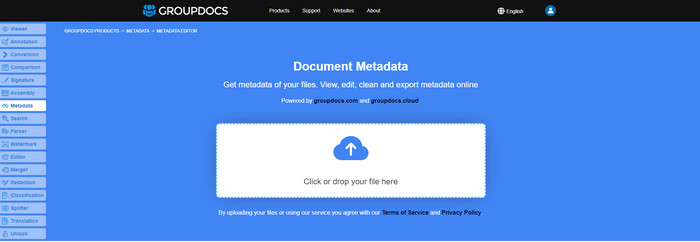
If you want to use an MKV metadata editor for free on the web, we highly suggest you try the GROUPDOCS.Metadata. It is the best choice to view and edit the metadata on your MKV as it works on all platforms, which means it is flexible and adaptable in any case. Moreover, it can easily manipulate the search and update of the tag according to the properties you will need, and if it needs to be removed, it will automatically do it. However, the tool can be challenging to handle on specific tasks, like updating the file's tags. So to get the hang of using the web tool, you will need to use it most of the time to improve your knowledge about the website functions and make it easier to handle.
Propriedades no Windows [Editor embutido no Windows]
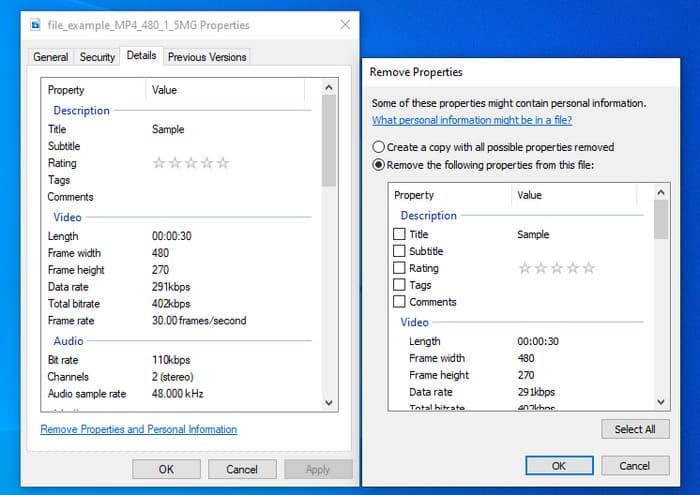
Não deseja baixar uma ferramenta para alterar metadados MKV e deseja usar a função interna do Windows para editar os metadados? Então seria melhor se você usasse as Propriedades no Windows. Esta função está disponível em todos os PCs com Windows e você não precisará baixar nenhuma ferramenta ou internet para usá-la. Você pode visualizar rapidamente os metadados e editá-los com sucesso com este recurso gratuito. No entanto, há alguns relatos de tags ausentes depois que eles tentaram usar esse recurso. De acordo com os usuários, ele pode remover automaticamente as tags do seu arquivo. Em vez de usar esse recurso, eles pretendem baixar a ferramenta certa para desperdiçar esforço nas tags que incluem em seu MKV ou arquivo de mídia. Mas se você quiser ver onde está esse recurso, basta clicar com o botão direito do mouse no arquivo, principalmente na parte inferior.
iFlicks [Para Mac]
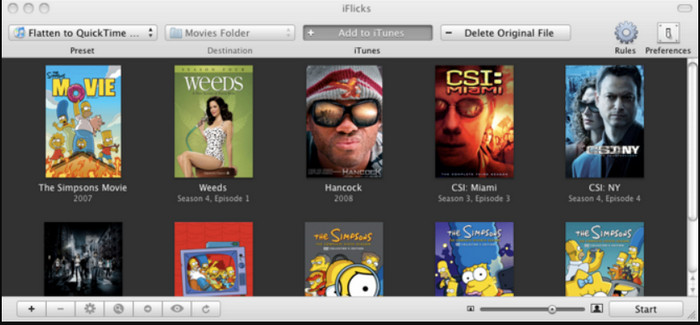
O iFlicks pode ajudá-lo a converter o MKV em um formato reproduzível ou ensiná-lo a editar metadados MKV no Mac. Essa ferramenta interage bem com o iTunes, pois fornece metadados detalhados em todos os arquivos de mídia. Com este software, você pode adicionar diferentes informações sobre seu arquivo, como slogan, gênero, data. classificações, resoluções e outros são buscados nos bancos de dados online. Além disso, este software compila metadados de onde você pode baixá-los e aplicá-los automaticamente aos arquivos. No entanto, as avaliações gratuitas podem durar apenas sete dias, portanto, se você quiser usar a ferramenta novamente, precisará pagar pela taxa de assinatura.
Parte 4. Perguntas frequentes sobre o Editor de metadados MKV
O MKV pode ser reproduzido no Mac?
MKV is playable on Mac if you use a third-party tool, such as the Blu-ray Player. But if you intentionally play the video on Quicktime, it won't work because it is unsupported. So, if you want to watch your MKV files on Mac, we highly recommend that you use a third-party Blu-ray Player, or you can convert the MKV format into MOV with the help of FVC Video Converter Ultimate.
Preciso converter MKV antes de editar os metadados?
Se a ferramenta que você deseja usar não suporta o upload do formato MKV, recomendamos que você converta o formato primeiro em um formato compatível. Mas com o pedágio que mencionamos acima, você não precisaria converter o arquivo em um formato compatível. No entanto, não há muitas opções ou ferramentas para editar tags MKV porque o formato é desconhecido. Embora seja difícil procurar, fizemos o possível para pesquisar todos os editores que você pode usar para atualizar ou alterar os metadados que suportam o formato MKV.
Por que os arquivos MKV são muito grandes?
The main reason why MKV files are big is that they can contain multiple contents of a video, audio, and subtitle with different codecs and elements. And you've added metadata on that file, and the file size will become even enormous. So, the best way to save space while having an MKV file on your drive is to compress it without destroying the quality or losing the information on the file. Click this link to learn more about compressing video files.
Conclusão
Even though there is a limited MKV metadata editor on the market, there are still powerful tools you can depend on available on different platforms. As we reviewed different software you can use, it is always still on your hands; which do you prefer to use on changing the metadata of your MKV file. Indeed, it is a tough decision because all of the tools are awesome to use. If you haven't decided which you prefer, we suggest you use the FVC Video Converter Ultimate because it is the most flexible software and has more advanced features that anyone can use. By pressing the download button, you will attain the best tag editor you can have on Windows and Mac!
-
 5 maneiras mais fáceis de remover metadados em qualquer arquivo de mídia
 Como remover metadados? É difícil fazê-lo? Preciso comprar ou usar uma ferramenta gratuita para remover tags? Todas essas perguntas têm respostas neste artigo.
-
 5 principais editores de metadados MP4 [atualizado em 2022]
 Como posso alterar meus metadados MP4? A melhor maneira de alterar os metadados do seu MP4 é usar um editor de tags que suporte o formato MP4, como o exemplo que listamos abaixo.
-
 Os 5 principais editores de tags de vídeo AVI escolhidos pelos usuários para 2022
 Qual é o melhor editor de tags AVI que posso usar? O mercado de editores de tags para arquivos AVI é muito amplo. Por isso, hoje apresentaremos os cinco editores mais escolhidos no ano de 2022.
