


 Video Converter Ultimate
 Gravador de ecrã
 Reparo de vídeo
 Secure Download
Guia sobre como remover a marca d'água Lumion na área de trabalho sem esforço
Lumion é um aplicativo mais comumente usado pelo arquiteto para criar um projeto 3D de uma casa, hospital, escola, infraestrutura, etc. -Tempo. Embora você possa usar o teste gratuito, o principal problema que você encontrará é que ele deixará uma marca d'água quando você exportar. Não é ótimo para apresentações profissionais.
Instead of worrying about this problem, you can use the best software to remove the watermark to present it without the logo of the Lumion. Do you want to know how to remove the Lumion watermark? If so, you must proceed with reading the information we added below in each software that can resolve the problem.

Parte 1. Principais maneiras de remover a marca d'água Lumion na Web e offline
FVC Video Converter Ultimate
Can you take off the Lumion pro 9 watermarks? There is no need to ask the question because FVC Video Converter Ultimate is the best solution to remove the watermark from the video you take on Lumion. This software is superior in removing the watermark; it uniquely removes the watermark attached to the exported video file. Also, suppose you are a Windows user. In that case, you can download its Windows version to remove the watermark with the help of this ultimate software. But if you are a Mac user, there is no need to worry because this software is available on other OS.
O que mais? Ele também pode fazer várias coisas, como adicionar efeitos ao vídeo que você faz no Lumion e aplicar alguns efeitos de transição para torná-lo melhor. Comparado com o outro software, esta ferramenta é o software definitivo entre os demais removedores de marca d'água que você pode baixar no mercado. Portanto, se você deseja remover a marca d'água do Lumion, siga as etapas abaixo para ajudá-lo a fazer isso sem esforço e em poucas etapas.
Step 1. To download the software on your Windows or Mac, click the below download button. Please choose the appropriate button to download the correct version of it. Press the file you download earlier to install it, then open it to proceed to the next step.
Free DownloadFor Windows 7 or laterSecure Download
Free DownloadFor MacOS 10.7 or laterSecure Download
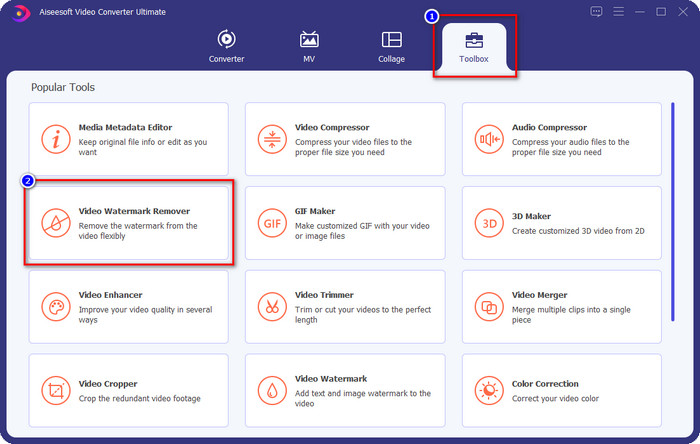
Step 2. After launching the software, open the Toolbox, and find the Video Watermark Remover on the set of features that will show after clicking the Toolbox.
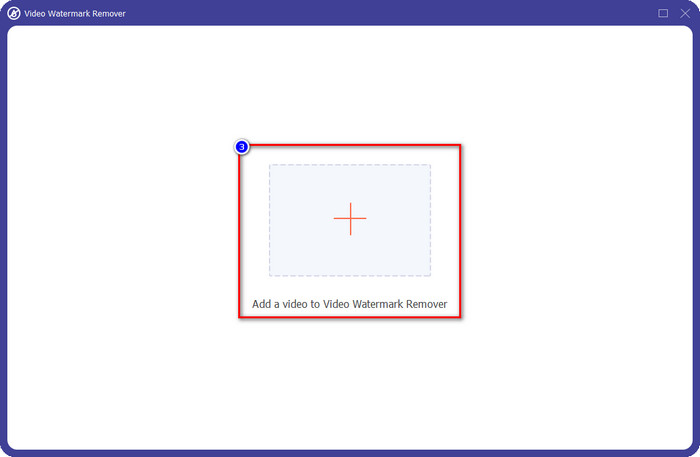
Step 3. To upload the Luminion file, you export with watermark, click the + icon, find the video file with watermark, click it, and then press Open to upload it.
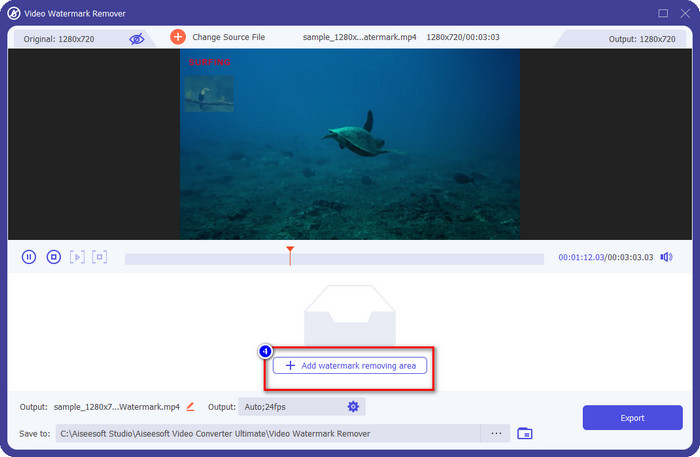
Step 4. Click Add Watermark Removing Area to remove the Luminion watermark placed on the video.
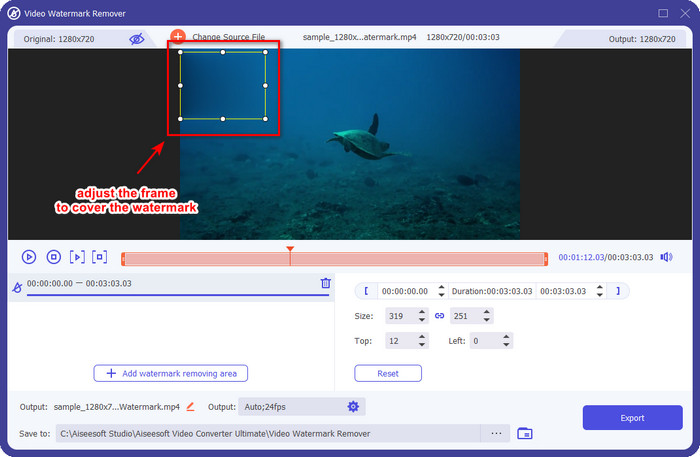
Step 5. Adjust the watermark remover by dragging the dots of the frame to cover the watermark. You can hold and drag the frame to place it properly in the video that has a watermark.
Step 6. To save the video without Luminion watermark, click Export, and it will automatically save the video without watermark.

Aiseesoft removedor de marca d'água grátis online
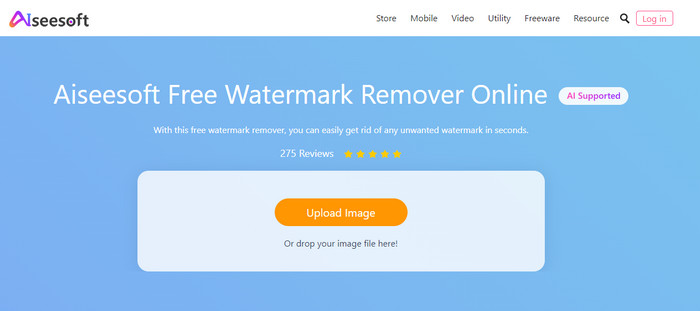
Aiseesoft Free Watermark Remover Online allows you to remove the Lumion watermark on your snap image. Though the web tool doesn't remove the watermark on video, you can still use this online software if you want to remove the watermark on your image. Also, downloading this tool isn't necessary because it is available on the web. So, if you want to save space on your desktop, and don’t want to wait on the downloading process, then luckily, you can use this software to remove the watermark.
Este software é a melhor solução para remover a marca d'água em todas as imagens que você possui. No entanto, esta ferramenta é de uso gratuito e acessível em todos os navegadores da Web para pesquisar.
Step 1. Search the official website of the remover online, then open the website of the watermark remover, and click Upload Image to add the image that has a Lumion watermark on it.
Step 2. Highlight the watermark using the tools presented above; ensure to cover the Lumion watermark so that you can remove it.
Step 3. Click Remove to make the Lumion trial watermark disappear before saving the image. After that, click Save to export the Lumion image without a watermark.
Editor de vídeo Gihosoft
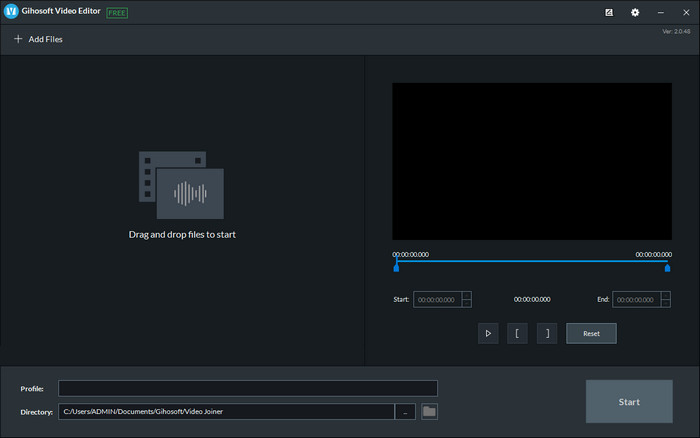
Gihosoft Video Editor can help you delete the watermark on the video you have by trimming it out. This tool can convert the video file you imported and simultaneously remove the watermark. Though the software is free to use on Windows and Mac, several drawbacks to removing watermarks became a problem for many users while they were using it. It can't directly remove the watermark on the video you upload, especially if the watermark is placed on the video and not at the beginning or end of the clip. Even though the software isn't as great as the other watermark remover we mentioned above, you can still use it to trim your clip's watermark with this tool easily.
Step 1. To download the software on your desktop, you will need to visit its official webpage to have the video cutter.
Step 2. Open the software, click Add Files, and upload the video with a watermark.
Step 3. Hold and drag the play heads in and out to trim out the watermark on your video.
Step 4. To save the changes, click Cut, and it will start the exporting process.
Parte 2. Perguntas frequentes sobre como remover a marca d'água Lumion
Posso comprar o Lumion premium para remover a marca d'água?
Sim, você pode comprar a versão premium dele. Ao exportar o design 3D que você fez, não haverá marca d'água, seja um vídeo ou uma imagem.
Qual é a maneira eficaz de remover a marca d'água Lumion?
Em vez de baixar o software no seu dispositivo para remover a marca d'água do vídeo ou imagem que você exporta no Lumion, você pode comprar a versão premium dele. Mas suponha que você não tenha dinheiro para pagar por isso. Nesse caso, você pode usar o removedor de marca d'água diferente mencionado neste artigo.
Por que não consigo iniciar o Lumion corretamente?
Se você quiser usar o Lumion corretamente, precisará de um desktop de alta especificação que atenda ao padrão exigido. Embora você possa iniciá-lo com especificações de versão baixa, ele travará com frequência e haverá momentos em que você não poderá iniciar o software corretamente em sua área de trabalho.
Conclusão
Now that we know different ways how to remove the Lumion watermark. You can understand to eliminate the watermark on the 3D design you’ve made to present it professionally. So, which tool do you think will suffies your needs? Suppose you haven’t chosen which you should use. In that case, we highly recommend you to use the FVC Video Converter Ultimate to remove video watermark because it is simply the best among the rest. So, if you want to have the ultimate watermark video remover, click the download button above and use it right away after you download and install it.
-
 Como adicionar marca d'água a um vídeo no iMovie no Mac [All Embracing]
 Você quer saber os segredos de adicionar uma marca d'água a um vídeo no iMovie? Não derrame o chá em ninguém e aprenda lendo este artigo.
-
 3 maneiras mais fáceis de adicionar marca d'água a um GIF online e offline
 Adicionar uma marca d'água a um GIF pode ser tão fácil quanto 1-2-3 se você usar corretamente a ferramenta certa. As ferramentas no mercado são muito amplas, mas apresentaremos as três ferramentas nas quais você pode confiar.
-
 4 melhores maneiras de remover a marca d'água do GIF [online e offline]
 Precisa remover marca d'água do GIF? Com a ferramenta deste artigo, você aprenderá os diferentes estilos com os diferentes removedores de marca d'água disponíveis em sua plataforma.
