


 Video Converter Ultimate
 Gravador de ecrã
 Reparo de vídeo
 Secure Download
Maneiras completas de remover a marca d'água do filtro Picsart em seus vídeos de forma eficaz
Nowadays, it is an in-need weapon to have a visual media editing software you can depend on your desktop like the Picsart. With it, you can tweak a few options to turn your normal image into photography, as no one has ever seen! You can get more customers or audiences with an eye-catchy image you create. But there is a problem with using the Picsart, which is the watermark it adds after exporting it. The watermark is pretty annoying and could become distractive on visual if it is not removed. So, if you want the software and a tutorial on removing the Picsart filter watermark, you must keep digging this article and learn more about it!

Parte 1. Como remover a marca d'água do filtro Picsart usando o software gratuito na área de trabalho
FVC Video Converter Ultimate - Removedor de marca d'água número um no Windows e Mac
Let’s start introducing the software with our number one pick that could help and teach you how to remove the watermark Picsart. FVC Video Converter Ultimate is the indispensable weapon in the arsenal; you will need to remove the watermark on videos easily while having a professional output. Due to its performance and incomparable features, many users have already tried it, and the tool didn’t disappoint them. If you require help removing the watermark on your video, then you can try to copy the steps we add below and perform them by following.
Step 1. You can have the ultimate software on your device by clicking the appropriate download button below. After that, you must install the software on your computer and click Start Now to open the software.
Free DownloadFor Windows 7 or laterSecure Download
Free DownloadFor MacOS 10.7 or laterSecure Download
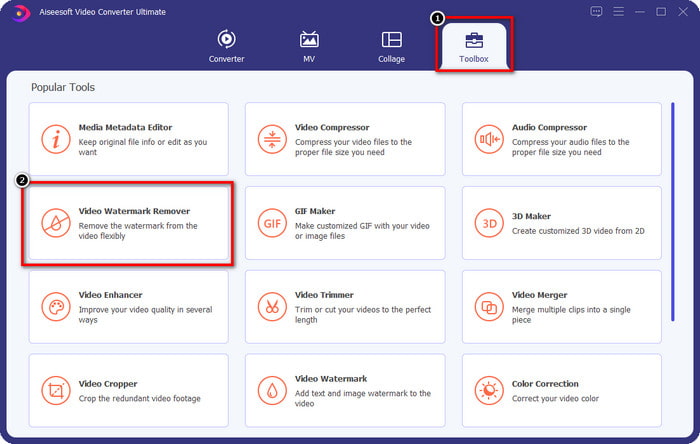
Step 2. In the Toolbox section, you will see other features you can use that could help you make a flourishing touch on your video. But today, click the Video Watermark Remover.
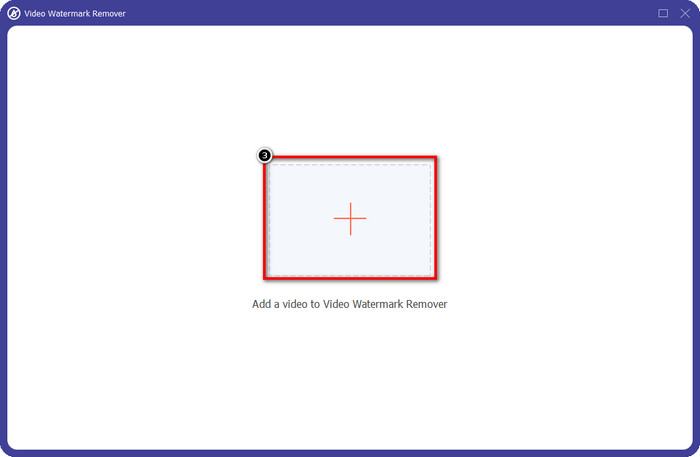
Step 3. Upload the video you edited on the Picsart by clicking the + icon. Search over the file on the folder that will show on your screen, then click Open.
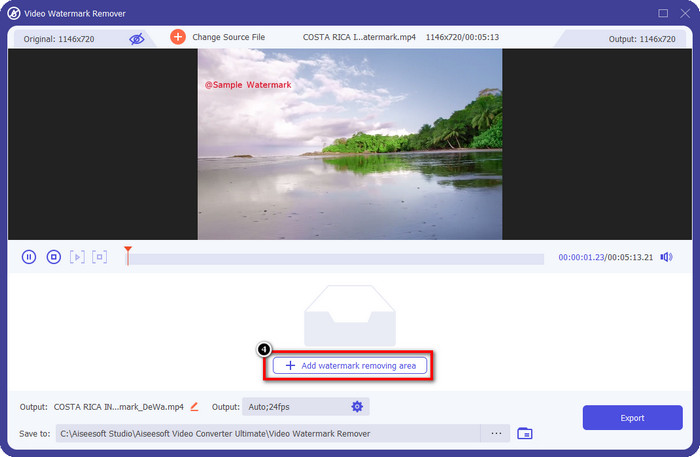
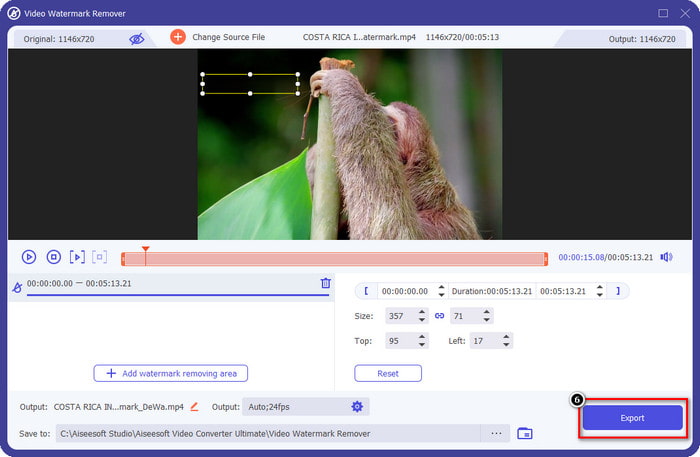
Step 4. Press the Add Watermark Removing Area to remove the watermark embedded on the video you upload.
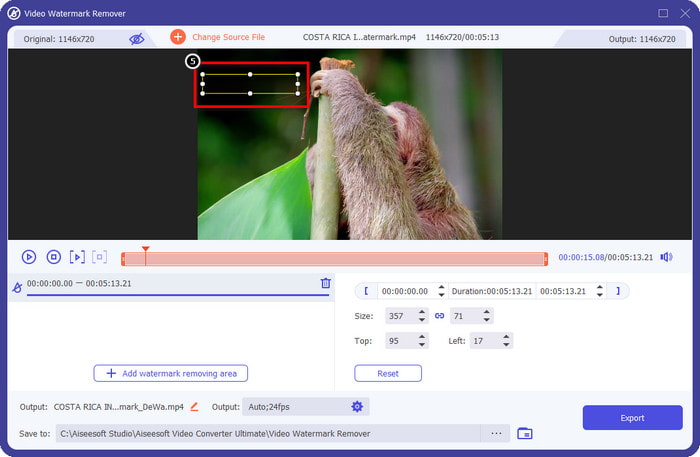
Step 5. Hold and place the selection box to the watermark and cover it up. You can extend or minimize the box according to your preferences.
Step 6. Now that you have finished covering up the watermark with the selection box click Export to save the final output on your local drive.
Fotos no Windows - Marca d'água de capa com design 3D
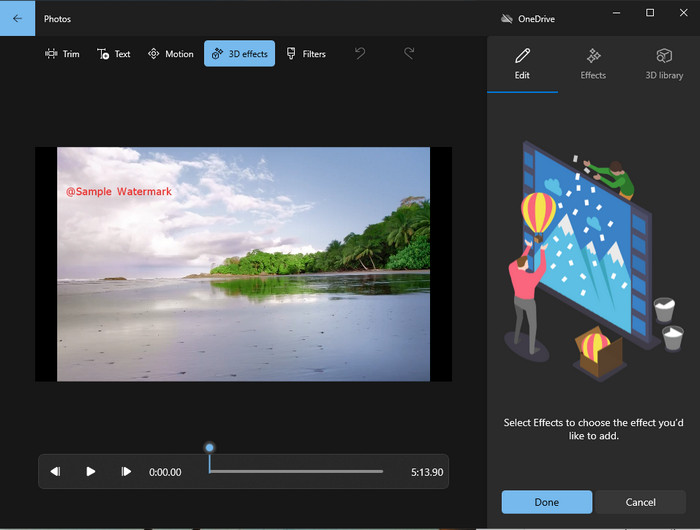
If downloading software is not your forte and you are a Windows user, you must try using the Photos to edit the watermark in your video. Learning how to remove the Picsart watermark with this tool will become even faster because you wouldn’t go to the phase of downloading the app. The tool doesn’t remove the watermark on the video, but you can cover up the watermark with the 3D designs. Nevertheless, the performance of this default visual media viewer and editor is good. Not sure about it? Then you can try to read the steps below and follow them if you want.
Step 1. Click the Window button on the taskbar and search the name of Photos to open it.
Step 2. After opening the built-in editor, you must click the + sign to upload the video you want to edit here
Step 3. Go to the 3D Effects, click the 3D Library, and search for the design you want to use to cover up the watermark. Place the design you’ve selected on the part that has a watermark.
Step 4. Press Finish Video to save the final output on your Windows local drive.
PickFrom Blur Video Online

PickFrom Blur Video Online can assist you on to remove the PicsArt watermark on the videos you have on the web. The tool is unknown to many, but we will introduce it today. We include this software because of its efficiency in removing the watermark on videos you upload. Its GUI is simple and plain; you won't get lost if you are about to use this software. So, if you want to remove the watermark, let’s go into the process below.
Step 1. Open your web browser, search its name, and click the first result to open the watermark remover online.
Step 2. Click the Click to Add File so that you can upload the video here.
Step 3. Tick the Blur Part of the Video, then place the selection box to the watermark.
Step 4. Press Start to download the video without the watermark on it.
Parte 2. Como remover a marca d'água Picsart comprando a versão Premium
Você deve comprar o software se não quiser ter problemas com a remoção da marca d'água dourada do Picsart. Vai custar uma certa quantia porque você precisará pagar por ele antes de poder usá-lo e depois exportar o vídeo sem nenhuma marca d'água incorporada. Então, se você quiser um tutorial passo a passo sobre como comprar o Picsart, você deve seguir o próximo tutorial que adicionamos.
Step 1. Open the official website of Picsart and open your account here. If you don’t have an account, you must create one by Signing up here.
Step 2. On the main website, click Pricing and see the prices for each available product.
Step 3. Choose the plan you want, monthly or yearly, then click Go to Payment.
Step 4. Add the billing statement by filling in the details it needs to be filled in, then click Purchase Now.
Related:
Remove Watermark From Graduation Pictures
Parte 3. Perguntas frequentes sobre como remover a marca d'água do Picsart
Posso comprar permanentemente o Picsart Gold?
Ele não suporta uma base ou plano de pagamento único, portanto, se você quiser usar o Picsart Gold, precisará aproveitar o plano mensal ou anual. Confira o preço de cada plano acessando o site oficial.
Posso criar uma assinatura personalizada no Picsart?
Sim, você pode criar uma assinatura para uma equipe no Picsart. Você pode definir o número de pessoas que usarão o aplicativo.
Onde posso acessar o Picsart?
Você pode baixar o Picsart no Windows, Android e iOS. Infelizmente, o aplicativo não tem uma versão para Mac no momento, mas não fique triste porque você pode usar outro software de edição de mídia disponível em seu sistema.
Conclusão
O tutorial que ensinamos anteriormente dá uma ideia de como remover marcas d'água usando o PicsArt e os melhores removedores de marca d'água que você pode usar. Agora você pode aproveitar o vídeo que edita no Picsart sem se preocupar com a marca d'água do produto que adiciona ao resultado final. Portanto, se você ainda não está convencido com as ferramentas que apresentamos, é obrigatório experimentá-las primeiro, especialmente o FVC Video Converter Ultimate. Clique no botão de download e tenha-o no seu Windows e Mac gratuitamente, depois aproveite os recursos e funções que ele oferece para você aproveitar.
-
 Como remover a marca d'água Pond5 usando as ferramentas finais
 Saiba como remover a marca d'água Pond5 seguindo as etapas simples abaixo. Você pode remover facilmente a marca d'água Pond5 em sua imagem usando essas ferramentas impressionantes.
-
 2 maneiras poderosas de como remover a marca d'água Dxtory
 Aprenda a remover a marca d'água Dxtory seguindo os dois melhores métodos. Se você está procurando a ferramenta mais adequada para remover a marca d'água Dxtory, leia aqui.
-
 Excelentes removedores de marca d'água Arnold Maya que você não deve perder
 Muitos removedores de marca d'água podem remover a marca d'água do Arnold Maya. Mas se você quiser saber quais são os melhores removedores de marca d'água Arnold Maya, leia esta página.
