


 Video Converter Ultimate
 Gravador de ecrã
 Reparo de vídeo
Como remover marca d'água de vídeos rapidamente
Need to remove a watermark from a video in an easy way? Well, you need to use the perfect tool. For instance, users want to remove this watermark text or logo to watch a video in a complete experience. However, this task is complicated for some editors because not all provide an effective watermark remover on their toolset. Ideally, you'll need to purchase an expensive editor for this task, and somehow, not all perform well. But today, we will present the best solution to your problem, whether you are using a computer or an iOS device. Additionally, all the software we offer you has sifted out carefully. So without further ado, let's dive into this article to know how to remove the watermark on any video.

Parte 1. Solução definitiva para remover marca d'água de qualquer vídeo no Windows e Mac
Learning how to remove a watermark from a video is a simple task for the best video editor Video Converter Ultimate. For you, there is no need to have vast experience in editing because this tool provides an interactive interface and easy-to-understand. Moreover, it also offers numerous advanced features you can use like merging, cutting, color correction, reverser, enhancer, and more.
Hoje, muitos usuários já baixaram essa ferramenta e todos estão satisfeitos porque fizeram isso. Impressionante né? Quer tentar usar esta ferramenta? Nesse caso, vamos verificar os passos abaixo e ver se esta ferramenta é a melhor solução para o nosso problema na marca d'água.

FVC Video Converter Ultimate
Mais de 5.689.200 downloads- É a melhor escolha para todos que desejam remover sua marca d'água em qualquer vídeo.
- Esta ferramenta final é a única que funciona como conversor, cortador, fusão, cortador.
- Disponível em todas as plataformas de desktop para downloads, como Windows e Mac.
- É fácil de usar, mas é o mais escolhido em relação ao problema em seu vídeo.
Free DownloadFor Windows 7 or laterSecure Download
Free DownloadFor MacOS 10.7 or laterSecure Download
Step 1. Download the ultimate tool on your computer, choose whether you are using a Windows or Mac. After the downloading process, follow the installation process and click Start Now to run the tool on your system.
Free DownloadFor Windows 7 or laterSecure Download
Free DownloadFor MacOS 10.7 or laterSecure Download
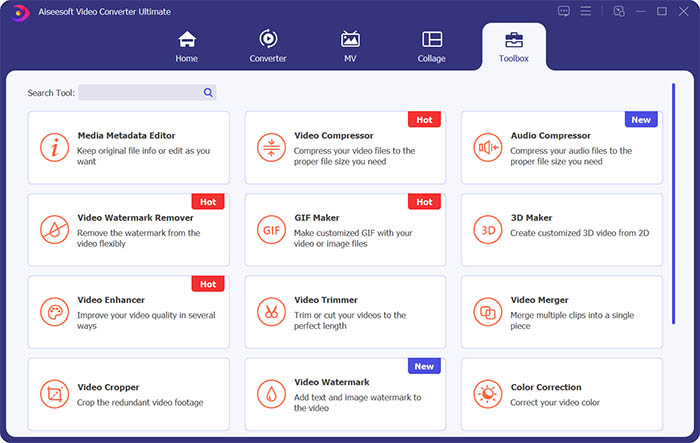
Step 2. Go to the Toolbox section and click Video Watermark Remover to erase the watermark from the video.
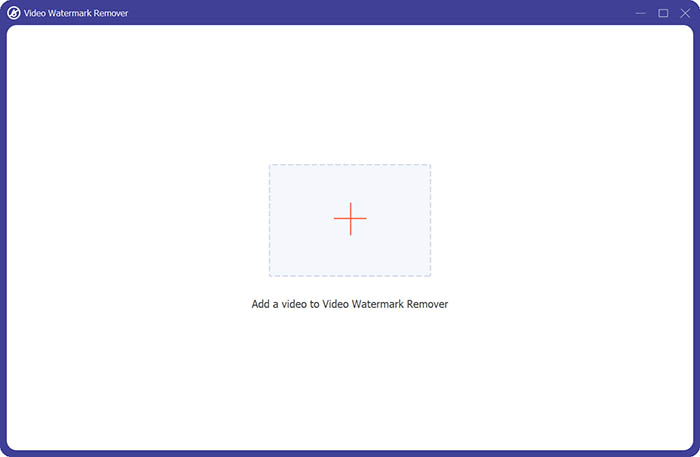
Step 3. Next, you need to click the central plus sign to import the video you want to remove the watermark.
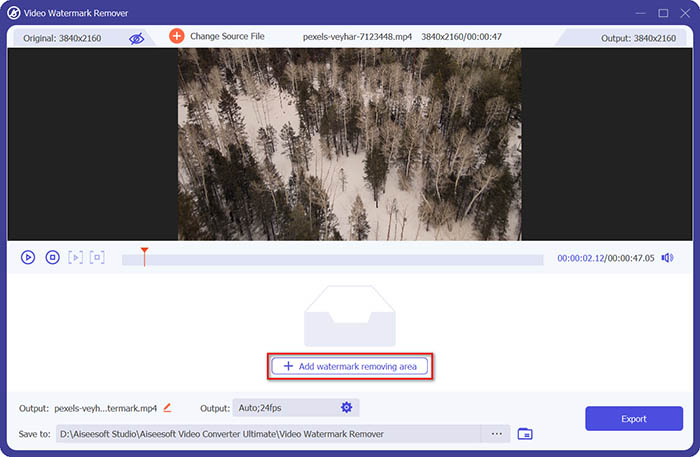
Step 4. After adding the video to the watermark remover, you should click the Add watermark removing area button to select the watermark area.
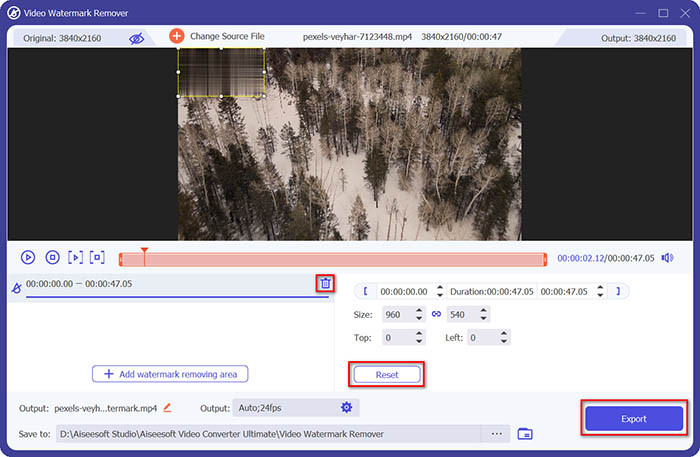
Step 5. Finally, you can click the Export button to get the video without the watermark.
Parte 2. Como remover a marca d'água de qualquer vídeo no iPhone
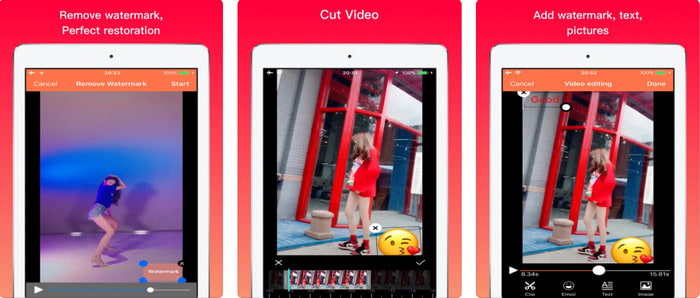
Video Eraser - Remove Logo 4+ already helps a lot of iOS users with their problems in regards to watermark. This app is free to download on every Appstore, but it also provides an app-in purchase to purchase the pro version. Although the tool offers an effective way of removing the watermark, it still encounters some problems, like the video quality won't be the same after you export it here. The watermark is blurred rather than removed. Also, uploading the file here became a problem because it takes much time even though the video is under 30 seconds. But if you want to learn how to remove watermark from video on iPhone, follow the steps below.
Step 1. Download the tool on the App Store, then open it, and press + to import the video with a watermark.
Step 2. Click the information button and click Remove Watermark, click the watermark, and press Start.
Step 3. After the process, the watermark is removed from the video.
Parte 3. Como se livrar da marca d'água em qualquer vídeo na Web
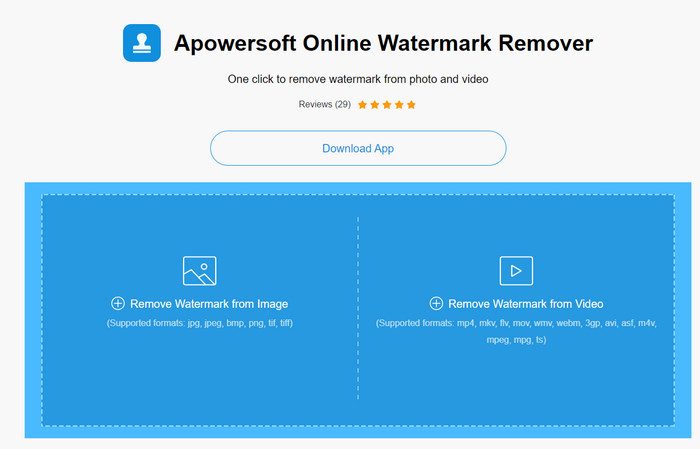
Apowersoft Online Watermark Remover is a free and accessible web tool you can use to remove watermarks. This online tool provides an effective way of removing the watermark even though you didn't download it because it is web-based. Even though it is an effective watermark remover, you will need to have a stable internet connection to finish the process, or else you'll need to repeat to one. So now, if you are on a tight budget and want to learn how to remove watermark from video online, then this is the tool for you.
Step 1. Search the Apowersoft Online Watermark Remover on your favorite web browser and open it.
Step 2. Press Remove Watermark from Video to upload the file with watermark on it. Wait for the uploading process to take place.
Step 3. On the video, hold the left click on your mouse and drag it on the watermark; once it is inside the broken line, you can now release it. Press Erase to begin the removing process, click Download to save it on your computer.
Parte 4. Perguntas frequentes sobre como remover marcas d'água de vídeos
Por que preciso me livrar da marca d'água no vídeo?
Precisamos remover a marca d'água irritante para aproveitar o vídeo como uma experiência completa. É aplicável apenas para uso pessoal, mas pode haver uma consequência se você usá-lo para tirar proveito se publicá-lo on-line e ganhar com o trabalho do outro.
Quais são as outras maneiras de remover marcas d'água?
Você pode encobrir a marca d'água ou substituí-la por sua marca d'água, se desejar. Este processo é sobreposto; só funciona melhor se a marca d'água for pequena ou na lateral do vídeo. Ou você pode cortar o vídeo com uma marca d'água e depois mesclá-lo com o outro vídeo. Esse processo de corte só funciona melhor se a marca d'água for pop-up. Existem duas maneiras diferentes de remover marcas d'água: desfocar e cortar o vídeo. Esses dois funcionam com as ferramentas que apresentamos acima.
Como adicionar uma marca d'água no Photoshop?
If you want to add a watermark on Photoshop, click this link and read it thoroughly to grasp the idea.
Conclusão
With the tool presented in this article, you can easily remove the watermark from the video for free, or you can also use the ultimate tool and purchase it. Although the watermark remover available in this article are easy to use, we still believe that the Video Converter Ultimate presents the most straightforward interface yet most effective one. So, if you want to have the, you can click the download button above to test it out and see if it suits you well.
-
 As 2 principais maneiras de converter o formato DivX para MKV [Resolvido]
 Por que preciso converter DivX para MKV? Quais são os conversores que posso usar? Você tem o mesmo pensamento? Então, este artigo o ajudará a saber mais sobre DivX e MKV.
-
 2 conversores finais de MPG para converter MPG para WMV gratuitamente
 Deseja converter MPG para WMV gratuitamente? Nesse caso, você tem sorte porque descobrimos que existem duas ferramentas que você pode usar para converter seus arquivos MPG.
-
 Como alterar o iTunes M4V para MKV no Mac e Windows [maneira mais rápida]
 Se você precisar converter M4V para MKV no Mac, leia este artigo. Como fornecemos fatos sobre os conversores que o ajudarão em seu processo de conversão.
