


 Video Converter Ultimate
 Gravador de ecrã
 Reparo de vídeo
 Secure Download
Como remover a marca d'água do gráfico de origem efetivamente no gráfico
You might need to use the Origin Graph to create a template on mathematical or scientific data that is too complicated to put into words. This software has already helped students, researchers, professors, people in business, and others who need to make a graph of their own. With its set of templates you can choose from, you can make an eye-appealing graph that could catch the viewers' attention. The problem you might likely encounter if you use its free version is that it adds a text watermark on the final output. Are you in trouble handling the watermark? Say no more! Because we got you covered. Here, we will present helpful tips on removing the watermark from Origin Graph and then use it on your Word or PowerPoint presentation.

Parte 1. Como remover marca d'água do gráfico de origem com o removedor de marca d'água de imagem on-line
FVC Free Watermark Remover Online is a top-notch text watermark remover you can use to eliminate the Origin Graph watermark. This tool is the most efficient in removing any object on your images to make them look even more professional once you remove the watermark. With it, we can assure you that it is a dedicated watermark remover you can use and depend on in times of this problem. Are you wondering if this tool is easy to use? Say no more! Because the steps we add below are the steps, you can follow to get rid of the text watermark on the image the Origin Graph adds.
Step 1. You can click this link to open the image watermark remover online; it will directly open a new tab where you can access the tool.
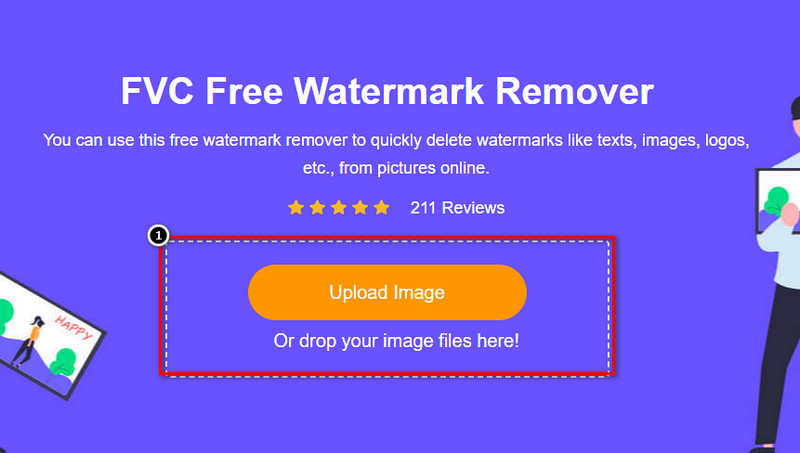
Step 2. Press Upload Image to add the photo with a watermark here, locate the photo file on the folder, and click Open to upload it successfully.
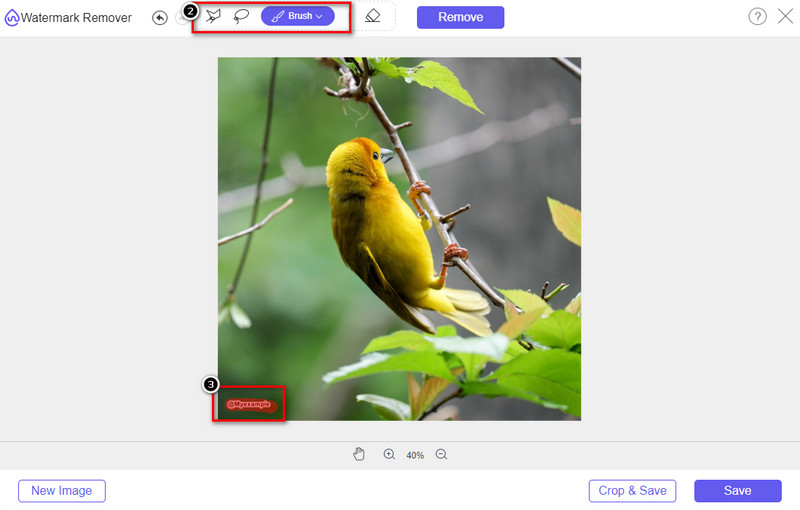
Step 3. You can use three tools to highlight the watermark; though they function differently, their effectiveness is the same. Choose one tool, then highlight the area of the image that has a watermark on it.
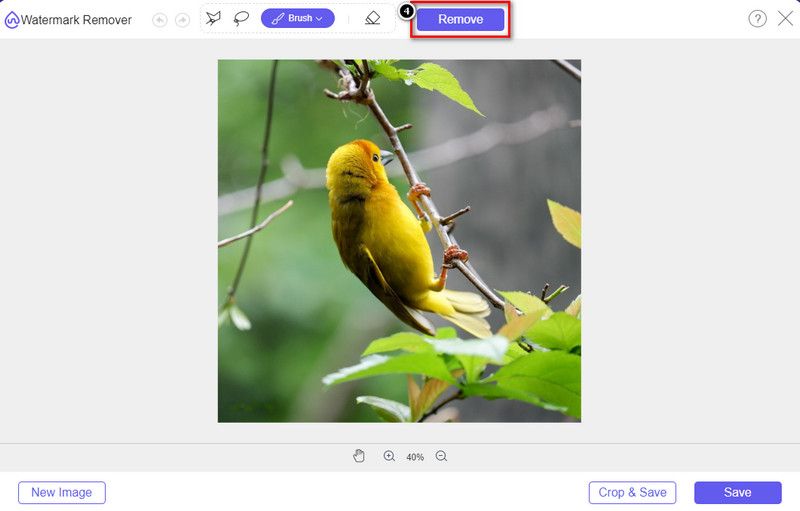
Step 4. Ensure to click the Remove icon after highlighting the tool's watermark. This step is essential so that when you export the image, you will have it without the watermark.
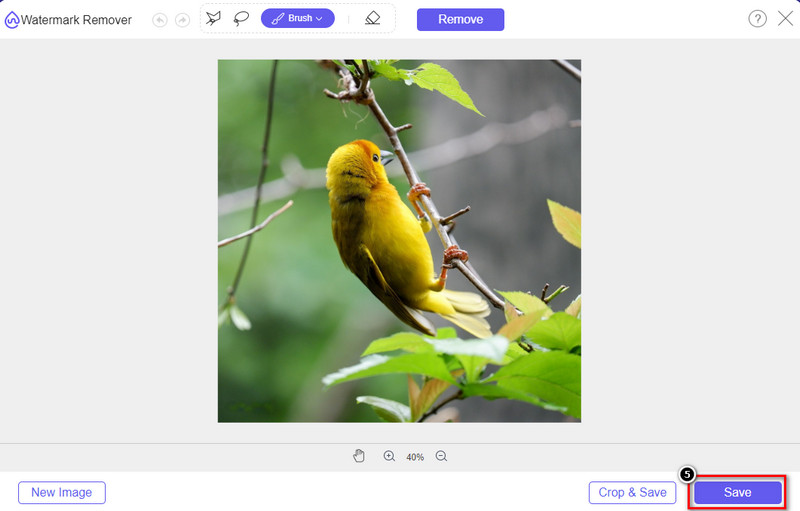
Step 5. To start the exporting process, you may now click the Save button. Wait for the process, and you can now check out the image without the watermark of Origin Graph visible on the area.
Prós
- Um removedor de marca d'água de imagem gratuito baseado na Web que você pode acessar.
- Ele funciona de forma eficiente na remoção da marca d'água com suporte à tecnologia AI.
- Ele suporta uma ampla variedade de formatos de imagem que você pode ter em sua unidade local.
- Nenhuma marca d'água é adicionada nas imagens exportadas.
Contras
- Precisa de conectividade com a Internet para funcionar.
- Seu foco é remover a marca d'água e nada mais.
Parte 2. Como copiar gráficos da origem para o Word ou PowerPoint sem a marca d'água
Nesta parte do artigo, daremos o procedimento que você precisa saber para adicionar o gráfico que você criou no Origin Graph sem a marca d'água. Siga-o de acordo para adicionar o gráfico com sucesso que você faz no Microsoft Word e PowerPoint sem marca d'água.
Você precisará liberar pelo menos 1,9 GB devido ao seu enorme tamanho de arquivo. No arquivo de 1,9 GB, você pode ter a ajuda que precisa, mas se não quiser, pode baixar a versão de 652 MB por meio de .zip ou .exe.
Passos sobre como criar um gráfico no gráfico de origem sem a marca d'água:
Step 1. First, download the Origin Graph on your operating system by going to its official website. Open the tool to start creating the graph you want.
Step 2. After launching the software, add the value of the table you need. You can add more variables and that number of graphs here.
Additional: You can click the Plot to see other graphs you can use, like Basic 2D, Bar, Statistical, and more.
Step 3. Click File, then press Save to export the graph you've created here.
Step 4. You can follow the steps we add in Part 1 and follow the tutorial on removing the watermark from Origin Graph with the help of FVC Free Watermark Remover Online.
Como usar o gráfico no Word sem marca d'água:
Step 1. Open the Word app on your desktop, then click Blank Page. If you've already created word docs, then open that File.
Step 2. Go to the Insert section, then click Pictures. Search over the graph file on your local drive, click it once, then press Open to upload it on Word.
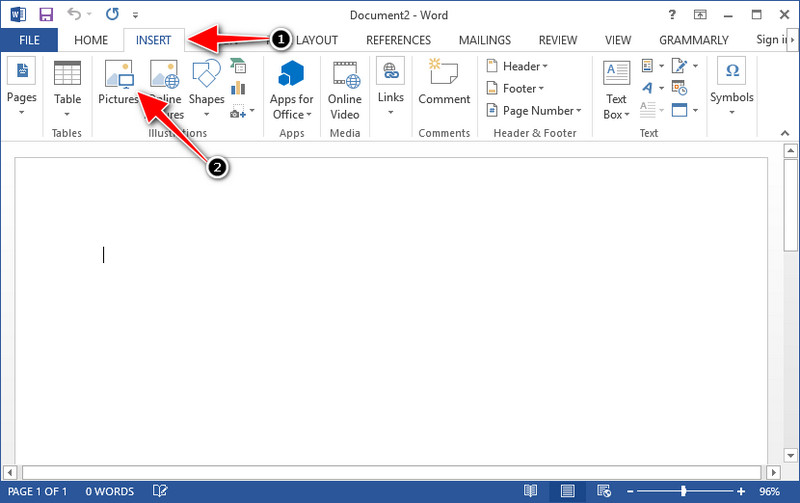
Step 3. It will load automatically on the Word docs you open or created; you can now place the graph by holding and dragging it on the Word.
Como usar o gráfico no PowerPoint sem marca d'água:
Step 1. Launch the PowerPoint on your computer and click Blank Presentation. You can also check out the recent presentation you've created on the left side. If there is the File you need to add the graph, click it to open.
Step 2. Press Insert and click Picture to insert the image graph you've created on Origin Graph.
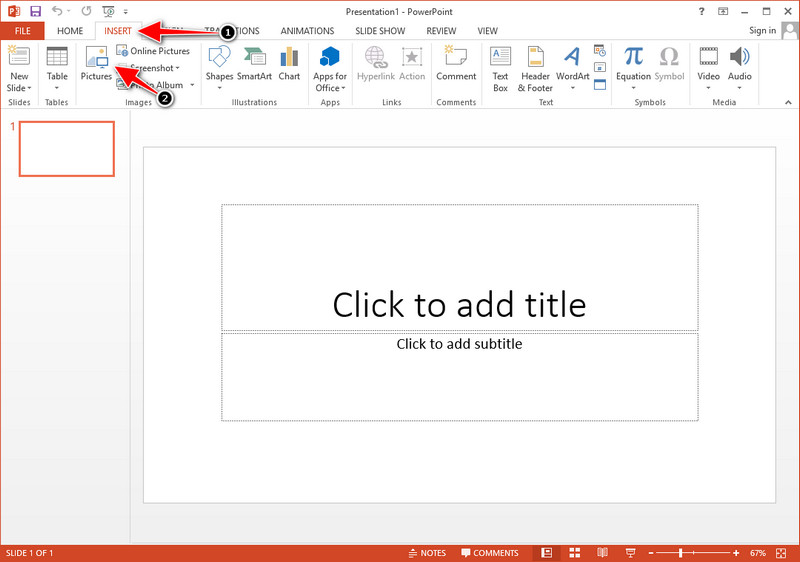
Step 3. Adjust the graph image and place them on the slide.
Further Reading:
How to Remove B612 Watermark from Your Images
How to Remove the WOW Slider Watermark for Free
Parte 3. Perguntas frequentes sobre como remover marca d'água do gráfico de origem
Quanto custa o Origin Pro?
Para os usuários individuais, você pode obter a versão premium do Origin Graph para $435. Você pode visitar sua loja oficial no Origin Lab.
Onde posso baixar oficialmente o Origin Graph?
Visite o Origin Lab para baixar o Origin Graph. Antes que você possa baixar o software em sua área de trabalho, ele fará perguntas. Depois disso, haverá duas opções para baixar o arquivo, se você quiser baixá-lo com ajuda ou não, na forma de .exe ou zip.
Excel e Origin são iguais?
O Excel e o Origin têm uma GUI semelhante a uma planilha para organizar os dados, calcular e definir rótulos. No entanto, o Excel se concentra em conter muitas colunas e linhas que você pode usar. Mas com o Origin, é para organizar atributos que usam uma fórmula de coluna em vez de uma fórmula de célula como o que o Excel suporta.
Conclusão
Agora que você aprendeu como remover a marca d'água do Origin Graph, é hora de usar o gráfico que você criou e apresentá-lo profissionalmente. Se seu objetivo é usá-lo no Word ou Powerpoint, você pode ler a Parte 2 para aprender como fazê-lo. A remoção da marca d'água com esta ferramenta é de longe a mais desejada por quem deseja remover a marca d'água nas imagens. O problema é resolvido com esta ferramenta. Se este artigo o ajudou, por favor, deixe 5 estrelas abaixo.
-
 Como remover marca d'água com Pixlr em etapas detalhadas [efetivo]
 Quer saber como remover uma marca d'água com o Pixlr? Se sim, continue lendo abaixo para saber como fazer isso e as alternativas que você pode usar.
-
 Remova a marca d'água Animotica em vídeos exportados com 3 maneiras comprovadas
 Você já se perguntou se é possível remover a marca d'água do Animotica nos vídeos que você exportou? Este artigo fornece um como fazer.
-
 Maneiras gratuitas de remover a marca d'água VideoShop em vídeos [sem esforço]
 Para remover a marca d'água do VideoShop, seu dispositivo precisará de um removedor de marca d'água. Para saber quais são, leia este artigo.
