


 Video Converter Ultimate
 Gravador de ecrã
 Reparo de vídeo
 Secure Download
Tutorial completo sobre como remover a marca d'água do Weibo que você precisa saber
Weibo é uma plataforma de mídia social conhecida usada para compartilhar, divulgar e obter informações como o Twitter que você pode usar com frequência na China. Você também pode postar e baixar miniaturas, fotos e vídeos aqui. No entanto, haverá uma marca d'água quando você exportá-la. Muitos usuários querem removê-lo porque atrapalha o visual do conteúdo.
Despite the thousands of watermark removers available, few tools can handle removing watermarks effectively. So, if you want doesn't like the watermark on the visual media you download. This article accumulates the best tools to use. We tested them out to prove that they are functional and practical in removing the watermark. To teach you how to remove the Weibo watermark, you must keep up the pace of reading this article.

Parte 1. Como remover a marca d'água do vídeo do Weibo usando o melhor removedor de marca d'água
Weibo watermark can be a problem on other tools because most tools leave a smear of the watermark. Yet, if you use the FVC Video Converter Ultimate, there will be no smear left on the watermark. No matter how big or small the watermark is, this tool can erase it effectively without any trace of the watermark. So you can enjoy watching the video you export on Weibo. In other words, removing the watermark with the help of this tool is a piece of cake.
Além disso, você também pode usar essa ferramenta para outras coisas, como cortar, mesclar, compactar, aparar, criar GIFs e muito mais. E se você quiser adicionar uma marca d'água em seu vídeo para que ninguém possa roubá-lo de você, você pode usar este software para fazer isso. É o software tudo-em-um necessário em sua área de trabalho. Você quer saber como remover a marca d'água do vídeo do Weibo? Você pode seguir as etapas seguintes, pois explicamos como fazê-lo passo a passo.
Free DownloadFor Windows 7 or laterSecure Download
Free DownloadFor MacOS 10.7 or laterSecure Download
': Antes de seguir as etapas seguintes, certifique-se de exportar o vídeo do Weibo no qual deseja remover a marca d'água para que possa encontrá-lo facilmente na pasta.
Step 1. First of all, you must download the software on your desktop and choose the version based on the operating system. After installing the software, follow the WinRAR set-up process that will show on your display, click Start Now to launch it, and proceed.
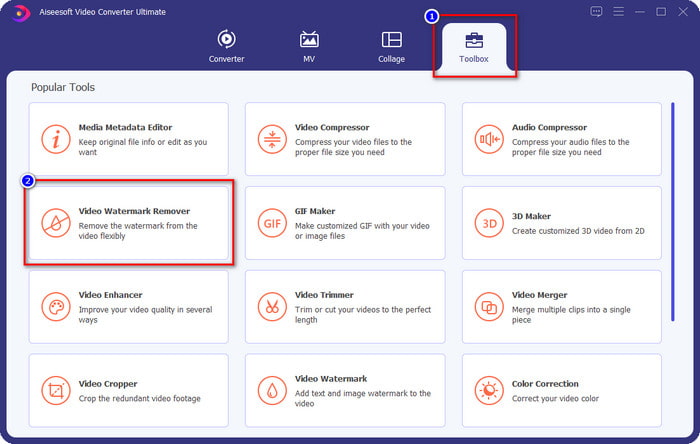
Step 2. Go to the Toolbox section and look for the Video Watermark Remover; click it.
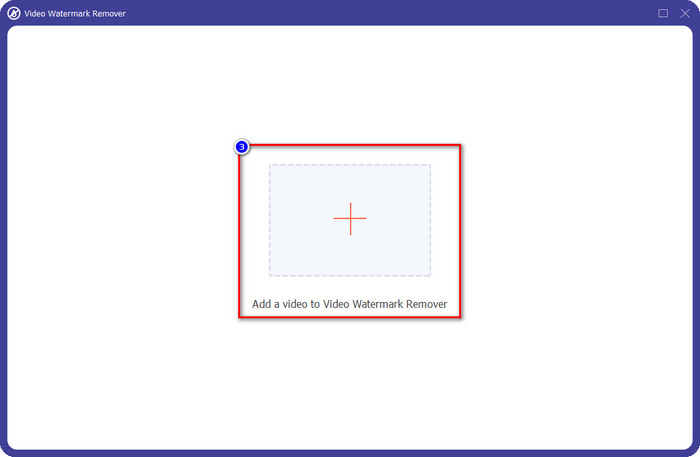
Step 3. Click the + button, and locate the Weibo video watermark you downloaded earlier in the folder, click the file, and press Open to upload it now.
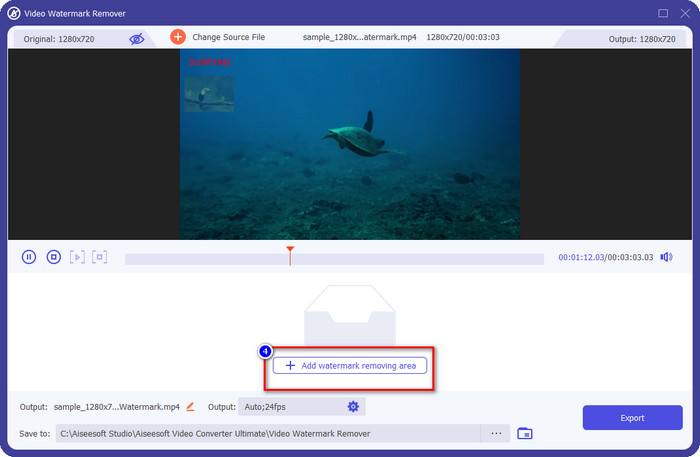
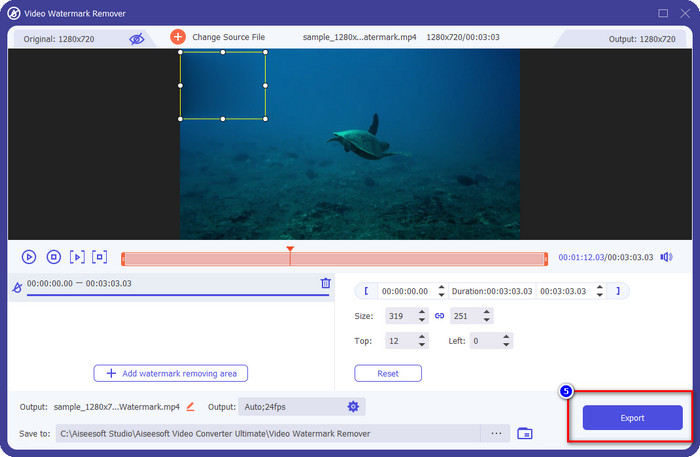
Step 4. On the new window that will show, click the Add Watermark Removing Area to proceed with removing the watermark.
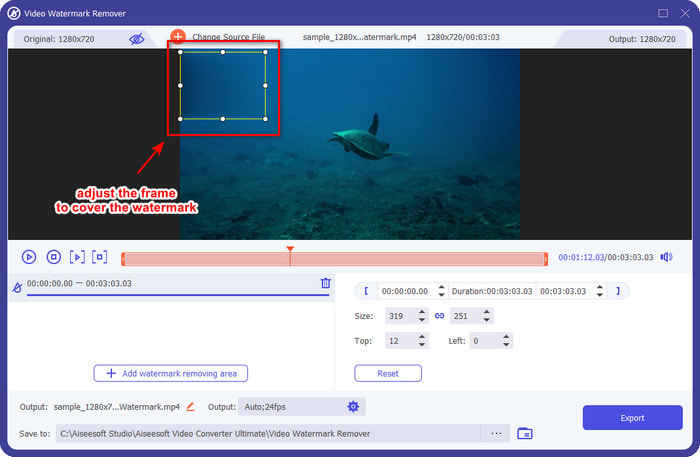
Step 5. Drag and hold the selection box to cover the watermark; you can also expand or shrink it according to your specifications and cover it before you export.
Step 6. After placing the selection box on the watermark, click Export to remove the watermark on the video you upload. There is no need to wait because it supports an ultra-fast process; you will have the Weibo video without the watermark after a few seconds.
Parte 2. Como remover a marca d'água do Weibo Photo usando a versão gratuita na Web
How to save Weibo photos without a watermark? You can't save an image without a watermark if exported on Weibo. But, you can use FVC Free Watermark Remover to erase the watermark on images. It is your complete watermark remover on images with a watermark. Functionality-wise, we can say that this tool is far better than the other watermark remover you can use on the web. So, if you want to remove the watermark on the image, this is the first choice that you might want to try. Though it can remove the watermark on an image, it isn't capable of removing it on videos like the ultimate tool can do for you.
No entanto, é de uso gratuito e sua interface web é limpa, para que você nem veja anúncios que possam incomodá-lo. Quer saber como usar esta ferramenta web? Em seguida, siga as etapas indicadas abaixo para experimentá-lo por si mesmo.
Nota: Igual ao vídeo, certifique-se de baixar a imagem Weibo que deseja ter e certifique-se de colocá-la em um local visível e de fácil acesso na pasta.
Step 1. To access the watermark remover on the web, click this link to open it.
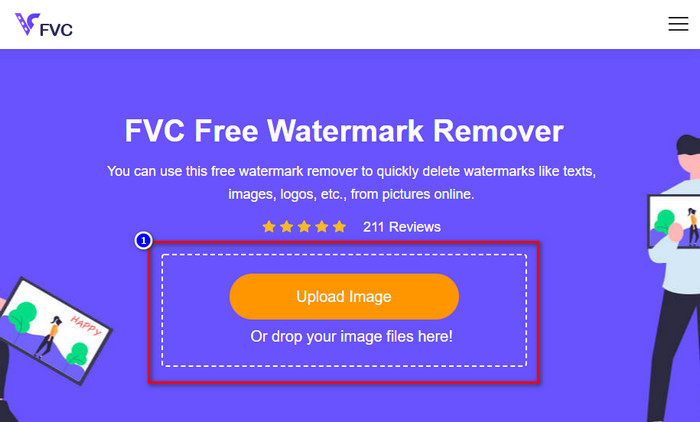
Step 2. On the web interface, click Upload Image, then a folder will show on your screen, find the image, and press Open to upload it.
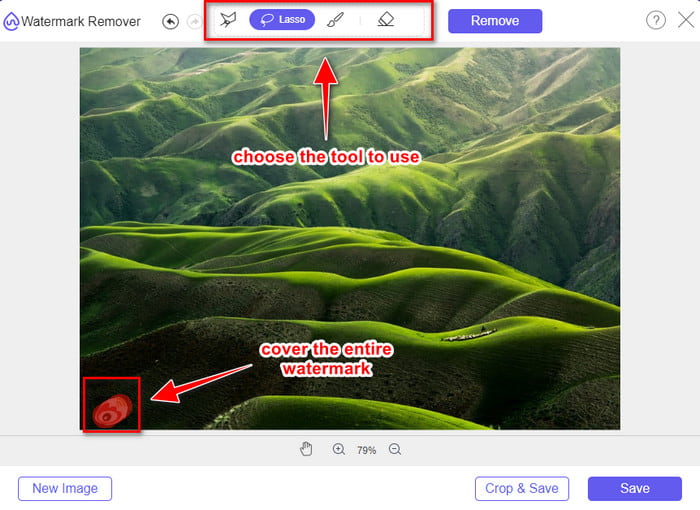
Step 3. You can trace the watermark here to remove it and ensure that every inch of the watermark is inside the tracing you did.
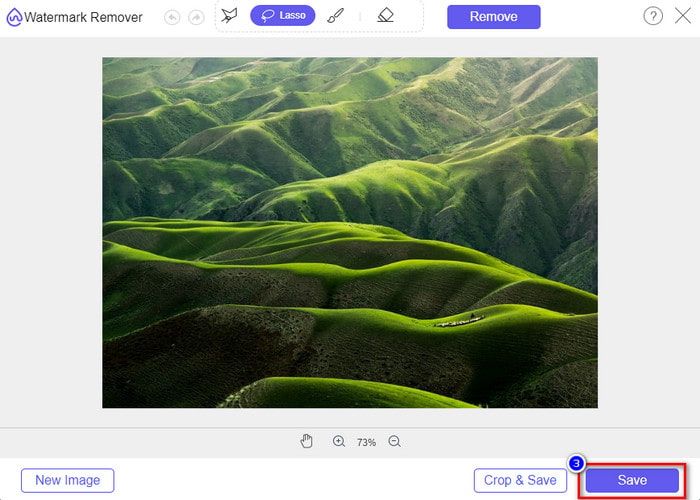
Step 4. Press Remove to erase the watermark that is in your image.
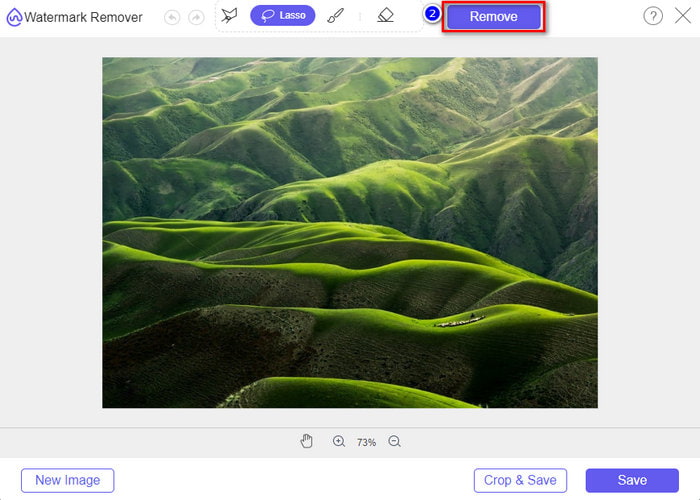
Step 5. After removing the watermark on the Weibo image, click Save to download the Weibo image without a watermark.
Related:
How to Remove TikTok Watermark
Parte 3. Perguntas frequentes sobre como remover a marca d'água do Weibo
Por que a marca d'água do Weibo ficou embaçada após exportá-la?
Algumas ferramentas desfocam a marca d'água para que ela não possa ser vista na mídia visual que exportaram no Weibo. Mas nem todas as ferramentas desfocam as marcas d'água; alguns removem a marca d'água na mídia visual sem deixar vestígios. Portanto, se você deseja remover a marca d'água no Weibo sem desfocá-la, deve conhecer a ferramenta que mencionamos acima para ajudá-lo a removê-la.
Posso encobrir o logotipo do Weibo no arquivo exportado?
Sim você pode. Dessa forma, você não verá a marca d'água do Weibo no arquivo. No entanto, adulterar isso cobriria algumas partes do arquivo, portanto, em vez de ajudá-lo, poderia piorar o arquivo. Portanto, é necessário um removedor de marca d'água para apagar a marca d'água do arquivo.
Todos os arquivos exportados no Weibo têm marca d'água?
Exportar qualquer tipo de arquivo nesta plataforma de microblog deixará uma marca. Não importa o que seja, marcas d'água são adicionadas ao arquivo. Ainda assim, você pode removê-lo com a ferramenta que mencionamos anteriormente neste artigo.
Conclusão
Amazing right? The FVC has the tool; you will need to remove the Weibo watermark on video and images instantly. Even though you haven't experience or are professional in this type of editing, editing is possible with the aforementioned tool. So, if you want to remove a watermark on an image, whether it is exported on Weibo or not, FVC Free Watermark Remover is the tool you will ever need. But on videos and GIFs, you must use professional software that is easy to use and affordable, like the FVC Video Converter Ultimate. What are you waiting for? Remove the watermark on your visual media to enjoy seeing it without any crest of the mark.
-
 Melhor maneira de adicionar marca d'água a um vídeo no Photoshop no Windows e Mac
 Quer saber como adicionar uma marca d'água a um vídeo no Photoshop? Nesse caso, este artigo fornecerá uma ou duas coisas que você precisa saber.
-
 3 melhores soluções sobre como remover marcas d'água de vídeos facilmente
 Quer remover a marca d'água irritante do vídeo? Com este blog, você pode aprender as diferentes ideias sobre como remover a marca d'água em um vídeo.
-
 4 melhores maneiras de remover a marca d'água do GIF [online e offline]
 Precisa remover marca d'água do GIF? Com a ferramenta deste artigo, você aprenderá os diferentes estilos com os diferentes removedores de marca d'água disponíveis em sua plataforma.
