


 Video Converter Ultimate
 Gravador de ecrã
 Reparo de vídeo
 Secure Download
Como remover a marca d'água WeVideo no vídeo editado como um profissional
Não quer baixar ou aproveitar nenhum editor de vídeo mensal em sua área de trabalho porque não tem orçamento suficiente para isso? O WeVideo é uma ferramenta obrigatória se você quiser um editor de vídeo gratuito que não roube nenhum dinheiro. Esta ferramenta da web permite que você faça uma saída de vídeo incrível ao seu alcance e de uma maneira mais bonita, seguindo alguns passos simples. Devido à sua popularidade, a ferramenta se tornou um dos editores de vídeo mais visitados que você pode acessar na web.
From this day forward, the chances of users visiting the website for its video editor will go more. But users have some queries about this video editor online, and more often, users ask does WeVideo have a watermark applied on the video edited? To answer the question, you must read the whole article to find out if it does leave a watermark on the video you edited here.

Parte 1. O WeVideo tem uma marca d'água
Sim, ele adiciona a marca d'água WeVideo assim que você exporta o vídeo editado aqui. Existem diferentes métodos para remover a marca d'água WeVideo, mas nem todos os removedores de marca d'água que você pode ver no mercado são tão eficazes quanto os outros removedores de marca d'água. Em vez de tentar todas as ferramentas para ver qual combina com você, as melhores coisas são consideradas aqui, pois oferecemos o removedor de marca d'água escolhido a dedo de nossa escolha que fornece a melhor saída na remoção da marca d'água. Mesmo que você seja um profissional ou não, você pode usar este removedor de marca d'água para eliminar facilmente a marca d'água em seu vídeo.
Parte 2. Como se livrar da marca d'água WeVideo
FVC Video Converter Ultimate
FVC Video Converter Ultimate provides the best video output for starters and professionals. With its power to remove the watermark on the video, it became popular with many users, and it became their first choice for removing the watermark in their video. It is compatible with Windows and macOS, so it supports multiple platforms from the oldest up to the latest version. Even though the tool is not free to use, you will still achieve the best output once you use this software on your end, for the users who want to use this and those who have already tried it but want to know how to get rid of WeVideo watermark. The step-by-step below will lead you on a path to where you can remove the watermark that is in your video effectively.
Step 1. You can download this software by clicking the download button presented below, choosing which operating system you are currently using, and ensuring to click the right button. After that, install the software promptly, follow the guide on setting it up, then open it.
Free DownloadFor Windows 7 or laterSecure Download
Free DownloadFor MacOS 10.7 or laterSecure Download
Step 2. On the Toolbox, locate the Video Watermark Remover this tool has, and click it to proceed.
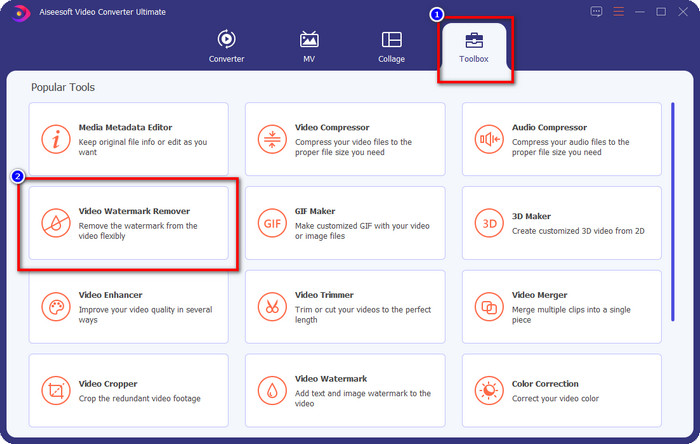
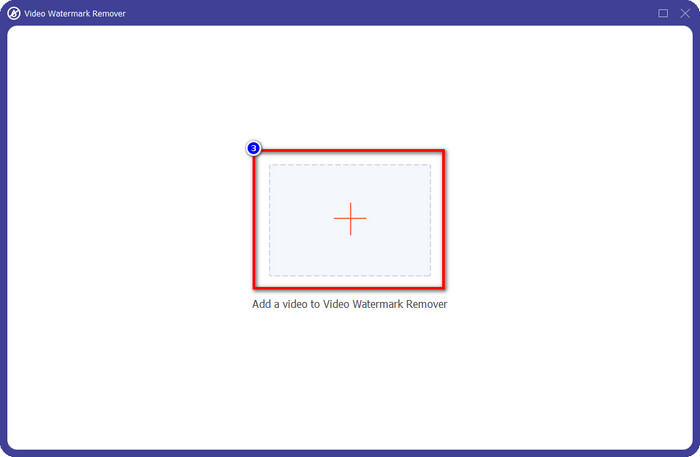
Step 3. By clicking the + icon, you upload the video containing a watermark. Search it over the folder that will show on your screen, click the file once, then press Open to upload it.
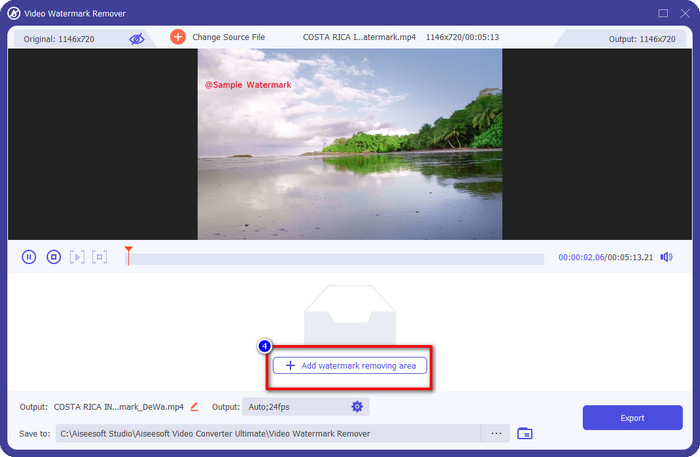
Step 4. After uploading the video with a watermark, press Add Watermark Removing Area and wait for the short loading process.
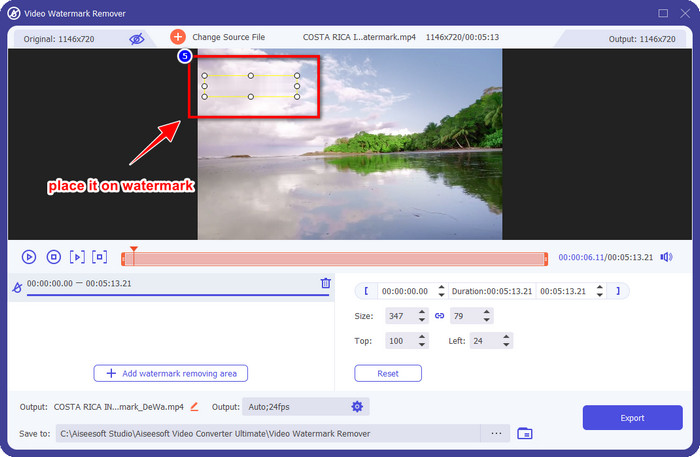
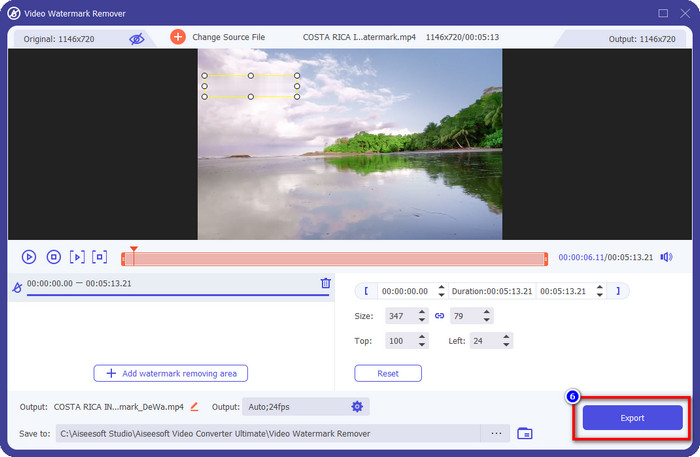
Step 5. Place the selection box to the WeVideo watermark and cover it all up so that when you export the video, you wouldn't see any traces of the watermark at the end of the video.
Step 6. You can save the video now; you remove the watermark here by clicking the Export button. The saving process wouldn't take much time because it supports ultra-fast processes and hardware acceleration.
iMyFone Mark Go
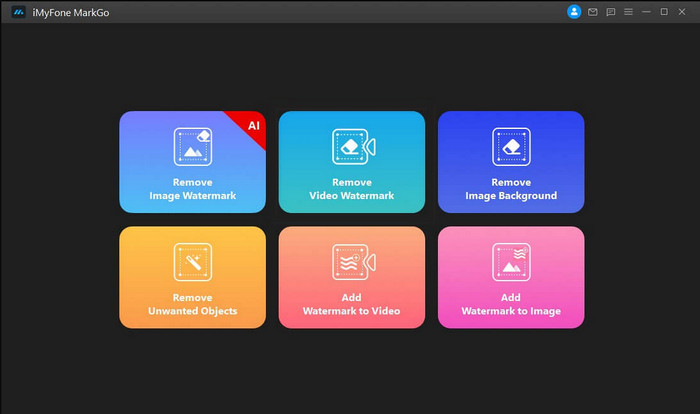
iMyFone Mark Go is another watermark remover you can download on your Windows and Mac to help you how to remove the WeVideo watermark. This tool effectively removes the watermark in your video, like what the ultimate tool can give you. Like any other offline software you can download on your desktop, you will need to avail the tool to remove the watermark and make good use of the premium version to remove the watermark on your video. Though it would cost you, it is not that expensive compared to other watermark removers you can download. So, if you want to remove the watermark on your video easily and effectively, you can follow the indicated steps below as we teach you how to do it step by step.
Step 1. Download the software on your desktop by going to its official website.
Step 2. After you've launched the software, click the Remove Video Watermark.
Step 3. Add the video file by clicking the Add the Video. Choose the video file that has a watermark.
Step 4. Move the rectangular shape that will show and place it to the watermark to cover it up. Even though there are three other options for removing the watermark, you can't access them because these options are for premium users.
Step 5. Click the Export button to save the video you removed the watermark on it.
Cortador de vídeo online - Remova o logotipo do vídeo
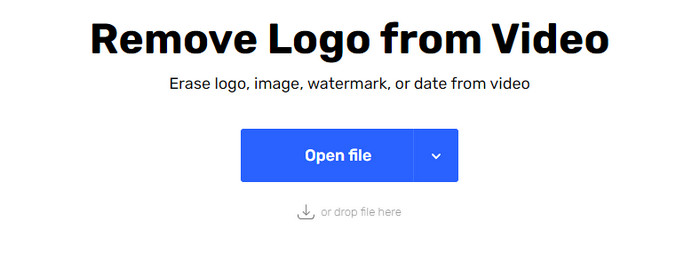
How to remove the WeVideo watermark for free? Use the Online Video Cutter – Remove Logo From Video. This software is a free web tool that you can use to remove the watermark in your video on the web without downloading any or paying any. This tool is effective as the other watermark remover on the market if we are about to compare, but not as good as the ultimate software. It can cover up the watermark in your video to make the video visual better. However, if you don't have an internet connection, this tool wouldn't be the best choice for removing the watermark in your video. But if you do have, then you can follow the steps below to start using this tool to remove the watermark on your video.
Step 1. Open a new tab and search the tool's name to start removing the watermark from the video.
Step 2. Click Open File to upload the WeVideo video here and for it to generate the preview of the video you uploaded.
Step 3. Click on the watermark to apply the removing area this tool has. Once you click any part of the video, there will be a selection box.
Step 4. Press Save to have the video without the watermark on it.
Related:
How to Remove Movavi Watermark
How to Remove the Weibo Watermark
Parte 3. Perguntas frequentes sobre como remover a marca d'água WeVideo
Qual ferramenta é a melhor para remover a marca d'água WeVideo?
Sem dúvida, é o FVC Video Converter Ultimate; esta ferramenta fornece a melhor saída na remoção da marca d'água em seu vídeo. Entre os removedores de marca d'água selecionados, não podemos negar que a ferramenta final é superior ao outro removedor de marca d'água.
Posso cortar a marca d'água WeVideo?
Sim, você pode cortar a marca d'água que o WeVideo deixa no seu vídeo. Mas a dimensão do vídeo será reduzida e há uma chance de que sua qualidade seja reduzida porque você cortou a proporção.
O que faz do WeVideo o melhor editor de vídeo da web?
Com todos os recursos fundamentais de edição de vídeo com os quais você pode se acostumar e como é fácil usar a ferramenta. Estes são os conhecimentos mais comuns sobre o que faz do WeVideo um dos melhores editores de vídeo que você pode usar na web. Mas não é tão bom quanto o outro editor de vídeo Adobe Premiere Pro, Final Cut Pro, etc.
Conclusão
Por fim, com os métodos que fornecemos acima, você já tem uma ideia de como se livrar da marca d'água WeVideo. Mas o que você acha da ferramenta que alistamos? Se você ainda não tem ideia do que usar, você deve testar o FVC Video Converter Ultimate em nossa opinião. Ele fornece o melhor dos melhores na remoção da marca d'água e também é fácil de usar. Então, o que você está esperando? Clique no botão de download para ter o removedor de marca d'água e usá-lo imediatamente.
-
 Removedores de marca d'água 123rf - Revisão completa das ferramentas finais
 Se você quiser saber quais são os removedores de marca d'água 123rf mais destacados, leia este artigo completamente. Este artigo fornece uma revisão detalhada das ferramentas.
-
 Como remover a marca d'água DeviantArt no Windows e Mac
 Quer aprender como remover a marca d'água DeviantArt em suas imagens? Usando os removedores de marca d'água DeviantArt mais notáveis, você pode remover facilmente essas marcas d'água irritantes.
-
 Softwares definitivos para remover a marca d'água do Video Helper em vídeos exportados [2022]
 Você quer saber como remover a marca d'água no vídeo que você baixa no Video Helper? Se sim, leia este artigo para saber.
