


 Video Converter Ultimate
 Gravador de ecrã
 Reparo de vídeo
 Secure Download
Redimensione o vídeo para o TikTok para fazer seus vídeos do TikTok se destacarem de muitos
Você está pronto para levar seus vídeos do TikTok para o próximo nível? Uma maneira de tornar seus vídeos visualmente mais atraentes é cortá-los! O corte permite que você se concentre nas partes mais importantes do seu conteúdo, ao mesmo tempo em que oferece uma aparência nova e única.
Don't worry if you've never cropped a video before. It's super easy! In no time, you can crop your videos like a pro and create content that stands out on the platform. So, grab your phone, and let's get started. Here, we will introduce various true and effective methods to resize videos for TikTok.

Parte 1. Motivos para recortar vídeos para o TikTok
Como o TikTok é uma plataforma popular para exibir conteúdo educacional, recreativo e muito mais, eles têm seus motivos para cortar vídeos. Dito isso, há muitos motivos para recortar vídeos para o TikTok. Nesta seção, vamos mencionar algumas das razões famosas.
Cortar seu vídeo ajuda você a se concentrar nos aspectos mais cruciais de seu conteúdo, permitindo destacar e enfatizar os pontos mais vitais. Isso pode ajudá-lo a transmitir seu ponto de vista e manter seu público interessado. Outro, recortar um vídeo pode torná-lo mais atraente esteticamente, enfatizando o assunto ou a ação em primeiro plano e eliminando as distrações.
Além disso, os vídeos do TikTok são normalmente vistos no modo retrato, mas você pode ter conteúdo filmado em paisagem ou quadrado, então você precisará ajustar a proporção de acordo. Se o seu vídeo tiver a melhor aparência na plataforma, talvez seja necessário cortá-lo para a proporção adequada. Por fim, o recorte pode ser utilizado de forma criativa para dar aos seus vídeos uma aparência totalmente sua. Você pode ganhar mais atenção e seguidores se fizer isso.
Parte 2. Como recortar um vídeo usando o TikTok
O TikTok é uma plataforma de mídia social que rapidamente se tornou um dos aplicativos mais populares para compartilhar vídeos curtos. É como se esta plataforma viesse com um recurso de redimensionamento de vídeo TikTok. O corte permite que você se concentre nas partes mais essenciais do seu vídeo e o torne visualmente mais atraente. Se você deseja destacar um assunto ou ação específica ou criar uma aparência única, o recorte pode ajudá-lo a atingir seu objetivo. Agora, aqui estão as etapas de como recortar vídeos usando o TikTok:
Step 1. Record or upload the video you want to crop. Once it's ready, tap on the Checkmark button to proceed to the editing screen.
Step 2. On the editing screen, you'll see various options including Trim, Sounds, and Effects. Using your fingers, adjust the size and position of the video to crop it as desired.
Step 3. Once you're happy with the cropping, tap the Save button to save your changes. You can edit your video by adding filters, music, and text as desired. When you're ready, tap the Next button to proceed to the posting screen.
Step 4. Add a caption and any relevant hashtags, then tap on Post to share your cropped video with the TikTok community. The process is the same when you wish to learn how to crop a video on TikTok on iPhone.
Parte 3. Como cortar um vídeo para TikTok com ferramentas de terceiros
Fornecemos alguns abaixo se você estiver procurando por outros aplicativos além do TikTok para cortar vídeos. Confira e aprenda como recortar um vídeo no TikTok usando essas ferramentas.
1. Video Converter Ultimate
FVC Video Converter Ultimate is a powerful video editing software that can help you crop and edit your videos for TikTok. With its user-friendly interface and advanced editing features, FVC Video Converter Ultimate is a great tool for anyone looking to create high-quality videos for the platform.
Key Features of FVC Video Converter Ultimate:
1. Crop and resize videos: With FVC Video Converter Ultimate, you can crop your videos to any size or aspect ratio you need for TikTok.
2. Edit and enhance videos: FVC Video Converter Ultimate also comes with a range of editing tools that allow you to adjust the brightness, contrast, saturation, and other aspects of your video.
3. High-quality output: FVC Video Converter Ultimate uses advanced algorithms to ensure your videos are converted to the highest quality possible.
4. Fast conversion speed: FVC Video Converter Ultimate is designed to convert your videos quickly and efficiently.
Agora, aqui estão os passos para redimensionar vídeos para TikTok usando este programa:
Step 1. Get the program
Para começar, basta baixar o software gratuitamente clicando no ícone abaixo. O programa pode então ser iniciado depois de instalado.
Free DownloadFor Windows 7 or laterSecure Download
Free DownloadFor MacOS 10.7 or laterSecure Download
Step 2. Add a video
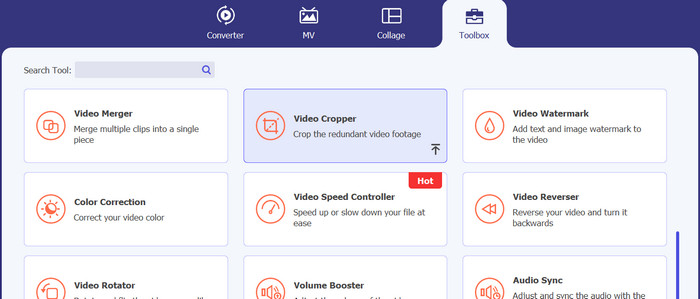
To access the Video Cropper, click on the Toolbox menu. Click the plus symbol to import a video file from your computer's hard disk for cropping.
Step 3. Crop the video
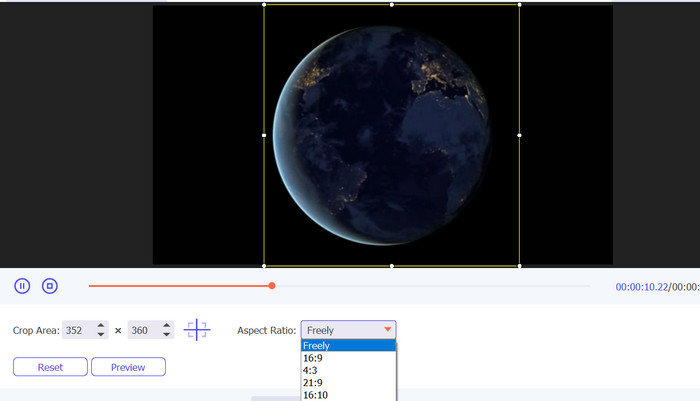
Crop the video to the appropriate aspect ratio. The aspect ratio and borders can be adjusted with the sliders. Ultimately, you may tweak the video and audio output settings in the Output submenu.
Step 4. Save the video
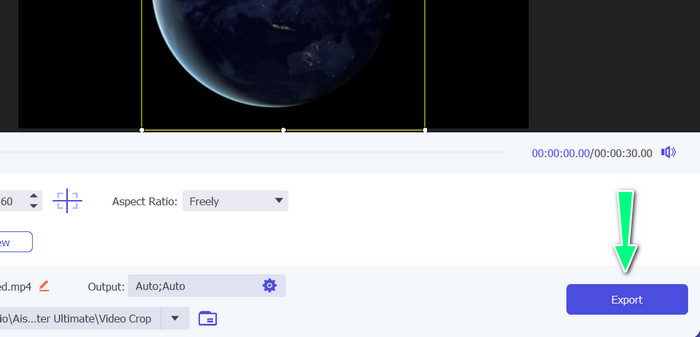
The Export button lets you save the cropped video to your computer once you preview the modifications in real-time.
Further Reading
2 Effortless Ways on How to Speed up a Video on TikTok
4 Effective Ways to Remove Tiktok Watermarks from Tiktok Videos
2. Vid.Fun
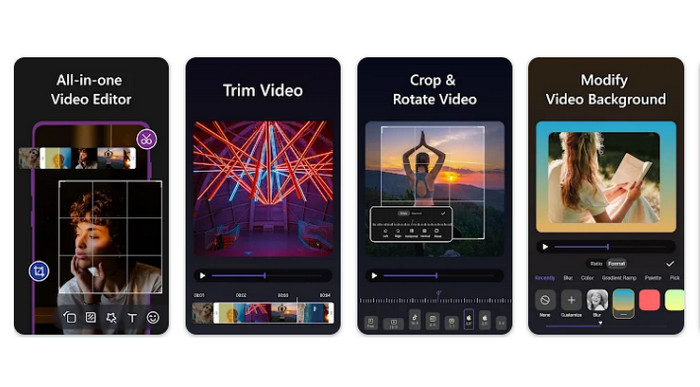
If you're looking for a quick way to crop videos on Android for TikTok, Vid.fun is a great option to consider. Vid.fun has a range of aspect ratios to choose from, including 1:1, 4:5, 9:16, and more, so you can be sure your videos will look great on TikTok. Follow the simple guide below to learn how to use it.
Step 1. Download Vid.fun from Google Play and start a new project.
Step 2. Drag the clip you want to crop from your device's gallery or camera roll to the timeline.
Step 3. Drag the corners of a rectangle placed on the movie. Just pull the corner knobs to crop the video. Afterward, share the film with family or post it online.
Conclusão
Cropping a video on TikTok is an easy procedure that can be done within the app itself. Also, you may learn to resize a video for TikTok with the programs mentioned. By following the steps outlined in this guide, you can crop your videos to the perfect aspect ratio for optimal viewing on TikTok.
-
 3 maneiras eficazes de adicionar vídeos e fotos no Tiktok
 Quer saber como adicionar imagens nos vídeos do Tiktok? Nesse caso, clique e leia este artigo para saber como adicionar facilmente as imagens ao seu vídeo Tiktok.
-
 Aprenda a desacelerar um vídeo no Tiktok [maneiras fáceis]
 Quer saber como desacelerar um vídeo no Tiktok? Desacelere ou acelere seu vídeo do TikTok perfeitamente seguindo estas etapas fáceis.
-
 Como cortar arquivo MP4 sem perder a qualidade do vídeo [2023]
 Aprenda como cortar MP4 com etapas fáceis fornecidas apenas para você. Portanto, mantenha o ritmo porque apresentamos a você o melhor das melhores ferramentas de corte que você pode usar.
