


 Video Converter Ultimate
 Gravador de ecrã
 Reparo de vídeo
Tutorial simplificado sobre como sincronizar áudio e vídeo no Adobe Premiere Pro
If you are a pro then you've already used the Adobe Premiere Pro as your video editor software that performs really well. A lot of Adobe users really love this software because it provides the best output you would love to insert on your video. But did you know that you can also use this tool to sync your audio with video? So, if you don't have an idea on how to do it then this is one of your lucky days. As we try it for yourself on how to sync it easily. So now, you will not need to read a manual because this write-up makes it simple for you to understand how to sync audio in Premiere easily and effectively with another alternative tool.

Parte 1. Como sincronizar áudio e vídeo no Adobe Premiere Pro
Before we start, let's have a brief introduction to the Adobe Premiere Pro. As we indicate above, this tool has already been used a lot by the professional editors who love to make amazing videos. However, this tool will take a lot of your time to learn because it provides a lot of advanced features that beginners will not understand. Although learning how to use it will surely take a lot of time, it is worth it to learn how to use it if you have free time. Moreover, the indicated steps below are simpler for you to understand to learn how to sync audio and video in Premiere if you follow the steps below.
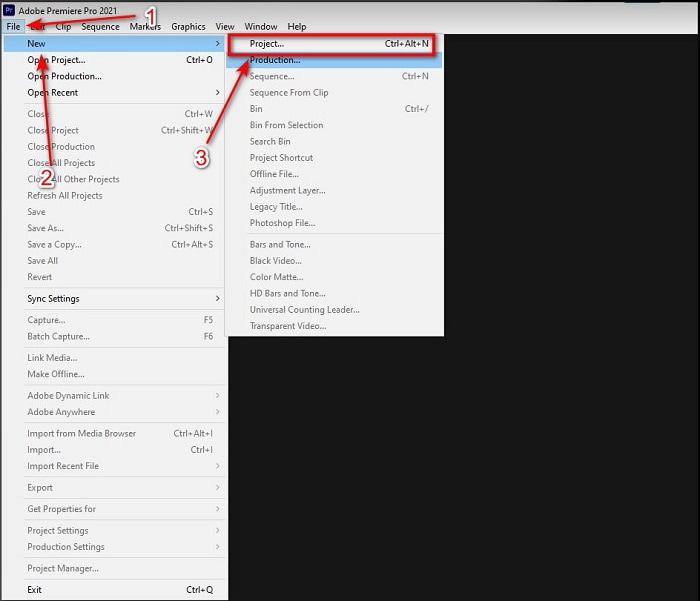
Step 1. First, you must buy the tool first and download it on your computer drive. Launch it after the downloading process has already been taken in place. Then click the File and under it is the New then click the Project to proceed then press OK on the new interface will be going to pop-up.
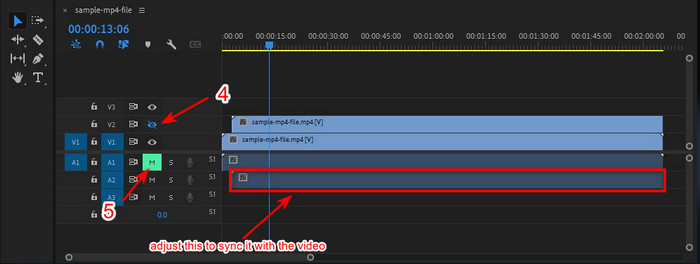
Step 2. And add the same video and audio to the Timeline twice. Then click the Toggle Track Output of the second video and mute the second by clicking the Mute Track. Adjust the audio track to make it sure that it will sync with the video.
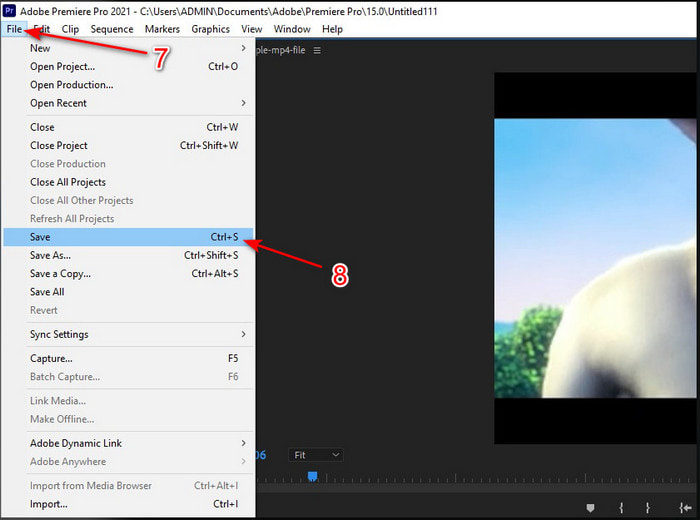
Step 3. Re-click the File above and locate the Save to finally export the media file into your computer drive.
Prós
- Esta ferramenta fornece um recurso de edição avançado.
- Editor top de linha que você pode baixar.
- Melhor escolha para ter uma saída profissional.
Contras
- Não é a melhor escolha para o iniciante que não tem ideia de edição.
- O software é totalmente caro em comparação com os outros editores que fornecem quase o mesmo recurso.
Parte 2. Método mais fácil de sincronizar áudio para iniciantes e profissionais com o Video Converter Ultimate
Just like Adobe Premiere Pro this phenomenal converter also produces high-quality and advanced editing features that you would love to use. But this is way easier to use compared to the premiere pro. The Video Converter Ultimate is the best friend of the editors who loves to make a video, enhance, boost, create Gif and more. This software specialized almost all of the internet user's problems even in syncing. And because of how easy it is to use, more than a million users have already downloaded and fell in love with it. So, if you want to make your life easier instead of using premiere pro sync audio why don't you use this? Follow the step below.
Steps on How to Sync Audio and Video with the Video Converter Ultimate:
Step 1. Download the software on your computer and choose whether it is a PC or Mac. Install it later on, do the set-up and click the Start Now to proceed.
Free DownloadFor Windows 7 or laterSecure Download
Free DownloadFor MacOS 10.7 or laterSecure Download
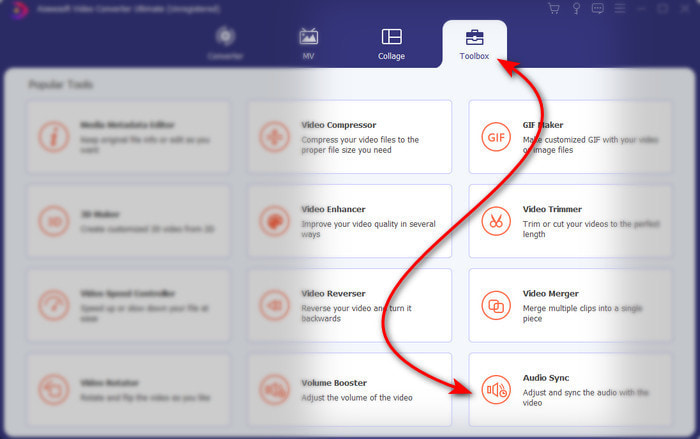
Step 2. Launch the tool after the first step and go next to the Toolbox section and press the Audio Sync in the lower part.
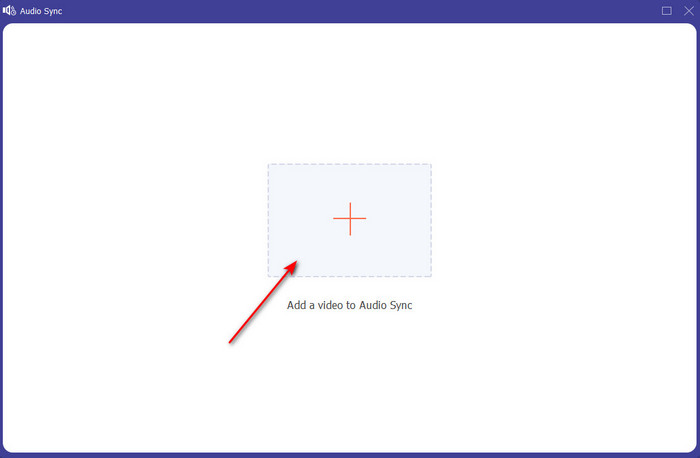
Step 3. Press the + button to insert the video and audio you want to be synced. After locating it on the folder click Open to proceed.
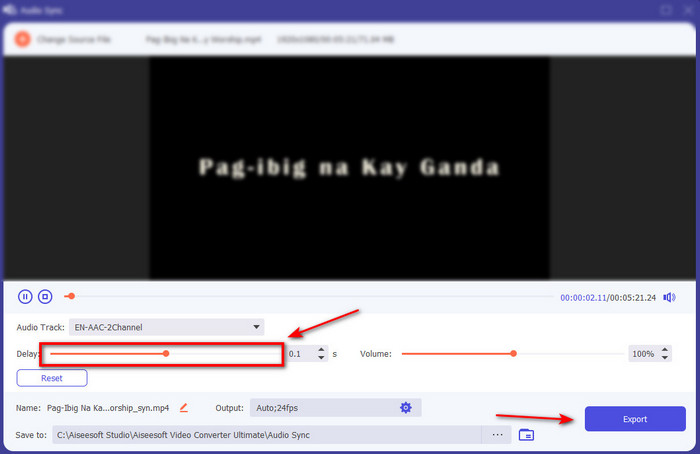
Step 4. To make the audio sync adjust the Delay slider to match it with the video. In addition, you can also boost the audio there as well by adjusting the volume slider. After it is done click Export to save the final output.
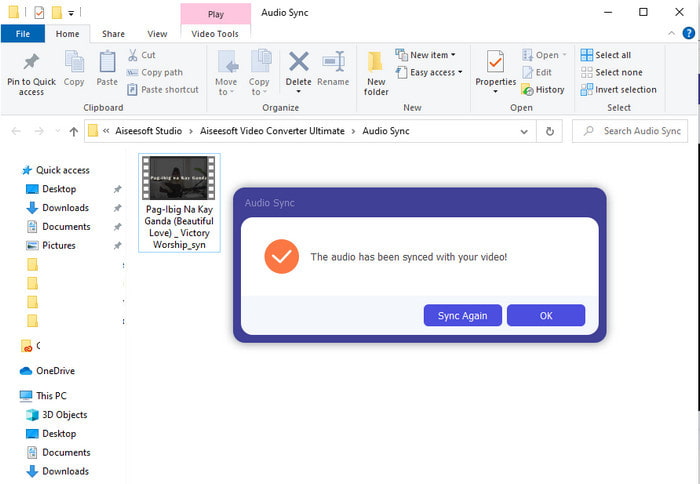
Step 5. After it is done, a folder will be going to show on your screen with synchronized audio and video you've made. Click the file to watch, play and enjoy the audio-video in sync.
Prós
- A melhor escolha para tornar seu vídeo fenomenal.
- A experiência geral ao usar esta ferramenta é literalmente definitiva e ainda assim fácil de usar.
- Está disponível em todas as plataformas, seja PC ou Mac.
Contras
- Assim como o Premiere Pro, esta ferramenta é paga, porém é bem mais barata que o Premiere Pro.
- Precisa ser baixado em sua unidade antes de poder acessá-lo.
Parte 3. Perguntas frequentes sobre sincronização de áudio e vídeo no Premiere
Posso usar o Premiere como gravador de tela?
If you're trying to record a screen on the Premiere pro then you must surrender now because you can't do it here. However, we can tell you a secret screen recorder you can choose on. So, if you want to know what are the Top 5 Best Screencasts you can use on PC, Mac, online, iOS, and Android.
O Adobe Premiere Pro é gratuito?
Na verdade, é um sim, você pode baixar esta ferramenta gratuitamente, mas você só pode acessar esta ferramenta por 7 dias em teste. Portanto, se a avaliação terminou, você deve assinar o Adobe Premiere Pro novamente para aproveitar toda a capacidade de edição dos recursos que este Premiere Pro oferece.
Posso usar outro site para baixar o Premiere Pro?
Não, porque é ilegal baixar todos os aplicativos com o outro site. Além disso, se você usar outro site para baixar o Premiere Pro, há uma chance de que ele carregue spyware, vírus ou muito pior. Portanto, se você deseja garantir sua segurança, baixe o software apenas para os principais sites oficiais.
Posso comprar um acesso vitalício ao Adobe Premiere Pro?
Embora você possa comprar um acesso mensal no Adobe Premiere Pro, ainda não pode comprar um acesso vitalício. Mas você pode comprá-lo com outro site, no entanto, isso é ilegal e haverá uma chance de que o arquivo que você vai baixar esteja corrompido, tenha um vírus ou seja uma farsa. Portanto, se você deseja usar e comprar o Adobe Premiere Pro, sugerimos a todos que o comprem em seu site principal.
Conclusão
Após 5 minutos de leitura deste artigo, já sabemos como usar o Adobe Premiere pro para sincronizar o áudio com o vídeo. No entanto, existe uma maneira mais simples de sincronizá-lo usando o Video Converter Ultimate. Como esta ferramenta oferece muito mais rapidez no ajuste do vídeo e áudio não sincronizados, tendo a melhor qualidade. Então, agora, se você tem muito dinheiro, vá com o Adobe Premiere Pro, mas se você quiser economizar muito com a mesma função, você deve usar o Video Converter Ultimate.
-
 Como diminuir a velocidade de um vídeo: dicas perfeitas [Desktop/Celular]
 Você está cansado de procurar as melhores ferramentas que ajudam a desacelerar um vídeo online? Leia este artigo específico para você se iluminar com as informações listadas abaixo.
-
 Windows Media Player | Aprenda a acelerar vídeos [Comprovado]
 Você deseja desacelerar seu videoclipe usando o Windows Media Player, mas está tendo problemas para saber como fazê-lo? Este artigo é ideal para leitura e pode esclarecer seu ponto de vista sobre como acelerar vídeos usando o Windows Media Player.
-
 Como alterar o vídeo em câmera lenta para velocidade normal [etapas fáceis]
 Quer saber como reverter um vídeo em câmera lenta que você baixou da Internet ou gravou acidentalmente em câmera lenta? Aprenda a converter vídeo em câmera lenta para velocidade normal no Mac, Windows, iOS e Android.
