


 Video Converter Ultimate
 Gravador de ecrã
 Reparo de vídeo
[Resolvido] Como usar filtros de vídeo para melhorar seu vídeo perfeitamente
Make your visual media look more outstanding than the other by using a video filter. These filters can heighten the tone, make consistency, add mood, and do more. Although there are many different filter apps on the market, we always hope video editing in the Video Converter Ultimate, like adding filters. But before we provide a tutorial on how to use the ultimate tool, let's take a look first at what a video filter is and the types you can use to help you create a perfect video. Check them first to have a gist of idea about it.

Parte 1. O que é o filtro de vídeo
Video Filter is popular on the entire web that helps the users create more detailed visual media without adding special effects. These filters are built-in, which means they have different designs to visual imagery by improving it on tone, brightness, depth, temperature, etc. Although filters can help you enhance the video, their purpose isn't the same as the other one. For example, if you are trying to shoot a portrait, you will need a filter suited. The following details will tell you the standard you should see to have the best video filter app you can download or use.
A lista aqui não são os diferentes filtros, mas falará sobre os processos, benefícios e padrões dos filtros.
1. Correção de cor ajustável
A correção de cor é um processo de controle da quantidade de luz que vai para o filme. Como fotógrafo, seu objetivo é ter as imagens perfeitas, equilibrando tudo. No entanto, nem sempre você terá a mesclagem ideal em tudo o que pode tornar sua fotografia melhor. Mas com o Filtro de Correção de Cor para equilibrar sua videografia, filtrando a cena de luz negra, brilho e contraste.
2. Filtros para o trabalho perfeito
Existem muitos filtros de rosto de vídeo diferentes no mercado, mas alguns não são tão bons quanto outros. Embora os editores de vídeo tenham um conjunto de filtros, procurar o filtro perfeito pode ser difícil de entender, especialmente se você não tiver uma vasta ideia sobre esses filtros. Mesmo que você possa experimentá-los todos, será um pouco demorado se você fizer isso. Então, se você quiser ter mais ideia sobre os filtros mais escolhidos no editor de vídeo, você pode ir para a parte dois.
3. Melhor editor de vídeo em movimento
A ferramenta que você deve selecionar deve ter recursos de edição de vídeo para ajudá-lo a cortar, mesclar, cortar e fazer mais. No entanto, se você escolher uma ferramenta para editar, deve considerar os itens abaixo. Se você é um profissional ou iniciante, deve observar seus padrões para ter o melhor editor de vídeo.
For Professional:
◆ Um editor de vídeo realiza edição avançada de vídeo para ajudá-lo a realizar uma tarefa complexa de uma só vez.
◆ Suporta diferentes tipos de arquivos para importação e exportação.
◆ Ele suporta a importação de arquivos de vídeo raw de câmeras, telefones celulares ou DSLRs.
For Beginner:
◆ Deve ser fácil de usar para realizar a edição de vídeo com eficiência.
◆ Embora não seja uma boa ferramenta profissional, deve ter as melhores ferramentas de edição que um iniciante precisa.
◆ A GUI deve ser menos pesada para evitar confusão nos recursos da ferramenta.
Parte 2. Quais são os melhores filtros de vídeo que você pode usar
Os detalhes listados aqui são os filtros que você pode usar para ajudar a atualizar o vídeo. Observe que os filtros não podem alterar a qualidade do vídeo, mas podem ajudar a melhorar a aparência do seu vídeo.
1. Filtro de rosto de animais

A maioria dos usuários adora usar filtros de cachorro ou gato em vídeo porque eles são únicos e nos dão boas risadas. Este filtro anima um animal diferente e outras coisas hilárias, ao contrário de outros filtros. Embora não aprimore sua fotografia, você ainda pode usar isso se quiser ter um filtro animado para uma finalidade diferente. Além disso, o principal aplicativo de filtragem que você pode baixar já adicionou filtros animados para seus usuários.
2. Filtro Cinza
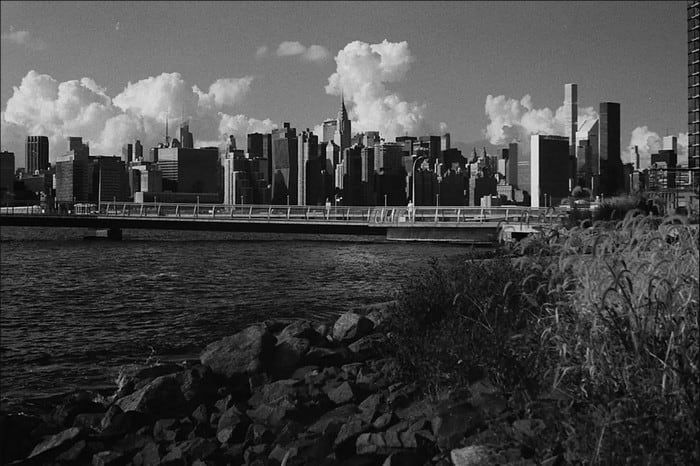
Did you miss the 90s and want to film a video in black and white? Well, Gray Filter can help to have the video of the 90s. This filter is not like the other filter that uses high contrast and colors because it uses a black and white color combination to make a 90s vibe.
3. Filtro de beleza
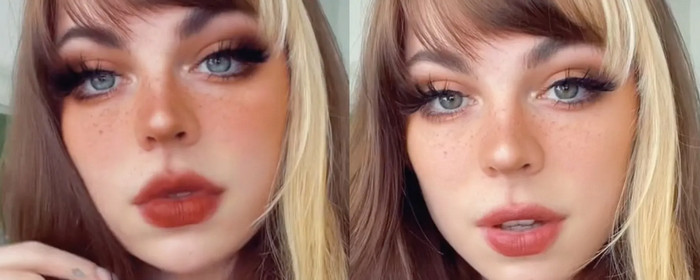
Quer filmar vídeos e ter um filtro de vídeo para suavizar a pele? Bem, um filtro de beleza pode ajudá-lo a melhorar sua foto de si mesmo. Com este filtro, você pode ver muitas diferenças entre a fotografia original e a aprimorada. Alguns influenciadores e artistas escolhem esse filtro para melhorar seus filmes e fotos.
4. Filtro Quente

Another filter can give your film warmth to a pale look and absorb a blue cast. Warm Filter takes your video to the level where your skin tones can improve even with electronic and outdoor shade. Although it absorbs blue cast, some deep blue cast can't absorb well by this filter. But this filter is best if you want to film a video to the skies.
5. Filtro Simples

Plain Filter can give you a soft filter for a video you've shot. This filter provides soft edges and more light in color than the raw video. Although it is a filter, this hasn't much effect on the video because it retains the original but slightly upgrades. It works best if you don't want to add too much filter to your video and highlight the original video.
Embora não tenhamos mencionado todos os filtros, esses são os filtros mais usados em qualquer aplicativo de filtragem de vídeo. No entanto, seu nome pode variar em diferentes ferramentas, mas a aparência em seu filtro seria a mesma.
Parte 3. Melhor programa para baixar para adicionar filtros de vídeo em qualquer vídeo ou clipe no Windows e Mac
You can get all of the four filters and more mentioned above if you download the Video Converter Ultimate. This software provides the most efficient way of adding filters on any video you take on any device like cameras and phones; even if you are using DSLR, you can use this tool to import the clip and add a filter on it. Unlike other filtering apps, this app is not only best for beginners; even if you are a pro, you can depend on this tool.
Além disso, se você deseja ter o melhor editor de vídeo no Windows e Mac, felizmente, pode usar isso. Então agora, se você for adicionar um filtro de vídeo, siga o tutorial fácil de seguir abaixo para adicionar um filtro em qualquer vídeo com sucesso.
Step 1. Download the video editor on your desktop by clicking the download button below. After you download the tool, you must install it by following the installation process and opening it.
Free DownloadFor Windows 7 or laterSecure Download
Free DownloadFor MacOS 10.7 or laterSecure Download
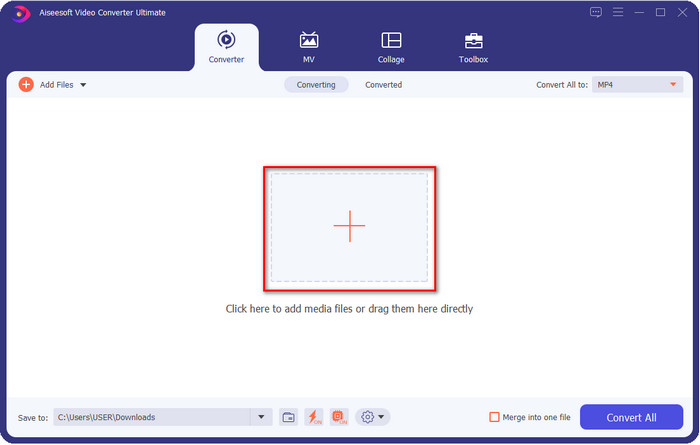
Step 2. To add the file to the video editor, click the + button. Select the video file on the folder that will show on your screen and press Open to add it to the filtering queues.
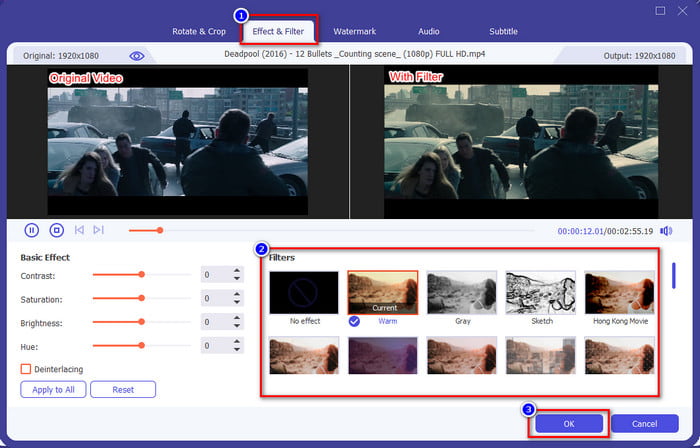
Step 3. A new window where you can edit will show on your screen if you click the magic wand button. Click Effects & Filters at the upper section, click the filter you want to use, test them all out if you wish, and click OK if you are satisfied with the filter you've selected.
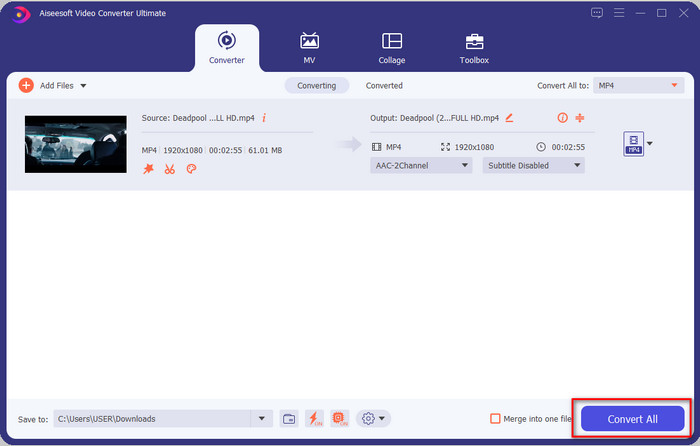
Step 4. Export the video on the editor by clicking the Convert All. Wait for several seconds to download the video file on your computer, and voila, with that, you now have the best video filtered with the help of the best video editor on Windows & Mac.
Related:
Parte 4. Perguntas frequentes sobre filtros de vídeo
É seguro baixar um aplicativo de filtro de vídeo?
Depende do site onde você fez o download. Embora seja seguro baixar um editor de vídeo na web, você precisa se certificar de que o site que está visitando é seguro. Ou então alguns podem obter seus dados e informações privadas sobre você.
Os filtros degradam a qualidade do vídeo?
A qualidade do vídeo pode mudar devido aos efeitos do filtro adicionado. Portanto, se você deseja manter a resolução de alta qualidade, deve pensar em qual filtro usa, pois isso alterará a qualidade do vídeo. Mas se você usar um filtro pixelado, isso afetará a qualidade do vídeo.
Por que o formato mudou depois de adicionar o filtro?
The format set into the tool you are using is the standard format from the start. To avoid this happening, with the Video Converter Ultimate, you must follow these steps the Video Converter Ultimate. After adding the filter, go to the Convert All to and look for the original format, click it. Follow the final step, and now your format is retained with the filter you add to the video.
Conclusão
We have now received enlightenment about video filters and the most pick filters. Now that we have already explained what it is and the filters you can use, it is time to download the Video Converter Ultimate to add a filter to your video and make it look amazing. This tool can help you not only to add filters to your video but also to edit it in an uncomplicated way. You can have this amazing tool by clicking the download button and purchasing it to enjoy the full features this tool brings.
-
 Como adicionar áudio e música ao vídeo gratuitamente em seu computador / telefone
 Este artigo mostra 4 maneiras fáceis de adicionar áudio a vídeo gratuitamente. Não importa qual faixa de áudio você deseja adicionar ao seu vídeo, você pode obter resultados satisfatórios aqui.
-
 Transforme GIF em formato de vídeo: converta memes GIF em vídeo [2021]
 Determine como transformar GIF em formato de vídeo com a ajuda das ferramentas listadas abaixo. Escolha qual deles e aprenda como fazê-lo, à medida que coletamos evidências suficientes sobre eles.
-
 GIF maravilhoso para aplicativos de vídeo para dispositivos Android e iOS
 Você sabia que pode converter GIFs em qualquer formato de vídeo de que goste usando o telefone? Escolha os melhores aplicativos em seu Android ou iOS.
