


 Video Converter Ultimate
 Gravador de ecrã
 Reparo de vídeo
 Secure Download
Utilize rotadores de vídeo on-line e diga adeus aos vídeos invertidos
Na era digital, o conteúdo de vídeo é parte integrante de nossas vidas. Os vídeos são uma ótima forma de passar a sua mensagem, seja para relembrar um momento especial ou fazer um conteúdo emocionante para as redes sociais ou para o seu negócio. Mas você pode achar que seus vídeos precisam estar na posição certa porque foram gravados no lugar errado ou porque precisam ser invertidos horizontal ou verticalmente.
This post will teach you about the best online video rotators available to help you transform your videos to your desired orientation. Explore more of them by reading through this article.

Parte 1. Melhores Rotadores de Vídeo Online
1. RotateMyVideo
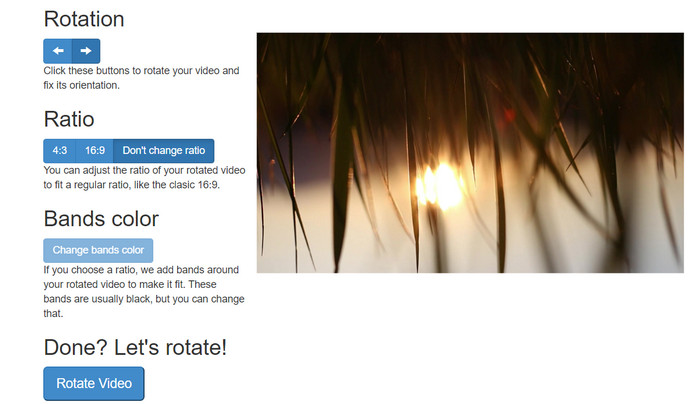
RotateMyVideo é uma ferramenta online simples e gratuita que permite girar e virar seus vídeos em qualquer direção sem a necessidade de um software especial. A ferramenta permite girar seus vídeos em 90 graus por vez e possui uma interface simples que torna o processo rápido e fácil. RotateMyVideo é uma boa escolha se você precisar girar um vídeo por motivos pessoais ou comerciais. Isso pode economizar tempo e esforço.
Prós
- Gire vídeos online gratuitamente sem taxas ocultas.
- Suporta rotação em incrementos de 90 graus.
- Virar vídeos horizontalmente ou verticalmente.
Contras
- Ele só pode girar vídeos com menos de 500 MB de tamanho.
- O processo de conversão de vídeo pode levar algum tempo.
- A interface do usuário pode não ser atraente.
Etapas para girar vídeos online com RotateMyVideo:
Step 1. Open a web browser and go to the RotateMyVideo website.
Step 2. Click on the Pick Video button to upload the video you want to rotate.
Step 3. Now, select the video orientation you want by clicking on the appropriate button. You may rotate the video left or right, flip it horizontally or vertically, or keep it at its original orientation.
Step 4. If you're satisfied with the rotated video, click on the Rotate video button to save the changes.
2. Clídeo
Clideo is an intuitive and versatile online video editing platform that offers a range of powerful tools for editing videos, including video rotation. Additionally, Clideo offers features like video trimming, merging, adding audio, and many more, making it a comprehensive video editing tool. Unlike other video editing software, Clideo is entirely web-based, meaning you don't need to download or install anything.
Prós
- Carregue vídeos de várias fontes.
- Compatível com vários formatos de vídeo.
- Interface amigável.
Contras
- Não é adequado para necessidades avançadas de edição de vídeo.
- A versão gratuita tem limitações.
Etapas para o conversor de vídeo de retrato para paisagem online:
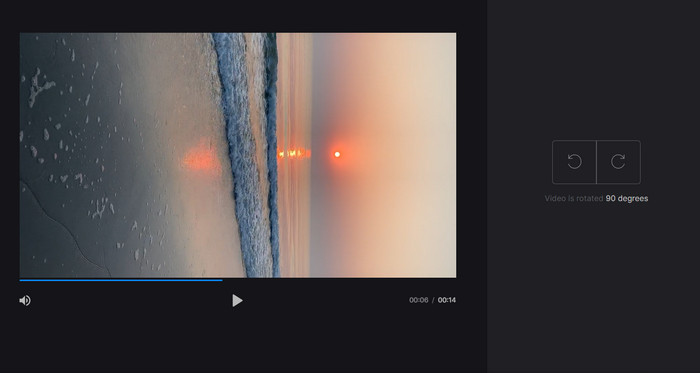
Step 1. Use a web browser to access the Clideo website. Then, reveal all the tools from the main page.
Step 2. Now, select the Rotate Video option from the menu and select Choose file to upload the video that you wish to rotate. You may also drag and drop the video file onto the website.
Step 3. Click on the Rotate button on the video player's right side. Choose the desired rotation orientation for the video by clicking the corresponding button. The video can be rotated clockwise or counterclockwise, horizontally or vertically.
3. Flexclip
O Flexclip é uma impressionante ferramenta de edição de vídeo online que permite criar vídeos com aparência profissional sem problemas. Uma das melhores coisas do Flexclip é sua extensa biblioteca de modelos que você pode usar para iniciar seu processo de edição de vídeo. Ele também oferece uma versão gratuita que permite criar vídeos de até um minuto sem marcas d'água.
Prós
- Extensa biblioteca de modelos.
- Oferece uma gama de opções de personalização.
Contras
- O preço pode ser alto para alguns usuários
- Controle limitado sobre a qualidade do vídeo
Etapas sobre como girar vídeos online sem marca d'água usando o Flexclip:
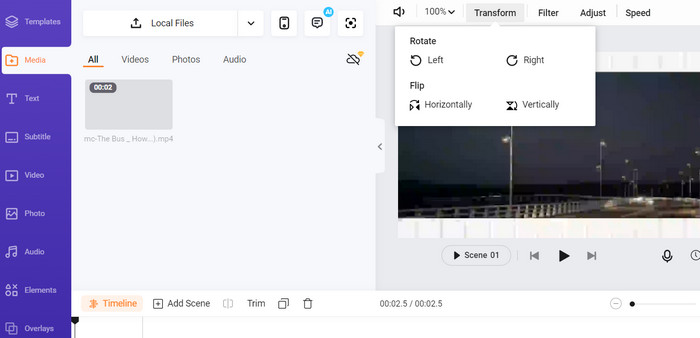
Step 1. Go to the Flexclip website, sign up for a free account, or log in if you already have one. Once you're logged in, click on the Start from Scratch button.
Step 2. Click the Upload button to upload the video you want to rotate. Alternatively, you can drag and drop the video file into the editor.
Step 3. Once your video is uploaded, click on the Transform button located in the upper menu of the preview. Use the buttons to rotate your video clockwise or counterclockwise until it's in the desired orientation.
4. Kapwing
This is another free online tool that allows you to rotate your videos. Likewise, it supports rotation in 90-degree increments and also allows you to flip your videos. While its advanced features, such as adding text, music, and special effects, make it a comprehensive video editing tool, its user-friendly interface and extensive library of tools and templates make it a great option for beginners.
Prós
- Edição de vídeo versátil.
- Online e baseado em nuvem.
Contras
- Duração do vídeo limitada.
- Tamanho de arquivo limitado.
Etapas para fazer o vídeo rodar online usando Kapwing:
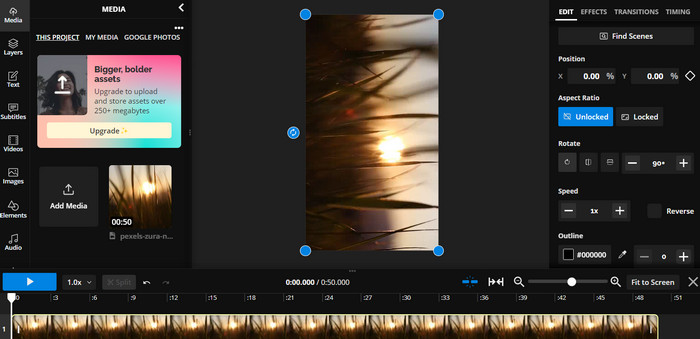
Step 1. Go to the Kapwing website and sign up for a free user account or sign in if you already have one. Click on the Start Editing button to start a new project.
Step 2. Tick the Upload button to upload the video that you want to rotate.
Step 3. Next, tick the media file from the timeline, and the edit options will appear in the right-hand menu.
Step 4. Choose the Rotate option and select the direction you want to rotate the video. Enter the degree to specify the angle of rotation. Then, you are done.
5. Cortador de Vídeo Online
Esta é uma ferramenta online gratuita que permite girar seus vídeos em qualquer direção. Você pode enviar seu vídeo e usar a ferramenta de rotação para ajustar a orientação do vídeo.
Prós
- Rápido e eficiente.
- Grátis para usar.
Contras
- É necessária uma conexão com a Internet.
- Perda de qualidade de vídeo.
Etapas para girar vídeos online com o Online Video Cutter:
Step 1. Visit the official Online Video Cutter website.
Step 2. Click on the Open file button to upload the video that you want to edit.
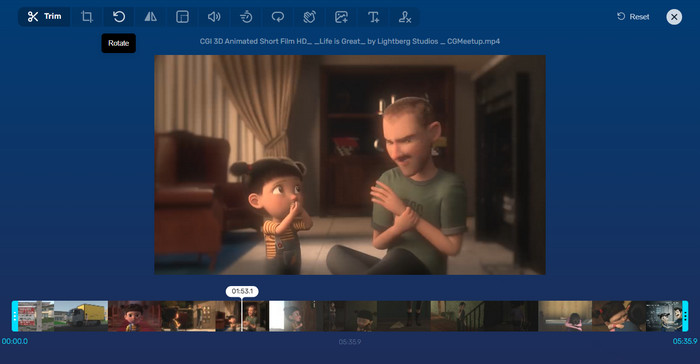
Step 3. When the video is imported, you will be redirected to the editing interface of the program. This time, hit the Rotate button from the menu.
Step 4. If you are satisfied with the way your video is rotated, hit the Save button at the bottom right corner.
Parte 2. Ferramenta Alternativa: Video Rotator Offline
FVC Video Converter Ultimate is a desktop app compatible with Windows and Mac. It allows users to convert and rotate videos offline. Moreover, users can rotate videos clockwise or counterclockwise by 90, 180, or 270 degrees. With a range of video editing tools, you can also do trimming, merging, adjusting video settings, and a lot more. Find out how this video rotator works.
Step 1. Obtain and install the tool
Primeiro, obtenha o programa baixando e instalando-o em seu computador. Logo após, inicie-o imediatamente.
Free DownloadFor Windows 7 or laterSecure Download
Free DownloadFor MacOS 10.7 or laterSecure Download
Step 2. Upload a video to rotate
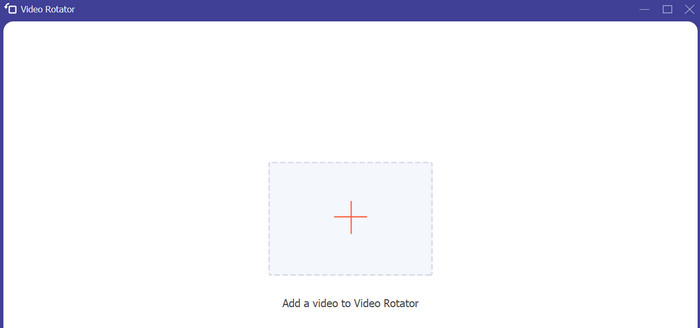
Next, go to the Toolbox tab and access the Video Rotator option of the program. After clicking this option, you will be prompted to upload your video. Now, tick the Plus sign button to insert your desired video.
Step 3. Rotate the video
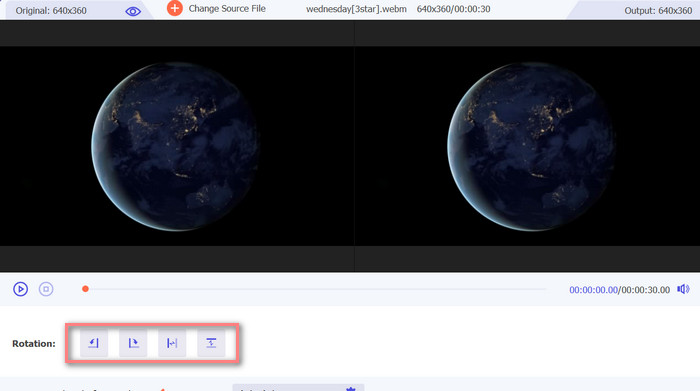
Neste ponto, marque o botão de rotação apropriado para obter a orientação de vídeo desejada. A visualização é em tempo real, para que você possa ajustar rapidamente.
Step 4. Get a copy of the rotated video
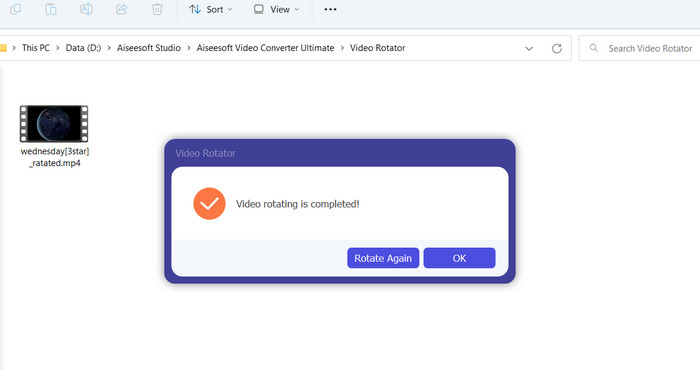
Finally, hit the Export button to get a copy of your edited video. Right after, a notification will appear, and the folder where the video is located will pop up.
Parte 3. Perguntas frequentes sobre rotadores de vídeo on-line
Os rotadores de vídeo online são seguros de usar?
A maioria dos rotadores de vídeo da Internet é segura de usar. Para garantir que seus dados e privacidade sejam protegidos, é essencial selecionar uma ferramenta renomada e confiável.
Posso rodar vídeos no meu smartphone?
Sim, muitos rotadores de vídeo on-line são compatíveis com dispositivos móveis e podem ser acessados no navegador da web do seu smartphone.
Há alguma limitação para usar um rotador de vídeo online?
Sim, alguns rotadores de vídeo online podem ter limitações, como restrições de tamanho de arquivo, recursos de edição limitados ou qualidade de vídeo reduzida.
Conclusão
Online video rotators offer a convenient and user-friendly way to rotate videos without downloading or installing any software. They are accessible on any device with an internet connection and can be used on the go. However, there may be limitations to their capabilities, such as file size restrictions and reduced video quality. Hence, we provided an offline alternative that provides solutions to these limitations.
-
 [4 maneiras] Como acelerar facilmente seus vídeos online
 Quer acelerar um vídeo online? Leia este artigo para saber mais sobre como acelerar um vídeo das diferentes maneiras possíveis.
-
 Excelentes maneiras de cortar vídeos on-line de maneira conveniente
 Cortar um vídeo é a melhor maneira de criar destaques de vídeo. Portanto, esta postagem fornecerá os métodos para aparar vídeos online com facilidade. Leia para saber mais.
-
 Crie Seu Melhor GIF Animado Através do Criador de GIF Online [2023]
 Uma revisão informativa sobre como fazer um GIF usando esses simples criadores de GIF online que você já encontra ou não na web.
