


 Video Converter Ultimate
 Screen Recorder
 Reparație video
 Descărcare sigură
Aflați cum să convertiți HEIC în GIF cu cele mai bune și gratuite convertoare
Vrei să transformi imaginile tale HEIC în GIF-uri animate? Atunci avem o soluție pentru tine. Fișierele HEIC sunt fișiere de imagine de înaltă calitate, care nu ocupă mult spațiu de stocare. Și, în mod normal, imaginile HEIC sunt doar imagini statice. Așadar, pentru a transforma un fișier de imagine în imagini animate, trebuie să convertești fișierul HEIC în format GIF. Formatele GIF pot fi imagini statice sau animate. Prin urmare, citește acest articol pentru a afla cel mai bun convertor HEIC în GIF pentru a-ți converti fișierul fără pierderi de calitate.

Partea 1. Cele mai bune 4 instrumente pentru a converti HEIC în GIF
Când vine vorba de comoditate, este sigur că convertoarele online sunt cele mai bune, deoarece nu trebuie să descărcați nimic. Și dacă sunteți în căutarea celor mai bune convertoare online HEIC în GIF, am încercat unele dintre cele mai bune convertoare HEIC în GIF disponibile pe internet. Deci, în această parte, veți cunoaște cele mai bune trei convertoare online HEIC în GIF.
Aiseesoft Free Image Converter Online
Dacă ești în căutarea celui mai bun convertor online HEIC în GIF, acest instrument este ceea ce cauți. Aiseesoft Free Image Converter Online este un instrument online gratuit care îți permite să convertești imaginile HEIC în format GIF, PNG și JPG. Este cunoscut ca fiind cel mai rapid convertor online HEIC în GIF de pe internet. În plus, spre deosebire de alte convertoare online, nu conține reclame și are un proces de încărcare foarte rapid.
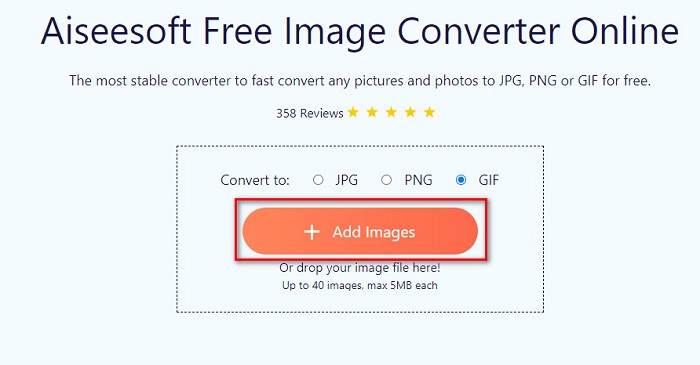
Pasul 1. Caută Aiseesoft Free Image Converter Online sau dă clic pe acest link pentru a merge direct pe pagina lor web. Apoi, în prima interfață, apasă butonul Add Images.
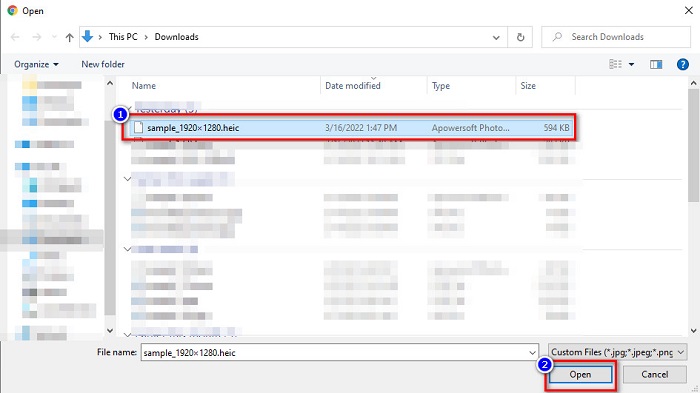
Pasul 2. Apoi vor apărea fișierele din computer; localizează imaginea ta HEIC și fă clic pe Open.
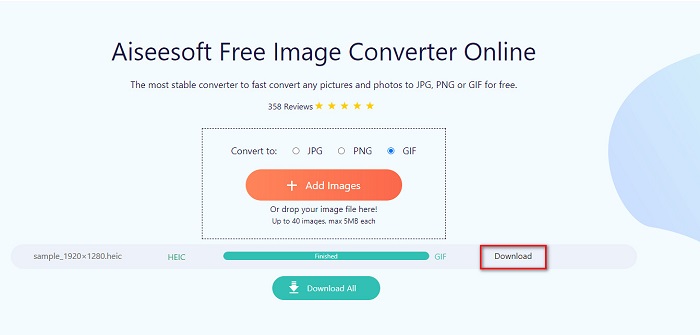
Pasul 3. Apasă pe butonul Download pentru a descărca imaginea ta GIF, ca ultim pas.
Pro
- Are un proces de conversie ultra-rapid.
- Nu conține reclame deranjante.
- Poate converti orice fișier imagine în PNG, JPG și GIF.
- Accesibil pe toate browserele web, inclusiv Google, Firefox și Safari.
Contra
- Este posibil să aveți un proces de conversie lent atunci când conexiunea dvs. la internet este lentă.
CloudConvert
Unul dintre cele mai folosite convertoare de pe internet este CloudConvert. Acest convertor poate transforma cu ușurință fișiere HEIC în GIF datorită interfeței sale simple. În plus, suportă numeroase formate de imagine, inclusiv HEIC, GIF, BMP, JPG, ICO și altele. De asemenea, poți ajusta rezoluția imaginii, dimensiunea fișierului și calitatea. Deși este o aplicație bazată pe web, nu conține reclame.
Pasul 1. În browser, caută CloudConvert HEIC to GIF converter. Apoi, în interfața principală a software‑ului, apasă butonul Select. Vor apărea fișierele din computer, pentru a selecta fișierul HEIC pe care vrei să‑l încarci.
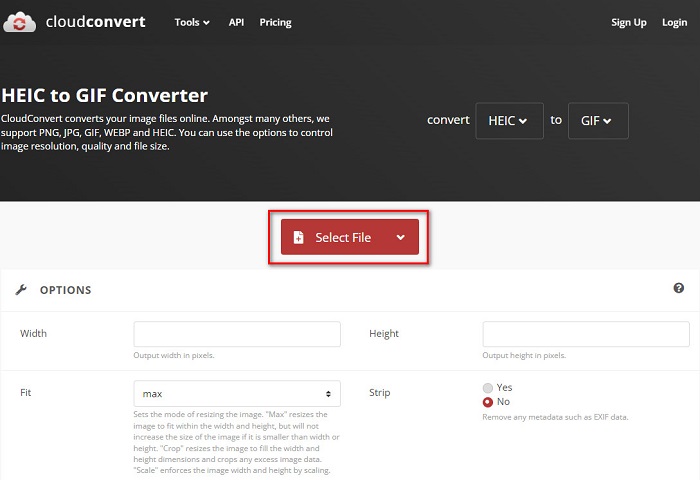
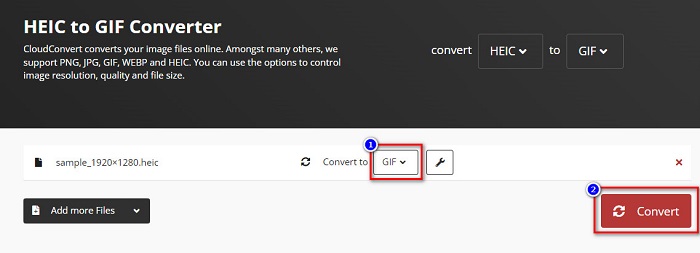
Pasul 2. În continuare, fă clic pe butonul drop-down de lângă Convert to, apoi selectează formatul de ieșire dorit. După aceea, apasă butonul Convert pentru a începe conversia fișierului HEIC în format GIF.
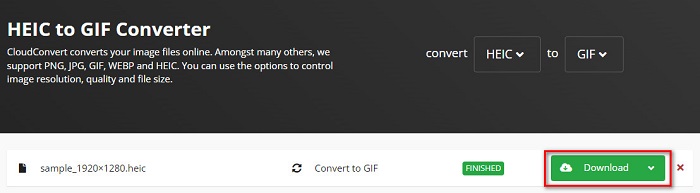
Pasul 3. La final, apasă pe butonul Download pentru a descărca fișierul GIF când conversia este terminată.
Pro
- Are un proces de conversie rapid.
- Nu conține reclame deranjante.
- Acceptă diverse formate de fișiere, inclusiv HEIC, GIF, JPG, PNG etc.
- Accesibil pe aproape toate motoarele de căutare precum Google și Safari.
Contra
- Când conexiunea la internet este lentă, este posibil să aveți un proces de conversie lent.
OnlineConvertFree
Un alt convertor online HEIC în GIF care merită încercat este OnlineConvertFree. Acest convertor are o interfață ușor de utilizat și un proces de conversie rapid. În plus, dacă ești în căutarea unui convertor care poate comprima și redimensiona fișierul, acest instrument are această funcție.
Cu toate acestea, conține reclame care sunt deranjante pentru mulți utilizatori. Cu toate acestea, acest convertor poate converti în continuare HEIC în GIF convenabil.
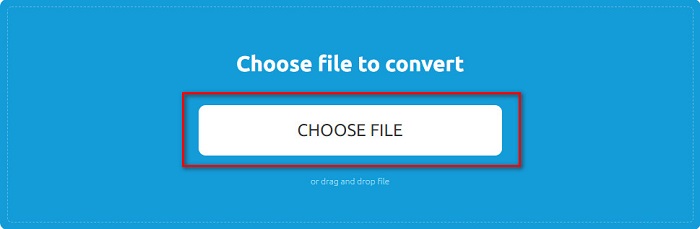
Pasul 1. Pentru primul pas, caută OnlineConvertFree în browser. Iar în interfața principală a software‑ului, fă clic pe Choose Files. Apoi vor apărea fișierele din computer, unde vei selecta fișierul HEIC și îl vei încărca.
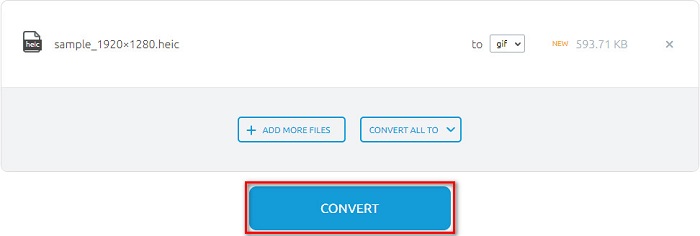
Pasul 2. În al doilea rând, apasă pe Convert button pentru a converti fișierul HEIC într-un fișier GIF. Va apărea apoi o nouă interfață.
Pasul 3. În final, derulează în jos și fă clic pe butonul Download pentru a descărca fișierul GIF.

Pro
- Are o interfață de utilizator simplă.
- Este sigur de utilizat.
Contra
- Conține reclame.
CDKM
CDKM este un instrument online care vă ajută să convertiți fișiere HEIC în GIF. Acest convertor online este un instrument ușor de utilizat, ceea ce îl face un instrument prietenos pentru începători. În plus, acceptă formate de fișiere standard precum HEIC, GIF, PNG, JPG și SVG. Cu toate acestea, acest convertor conține reclame care ar putea fi deranjante pentru dvs. Cu toate acestea, vă poate converti fișierul rapid, așa că este un convertor care trebuie încercat.
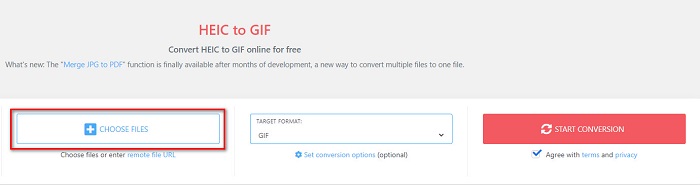
Pasul 1. În browser, caută CDKM și accesează pagina lor web. În interfața principală a software‑ului, fă clic pe butonul Choose Files. Când apar folderele din computer, selectează fișierul HEIC, apoi încarcă‑l în interfața principală.
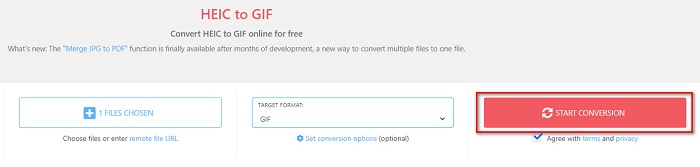
Pasul 2. În continuare, apasă butonul Start Conversion pentru a converti fișierul HEIC într-un fișier GIF. Apoi treci la pasul următor.
Pasul 3. Apoi, descarcă fișierul GIF făcând clic pe butonul Download de mai jos.

Partea 2. Diagramă de comparație între HEIC și GIF
HEIC este un format de fișier imagine creat de Apple. Când faci o fotografie folosind un dispozitiv Apple, vei vedea că extensia imaginii tale este .heic. De asemenea, aceste fișiere de imagine au o calitate excelentă și o dimensiune mică, ceea ce le face populare. Totuși, fișierele HEIC nu sunt compatibile cu multe dispozitive. Este ușor să deschizi și să vizualizezi fișiere HEIC pe dispozitivele Apple. Însă trebuie să le convertești în alte formate dacă vrei să le vezi pe alte platforme.
Pe de altă parte, fișierele GIF sunt formate de imagine fără pierderi care sunt animate. Aceste formate de imagine pot fi imagini animate sau statice. În plus, aproape toate platformele media acceptă formate GIF.
| HEIC | GIF | |
| Comprimat/Necomprimat | Comprimat | Comprimat |
| Disponibilitate | Disponibil pe dispozitivele Apple. | Disponibil pe toate platformele media |
| Fără pierderi/Nu | Fara pierderi | Fara pierderi |
| Calitatea imaginii | Calitate ridicată a imaginii | Au o calitate mai scăzută în comparație cu imaginile HEIC |
| Cel mai bine folosit pentru | Cel mai bine folosit pentru a face fotografii | Cel mai bine folosit pentru animarea clipurilor video scurte. |
Partea 3. Întrebări frecvente despre conversia HEIC în GIF
Puteți reda GIF animat pe un dispozitiv Mac?
Da. Un dispozitiv Mac poate reda GIF-uri animate; totuși, există situații în care nu le poate reda, caz în care trebuie să folosești un vizualizator online dacă nu funcționează.
Pot converti imaginile JPG în GIF-uri?
Există multe moduri de a converti JPG în GIF. Convertoarele online menționate mai sus îți permit să convertești fișiere de imagine JPG în GIF-uri.
Puteți salva GIF-uri pe iPhone?
Din fericire, dispozitivele iPhone acceptă fișiere GIF. Prin urmare, puteți salva GIF-uri pe iPhone. Dar dacă nu puteți salva un fișier GIF, asigurați-vă că reporniți iPhone-ul și încercați să descărcați din nou.
Concluzie
După cum s-a arătat mai sus, există o mulțime de modalități de a converti HEIC în GIF. Totuși, nu toate convertoarele online oferă un proces de conversie ultra-rapid. Așa că, dacă ești în căutarea celui mai bun convertor online HEIC în GIF, folosește Aiseesoft Free Image Converter Online.
-
 Ce este fișierul VOB și cum să transformați fișierul VOB în GIF gratuit
 Doriți să aflați mai multe despre fișierele VOB și despre cum să le partajați după ce au fost extrase? sau De ce trebuie să convertiți VOB în GIF? Atunci citește cu atenție acest articol.
-
 Top 3 convertoare pe care nu ar trebui să le ratați pentru a converti PNG în GIF animat
 Vrei să dai viață PNG-ului tău? Apoi încercați să convertiți formatul animat PNG în GIF cu instrumentele utile disponibile și pașii pentru a face acest lucru.
-
 Cele mai bune 5 moduri de a schimba imaginea în GIF animat [Actualizat 2022]
 Ai nevoie de un convertor de imagine în GIF? Acest articol va oferi cele mai bune cinci convertoare pe care le putem găsi pe piață. Deci, să aflăm aceste instrumente citind acest articol.
