


 Video Converter Ultimate
 Screen Recorder
 Reparație video
Înțelegeți ce sunt metadatele: tipuri, exemple, importanță și cum să le vizualizați
Metadatele sunt esențiale pentru orice fișier, deoarece explică multe lucruri despre fișierul media. Dar întrebările sunt: ce sunt metadatele? La ce folosesc? Care sunt exemple de metadate? Este necesar să avem metadate? Vei afla răspunsurile la toate aceste întrebări mai târziu, în acest articol. În plus, îți vom prezenta și un editor de metadate perfect, pe care îl poți folosi pentru a adăuga sau edita metadatele fișierului tău media. Citește tot articolul de mai jos și află mai multe despre metadate.

Partea 1. Ce sunt metadatele
Definiție
Metadatele sunt date despre datele ascunse din fișierul media. Ce sunt metadatele? Să presupunem că doriți să recunoașteți conținutul fișierului și alte caracteristici, atunci metadatele sunt un cod cheat. Fiecare fișier media are metadate, iar dacă aveți de gând să aveți un fișier media organizat, metadatele vă vor ajuta să aranjați fișierul dacă aveți de-a face cu biblioteci de fișiere media. Acum că avem o idee despre metadate, să ne uităm în continuare la tipurile de metadate.
Care sunt diferitele tipuri de metadate
Știați că metadatele au diferite tipuri? Dacă nu, mai jos vă va ajuta să înțelegeți celelalte șase structuri de metadate și scopul lor în stocarea datelor. Așa că acum, pentru a ști care sunt exemplele de metadate, citiți graficul de mai jos.
| Tipuri de metadate | Descriere |
| Metadate descriptive | Identifică resursele unui anumit obiect, inclusiv mai multe elemente, cum ar fi titlul, rezumatul, autorul și cuvântul cheie. |
| Metadate administrative | Este folosit pentru a gestiona informații precum tipul de resursă, crearea sau achiziția de date, permisiunea și dispoziția. |
| Metadate de referință sau Metadate explicative | Datele interne descriu conținutul și datele statistice de calitate din perspectiva cuiva. |
| Metadate statistice | Descrie procesul de date statistice prin colectarea, prelucrarea și producerea acestora. |
| Metadate legale | Informațiile includ date despre proprietarul drepturilor de autor, licențele publice și proprietatea. |
| Metadate structurale | Datele descriu tipul, versiunea, relațiile și alte caracteristici ale materialului digital. |
Care este importanța metadatelor?
Ce sunt metadatele și tipurile lor sunt deja explicate mai sus; Acum, trebuie să stabilim importanța acestuia. Cu metadate, puteți cunoaște celelalte informații despre fișierul media, cum ar fi autorul, data și ora, diferite materiale digitale și multe altele. De asemenea, dacă doriți să vă protejați fișierul media, aceasta este una dintre cele mai bune modalități de a-l folosi în loc de a folosi un filigran. Deci, dacă fișierul dvs. media are metadate pe el, puteți face multe lucruri pe care nu vă vine să credeți că le puteți face, cum ar fi organizarea acestuia în folderul sau în bibliotecă.
Partea 2. Cum să vizualizați metadatele pe diferite platforme
Știați că vă puteți verifica metadatele din fișierul media prin intermediul dispozitivelor dvs. fără a instala un instrument special? Vrei să știi cum să o faci? În acest caz, trebuie să citiți următoarele detalii pentru a afla mai multe despre ce metadate sunt în fișierul dvs. media.
Pentru utilizatorii Windows
Pasul 1. Găsește fișierul pe desktop și apasă butonul de clic dreapta de pe mouse.
Pasul 2. Apoi apasă pe Proprietăți și găsește fila Detalii; vei vedea metadatele videoclipului tău acolo.
Pentru utilizatorii de Mac
Pasul 1. Caută fișierul media în Finder, apasă butonul dreapta al mouse‑ului și fă clic pe Tools.
Pasul 2. Sub acesta, apasă pe Show Inspector.
Pasul 3. Va apărea o nouă fereastră, apoi apasă pe Exit, iar metadatele fișierului tău vor fi afișate.
Pentru utilizatorii de iPhone
Pasul 1. Deschide aplicația Poze (Photo).
Pasul 2. Fă clic pe videoclipul sau imaginea căreia vrei să îi verifici metadatele.
Pasul 3. Bifează pictograma i, iar metadatele vor apărea pe ecran.
Pentru utilizatorii Android
Pasul 1. Pornește Google Foto pe dispozitivul tău – dacă nu este încă instalat pe telefon, mai întâi trebuie să îl descarci din Play Store.
Pasul 2. Deschide fișierul și apasă pe pictograma i pentru a verifica metadatele.
Partea 3. Cum să editați sau să adăugați metadate cu cel mai bun editor de metadate de pe desktop
Cu cel mai bun editor de metadate, poți adăuga cu ușurință metadate unui fișier media care nu are deloc sau le poți edita pe cele existente. FVC Video Converter Ultimate este instrumentul perfect pe care ar trebui să îl folosești pentru a schimba sau a adăuga metadate la orice fișier media cu ușurință. Așadar, pentru a ști la ce sunt folosite metadatele, poți urma pașii de mai jos și vei afla ușor ce alte lucruri poți adăuga în metadate.
Pasul 1. Apasă butonul de descărcare de mai jos pentru a descărca instrumentul pe Windows sau macOS, fă clic pe fișierul descărcat, urmează procedura de instalare și deschide aplicația.
Descărcare gratuită pentru Windows 7 sau o versiune ulterioară Descărcare securizată
Descărcare gratuită pentru MacOS 10.7 sau o versiune ulterioară Descărcare securizată
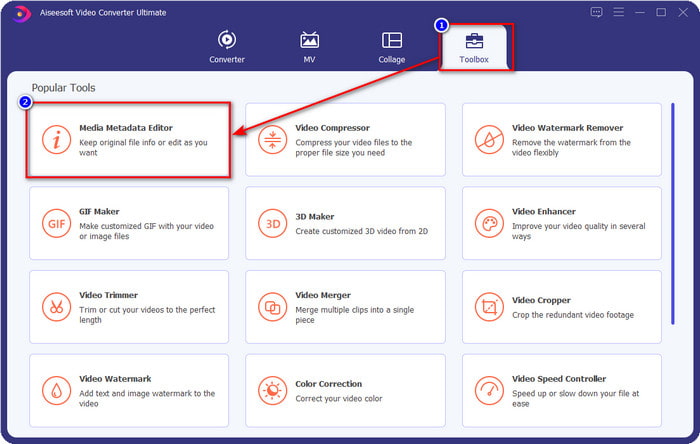
Pasul 2. Mergi la secțiunea Toolbox și găsește Media Metadata Editor; apasă pe el pentru a‑l deschide.
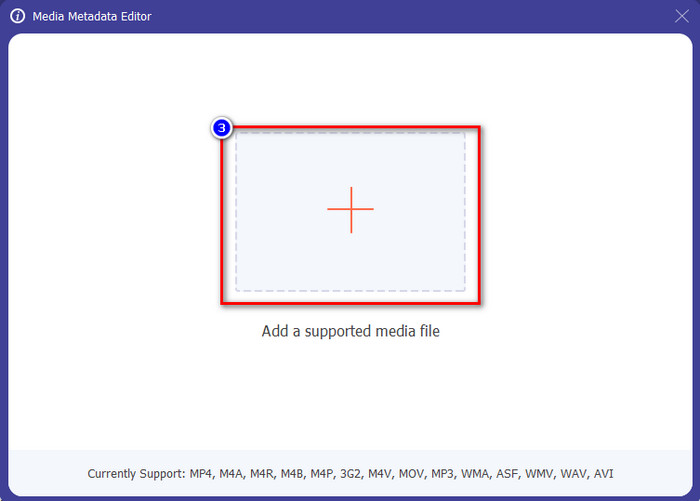
Pasul 3. Vor apărea noi ferestre pe ecran; apasă butonul + pentru a adăuga videoclipul căruia vrei să îi adaugi sau să îi editezi metadatele. Localizează videoclipul în folderul de pe computer și apasă pe Open pentru a continua.
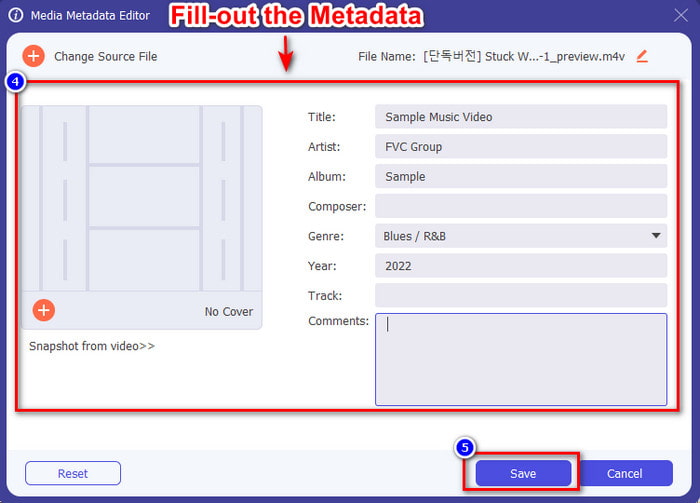
Pasul 4. Așteaptă ca instrumentul să încarce fișierul, iar editorul de metadate va apărea; în această zonă poți adăuga metadate personalizate completând caseta de text. După ce ai adăugat datele esențiale, apasă pe Save pentru a descărca fișierul media cu metadatele incluse. Fără niciun efort, ai adăugat sau ai editat metadatele fișierului tău.
Articole similare:
Cum să adaugi o imagine la un videoclip
Cum să adaugi un filigran în iMovie
Partea 4. Întrebări frecvente despre metadate
De ce dimensiunea fișierului devine mai mare după adăugarea metadatelor?
Nu ar trebui să fii surprins dacă dimensiunea fișierului media devine mai mare din cauza metadatelor, deoarece așa va fi. Motivul din spatele acestuia este că metadatele sunt un element stocat pe fiecare fișier media; metadatele contribuie la dimensiunea videoclipului.
Metadatele afectează calitatea videoclipului?
Calitatea videoclipului nu se va schimba chiar dacă adăugați, editați sau descărcați un videoclip cu metadate pe el.
Care sunt metadatele importante de adăugat?
Să presupunem că doriți să adăugați metadate la fișier fără metainformații. Va trebui să completați lucrurile importante: numele autorului, titlul, data și ora. Toate lucrurile sunt importante, dar acestea sunt partea esențială a metadatelor.
Concluzie
În sfârșit, acum avem o cunoaștere amplă despre metadate; toate întrebările care te frământau au primit deja răspuns în această postare. Acum, că știi ce sunt metadatele, trebuie să adaugi metadate fișierelor tale pentru a le oferi un strat suplimentar de protecție, cu ajutorul celui mai bun editor de metadate pentru desktop. Fără îndoială, FVC Video Converter Ultimate este instrumentul perfect pe care oricine îl poate folosi pentru a aplica cu ușurință metadate unui fișier sau pentru a le edita, dacă există deja. Cu ajutorul acestui software poți face multe lucruri; vrei să știi care sunt acestea? Ei bine, făcând clic pe butonul de descărcare, vei vedea celelalte funcții uimitoare pe care le oferă.
-
 3 moduri eficiente de a adăuga videoclipuri și imagini împreună pe Tiktok
 Vrei să știi cum să adaugi imagini în videoclipurile Tiktok? În acest caz, faceți clic și citiți acest articol pentru a afla cum să adăugați cu ușurință imagini la videoclipul dvs. Tiktok.
-
 Adăugați text la videoclip cu cei mai buni 3 editori video [fără efort]
 Adăugarea de text la un videoclip este o sarcină ușoară cu instrumentul potrivit. Așadar, astăzi vă vom prezenta diferitele instrumente pe care le puteți folosi pentru a adăuga text la videoclipul dvs. înainte de a-l partaja.
-
 Revizuire Bona Fide Despre 6 aplicații video text [2022]
 Vrei să știi ce sunt aplicațiile video text pe care le poți folosi pe platformă? Acest articol va oferi o revizuire bună a celor șase aplicații video text de pe piață.
