


 Video Converter Ultimate
 Screen Recorder
 Reparație video
6 cele mai bune controlere de viteză video pentru Windows/Mac/Android/iOS
Accelerarea sau încetinirea unui videoclip poate crea o iluzie incredibilă dacă te-ai plictisit să folosești mereu aceleași efecte. Această tehnică de editare video este simplă, dar eficientă. Când cauți pe internet, există numeroși controlori de viteză disponibili pe piață și știm că este greu să alegi. Însă, dacă citești acest articol, vom analiza aplicațiile de control al vitezei pe care le poți folosi pentru a schimba viteza de redare. Ești interesat de cele mai bune aplicații de control al vitezei? În acest caz, continuă să citești pentru a afla mai multe despre controlerul de viteză video disponibil pe platformele tale.

Partea 1. Top 6 controlere de viteză video pentru Windows, Mac, Chrome, iOS și Android
Top 1. Video Converter Ultimate (Windows și Mac)
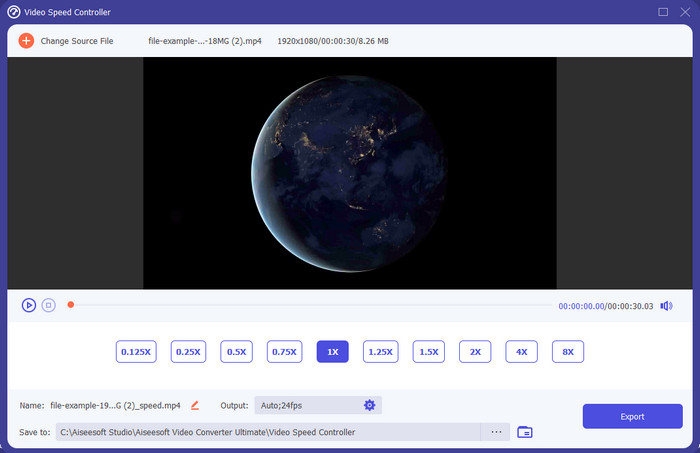
Ai nevoie de un controler de viteză video foarte eficient pentru a accelera sau încetini videoclipul? În acest caz, Video Converter Ultimate este ajutorul pentru acest tip de problemă. Este cel mai ușor de folosit instrument cu care poți schimba fără efort viteza videoclipului, indiferent dacă ai nevoie de o viteză mare sau de un slow‑motion. Chiar dacă modifici viteza, calitatea originală a videoclipului va rămâne aceeași, însă mișcarea din video nu, deoarece ai schimbat viteza.
În afară de asta, puteți face multe lucruri precum conversia, îmbinarea, tăierea și multe altele; practic, este un instrument all-in-one. Doriți să aflați celelalte oferte pe care le puteți avea cu această aplicație video accelerată? Dacă da, citiți caracteristicile instrumentului pentru a afla mai multe sau puteți descărca software-ul de pe desktop chiar acum pentru a-l testa.

Video Converter Ultimate
5.689.200+ Descărcări- Poate schimba cu precizie cadrele video în sus sau în jos rapid în orice format video, cum ar fi MP4.
- Sunt disponibile numeroase funcții și efecte de editare video.
- Este flexibil pe toate platformele precum Windows sau macOS.
- Procesul ultra-rapid vă face să descărcați sau să exportați procesul într-o clipă.
- Exportarea sau descărcarea videoclipului pe care îl editați nu va avea un filigran.
Descărcare gratuită pentru Windows 7 sau o versiune ulterioară Descărcare securizată
Descărcare gratuită pentru MacOS 10.7 sau o versiune ulterioară Descărcare securizată
Pro
- Schimbați cadru pe cadru al videoclipului, chiar dacă sunteți profesionist sau nu.
- Opțiuni de redare video ușor de înțeles.
- O capacitate remarcabilă de partajare a rețelelor sociale.
- Se poate descărca gratuit, dar oferă achiziții în aplicație.
Contra
- Trebuie să cumpărați dacă doriți să aveți capacitatea completă a instrumentului.
Top 2. Clipchamp (Windows)
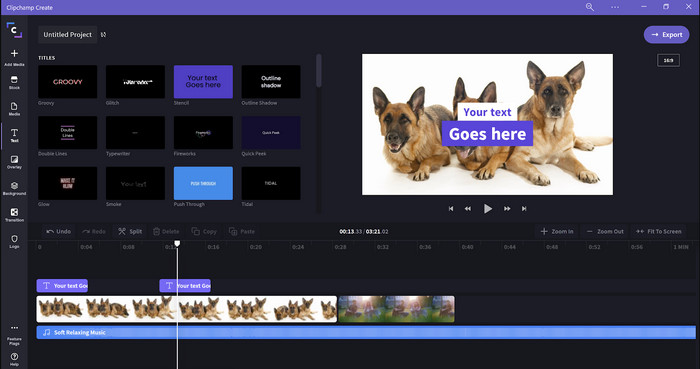
Clipchamp este un editor de viteză video pe care îl poți folosi pe Windows. Acest instrument oferă o curbă de învățare mai puțin abruptă, așa că merită să îl încerci dacă ești începător în editare. De asemenea, acceptă mai multe funcții pe care probabil vei dori să le folosești. Totuși, un dezavantaj major al acestui instrument este calitatea de ieșire a videoclipului. Poți exporta fișierul doar la o calitate video de 480p, ceea ce este scăzut față de alte instrumente gratuite. Dar, dacă ai nevoie ca instrumentul să exporte la 720 sau 1080, te poți abona plătind taxa de abonament. În plus, instrumentul este excelent, însă tot nu este la fel de bun ca primul editor.
Pro
- GUI simplu și ușor de utilizat.
- Oferă funcții suplimentare pentru editare.
- Controlați cu ușurință redarea video.
Contra
- Pentru versiunea gratuită, rezultatul final este 480.
- Uneori, instrumentul a devenit inflexibil cu sarcina.
Top 3. Controler de viteză video (Chrome)

Vrei să folosești o extensie de controler de viteză video pe Chrome? Atunci poți utiliza Video Speed Controller. Acest instrument este disponibil în orice browser Chrome pentru a accelera sau încetini videoclipul pe care îl urmărești. Este ușor de folosit pentru oricine și este, de asemenea, sigur de accesat, deoarece este o extensie pentru Chrome. Totuși, dacă exporți videoclipul, redarea va rămâne aceeași, chiar dacă ai schimbat-o. Asta pentru că instrumentul funcționează doar pe videoclipul pe care îl urmărești în prezent în Chrome și nu în afara acestuia. Informație suplimentară: odată ce accelerezi videoclipul cu această extensie, toate videoclipurile redate în Chrome vor fi la aceeași viteză.
Pro
- Controler de viteză punctual pe care îl puteți folosi pe Chrome.
- Capacitatea de a derula înapoi sau de a reseta cu ușurință viteza de redare a videoclipurilor pe Chrome.
- Acceptă comanda tastelor scurte.
Contra
- Panoul controlerului video nu este vizibil.
- Nu puteți modifica viteza videoclipului în afara Chrome.
Top 4. Accelerați pentru Safari (iOS și Mac)
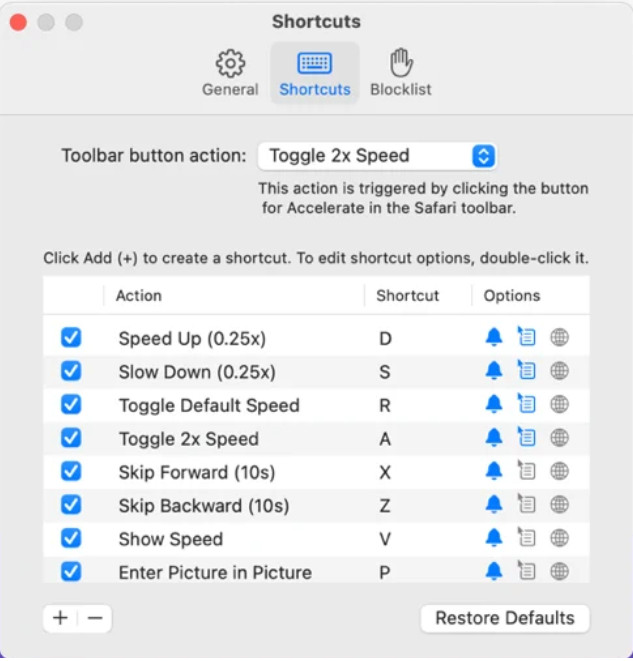
Ai nevoie de un controler de viteză video pe Safari? Accelerate for Safari este disponibil pe orice Safari de pe dispozitivele Apple. Acest instrument poate modifica viteza de redare a fiecărui videoclip HTML5 din Safari. La fel ca extensia pentru Chrome de mai sus, este limitat la dispozitivele Apple. Așadar, dacă ești utilizator Apple, s-ar putea să îți placă să folosești această extensie de control al vitezei pentru a accelera sau încetini videoclipul. În plus, poți folosi tastele de la tastatură pentru a comanda instrumentul să schimbe viteza de redare a videoclipului.
Pro
- Este sigur de utilizat în toate Safari.
- De asemenea, acceptă Picture-in-Picture și AirPlay.
- Tastele de comandă rapidă sunt disponibile pentru a prelua controlul asupra instrumentului.
Contra
- Nu acceptă alt browser web decât Safari.
- Limitat la videoclipuri HTML 5.
Top 5. Slow Fast Slow - Controlează viteza videoclipurilor tale (iOS)
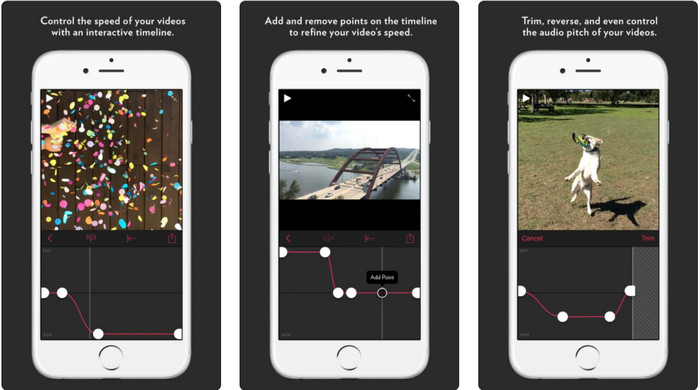
Pentru un controler de viteză video pe iPhone, poți folosi Slow Fast Slow. Acest instrument îi ajută pe utilizatorii iOS să modifice instantaneu viteza de redare a videoclipului; funcționează cel mai bine pentru slow‑motion. În plus, are o cronologie interactivă încorporată pentru a ajusta viteza. Suportă, de asemenea, alte funcții, precum modificarea înălțimii tonului și redarea inversă a clipului. Totuși, acest instrument necesită sistemul iOS 10, astfel încât nu îl poți folosi dacă sistemul tău nu este 10.
Pro
- Acceptă alte funcții pentru videoclipul dvs.
- Ușor de utilizat.
- Poate încetini videoclipurile cu până la 1/16 viteză.
Contra
- Nu acceptă ieșire 4k și alegerea FPS.
- Nu funcționează pe unele dintre noile dispozitive iOS.
Top 6. Video Speed Controller Pro (Android)
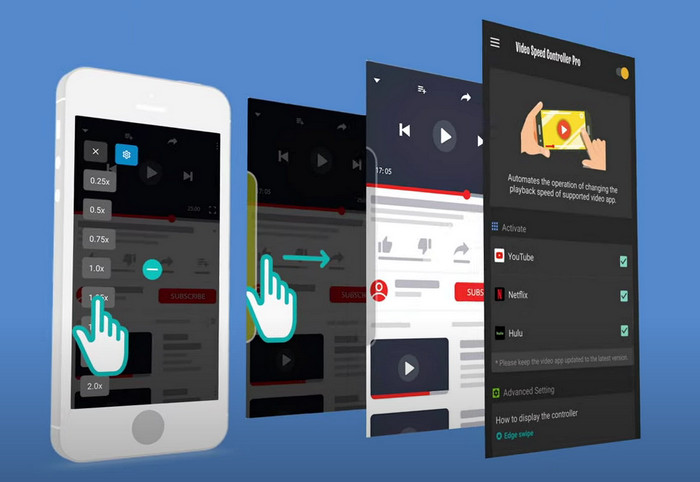
Dacă ai nevoie de un controler de viteză video pe Android, atunci ghici ce? Poți folosi Video Speed Controller Pro instalându-l din Play Store. Cu ajutorul acestui instrument, poți accelera cu ușurință orice videoclip redat pe Androidul tău. În plus, acest instrument funcționează ca o extensie de control al vitezei pe Android. Deși poate accelera videoclipul, viteza maximă este de doar 2x. Totuși, dacă ai nevoie să accelerezi vizionarea videoclipurilor, îl poți folosi pe YouTube, Netflix și alte platforme video pe Android.
Pro
- Este simplu de utilizat.
- Instrumentul în sine este la punct.
- Este disponibilă o bară de meniu pentru a dezvălui opțiunile de redare.
Contra
- Opțiunile de viteză de redare sunt limitate.
- Uneori nu merge bine.
Partea 2. Diagrama comparativă
| Caracteristici | Video Converter Ultimate (Windows și Mac) | Clipchamp (Windows) | Controler de viteză video (Chrome) | Accelerați pentru Safari (iOS și Mac) | Slow Fast Slow – Controlează viteza videoclipurilor tale (iOS) | Video Speed Controller Pro (Android) |
| Control de viteza |  | | | | | |
| Ieșire video de înaltă calitate | |  | | | | |
| Caracteristici de editare | | | | | | |
| Proces de export ultra-rapid | | | | | | |
Partea 3. Întrebări frecvente despre Video Speed Controller
De ce trebuie să folosesc un regulator de viteză?
În unele cazuri, va trebui să vizionați un videoclip cu viteză mare sau să încetiniți. Un exemplu grozav de vizionare a unui videoclip accelerat este finalizarea imediată a videoclipului pe care îl vizionați sau la fel. Accelerarea videoclipurilor este de mare ajutor pentru acești utilizatori. În timp ce este lent, acesta este de obicei folosit pentru o reluare instantanee a sporturilor cu ritm rapid, cum ar fi cursele, baschetul, voleiul și multe altele. Indiferent de cele două, veți avea nevoie de un regulator de viteză eficient pentru a depăși manual viteza normală la nevoile dvs.
Pot accelera videoclipurile pe Tiktok?
Da, poți filma videoclipuri accelerate în Tiktok. Totuși, nu poți urmări videoclipuri pe Tiktok la viteză mare. Așadar, dacă ai nevoie de ajutorul unui instrument bun pentru accelerare, dă clic și citește acest articol pentru a afla cum să accelerezi un videoclip pe Tiktok.
Cum să încetinești videoclipurile?
Spre deosebire de accelerarea videoclipurilor, poți crea un slow‑motion în videoclipurile tale cu ajutorul editorilor disponibili pe piață. Ce instrument ar trebui să folosești? Nicio grijă, deoarece îți prezentăm cel mai bun software pentru videoclipuri slow‑mo pe care îl poți folosi pentru a crea un efect de încetinire. Dacă ai nevoie de mai multe informații, poți da clic pe acest link.
Concluzie
Astăzi, ești deja bine informat despre aplicațiile plătite și gratuite pentru accelerarea videoclipurilor pe diferite platforme. Controlerele de viteză oferă un set unic de funcții pentru a ajuta diverși utilizatori să accelereze videoclipurile. Dacă citim cu atenție, putem vedea că FVC Video Converter Ultimate oferă totul pentru utilizatorii care au nevoie de ajutor. Așadar, dacă vrei să descarci acest instrument complet pe desktop, poți da clic pe butonul de descărcare și să te bucuri de o experiență completă cu acest instrument.
-
 Cum să accelerezi un videoclip cu cele mai bune 5 software-uri disponibile [Windows/Mac/Linux]
 Vrei să știi cum să accelerezi cu ușurință videoclipurile? Apoi, citiți acest articol în timp ce vă explicăm cum să accelerați eficient pe Windows, Mac și Linux.
-
 Cele mai ușoare modalități de a accelera un videoclip pe dispozitivele dvs. Android [2021]
 Știați că puteți accelera un videoclip pe Android? Deci, dacă doriți să știți cum să accelerați un videoclip pe telefonul dvs. Android, atunci citiți acest articol.
-
 Sfaturi excelente pentru 2021: Cum să accelerezi un videoclip pe iMovie
 Prietenul tău sugerează iMovie să te ajute cu problema ta despre cum să accelerezi un videoclip folosind sistemul de operare iOS, dar nu știi ce să faci? Vezi mai multe despre asta pe măsură ce citești mai multe prin acest articol.
