


 Video Converter Ultimate
 Screen Recorder
 Reparație video
 Descărcare sigură
Aflați ce este un filigran | Tipuri și motive pentru care este necesar în videoclipuri
În zilele noastre, încărcarea videoclipurilor a devenit accesibilă pentru toată lumea, fie că este vorba de angajați, studenți, persoane în vârstă sau tineri, inclusiv redistribuirea lor pe alte platforme de social media. Deși este gratuit să faci asta, unele persoane profită de videoclipurile altora ca să câștige bani și își însușesc deja dreptul de proprietate asupra lor. Pentru a împiedica pe cineva să-ți fure munca, trebuie să adaugi un filigran pe videoclip. Dar de ce trebuie să îl adaugi? Care este scopul lui? Cum se adaugă sau se elimină filigranul dintr‑un videoclip? Pentru a răspunde la toate întrebările pe care le ai în minte, continuă să citești acest articol pentru a afla răspunsul la întrebarea ce este un filigran pe un videoclip.

Partea 1. Ce este filigranele video
Se știe că filigranele fac parte din majoritatea conținutului digital, cum ar fi videoclipurile, încărcate pe web. Protejează videoclipurile de pe net de a fi furate de oricine și folosite pentru câștigul lor. De asemenea, permite oricui să știe unde sau care este proprietarul sau sursa videoclipului menționat. Deși oricine are acces să adauge filigrane pentru a proteja sau promova, trebuie totuși să vă faceți filigranul unic și distins pentru ca oricine să le cunoască. Dar ce este un filigran în editarea video pe care trebuie să îl utilizați? Există tipuri de filigrane văzute de obicei pe videoclipuri; trebuie să continui să citești acest articol pentru a ști care sunt acestea.
Partea 2. Care sunt tipurile de filigrane video
Există patru tipuri de filigran video pe care le puteți utiliza pentru a le adăuga la videoclip. Pentru a-i cunoaște tipurile, trebuie să continuați să citiți detaliile de mai jos pentru a vă ajuta să știți ce tip de filigran ar trebui să utilizați.
4 tipuri de filigran pe care le puteți aplica videoclipurilor:
◆ Filigran perceptibil – după cum sugerează și numele, este vizibil, ceea ce înseamnă că, dacă putem vedea cu ochiul liber filigranul, acesta este considerat un filigran vizibil. Oricine îl detectează rapid, deoarece este văzut în mod clar. Este folosit de obicei pentru promovarea unui brand.
◆ Filigran imperceptibil – este opusul filigranului vizibil. Acest tip de filigran este ideal pentru oricine vrea să prindă hoțul care încearcă să fure videoclipul. Pentru că, dacă filigranul este invizibil, nici măcar tu nu îl poți detecta cu ochiul liber.
◆ Filigran public - cu ajutorul unui anumit algoritm, oricine are acces pentru a modifica filigranul în funcție de preferințele proprii. Deși este transparent pentru oricine, totuși nu este considerat cea mai sigură modalitate de a adăuga un filigran.
◆ Filigran fragil - este cel mai sensibil tip de filigran. Se potrivește cel mai bine persoanelor care nu doresc ca impostorii să manipuleze conținutul. De asemenea, poate fi distrus cu ușurință prin modificarea datelor videoclipului.
Partea 3. De ce să adăugați filigrane la conținutul dvs. video
Cu acesta, utilizatorii și chiar și dvs. puteți identifica cu ușurință cine este proprietarul, site-ul web sau software-ul pe care l-au folosit pentru videoclipul încărcat. De asemenea, filigranul poate fi folosit pentru branding subtil pe web, cum ar fi adăugarea siglei, a numelui mărcii, a etichetei și multe altele. Filigranele sunt utilizate în principal pentru recunoașterea mărcii și protecție. Oricare ar fi scopul dvs. în adăugarea unui filigran, toată lumea trebuie să adauge un filigran, mai ales dacă suntem pe cale să-l încărcăm pe web.
Majoritatea filigranelor folosite pe videoclipuri sunt transparente, deoarece acestea sunt cele mai greu de îndepărtat, mai ales dacă sunt plasate în mijloc. Chiar dacă filigranul este transparent, vizionarea unui videoclip cu filigran nu este atât de neplăcută pe cât crezi. Deși poate ajuta, există încă dezavantaje în ceea ce privește filigranul, în special în ceea ce privește experiența de vizionare a utilizatorilor. Citiți partea 4 pentru a afla care este cel mai bun software gratuit de filigran pe care îl puteți utiliza.
Partea 4. Cum să adăugați și să eliminați filigran la videoclipurile dvs
Vrei să adaugi sau să elimini filigranul din videoclipul tău? Din fericire, FVC Video Converter Ultimate poate rezolva această problemă, atât prin eliminarea, cât și prin adăugarea filigranului. Acest software funcționează impecabil în ceea ce privește aplicarea filigranului pe videoclip. La nivel profesional, este cea mai bună alegere, dar poate fi alegerea ideală și pentru începători! Pentru că are o interfață ușor de utilizat, ce îți permite să stăpânești adăugarea și eliminarea filigranelor în doar câteva minute.
Deoarece primele detalii specifică ce este un filigran și cum este realizat. Este timpul să adăugăm și să eliminăm din videoclipul dvs. citind tutorialul pas cu pas de mai jos. Dar mai întâi, trebuie să descărcați software-ul pe desktop făcând clic pe butonul de descărcare prezentat mai jos. Urmați procesul de instalare și configurare, apoi lansați instrumentul și puteți trece acum la pașii.
Descărcare gratuită pentru Windows 7 sau o versiune ulterioară Descărcare securizată
Descărcare gratuită pentru MacOS 10.7 sau o versiune ulterioară Descărcare securizată
Cum să adăugați filigran la un videoclip:
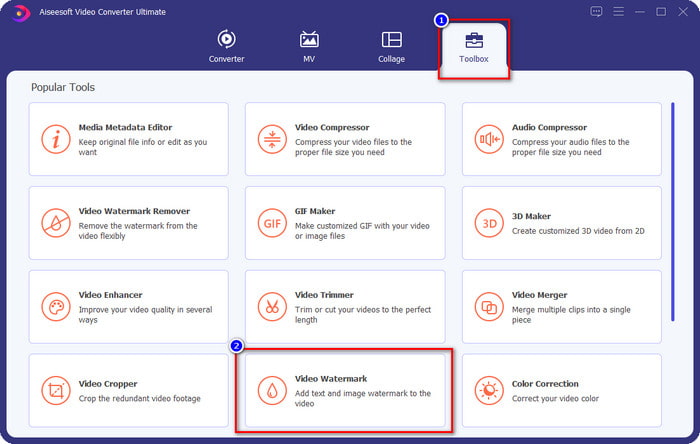
Pasul 1. După ce deschizi software‑ul, trebuie să mergi la Toolbox și să cauți Video Watermark; dă clic pe acesta.
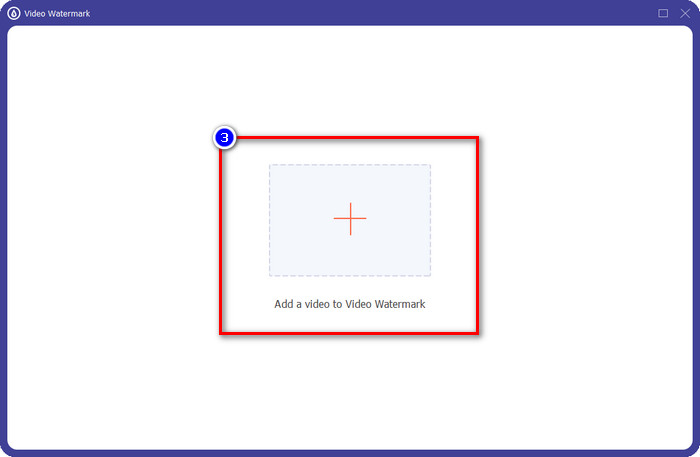
Pasul 2. Apasă butonul + pentru a încărca videoclipul pe care vrei să adaugi filigranul. Caută în folder fișierul video pe care vrei să îl încarci și apasă Open pentru a continua.
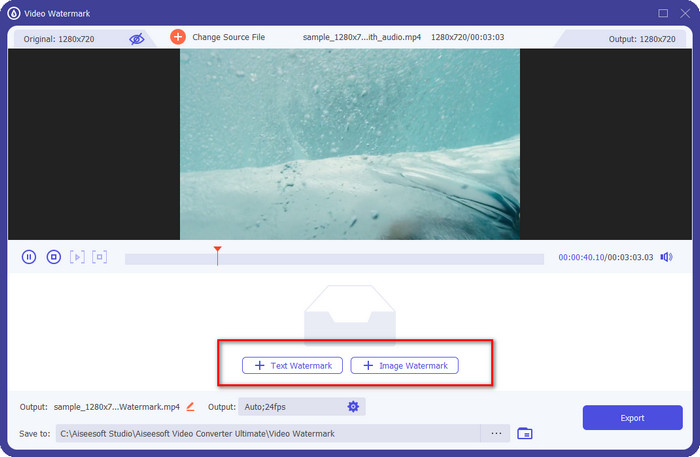
Pasul 3. Sunt disponibile două opțiuni: dacă vrei să adaugi text, trebuie să dai clic pe Text Watermark, dar pentru logo sau imagini trebuie să dai clic pe Image Watermark.
Pentru Text Watermark:
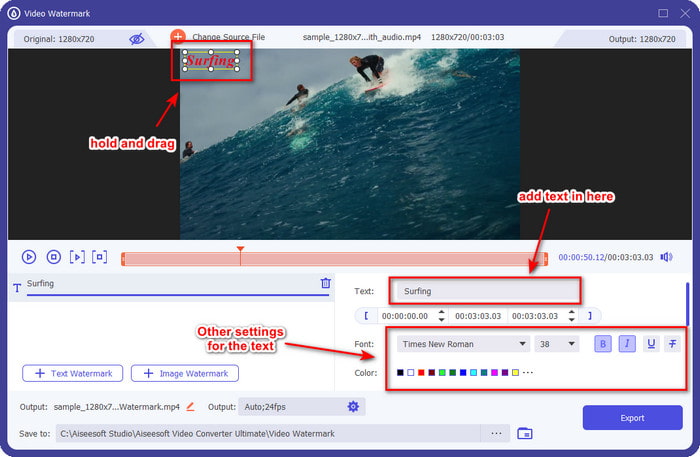
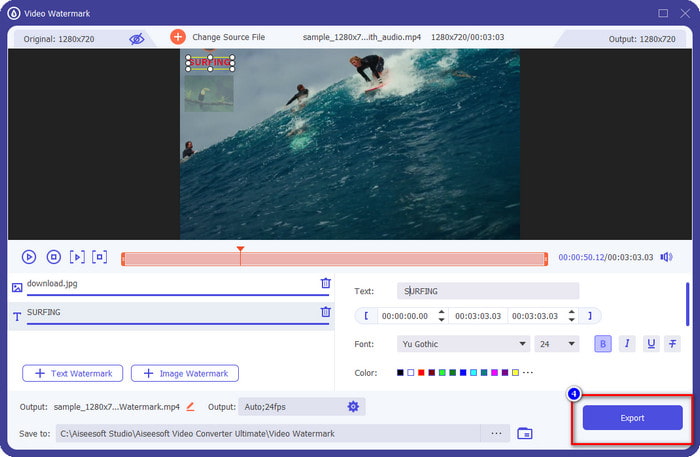
Introduceți filigranul pe care doriți să îl adăugați în această parte, apoi puteți schimba culoarea fontului și stilul filigranului textului în funcție de nevoile dvs. Trageți textul de pe videoclip pentru a-l plasa oriunde în videoclip.
Pentru filigran de imagine:
Dă clic pe Image Watermark și alege fișierul de imagine pe care vrei să îl folosești ca filigran. Asigură‑te că imaginea pe care vrei să o folosești se află deja pe unitatea ta. Acum poți modifica celelalte setări ale imaginii în această secțiune. Trage filigranul‑imagine peste întregul videoclip pentru a‑l poziționa corect.
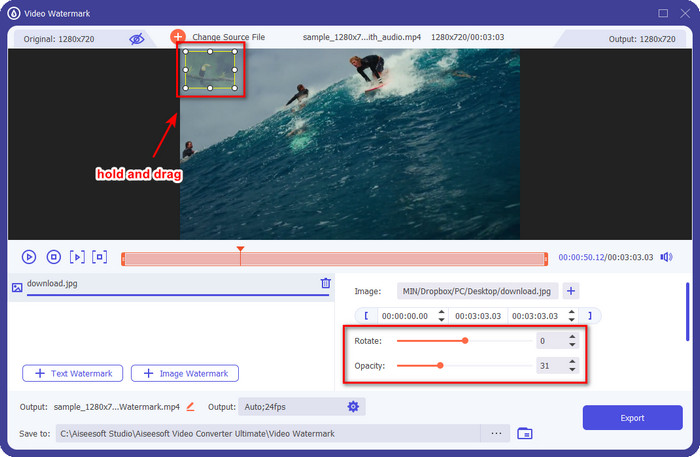
Pasul 4. Pentru a salva videoclipul cu filigranul adăugat, acum poți da clic pe butonul Export.
Cum să eliminați filigranul dintr-un videoclip:
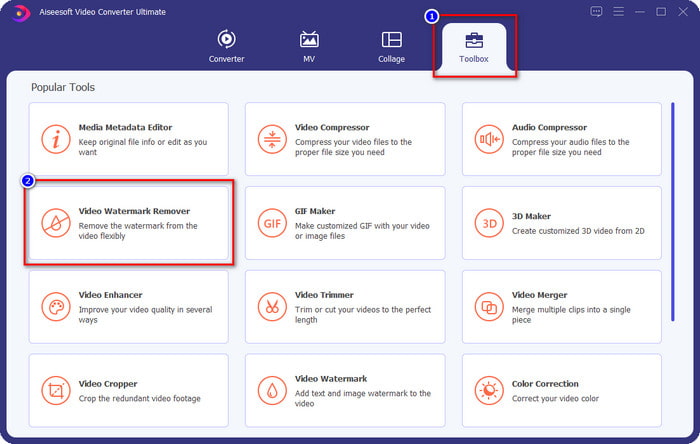
Pasul 1. În Toolbox, găsește Video Watermark Remover și deschide‑l.
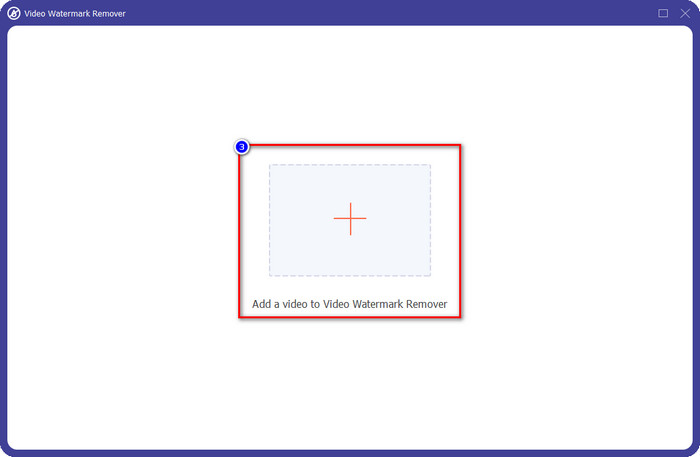
Pasul 2. Dă clic pe pictograma + pentru a încărca videoclipul cu filigran și apasă Open după ce te‑ai hotărât.
Pasul 3. Apasă Add Watermark Removing Area pentru a șterge filigranul din videoclipul tău.
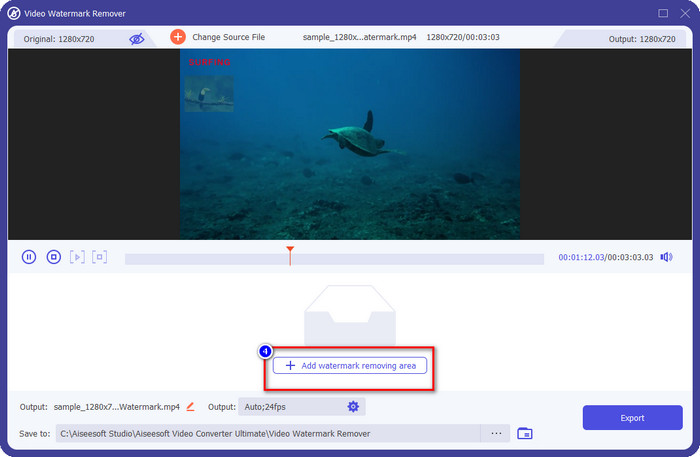
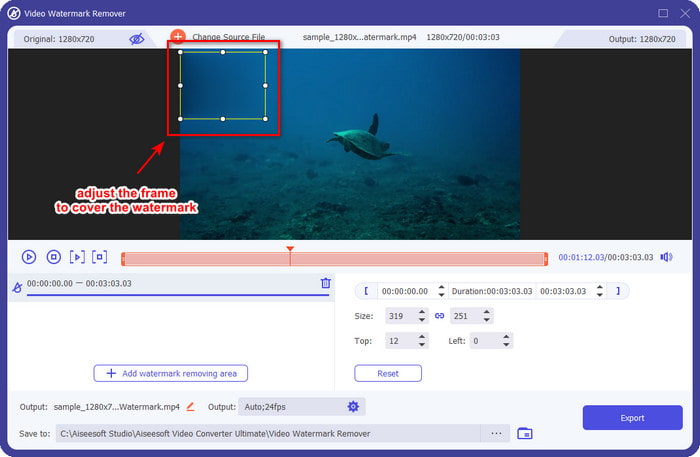
Pasul 4. Plasează cadrul pentru eliminarea filigranului peste filigran pentru a‑l înlătura. De asemenea, îl poți redimensiona și îi poți schimba liber poziția în videoclip.
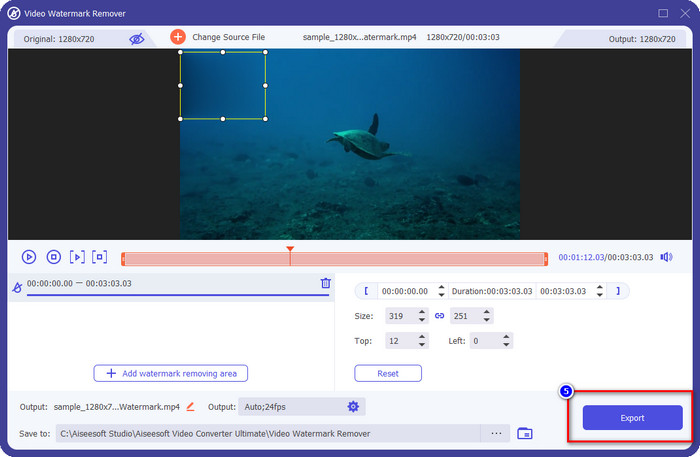
Pasul 5. Acum că filigranul este estompat, poți da clic pe Export pentru a salva videoclipul fără filigran. Atât de simplu.
Articole similare:
Cum să adaugi filigran pe un GIF
Cum să elimini filigranul dintr‑un GIF
Partea 5. Întrebări frecvente despre Watermark on Video
Pot să adaug simultan un filigran text și unul imagine?
Cu siguranță, da. Puteți adăuga text și filigran de imagine pe videoclipul cu care aveți de-a face. Pentru a face acest lucru, puteți urma pașii pe care i-am furnizat mai sus pentru a adăuga un filigran folosind text și o imagine.
Filigranul mărește dimensiunea fișierului video?
Deși dimensiunea fișierului video cu filigran nu diferă de cea fără filigran, dimensiunea fișierului video cu filigran este ușor diferită de videoclipul fără filigran. Totuși, putem spune că dimensiunea fișierului video este cel mai probabil aceeași cu sau fără.
Ce tip de filigran se potrivește nevoilor mele?
Înainte de a adăuga un filigran la videoclipul cu care aveți de-a face, este necesar să cunoașteți diferitele tipuri de filigrane. Vă rugăm să citiți informațiile adăugate mai sus, deoarece le-am discutat individual pentru a determina pe care ar trebui să le utilizați cu ușurință.
Concluzie
În sfârșit, acum știm ce este un logo‑filigran și cum să adăugăm unul pe videoclipul tău. Așadar, dacă vrei o soluție completă pentru gestionarea filigranelor, fie că este vorba de eliminare sau de adăugare, atunci FVC Video Converter Ultimate este ajutorul de care ai nevoie. Dacă vrei să afli ce alte lucruri mai poate face acest instrument, îl poți descărca chiar acum pe desktopul tău și să vezi cu ochii tăi.
-
 Cel mai bun mod Cum să adăugați filigran la un videoclip în Photoshop pe Windows și Mac
 Vrei să știi cum să adaugi un filigran la un videoclip pe Photoshop? În acest caz, acest articol vă va oferi lucrurile pe care trebuie să le știți.
-
 4 moduri eficiente de a elimina filigranele Tiktok din videoclipurile Tiktok
 Trebuie să eliminați filigranul Tiktok din videoclipurile dvs. Tiktok exportate? O poți face aici cu ajutorul instrumentelor pe care le prezentăm; o poți face cu ușurință.
-
 Cum să adăugați filigran la un videoclip în iMovie pe Mac [All Embracing]
 Vrei să afli secretele adăugării unui filigran la un videoclip în iMovie? Nu vărsați ceaiul pe nimeni și învățați-l citind acest articol.
