


 Видео конвертер Ultimate
 Устройство записи экрана
 Видео ремонт
 Безопасная загрузка
Исправить пиксельное видео онлайн бесплатно: освоение пиксельного восстановления
Пикселизация возникает, когда становятся заметны отдельные пиксели, из‑за чего изображение в видео выглядит блочным и искажённым. К распространённым причинам относятся низкое разрешение, артефакты сжатия и перекодирование видео. Пикселизация в роликах может сильно раздражать, ухудшая впечатление от просмотра и снижая общее качество вашего контента. Хорошая новость в том, что вам не нужно быть экспертом по видеомонтажу или покупать дорогое ПО, чтобы справиться с проблемами пикселизации. В этой статье мы покажем, как бесплатно исправить пикселизированное видео онлайн, чтобы вы смогли овладеть искусством «ремонта» пикселей. Исправьте пикселизацию видео и уже сегодня попробуйте наш предельно ясный метод, позволяющий получить профессиональный результат!

Часть 1. Что вызывает пиксельное видео
Пикселизация в видео может возникнуть из-за различных факторов, и понимание этих причин имеет важное значение для эффективного решения и предотвращения этой проблемы. Вот несколько распространенных причин, по которым в видео может возникнуть пикселизация:
1. Низкое разрешение. Видео с низким разрешением лишены деталей, потому что в них меньше пикселей. Пикселизация появляется, когда такие ролики растягивают или просматривают в большом размере, и отдельные пиксели становятся более заметными. (Узнайте, как изменить разрешение видео здесь.)
2. Неподходящий кодек или формат. Пикселизация может возникать при записи или экспорте видео в неподходящем кодеке или формате. При использовании некоторых кодеков, которые уменьшают размер файлов за счёт качества изображения, пикселизация может проявляться сильнее.
3. Низкий битрейт. Битрейт — это объём данных, обрабатываемых за одну секунду. Недостаточный битрейт при сжатии видео может приводить к пикселизации, особенно в сценах с большим количеством движения или мелких деталей.
4. Сжатие при загрузке/выгрузке. Пикселизация может появляться на платформах, которые дополнительно сжимают видео при загрузке или скачивании. Например, социальные сети часто используют собственные алгоритмы сжатия.
5. Качество камеры. Важным фактором является качество камеры, на которую записывалось видео. Ролики, снятые на камеры низкого качества, могут содержать изначальную пикселизацию, которая становится заметнее на больших экранах.
Часть 2. Исправьте пиксельные видео онлайн бесплатно
Исправить пиксельные фильмы онлайн бесплатно можно с помощью различных инструментов и платформ. Без необходимости дорогостоящего программного обеспечения выполните следующие действия, чтобы улучшить качество пиксельных видео:
◆ Более четкое видео Flixier
◆ Clideo очистка видео
◆ Очистка видео VEED.IO
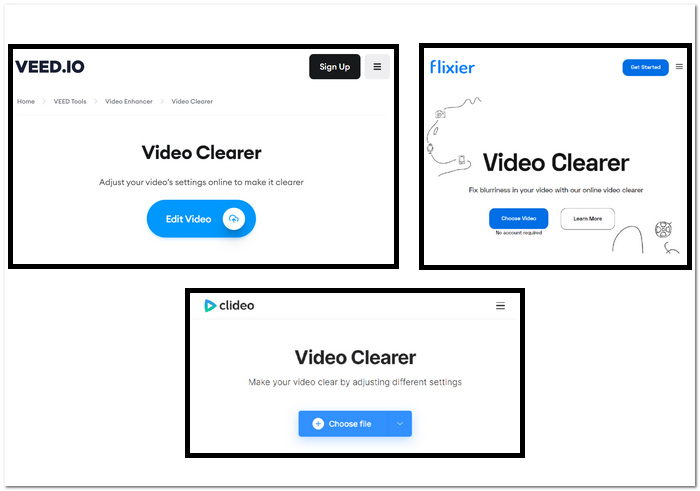
Шаги по исправлению пикселизированных видео с помощью онлайн‑инструментов:
Шаг 1. Выберите один из онлайн‑инструментов выше и перейдите на его сайт.
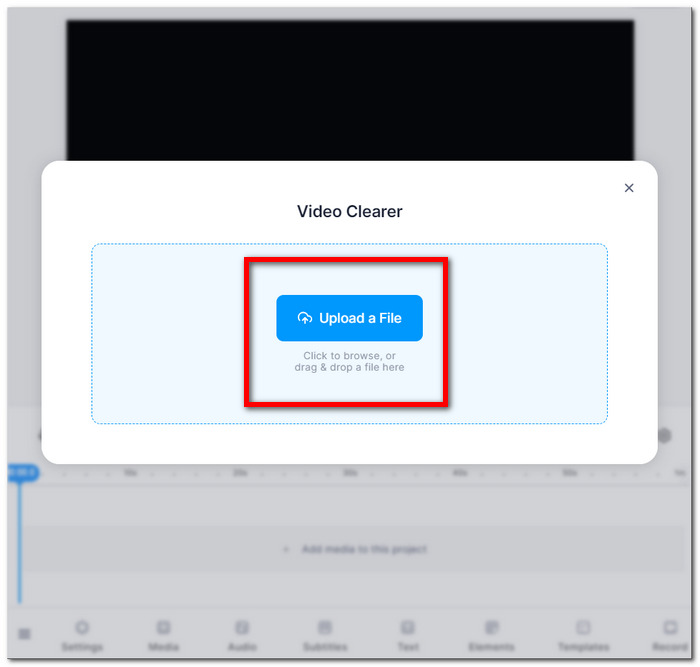
Шаг 2. Перетащите файл вашего видео в формате MOV или MP4 или загрузите его из локальной папки.
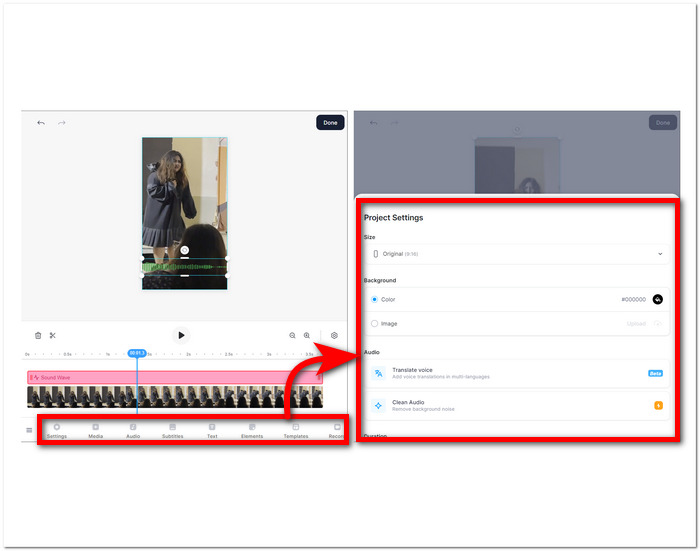
Шаг 3. Настройте параметры видео — яркость, контраст, насыщенность и т. д.
Шаг 4. Когда вы будете довольны результатом, нажмите Done, а затем кнопку Export или Download, чтобы сохранить видео.
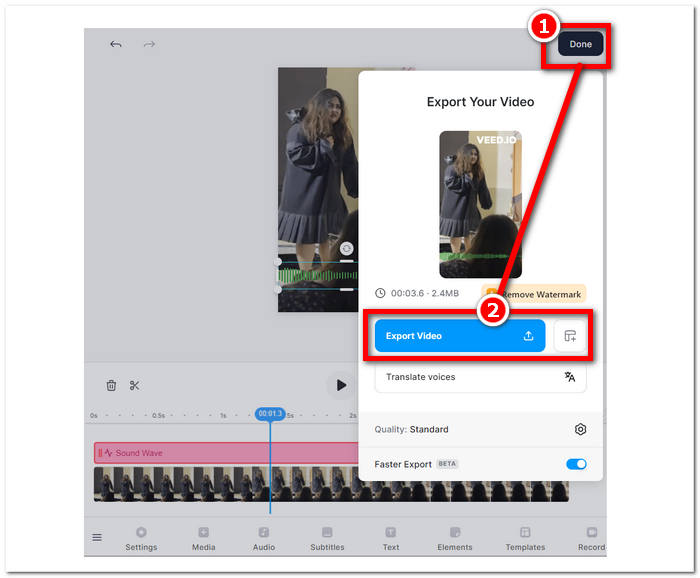
Эти инструкции помогут вам улучшить качество ваших пиксельных фильмов без оплаты дополнительного программного обеспечения. Попробуйте различные методы, чтобы увидеть, какой из них лучше всего соответствует вашим целям по улучшению качества и специфичности ваших видео.
Часть 3. Как сделать видео менее пикселизированным на Windows и Mac
1. Конвертер видео Ultimate
Представляем Video Converter Ultimate — универсальный видеокомбайн, созданный для того, чтобы преобразить ваш мультимедийный опыт. Этот мощный инструмент позволяет без труда конвертировать, улучшать, сжимать и редактировать видео- и аудиофайлы на сверхвысокой скорости. Хотите изменить формат ролика, улучшить качество изображения и звука, уменьшить размер файла без потери качества или придать видео профессиональный вид за счёт аккуратного монтажа — наш комплексный видеопакет решит все эти задачи. Насладитесь удобством единой многофункциональной платформы для всех мультимедийных нужд, которая обеспечивает эффективность, не жертвуя скоростью и качеством.
Шаги по использованию Video Converter Ultimate:
Шаг 1. Установите программу и запустите её на своём компьютере.
Бесплатная загрузкаДля Windows 7 и новееБезопасная загрузка
Бесплатная загрузкаДля MacOS 10.7 и новееБезопасная загрузка
Шаг 2. На главном экране найдите раздел Toolbox и в нём нажмите Video Enhancer.
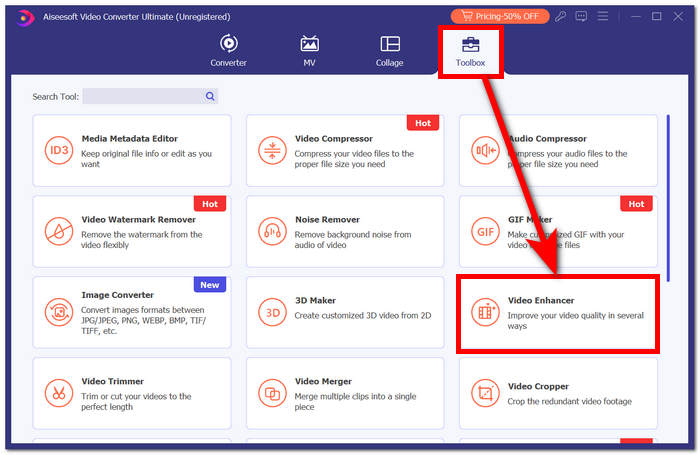
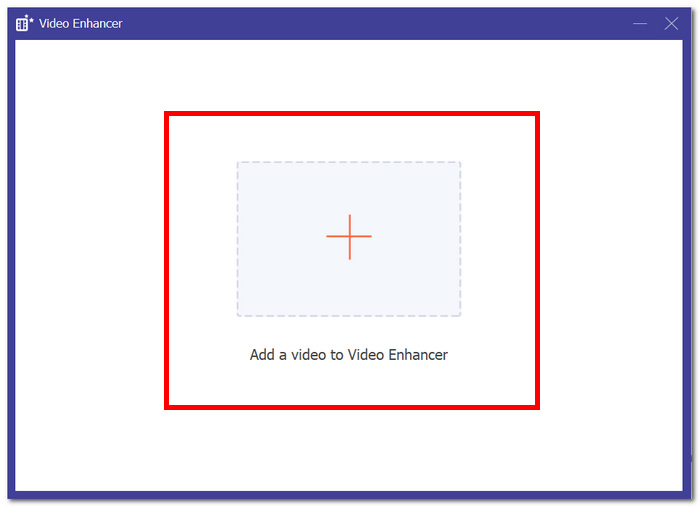
Шаг 3. Нажмите +, чтобы добавить видео в модуль Video Enhancer.
Шаг 4. На последнем этапе настройте параметры для улучшения видео. Вы можете Upscale Resolution и Preview. Когда вы будете довольны изменениями, нажмите кнопку Enhance, чтобы экспортировать и сохранить непикселизированное видео на компьютер.
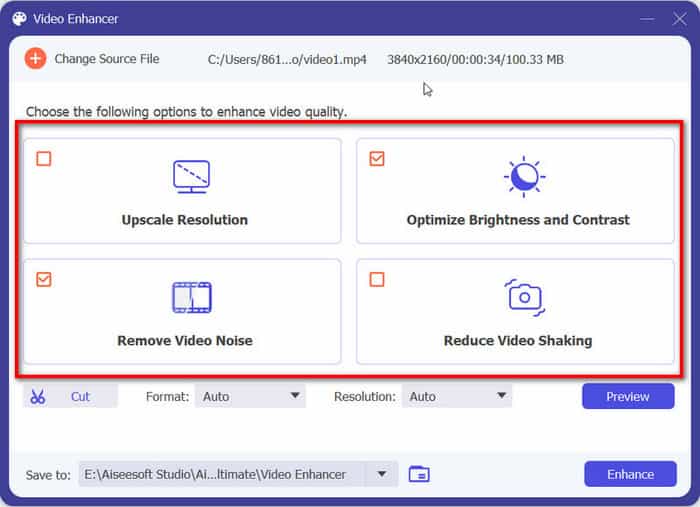
Благодаря FVC Video Converter Ultimate удобство единой универсальной платформы удовлетворит все ваши мультимедийные потребности, обеспечивая эффективность без ущерба для скорости и качества.
2. Ремонт видео Aiseesoft
Aiseesoft Video Repair — это надёжное решение для восстановления видео с потерянными или повреждёнными данными и с эффектом пикселизации. Для восстановления этому мощному приложению нужен лишь образец видео в том же формате. Программа проста в использовании и поддерживает ремонт файлов множества форматов, включая MP4, MOV, AVI, WMV и FLV. Она также способна восстанавливать ролики, повреждённые в результате пикселизации, вирусных атак и ошибок файловой системы. Aiseesoft Video Repair — отличный инструмент для тех, кто случайно повредил видео или хочет восстановить ролик, испорченный из‑за проблем с оборудованием или программным обеспечением.
Шаги по использованию Aiseesoft Video Repair:
Шаг 1. Скачайте программу с их сайта, установите и запустите её на компьютере.
Бесплатная загрузкаДля Windows 7 и новееБезопасная загрузка
Бесплатная загрузкаДля macOS 10.7 и новееБезопасная загрузка
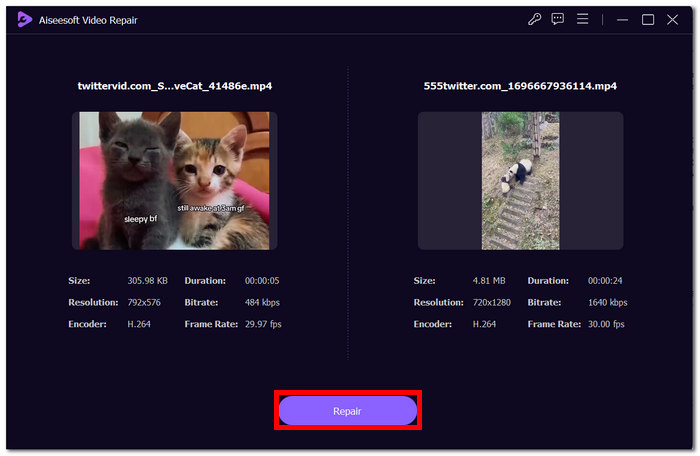
Шаг 2. В интерфейсе программы добавьте пикселизированный видеофайл, нажав красную кнопку + слева, затем добавьте образец видео, нажав фиолетовую кнопку + справа.
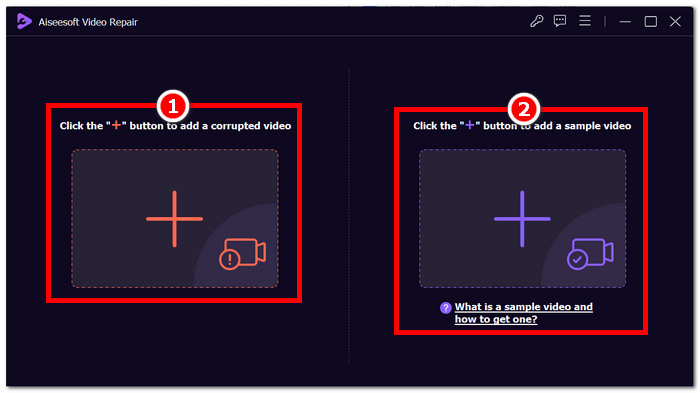
Шаг 3. После добавления повреждённого и образцового видео нажмите Repair, чтобы запустить процесс, затем нажмите Preview, чтобы проверить качество.
Шаг 4. Если результат вас устраивает, нажмите Save, чтобы сохранить исправленное видео.
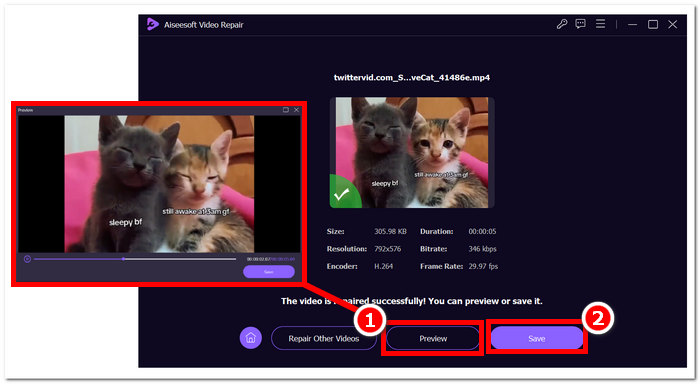
Его удобный интерфейс и расширенные возможности предлагают быстрый и эффективный способ восстановления поврежденных видео, что делает его незаменимым инструментом для восстановления видео.
Часть 4. Часто задаваемые вопросы об исправлении пиксельного видео
Можно ли исправить пикселизацию?
Да, пикселизацию часто можно исправить с помощью различных методов и инструментов. Будь то онлайн-платформы, программное обеспечение для редактирования видео или специализированные алгоритмы, существуют способы устранения пикселизации и повышения общего качества видео. Эффективность решения может зависеть от серьезности и основной причины пикселизации.
Почему возникает пикселизация?
Пикселизация возникает из-за различных факторов, в том числе видео с более низким разрешением имеет меньше пикселей, что делает отдельные пиксели более заметными, особенно при растягивании или просмотре в больших форматах. Видео с более низким разрешением имеют меньше пикселей, что делает отдельные пиксели более заметными, особенно при растягивании или просмотре в больших форматах. Преобразование видео между различными форматами или кодеками может привести к пикселизации, если оно выполнено неправильно, поскольку некоторая информация может быть потеряна. Понимание конкретной причины пикселизации имеет решающее значение для определения наиболее эффективного метода ее устранения.
Устраняет ли улучшение качества видео пикселизацию видео?
Да, улучшение общего качества видео часто помогает уменьшить пикселизацию. Управляя такими параметрами, как разрешение, сжатие и перекодирование, вы можете повысить чёткость и снизить заметность отдельных пикселей. Повышение разрешения видео, корректировка настроек сжатия и использование более качественного оборудования при съёмке — всё это эффективные способы улучшить качество и уменьшить пикселизацию. Однако успех этих методов зависит от исходного качества ролика и степени выраженности пикселизации.
Заключение
Бесплатное исправление пиксельных видео онлайн — это доступный навык, который может повысить качество вашего контента. Независимо от того, выбираете ли вы удобные платформы, такие как Google Photos, или специализированные инструменты, такие как Fix. Мастеринг видео с восстановлением пикселей позволяет создавать видеоролики с кристально чистым изображением. Не забывайте понимать причины пикселизации, изучать различные онлайн-инструменты и применять ручные методы, чтобы обеспечить оптимальное качество видео в будущих проектах. Попрощайтесь с пикселизацией и наслаждайтесь более плавным и приятным просмотром!
-
 Топ-7 бесплатных инструментов для восстановления видео: восстановите поврежденные видео
 Откройте для себя 7 лучших бесплатных онлайн-восстановлений видео, которые помогут исправить поврежденные или поврежденные видеофайлы. Оживите свои драгоценные воспоминания с помощью этих лучших инструментов для восстановления видео.
-
 Как исправить размытое видео: кристально чистое видео ждет
 Как сделать размытое видео четким? Не позволяйте размытым видео утомлять ваш контент; найдите решения для кристально чистого просмотра и достижения профессионального качества отснятого материала.
-
 Руководство по ремонту видео, которые не воспроизводятся на телефонах Android
 Хотите узнать, почему видео на вашем устройстве Android не воспроизводится? Если да, то, чтобы решить проблему самостоятельно, вы можете продолжить чтение, чтобы узнать больше.
