


 Видео конвертер Ultimate
 Устройство записи экрана
 Видео ремонт
6 лучших контроллеров скорости видео для Windows/Mac/Android/iOS
Ускорение или замедление видео может создать невероятную иллюзию, если вам наскучило пользоваться стандартными эффектами. Этот прием видеомонтажа прост, но при этом очень эффективен. В интернете можно найти множество разных контроллеров скорости, и мы понимаем, что выбрать нелегко. Но если вы прочитаете эту статью, мы рассмотрим приложения‑регуляторы скорости, с помощью которых можно менять скорость воспроизведения. Интересуют лучшие приложения‑контроллеры скорости? Тогда продолжайте читать, чтобы узнать больше о доступных на ваших платформах контроллерах скорости видео.

Часть 1. 6 лучших контроллеров скорости видео для Windows, Mac, Chrome, iOS и Android
Вверх 1. Video Converter Ultimate (Windows и Mac)
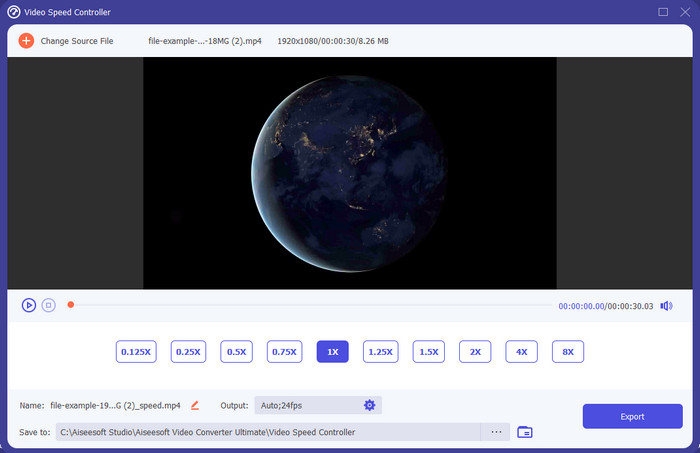
Вам нужен контроллер скорости видео, который действительно эффективно ускоряет и замедляет ролики? В таком случае Video Converter Ultimate как раз поможет решить эту задачу. Это самый простой в использовании инструмент для изменения скорости видео, будь то сильное ускорение или воспроизведение в замедленном режиме. Даже если вы меняете скорость, исходное качество видео сохранится, а вот движение в кадре изменится, поскольку вы меняете именно скорость.
Помимо этого, вы можете делать множество вещей, таких как преобразование, слияние, вырезание и многое другое; по сути, это универсальный инструмент. Хотите узнать о других предложениях, которые вы можете получить с этим приложением для ускорения видео? Если это так, ознакомьтесь с функциями инструмента, чтобы узнать больше, или вы можете загрузить программное обеспечение на свой рабочий стол прямо сейчас, чтобы протестировать его.

Видео конвертер Ultimate
5 689 200+ загрузок- Он может точно изменять видеокадры вверх или вниз быстро в любом видеоформате, таком как MP4.
- Доступны многочисленные функции редактирования видео и эффекты.
- Он гибок на всех платформах, таких как Windows или macOS.
- Сверхбыстрый процесс позволяет вам загружать или экспортировать процесс в мгновение ока.
- При экспорте или загрузке видео, которое вы редактируете, водяной знак не будет.
Бесплатная загрузкаДля Windows 7 или более поздних версийБезопасная загрузка
Бесплатная загрузкаДля MacOS 10.7 или более поздних версийБезопасная загрузка
Плюсы
- Меняйте кадр за кадром видео, даже если вы профессионал или нет.
- Простые для понимания параметры воспроизведения видео.
- Выдающаяся возможность обмена в социальных сетях.
- Его можно загрузить бесплатно, но есть встроенные покупки.
Минусы
- Необходимо приобрести, если вы хотите иметь все возможности инструмента.
Вверх 2. Clipchamp (Windows)
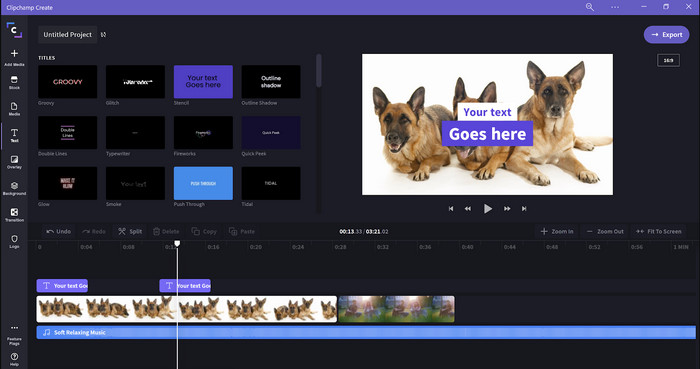
Clipchamp — это редактор скорости видео, который можно использовать в Windows. У этого инструмента несложный порог вхождения, поэтому, если вы новичок в монтаже, стоит обратить на него внимание. Он также поддерживает ряд функций, которые могут вам пригодиться. Однако главный недостаток программы — качество итогового видео. Бесплатно можно экспортировать файл только в разрешении 480p, что ниже, чем у многих других бесплатных инструментов. Если же вам нужно 720p или 1080p, можно оформить подписку за отдельную плату. В целом инструмент неплохой, но он все же уступает первому редактору.
Плюсы
- Простой графический интерфейс и простой в использовании.
- Он предлагает дополнительные функции для редактирования.
- Легко управлять воспроизведением видео.
Минусы
- Для бесплатной версии окончательный вывод равен 480.
- Иногда инструмент становился негибким при выполнении задачи.
Топ 3. Контроллер скорости видео (Chrome)

Хотите использовать расширение контроллера скорости видео в Chrome? Тогда вы можете установить Video Speed Controller. Это расширение доступно в любом браузере Chrome и позволяет ускорять или замедлять просматриваемое видео. Оно просто в использовании и безопасно, поскольку является официальным расширением для Chrome. Однако при экспорте видео скорость воспроизведения останется прежней, даже если вы её меняли. Инструмент действует только на то видео, которое вы в данный момент смотрите в Chrome, и не работает за его пределами. Дополнительно стоит учесть, что после ускорения видео через это расширение все ваши ролики, воспроизводимые в Chrome, будут идти на той же скорости.
Плюсы
- Регулятор скорости на точке, который вы можете использовать в Chrome.
- Возможность легко перематывать или сбрасывать скорость воспроизведения видео в Chrome.
- Он поддерживает команду коротких клавиш.
Минусы
- Панель видеоконтроллера не видна.
- Вы не можете изменить скорость видео вне Chrome.
Топ 4. Ускорение для Safari (iOS и Mac)
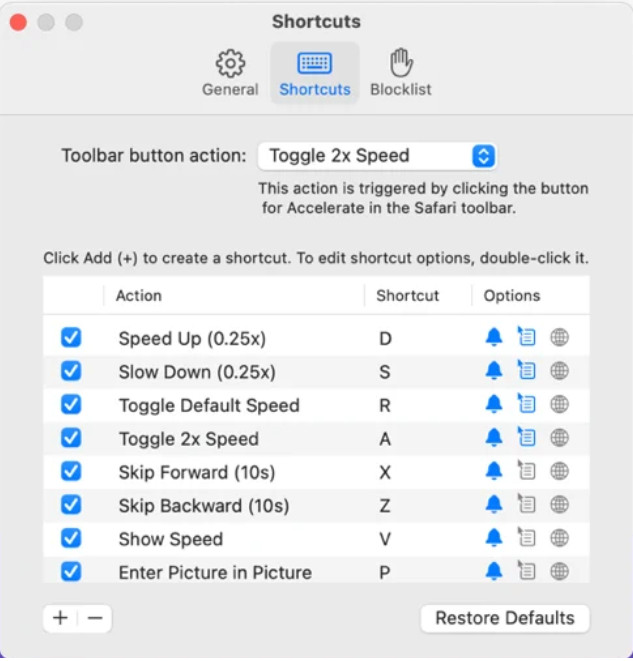
Нужен контроллер скорости видео в Safari? Accelerate for Safari доступен в любом Safari на устройствах Apple. Этот инструмент позволяет менять скорость воспроизведения любого HTML5‑видео в Safari. Как и описанное выше расширение для Chrome, он ограничен только устройствами Apple. Поэтому, если вы пользователь Apple, вам может подойти это расширение для ускорения или замедления видео. Кроме того, вы можете использовать клавиши на клавиатуре, чтобы управлять изменением скорости воспроизведения.
Плюсы
- Безопасно использовать во всех Safari.
- Он также поддерживает «картинку в картинке» и AirPlay.
- Доступны сочетания клавиш для управления инструментом.
Минусы
- Он не поддерживает другой веб-браузер, кроме Safari.
- Ограничено видео HTML 5.
Топ 5. Медленно, быстро, медленно — контролируйте скорость ваших видео (iOS)
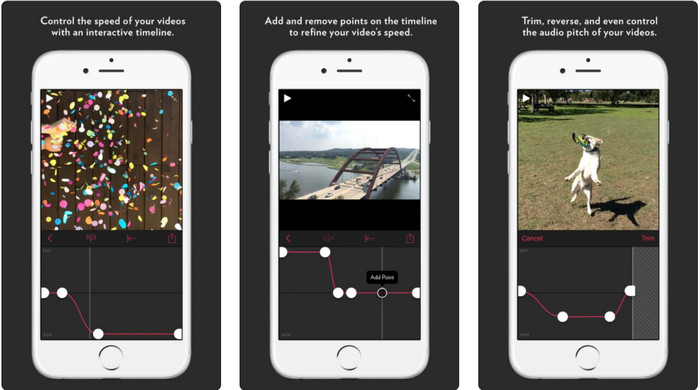
Если вам нужен контроллер скорости видео на iPhone, вы можете использовать Slow Fast Slow. Этот инструмент помогает пользователям iOS мгновенно изменять скорость воспроизведения видео и особенно хорошо подходит для создания замедленного эффекта. Кроме того, в нем есть очень наглядная встроенная шкала времени для точной регулировки скорости. Он поддерживает и другие функции, такие как изменение высоты тона и реверс клипа. Однако для работы приложения требуется система iOS 10, поэтому, если у вас версия ниже 10, воспользоваться им не получится.
Плюсы
- Он поддерживает другие функции для вашего видео.
- Дружественный интерфейс.
- Может замедлять видео до скорости 1/16.
Минусы
- Он не поддерживает вывод 4k и выбор FPS.
- Он не работает на некоторых новых устройствах iOS.
Топ 6. Контроллер скорости видео Pro (Android)
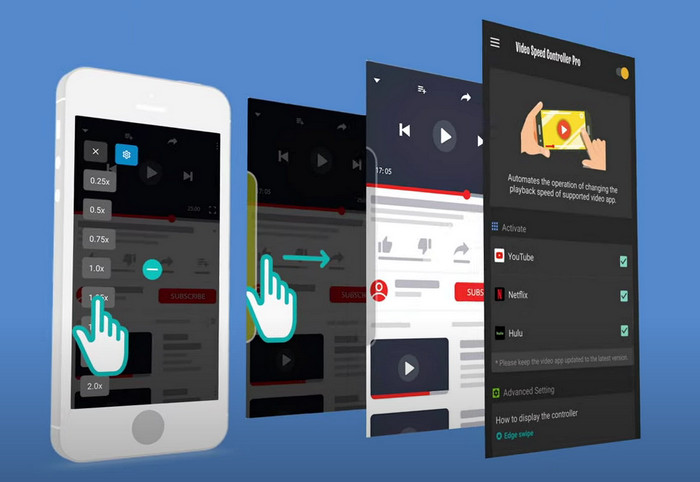
Если вам нужен контроллер скорости видео на Android, то, представьте себе, вы можете установить Video Speed Controller Pro из Play Store. С помощью этого инструмента можно без труда ускорять любые видео, которые воспроизводятся на вашем Android‑устройстве. По сути, это аналог расширения‑контроллера скорости для Android. Несмотря на то, что программа умеет ускорять видео, максимум, которого она достигает, — только 2×. Тем не менее, если вам нужно ускорить просмотр, вы можете использовать её в YouTube, Netflix и других видеосервисах на Android.
Плюсы
- Он прост в использовании.
- Сам инструмент на высоте.
- Строка меню доступна для отображения параметров воспроизведения.
Минусы
- Варианты скорости воспроизведения ограничены.
- Иногда это плохо работает.
Часть 2. Сравнительная таблица
| Функции | Конвертер видео Ultimate (Windows и Mac) | Клипчамп (Windows) | Контроллер скорости видео (Chrome) | Ускорение для Safari (iOS и Mac) | Медленно, быстро, медленно — контролируйте скорость ваших видео (iOS) | Контроллер скорости видео Pro (Android) |
| Контроль скорости |  | | | | | |
| Видеовыход высокого качества | |  | | | | |
| Функции редактирования | | | | | | |
| Сверхбыстрый процесс экспорта | | | | | | |
Часть 3. Часто задаваемые вопросы о контроллере скорости видео
Зачем мне использовать регулятор скорости?
В некоторых случаях вам нужно будет смотреть видео на высокой или замедленной скорости. Отличным примером просмотра ускоренного видео является немедленное завершение видео, которое вы смотрите, или что-то подобное. Ускорение видео очень помогает этим пользователям. В то время как замедленная съемка обычно используется для мгновенного воспроизведения быстрых видов спорта, таких как гонки, баскетбол, волейбол и другие. В любом из этих двух случаев вам понадобится эффективный регулятор скорости, чтобы вручную изменить нормальную скорость в соответствии с вашими потребностями.
Можно ли ускорить видео в Tiktok?
Да, в TikTok можно снимать видео с ускорением. Однако смотреть чужие ролики в TikTok на повышенной скорости нельзя. Поэтому, если вам нужен подходящий инструмент для ускорения, перейдите по ссылке и прочитайте эту статью, чтобы узнать, как ускорить видео в TikTok.
Как замедлить видео?
В отличие от ускорения видео, вы можете создавать ролики в замедленном режиме с помощью доступных на рынке редакторов. Какой инструмент выбрать? Не переживайте: мы подобрали лучшие программы для создания slow‑motion‑эффекта, которые помогут вам сделать качественное замедление. Если хотите узнать больше, нажмите на эту ссылку.
Заключение
Теперь вы хорошо осведомлены о платных и бесплатных приложениях для ускорения видео на разных платформах. Контроллеры скорости предоставляют уникальные возможности, помогая пользователям ускорять воспроизведение роликов. Если внимательно присмотреться, видно, что FVC Video Converter Ultimate дает пользователям все необходимое. Поэтому, если вы хотите скачать этот универсальный инструмент на свой компьютер, нажмите кнопку загрузки и насладитесь полным набором его возможностей.
-
 Как ускорить видео с помощью 5 лучших доступных программ [Windows/Mac/Linux]
 Вы хотите знать, как легко ускорить видео? Затем прочтите эту статью, в которой мы объясняем, как эффективно ускорить работу в Windows, Mac и Linux.
-
 Самые простые способы ускорить видео на устройствах Android [2021]
 Знаете ли вы, что на вашем Android-устройстве можно ускорить просмотр видео? Итак, если вы хотите узнать, как ускорить воспроизведение видео на своем телефоне Android, прочтите эту статью.
-
 Отличные советы 2021 года: как ускорить просмотр видео в iMovie
 Ваш друг предлагает iMovie помочь вам с вашей проблемой, как ускорить видео с помощью операционной системы iOS, но вы не знаете, что делать? Подробнее об этом вы узнаете, прочитав эту статью.
