


 Video Converter Ultimate
 Skärminspelare
 Video reparation
 Säker nedladdning
GIF-komprimering - Hur komprimerar du animerad GIF till liten filstorlek
Du kan se animerade GIF i många fall, till exempel Facebook, Twitter, WhatsApp och många andra webbplatser. Dess lilla filstorlek och loop-animationer gör GIF populär. Det är sant att GIF tar mindre lagringsutrymme än vanliga videoformat. Du måste dock fortfarande komprimera GIF för att minska filstorleken. Således kan du optimera webbsidans laddningshastighet och fildelningshastighet.

Om du vill visa GIF-animationer och förkorta laddningstiden kan du komprimera och optimera GIF som följande visar. Här finns många användbara förslag för att minska animerad GIF-bildfilstorlek. Du kan komprimera GIF till 1 MB eller ännu mindre här.
Del 1: Hur komprimerar du GIF online gratis
Oavsett hur många GIF-filer du vill komprimera eller hur stor din animerade GIF är kan du få en tillfredsställande lösning här. FVC Free Video Compressor kan komprimera GIF-filer gratis på din Windows- och Mac-dator. Dess stöd för batchkomprimering och upp till 30x snabbare komprimeringshastighet slår de flesta onlinekompressorer. Dessutom kan du ställa in GIF-komprimeringsförhållandet med en enkel skjutreglage. På så sätt får du mer flexibla kontroller för att komprimera stora animerade GIF-filer. Innan du komprimerar och ändrar storlek på GIF-filer online följer här huvudfunktionerna hos den kostnadsfria onlinefilkompressorn.
Gratis nedladdningFör Windows 7 eller senareSäker nedladdning
Gratis nedladdningFör MacOS 10.7 eller senareSäker nedladdning
1. Komprimera GIF under 1 MB med anpassningsbart kompressionsförhållande.
2. Ingen filstorleksgräns eller vattenstämpel.
3. GIF-komprimeringsstöd för batch.
4. Justera GIF-parametrar för att konvertera och komprimera GIF online.
5. 30x snabbare hastighet än andra gratis videokompressorer online.
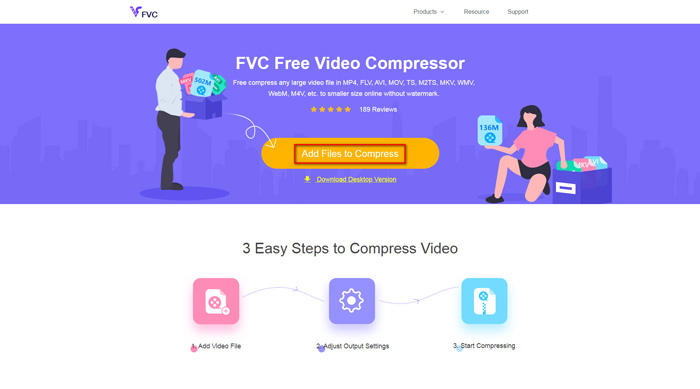
Steg 1: Öppna FVC Free Video Compressor i din webbläsare. Klicka på Add Files to Compress i huvudgränssnittet. Klicka på Download för att först installera dess startprogram.
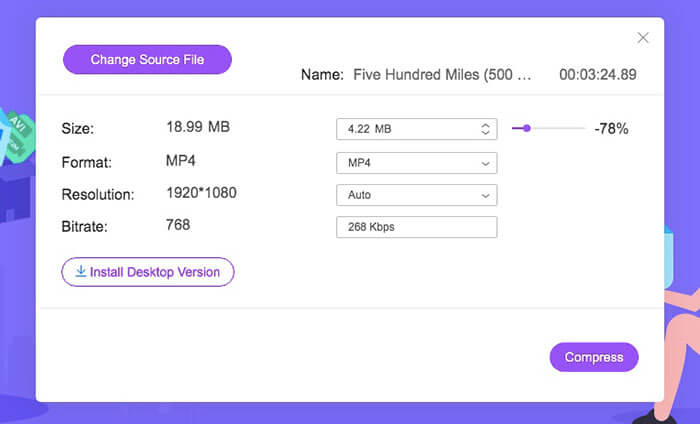
Steg 2: Importera din animerade GIF till onlinekompressorn. Flytta skjutreglaget Size för att minska GIF-filens storlek. Dessutom kan du ändra utdataformat och andra parametrar.
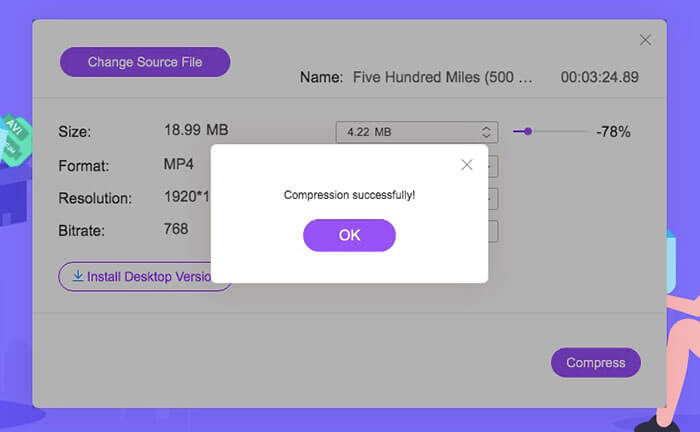
Steg 3: Klicka på Compress och ställ in målmappen. Du kan få de komprimerade GIF-filerna på kort tid.
Klicka här för att läsa om hur du konverterar MP4 till GIF
Del 2: Hur man komprimerar och minskar GIF-filstorlek med Photoshop
Trots GIF-kompressorerna online kan du använda Photoshop för att optimera GIF-animationer. Photoshop är ett bra verktyg för att komprimera GIF-storlek på din dator. Om du prenumererar på Photoshop kan du också prova följande GIF-komprimeringstips.
1. Trimma GIF-animationen
Steg 1: Öppna Photoshop.
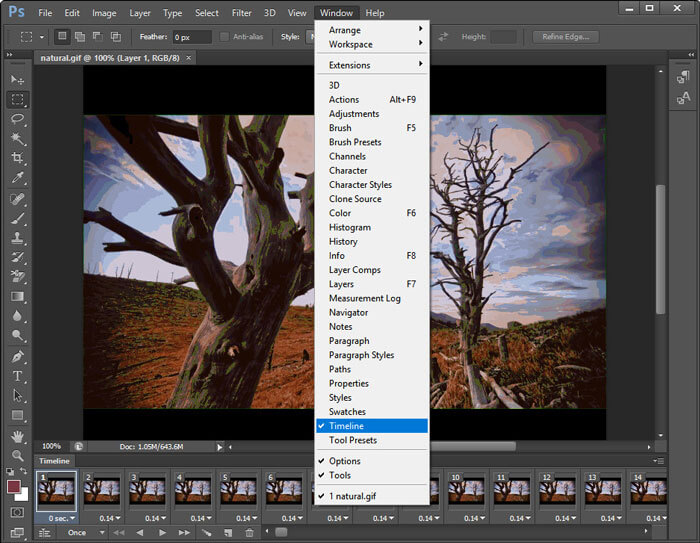
Steg 2: Välj Timeline från Window-menyn.
Steg 3: Aktivera alternativet Loop Playback från snabbmenyn (högerklick).
Steg 4: Trimma GIF-animationsfilen nedan för att ta bort oönskade delar.
2. Minska bildstorleken
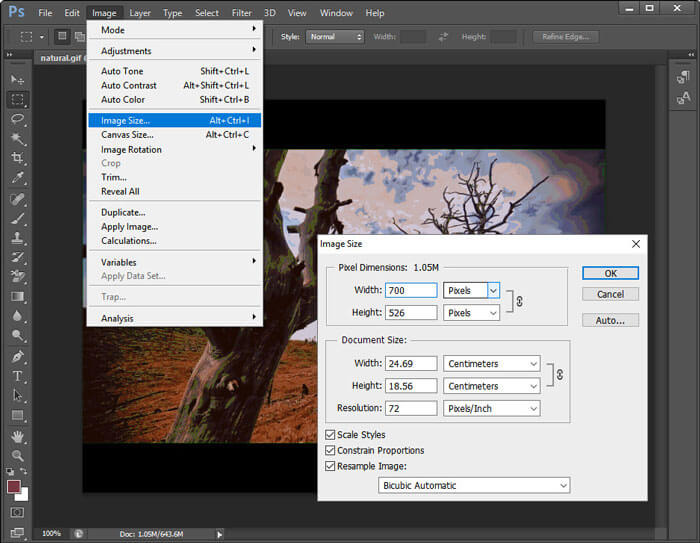
Steg 1: Kör Photoshop. Välj Image Size från Image-menyn högst upp.
Steg 2: Ett fönster med Image Size visas. Ändra bredd och höjd för att komprimera GIF-filen.
Steg 3: Klicka på OK för att spara ändringarna.
3. Använd alternativet Spara för webben
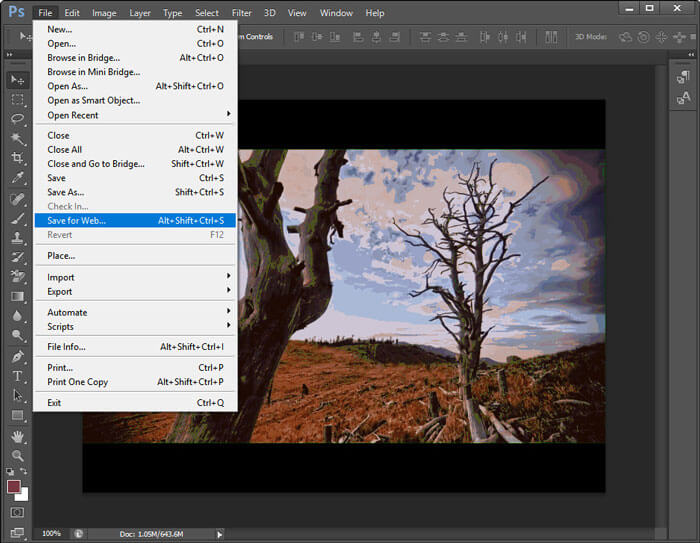
Steg 1: Importera din GIF-fil i Photoshop.
Steg 2: Öppna menyn File, välj Export och därefter Save for Web.
Steg 3: Justera bildstorlek, kvalitet och andra alternativ i fönstret Save for Web.
Steg 4: Klicka på OK för att minska GIF-filens storlek med Photoshop.
4. Minska antalet bilder
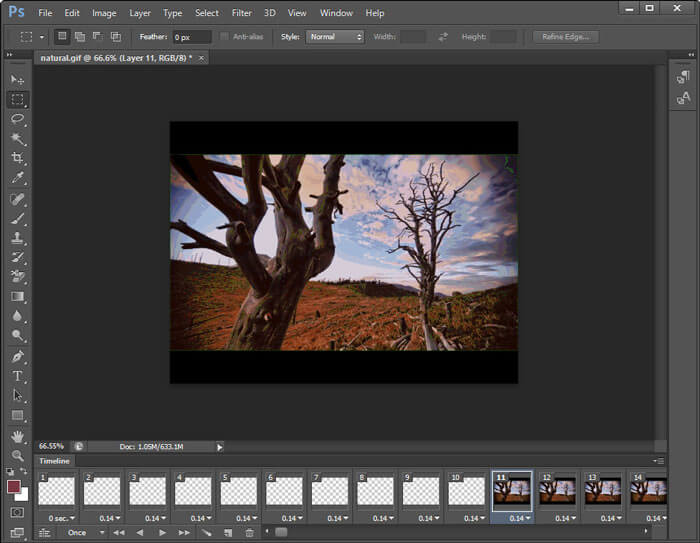
Steg 1: Öppna din animerade GIF i Photoshop.
Steg 2: Ta bort några bildrutor i tidslinjen.
Steg 3: Markera alla återstående bildrutor. Du behöver öka varaktigheten manuellt.
Steg 4: Spara den nya versionen av GIF-animationen. Den komprimerade GIF-filen är mindre än originalet.
5. Optimera GIF-parametrar
Du kan göra din GIF-fil mindre genom att minska antalet färger. Det maximala färgantalet är 256. Om din GIF-animation inte är särskilt stor kan du minska till 64 färger eller ännu färre. GIF-kvaliteten blir dock inte lika bra som originalet. Gå bara till fönstret Save for Web och öppna listan Colors för att göra ändringarna.
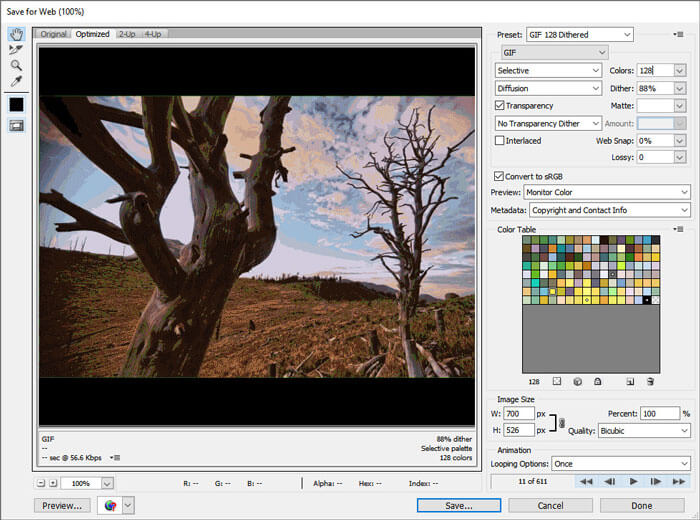
Dessutom kan du minska GIF-filstorleken med dithering, perceptuell, selektiv, adaptiv, restriktiv, transparens, sammanflätad och andra alternativ. Alla alternativ i fönstret Spara för webben kan hjälpa dig att komprimera animerade GIF-filer.
Del 3: Vanliga frågor om komprimering av GIF
Vad är GIF-komprimeringsalgoritm?
GIF-formatet använder LZW-komprimeringsalgoritmen. Denna GIF-komprimeringsalgoritm konstruerar en färgtabell. Varje färg kan matchas med en pixel. Således kan bilder med stora färgområden komprimeras till små GIF-filer.
Hur komprimerar GIF på Android?
Du kan använda onlinekompressorer för att komprimera GIF-filer på Android. Eller så kan du också använda Gif mini för att beskära och komprimera GIF-filer. Dessutom kan du minska ramar och lägga till text innan du exporterar. Denna GIF-kompressor-apk kan vara din GIF-kompressor, redigerare och tittare.
Hur komprimerar GIF på iPhone?
För att ändra storlek på stora GIF-filer på din iOS-enhet kan du använda YouCompress, Shortpixel, Compress-Or-Die och mer. Ladda bara upp din GIF-fil och optimera sedan GIF med komprimering med förlust. Dessutom kan du använda GIF-tillverkare och redigeringsappar för att redigera GIF-filer och krympa filstorlekar, till exempel GifArt, HipGif, Slowmographer, etc.
Sammanfattningsvis kan du komprimera GIF för hastighet med ovanstående lösningar. Det är inte så stort att komprimera en stor GIF under 1 MB, 100 KB, 50 KB eller ännu mindre. Du kan klippa, beskära och justera inställningar för att minska GIF-filstorleken. Om du har några andra förslag för GIF-komprimering kan du dela med oss i kommentarerna nedan.
-
 Hur komprimerar du en MP4-video till mindre storlek
 MP4-video är för stor för att kunna laddas upp? Vill du minska videostorleken? Här är tre effektiva sätt att komprimera en MP4-fil till mindre storlek utan begränsning.
-
 Granskning av Top 10 HD Video Converter Software
 Läs och jämför för att få det bästa HD-videokonverteringsprogrammet från 10 rekommendationer. Här är de detaljerade recensionerna av varje HD-videokonverterare för multiplatform.
-
 Vad är en MTS-fil och hur man konverterar MTS till MP4 / MOV / MKV / AVI
 Vad är en MTS-fil och hur kan jag spela den? Det här inlägget ger dig en grundläggande instruktion om MTS-filen. Dessutom kan du få 3 enkla sätt att konvertera MTS-filer till MP4, MOV, AVI, MPEG, MTS, MKV eller andra format med hög kvalitet.
