


 Video Converter Ultimate
 Skärminspelare
 Video reparation
 Säker nedladdning
100% Gratis sätt att komprimera M4V-filstorlek från GB till MB
M4V-filformat, liknar MP4, är en fantastisk videokontainer som produceras av Apple. Du kan spela M4V-filer på nästan alla populära spelare, som iTunes, QuickTime, VLC Media Player, RealPlayer och mer. Men ibland kanske du tycker att din M4V-video är för stor för att lagras eller delas. I den här situationen måste du minska filens storlek.
Om du inte vet hur man komprimerar M4V kan du prova alternativen nedan.

Del 1. Hur man komprimerar M4V online gratis
Som vi nämnde kan det vara lite svårt att redigera och dela en stor videofil på YouTube, Facebook, Instagram eller andra strömmande webbplatser. Eftersom dessa webbplatser vanligtvis har en strikt storleksbegränsning på videon du laddar upp. Dessutom kan stora filer ta mycket plats på din dator, hårddisk, telefon, flash-enhet, minneskort etc.
Därför, när du har en stor M4V‑fil är det bäst att krympa storleken med en professionell videokompressor. Om du letar efter ett gratis program, varför inte prova FVC Free Video Compressor? Det är helt kostnadsfritt att använda. Dessutom är det ett webbaserat komprimeringsverktyg, vilket innebär att du kan komprimera valfri video till önskad storlek utan att installera tung programvara på datorn.
Du kan använda den i alla vanliga webbläsare som Google Chrome, Mozilla Firefox och Microsoft Edge. Och det kommer ingen vattenstämpel att läggas till i den komprimerade videon. Du kan även njuta av videon med hög bildkvalitet.
Här är stegen för hur man komprimerar stora M4V-filer online.
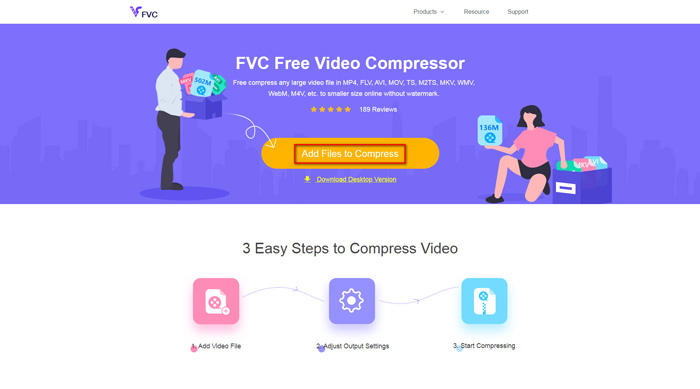
Steg 1. Gå till webbplatsen för FVC Free Video Compressor i din webbläsare. Du kommer att se en knapp som heter Add Files to Compress i bannern. Klicka på den och följ anvisningarna för att ladda ner och installera FVC‑startprogrammet på din dator.
Steg 2. Därefter behöver du välja den M4V‑fil du vill komprimera. Sedan kan du flytta reglaget bakom rutan Size för att justera och enkelt hitta exakt den filstorlek du vill ha. Du kan också ändra upplösning och bithastighet separat efter behov.
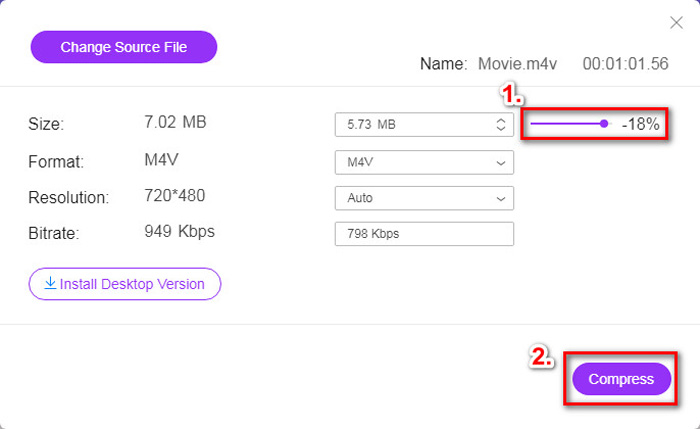
Steg 3. Om du vill komprimera M4V till MP4 ska du välja MP4 som utdataformat här. Om inte kan du klicka på Compress direkt i högra hörnet. Välj en mapp för att spara den komprimerade videon och vänta några sekunder tills du får den önskade videon.
Del 2. Hur man minskar M4V-filstorlek på Mac / Windows
Eftersom M4V är ett format som utvecklats av Apple kan du också använda Apples standardspelare, QuickTime Player, för att komprimera M4V‑filer på Mac. QuickTime Player erbjuder dessutom en Windows‑version för PC‑användare. Men du bör vara medveten om att den senaste versionen för Windows är QuickTime 7.7.9 som släpptes 2016. Så om du vill ha ett nyligen uppdaterat program kan du prova FVC Free Video Compressor, som till och med klarar 4K‑videor.
Hur som helst, följ stegen nedan för att minska M4V-filstorleken i QuickTime.
Steg 1. Öppna M4V‑filen som ska komprimeras med QuickTime.
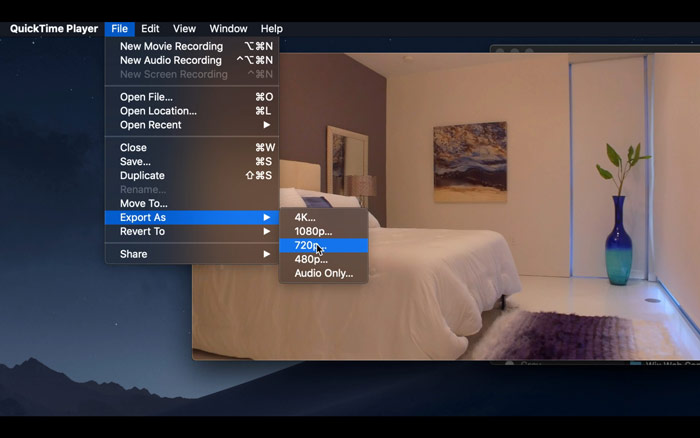
Steg 2. Leta upp menyn File uppe till vänster. Klicka på den och hitta alternativet Export As i listan. Välj sedan en upplösning som är lägre än originalvideons för att komprimera videon. Vi vill ju trots allt inte öka storleken här.
Steg 3. Om du inte vill ändra sökvägen för var filen sparas kan du helt enkelt klicka på Save. Vänta sedan tills videon har exporterats.
Del 3. Vanliga frågor om komprimering av M4V
1. Kan jag bara byta namn på M4V till MP4?
Nej, om du menar att konvertera M4V till MP4 genom att bara byta filändelsen till .mp4. Deras kodning är nämligen inte densamma. Du bör använda ett mer professionellt verktyg för att konvertera M4V till MP4.
2. Accepterar YouTube M4V-formatet?
Tyvärr stöder YouTube endast ett begränsat antal filformat som inte inkluderar M4V. Så om du vill ladda upp din M4V-video till YouTube bör du konvertera den till ett format som stöds av YouTube som MP4.
3. Hur slår man samman flera M4V-videor till en?
Om du har flera M4V‑videofiler som behöver slås ihop till en kan du prova FVC Free Online Video Merger för att slå ihop olika videofiler.
Slutsats
Nu har du 2 enkla och kostnadsfria sätt att komprimera M4V‑fil. Om du är Mac‑användare kan du använda QuickTime Player för att minska videostorleken. Men om du inte är nöjd med de fasta upplösningar som QuickTime erbjuder eller om du använder en Windows‑PC, kan du ge FVC Free Video Compressor en chans.
-
 M4V till MP3 Converter - 4 bästa metoder för att extrahera MP3 från M4V-filer
 När du enkelt vill extrahera MP3-ljud från M4V-videor kan du lära dig mer om de 4 bästa M4V till MP3-omvandlarna för att få önskade ljudfiler från artikeln.
-
 4 sätt att konvertera QuickTime-filmer till MP4 gratis på telefon / dator
 Läs och få 4 sätt att konvertera QuickTime till MP4-videor gratis på din telefon eller dator. Du kan enkelt ändra filformat från MOV till MP4 på Windows / Mac / iPhone / Android / online.
-
 4 bästa MP4 till M4V-omvandlare för att förvandla MP4-videor till M4V med lätthet
 När du behöver ändra MP4 till M4V-filer bör du lära dig mer information om skillnaderna mellan de två formaten, liksom de bästa MP4 till M4V-omvandlarna från artikeln.
