


 Video Converter Ultimate
 Skärminspelare
 Video reparation
 Säker nedladdning
2 snabba sätt att krympa stora OGV-filer [gratis och online]
OGV-filer används ofta för att spela upp videoinnehåll på webbsidor med HTML5‑taggen

Del 1. Online sätt att komprimera OGV-filer med en OGV-kompressor
Free Video Compressor är ett populärt och användbart kostnadsfritt onlineverktyg för komprimering av OGV-filer. Till skillnad från många andra vanliga gratis onlinetjänster har Free Video Compressor inga begränsningar för antalet eller storleken på filer du laddar upp. Ännu viktigare är att det inte läggs till någon vattenstämpel i de exporterade videofilerna. Dessutom kan du komprimera MP4, AVI, WMV, MOV och många andra vanliga videoformat utan att förstöra kvaliteten.
Hur man komprimerar OGV-filer med gratis videokompressor
Steg 1. Gå till den webbaserade OGV‑videokompressorn genom att skriva in https://www.free-videoconverter.net/free-video-compressor/.
Steg 2. Leta upp och klicka på knappen Add Files to Compress och ladda sedan ner startprogrammet för att aktivera tjänsten. I fönstret som öppnas letar du upp dina OGV-filer och klickar på Open för att bekräfta.

Steg 3. Ställ sedan in komprimeringsinställningarna för att göra filen mindre. Du kan ange videons storlek, ändra upplösningen, välja bithastighet med mera.

Steg 4. Klicka på knappen Compress för att starta processen. När den är klar laddas filen automatiskt ner till din dator.

Dessutom kan den här gratis videokompressorn hjälpa dig att lösa andra problem med videokomprimering. Kontrollera bara följande artiklar:
Hur man komprimerar en video för e‑post
Hur man komprimerar AVCHD‑videofiler gratis på Windows och Mac
Del 2. Hur man komprimerar och optimerar en OGV-fil med Clideo
Clideo är en kostnadsfri allt-i-ett-verktygsverktyg. Det fungerar med alla populära format och komprimerar snabbt och kräver ingen nedladdning. Det låter dig komprimera en OGV-fil upp till 500 MB gratis, men den har ingen kvantitetsgräns. Nu kan du följa stegen nedan för att minska din OGV-filstorlek.
Steg 1. Gå till https://clideo.com/compress-video och klicka sedan på knappen Choose file.
Steg 2. Ladda upp en OGV-fil du vill komprimera från din dator. Du kan också välja en fil från Dropbox eller Google Drive genom att klicka på den blå nedåtpilen.
Steg 3. När filen har laddats upp börjar verktyget bearbeta videon. Bearbetningstiden beror på videons storlek.
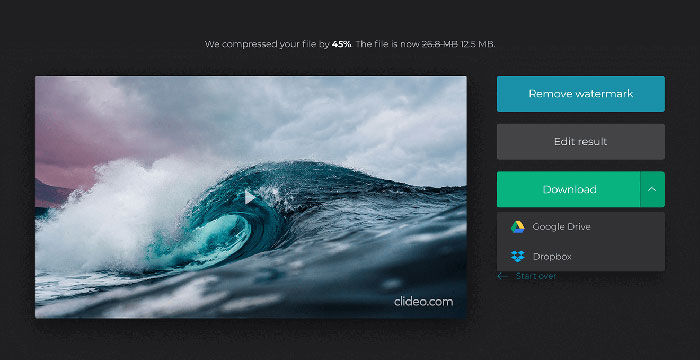
Steg 4. När komprimeringen är klar kan du se den ursprungliga filstorleken och den komprimerade. Nu kan du förhandsgranska resultatet för att försäkra dig om att det ser bra ut. Om du är nöjd kan du klicka på knappen Download för att spara den på din enhet eller i molnlagring.
Del 3. Vanliga frågor om komprimering av OGV-filer
Vad är en OGV-fil?
En OGV-fil är en videofil som sparas i Xiph.Org Ogg-containerformat med öppen källkod. Den innehåller videoströmmar som kan använda en eller flera olika codecs, som Theora, Dirac eller Daala. OGV-filer kan spelas med en mängd olika mediaspelare.
Hur fungerar OGV-komprimering?
När det gäller OGV-filkomprimering är det interframe-komprimering som leder till att minska filstorleken genom att ta bort likheterna mellan videoramar.
Hur komprimerar jag MP4 till OGV-format?
Du kan använda det ovan nämnda verktyget - Gratis videokompressor för att komprimera dina MP4-filer till OGV. Eller så kan du välja ett videokonverteringsprogram som hjälper dig att göra det.
Slutsats
Ovanstående online-metoder kan hjälpa dig att komprimera en OGV-video effektivt. Vilken föredrog du att använda? Du kan dela dina rekommendationer i kommentarerna nedan!
-
 Från 50 MB till 5 MB - Hur komprimerar du MP4-fil på sekunder
 MP4-video är för stor för att kunna laddas upp? Vill du minska videostorleken? Här är tre effektiva sätt att komprimera en MP4-fil till mindre storlek utan begränsning.
-
 Handledning - 7 sätt att komprimera videor gratis utan att förlora kvalitet
 Läs och få 7 sätt att komprimera videor gratis på din dator eller telefon. Du kan enkelt minska stora videor till små filstorlekar för e-post, Twitter, Instagram, YouTube, WhatsApp och mer.
-
 Hur komprimerar du MOV-filer på Windows, Mac, iPhone och Android
 Den här artikeln visar hur du komprimerar QuickTime MOV-videor på din telefon eller dator i detalj. Om din MOV-video är för stor för att skicka, dela eller spara kan du få 4 användbara lösningar här.
