


 Video Converter Ultimate
 Skärminspelare
 Video reparation
Var en omfattande kritik för att lösa ur synkronisering [Ljud och video]
You have an online reporting project for your class tomorrow. You're finding the best applications or software that you can use to record your video to achieve the reporting you need to submit tomorrow. But instead of having a solution to your problem, chaos and trouble start to make you overthink because the audio and video are out of sync. You don't have to worry about your situation because it's your lucky day; this article covers everything you need to learn to mend your concern.

Del 1. Varför synkroniseras inte ljudet med videon?
Ljud och bild kan vara osynkroniserade av flera anledningar, inklusive följande: Sändningen eller anslutningen mellan din kabel-/satellitmottagare kan vara problemet när du tittar på ett TV-program. En opålitlig DVD- eller Blu-ray DiscTM-spelare eller själva skivan kan vara skyldig om du har en av dessa enheter ansluten till din TV. Om ditt hemmabiosystem är anslutet till din TV via en optisk kabel, kanske du märker en ljudfördröjning som måste korrigeras manuellt. Å andra sidan kan din TV:s inställningar vara skyldiga.
Del 2. 3 bästa beprövade verktyg: Hur man synkroniserar ljud och video
1. Använd Video Converter Ultimate
Det finns många sätt och programvara tillgängliga online som kan hjälpa till med det givna problemet, och detta är ett av de bästa verktygen vi rekommenderar att du använder. Ladda ner FVC Video Converter Ultimate på din dator, en programvara med olika funktioner som förbättrar ett videoklipp. En av funktionerna som erbjuds kan fixa ett videoklipps problem med ljud- och videosynkronisering i Windows 10 - till exempel - genom att justera dess fördröjning. Följ stegen nedan för att veta hur du använder programvaran:
Step 1: To download the software to your desktop, click the Free Download button. Then install the software and customize the setup as desired. If everything is in order, launch the software after installing.
Gratis nedladdningFör Windows 7 eller senareSäker nedladdning
Gratis nedladdningFör MacOS 10.7 eller senareSäker nedladdning
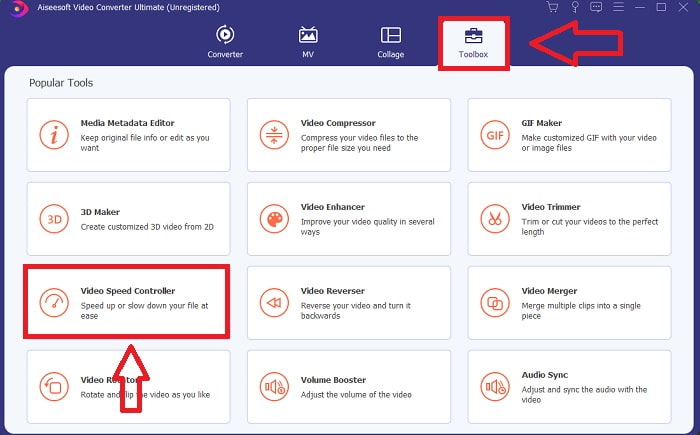
Step 2: On the main interface, click the Toolbox feature and proceed with Audio Sync.
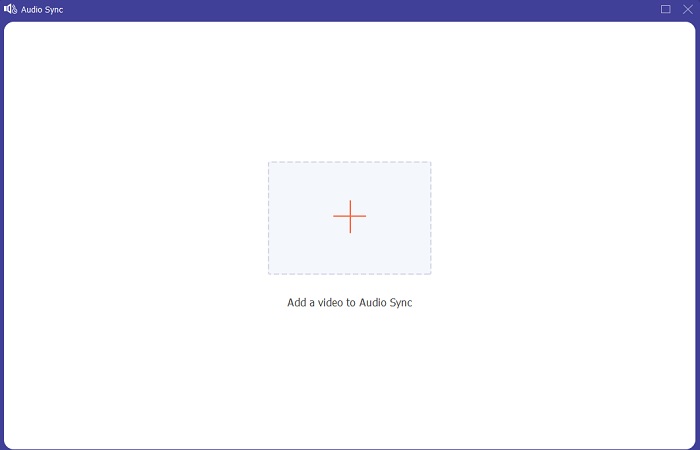
Steg 3: Lägg till valfri fil genom att klicka på +‑knappen enligt dina önskemål och fortsätt sedan med att redigera videoklippet.
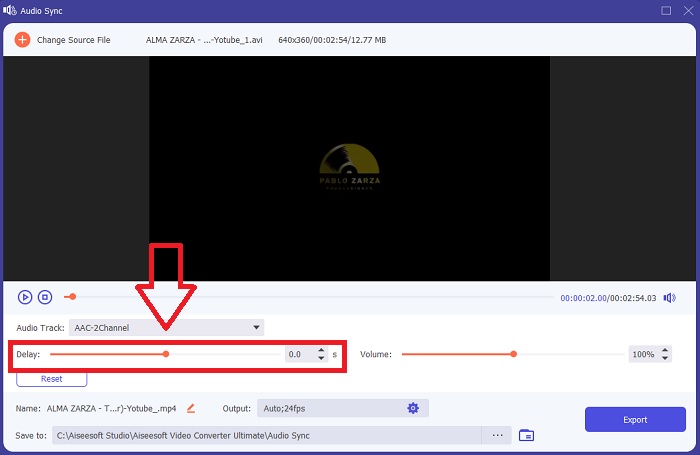
Step 4: Adjust the slider of the audio to sync its video clip. You can also change the output device and customize the volume of your video clip.
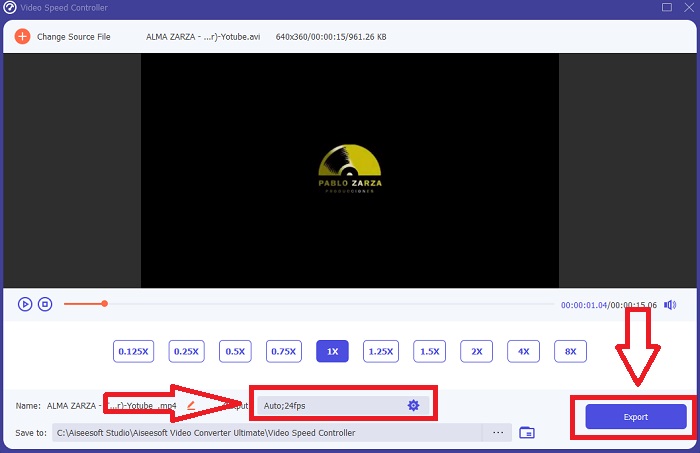
Step 5: If you finish editing the sync of your video clip, click Export and choose where your file will be saved.
2. Använd VLC Media Player
The VLC media player is an application available in every operating system; Windows, Mac, iPhone, and Android. Even though it is accessible to every device, each has different ways of fixing the audio delay and syncing the audio of the video's clip. This media player is common with its faulty operating system, but you can also use this media player to fix audio and video sync permanently.
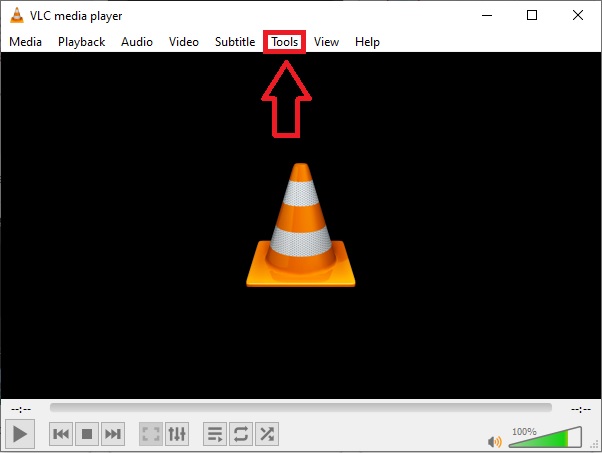
Step 1: Open the VLC media player in windows, and click the Tools tab. After you click the Tools tab, click the Preference.
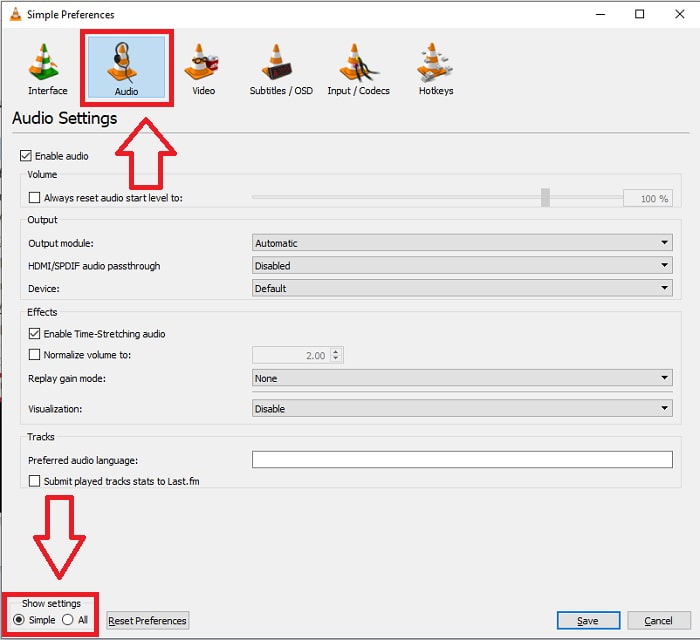
Step 2: Another interface will appear on your screen. Continue the process by clicking the Audio tab. At the bottom left corner, select All to access the advanced settings.
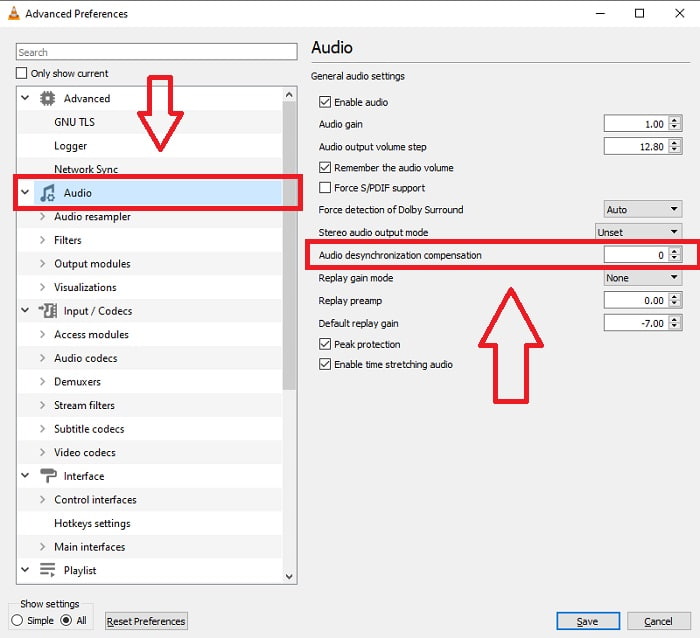
Step 3: The advanced settings will provide you with the entire grounds. Proceed with locating the Audio in the advanced settings tab. After you press it, you will see the general audio settings and adjust the Audio Desynchronization Compensation. If the Audio is lagging behind the video, change the value to a positive value to compensate. Negative values should be used if the audio is playing ahead of the video. VLC out of sync will permanently be fixed with this process.
Relaterat:
How to Fix VLC Player Won't Play MKV
How to Fix VLC Not Playing DVD
3. Använd Premiere Pro
When it comes to creating broadcast-quality, high-definition video, Premiere Pro is the tool of choice. This software can be used to import all kinds of media, including video and audio. It can then be used to edit that media and export it in the format needed for distribution. Various videos and still images can be edited together when using Premiere Pro to create videos. Videos can have titles, filters, and other effects applied. This software is a big help when audio and video are out of sync, especially for desktop or laptop users. Here are the steps given to execute the procedure properly.
Step 1: Make sure to layer your audio and video files in your timeline, as shown in the illustration.
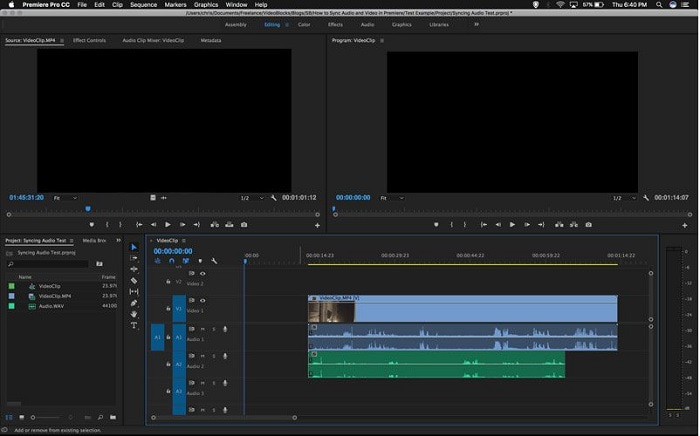
Step 2: Right-click to select both the audio and video tracks. There will be an appearance of a dropbox. Choose Synchronize from the drop-down menu that appears.
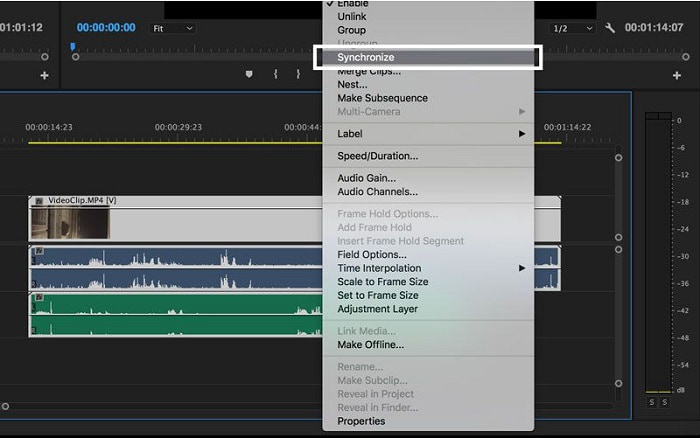
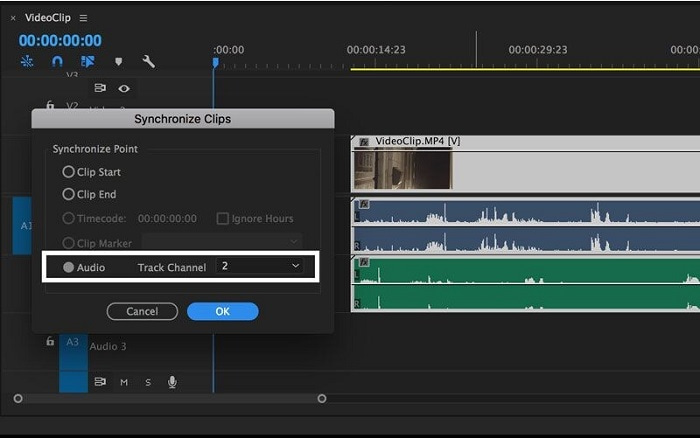
Step 3: Now select Audio as the synchronize point. Select the track that you want to synchronize. Lastly, delete the scratch track and select the Link option to link clips.
Del 3. Vanliga frågor om ljud och video ur synk
Om jag ändrar samplingshastigheten, försämras ljudkvaliteten?
Om du bara vill lyssna på ljudet i ditt videoklipp och inte göra några ändringar måste du ändra samplingshastigheten för att hänga med. Du kommer bara att kunna synkronisera videons ljud genom att justera videoklippets ljudfördröjning i FVC Video Converter Ultimate. Du kommer inte längre att oroa dig för försämrad ljudkvalitet när du justerar samplingshastigheten. Med denna programvara kommer du inte att oroa dig för ljud som inte synkroniseras i videon. Denna programvara innehåller en funktion som kan lösa det givna problemet; den har också andra funktioner som kan gynna alla användare och användas på ett enkelt sätt.
Vad är Audio Desynchronization Compensation?
Ställ in en positiv eller negativ ljuddesynkroniseringskompensationsfördröjning i millisekunder i VLC-inställningarna genom att klicka på Ljud och sedan markera kryssrutan Avancerade alternativ.
Vad är den andra anledningen till att video och ljud inte är synkroniserade?
Den andra anledningen till att video och ljud inte är synkroniserade är på grund av den ostödda videoutgången som ljudenheten inte kan använda, och vice versa.
Slutsats
To conclude, audio and video delay must be a difficult scenario most people have in the online world. Especially this pandemic, gadgets and online necessities are popular, but how are you going to function properly or do your task properly if there's a hurdle facing these online shenanigans like the issue of how to sync audio and video? If there's a delay happening. To sum up, all the given ways and alternatives to clarify all the concerns are presented here in the article. We recommend using Video Converter Ultimate to fix these unnecessary situations for the future.
-
 Topp 5 Slow Motion videospelare på datorn (Windows / Mac / Linux)
 Slow motion är en mycket användbar funktion i många situationer. Om du vill titta på videor med långsam hastighet för att få mer detaljerad information i de flyktiga bilderna kan du lära dig de fem bästa slowmotion-videospelarna i den här artikeln.
-
 [2 bästa lösningarna] Hur man enkelt spelar AVI-filmer på iPhone/iPad
 Kan du inte spela AVI-filmer på din iPhone/iPad och vill inte ladda ner tredjepartsvideospelare? Du kan lära dig två effektiva sätt att konvertera AVI-videor för att spela på iPhone.
-
 Kan Wii / Wii U spela DVD-skivor utan Homebrew? 2 lösningar för dig
 När du sätter in DVD-skivor i Wii kommer du att upptäcka att Wii inte kan läsa och spela DVD-skivor på grund av den regionala låsningen. I den här artikeln kommer du att lära dig hur du enkelt spelar DVD-skivor på Wii/Wii U utan Homebrew-hacket.
