


 Video Converter Ultimate
 Skärminspelare
 Video reparation
 Säker nedladdning
Hur man ställer in Spotify-låten till din ringsignal - en guide i fullständiga steg
Spotify erbjuder ett enormt bibliotek med musik, poddar och annat ljudinnehåll till användare över hela världen. Miljontals låtar finns tillgängliga för att lyssnas på när som helst. Om du också vill ställa in den vackra musiken som Spotify erbjuder som ringsignal på din smartphone måste du först ladda ner den valda ljudfilen till din enhet. Det fina är att denna procedur inte är komplicerad. I den här artikeln delar vi upp hela processen för hur du gör en Spotify-låt till din ringsignal i tre delar och analyserar varje del i detalj åt dig. När du förbereder dina ringsignaler kan du behöva klippa ut en del av ljudet. Med detta i åtanke kommer vi också att rekommendera ett av de mest professionella verktygen för ljud- och videoredigering. Några vanliga frågor om hur man ställer in ringsignaler kommer också att besvaras.

Del 1. Ladda ner Spotify Song för ringsignal
Kan du använda Spotify för ringsignaler? Svaret är ja, naturligtvis. Vad du behöver veta innan du fortsätter officiellt är att du för närvarande inte kan ladda ner musik direkt till din enhet via Spotify och ställa in dem som dina ringsignaler. Därför behöver vi hjälp av några verktyg. Enligt vår undersökning är Spotify Downloader ett ganska bra val. Allt du behöver göra är att öppna dess officiella webbplats i din webbläsare, kopiera länken till din favoritmusik och klistra in den i motsvarande avsnitt. Således kommer du att kunna ladda ner filen direkt till din dator. Om du har några problem med det kommer vi att förklara stegen i följande avsnitt.
Här är vad du behöver göra för att ladda ner Spotify-låtar för ringsignaler med Spotify Downloader.
Steg 1. Gå in på den officiella webbplatsen för Spotify Downloader i din webbläsare.
Steg 2. Öppna Spotify-appen på din telefon. Hitta sedan det ljud du vill ladda ner.
Steg 3. Tryck på ikonen med tre punkter och välj Dela > Kopiera länk.
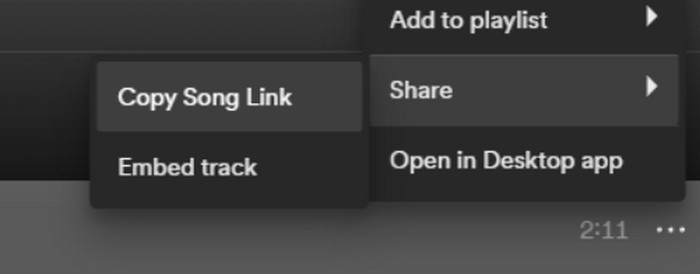
Steg 4. Nu kan du gå till sidan för Spotify Downloader. Klistra in den kopierade länken och klicka på Skicka.
Steg 5. När processen är klar klickar du på Ladda ner.

Del 2. Gör en Spotify-låt till din ringsignal
När du har laddat ner din favoritmusik till din enhet kan du börja redigera den. Vi kan redigera höjdpunkten för låten eller din favoritdel av låten och göra en Spotify-låt till din ringsignal. Det bör noteras att iPhone- och Android-telefoner stöder olika ljudformat för ringsignaler. För närvarande stöder iPhone endast ringsignaler i M4R-format, medan Android-telefoner för närvarande stöder MP3, M4A, WAV och OGG. Om du upptäcker att ditt ljudfilformat inte uppfyller ovanstående krav kan du använda en professionell formatkonverterare för att hjälpa dig.
I det här fallet rekommenderar vi att du provar ett allt-i-ett-verktyg för ljudredigering, den FVC-utvalda Video Converter Ultimate, för att genomföra redigeringen av låten på ett och samma ställe. Förutom själva formatkonverteringen stöder det även redigering av ljudlängd, justering av volym och ljudspår samt att lägga till in- och uttoningseffekter till dina ringsignaler. Du kommer att ha minimal eller ingen extra väntetid när du använder det för att bearbeta dina filer. Det hjälper dig att ändra parametrarna för ditt ljud med hög effektivitet.
Gratis nedladdningFör Windows 7 eller senareSäker nedladdning
Gratis nedladdningFör MacOS 10.7 eller senareSäker nedladdning
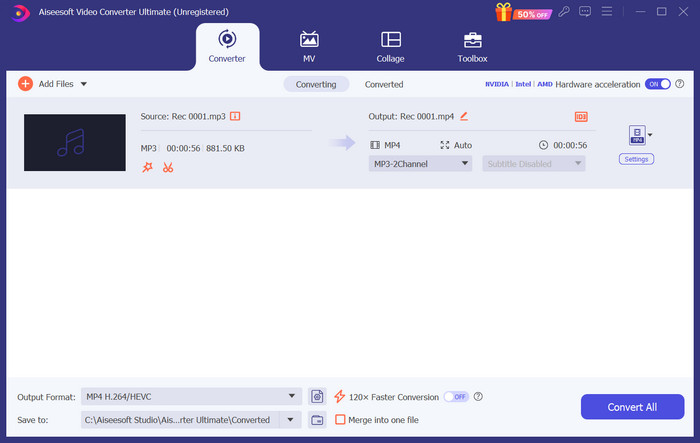
Här kommer vi att lära dig hur du skapar ringsignal från Spotify med FVC Video Converter Ultimate.
Steg 1. Ladda ner och installera FVC Video Converter Ultimate på din dator. Se till att du har sparat din favoritlåt på enheten.
Steg 2. Öppna programmet på din dator och klicka på Lägg till filer för att ladda upp Spotify-låten till plattformen.
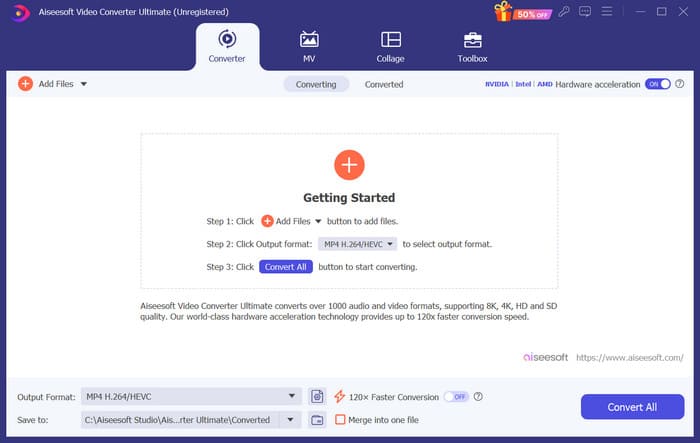
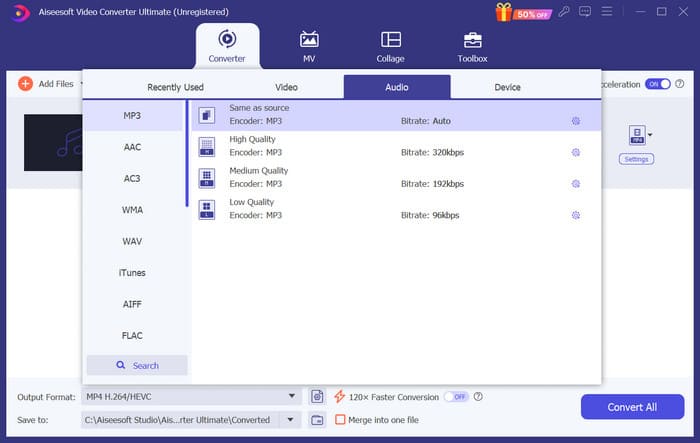
Steg 3. För att konvertera formatet på din ringsignal, öppna rullgardinsmenyn bredvid Utdataformat. Sedan kan du välja ditt önskade format bland alla alternativ under Ljud.
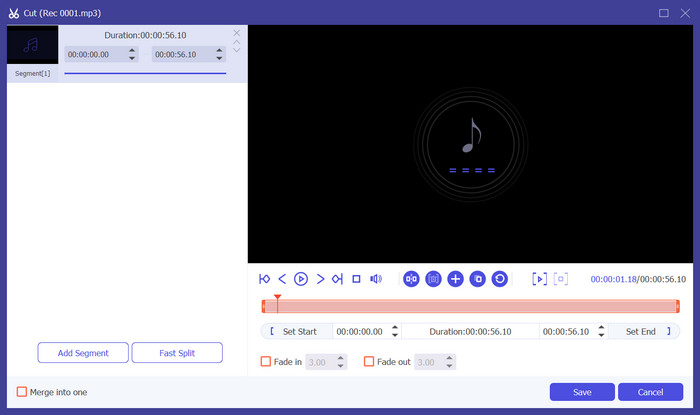
Steg 4. För att välja en del av låten som din telefons ringsignal klickar du på Klipp. Du kommer då in på sidan för trimning. Dra reglaget för att välja den del du vill behålla. I detta fönster kan du också lägga till in- och uttoningseffekt på din ringsignal.
Steg 5. För att ändra volymen eller ljudspåret för din fil klickar du på Redigera. På den nya sidan kan du till och med förhandsgranska redigeringsresultatet direkt. För att spara ändringen klickar du på OK.
Steg 6. När du är klar med att ställa in din ringsignal klickar du på Konvertera alla för att exportera filen.
Del 3. Ställ in Spotify Song som ringsignal
Nu när vi har vår nya ringsignal klar och har redigerat den till rätt längd måste vi ta det sista steget: ställa in Spotify-låten som ringsignal för inkommande samtal på din telefon. Med tanke på att olika enheter fungerar olika, kommer vi att guida dig när du ställer in den på din enhet från både iPhone och Android-telefoner.
Android
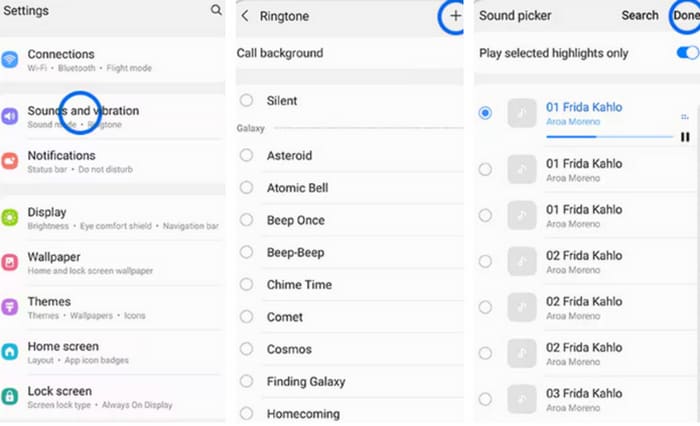
I det här avsnittet guidar vi dig genom att ställa in Spotify-låtar till ringsignaler på din Android-telefon. Vi kommer att använda en Samsung-telefon som exempel. Innan vi börjar bör du överföra din Spotify-låt till din telefon. Transformation via USB-kabel eller Bluetooth är båda vägar som kan refereras.
Steg 1. Gå till Inställningar på din telefon och tryck på Ljud & vibration > Telefonsignal > Mina ljud.
Steg 2. Tryck på Lägg till och välj den redigerade Spotify-låten bland alla filer på din mobiltelefon.
Steg 3. För att spara ändringen trycker du på Klar. Nu har du lagt till en Spotify-låt som ringsignal på din Samsung-telefon.
iPhone
Om du vill skapa en ringsignal till din iPhone kan du behöva använda tredjepartsverktyg. Det mest populära verktyget är GarageBand, och vi förklarar hur du ställer in Spotify-låtar som iPhone-ringsignaler.
Steg 1. Ladda ner och starta GarageBand på din iPhone. Välj Projekt.
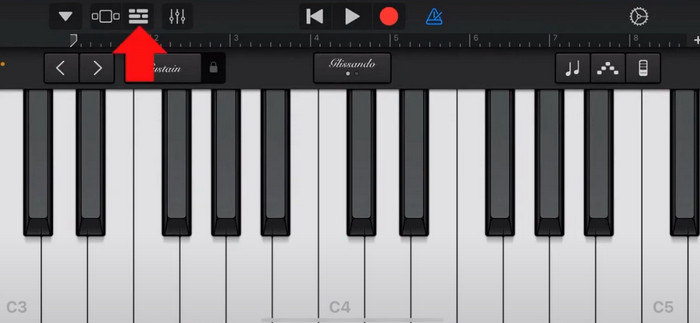
Steg 2. Välj sedan Loop > Filer. För att välja din Spotify-låt väljer du Bläddra bland objekt i appen Filer.
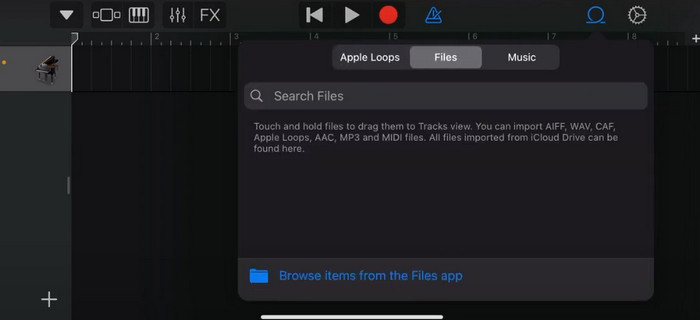
Steg 3. Placera den trimmade Spotify-filen på tidslinjen.
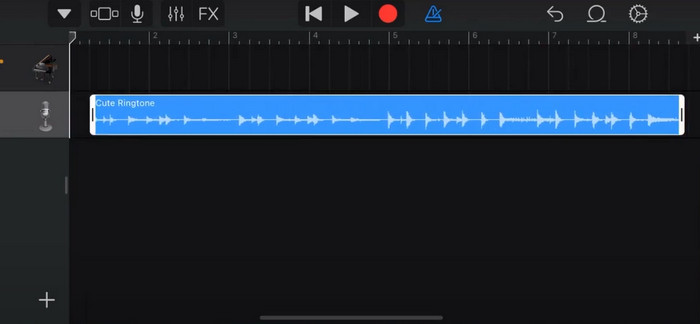
Steg 4. Inaktivera Metronom. Tryck sedan på pilen nedåt och välj Mina låtar.
Steg 5. Håll ned låtklippet och tryck på Dela.
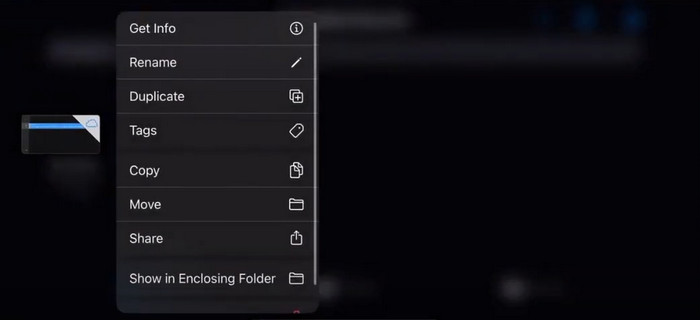
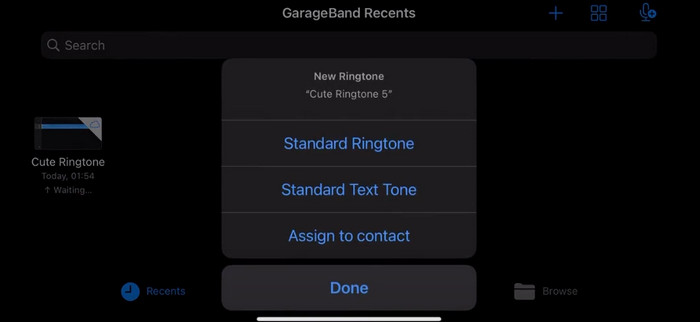
Steg 6. Välj Ringsignal > Exportera. Tryck på Använd ljud som > Standardringsignal.
Del 4. Vanliga frågor om att göra en Spotify-låt till din ringsignal
Kan jag använda en Spotify-låt som ringsignal direkt?
Spotify tillåter inte användare att direkt använda en låt från appen som ringsignal på en mobil enhet. Det finns dock alternativa metoder du kan använda för att ställa in en Spotify-låt som ringsignal. Du kan köpa låten du gillar från en digital musikbutik som iTunes eller Google Play Musik. Det finns verktyg från tredje part tillgängliga som låter dig konvertera Spotify-låtar till MP3-filer.
Hur gör jag en anpassad ringsignal för min iPhone utan iTunes?
Om du vill skapa en anpassad ringsignal för din iPhone utan att använda iTunes kan du använda GarageBand, en musikapp som är tillgänglig på iOS-enheter. Den här metoden låter dig anpassa din ringsignal med dina favoritljudklipp på din enhet.
Hur konverterar jag Spotify till en iPhone-ringsignal utan en dator?
Att konvertera en Spotify-låt direkt till en iPhone-ringsignal utan att använda en dator är svårt. Du kan dock hitta några alternativa metoder för att uppnå ett liknande resultat. Du kan till exempel använda en app för att skapa ringsignaler eller välja GarageBand.
Slutsats
Ovan har vi gett en fullständig översikt över hur du ställer in en Spotify-låt som din ringsignal för inkommande samtal. Vi har täckt alla steg och försett dig med ett toppmodernt ljudredigeringsverktyg, FVC-rekommenderade Video Converter Ultimate, för att hjälpa dig att anpassa din låt. Om du vill kan detta verktyg också enkelt hjälpa dig att göra en video till din ringsignal. Vi är övertygade om att du får de instruktioner du behöver.
-
 Bästa genomgången Hur man konverterar WAV till ringsignal på nolltid
 Vill du konvertera WAV till en ringsignal utan ansträngning? Våra användarvänliga verktyg får jobbet gjort! Njut av högkvalitativ ljudkonvertering på ett ögonblick - ingen teknisk huvudvärk. Prova dem idag!
-
 Hur man gör ett röstmemo till en ringsignal på iPhone och Android
 Om du vill göra ett röstmemo till en ringsignal, läs den här artikeln. Oavsett om du är iPhone-användare eller Android-användare kan du hitta lösningar i vårt innehåll.
-
 5 MP3-klippare för att enkelt klippa vilket ljud som helst [2024 uppdaterad]
 Behöver du en MP3-skärare för att trimma ljudet? Läs i så fall den här artikeln eftersom vi tillhandahåller verktygen att lita på för enkel ljudklippning.
